
Managing HR documentation and employee records becomes significantly harder as a business grows. HR document management software provides businesses a central place to create, store, organize, sign and retrieve employment documents.
However, growing businesses need more than just document storage. The right system is the one that keeps each document connected to the employee, the HR action that created it, and the history that follows that employee throughout employment. It ensures less administrative work, more consistent documentation and fast retrieval of documents.
Modern employee HR document management platforms are purpose-built businesses that want to keep all their HR documents in one place. They combine AI-powered HR document generation with centralized employee records and electronic signatures. And also features policy acknowledgement, expiration reminders, asset management, incident reports and employee self-service.
In this guide, we explore the difference between a digital filing cabinet and an HR document management system capable of supporting a growing business. Below, we break down what this connected approach looks like in practice and reveal where most tools, including well-known HCM platforms, quietly fall short.
Key HR Document Management Features at a glance
| Requirement | What a modern HR document system should provide |
| Employee documents | Contracts, offer letters, policies, warnings, performance records and other HR documents |
| Employee connection | Every document linked to the correct employee record |
| Document creation | Templates and AI-assisted document generation |
| Review | HR review and editing before documents are issued |
| Signatures | Electronic signature and signed-document storage |
| Policy acknowledgements | Tracking of employee receipt and acknowledgement |
| Expiration | Reminders for documents requiring attention |
| History | Previous versions and employment documentation history |
| Access | Controlled access to sensitive HR records |
| Search | Fast retrieval without searching through folders and emails |
What is HR Document Management Software?
A recent HR document-management guide defined the category around creating, storing, organizing and securing employee records, policies and compliance documents in one digital system.
HR document management software is a centralized software that helps businesses to create, store, organize, secure, track and retrieve HR documents throughout the employee lifecycle. Modern HR documentation software like the HRDocket connects employee profiles and HR workflows in one secured place.
This means that people managers no longer have to worry about employees’ employee contracts, policy acknowledgements, or performance documents being stored in separate places.
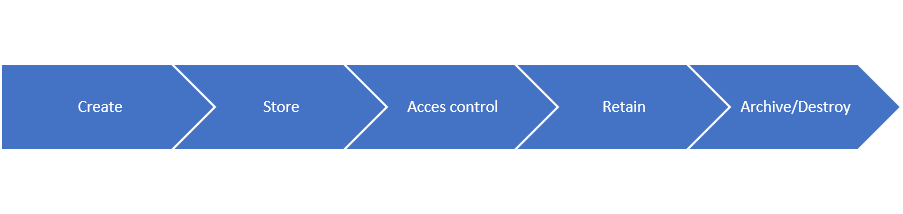
Since the early days of computing and the internet, organizations have often sought efficient ways of managing paper-based documents. These ways have evolved from hierarchical folder structure to modern-day document management systems.
Digital and cloud-based storage vaults like Google Drive and OneDrive are not ideal for managing HR documentation because they lack some key features. Employee record management software has distinguishing features like role-based access controls, time-stamped audit trails, automated filing and built-in e-signatures.
Why small businesses need a dedicated HR document system
Every business has to deal with employee records. Large organizations often have a dedicated compliance team or a full HRIS that handles documentation issues. But small businesses rarely have that luxury.
Without a structured documentation system, files are scattered across file cabinets, email threads, digital storage and computer desktops. This often leads to compliance risks such as missing acknowledgements, missed deadlines, outdated clauses, unsigned contracts and sometimes incomplete onboarding documentation.
Relying on outdated templates creates inconsistency. Also, finding employee records from file cabinets and shared folders can take a long time. During an audit or an employment dispute, the inability to produce a complete or well-organized document can cause serious consequences.
Disorganized HR documentation can cause businesses compliance fines or weaken the organisation’s position in employment disputes. In the United States, for instance, every employer is subject to baseline federal recordkeeping requirements regardless of the HR system they use.
Key features to look for in HR Document management software
Not every document management platform is designed specifically for HR. Growing businesses need systems that support the complete documentation lifecycle. Some key features to look for include:
1. Employee documents
Before evaluating any employee document management software, it is necessary to be specific about what actually flows through HR frequently, such as contracts, offer letters, warnings, policies, performance documents, verification documents and other HR documents. This is one of the main reasons why businesses that have cloud storage still need a dedicated document management platform.
2. Centralized and searchable employee records
Modern employee document management platforms are not just folders for employees’ contracts, warning letters, signed policies, and performance documentation. They should be able to connect documents to the appropriate employee profile. Modern platforms feature Employee self-service portal where staff can view and sign documents assigned to them. Self-service portals also allow employees to request HR services and support without contacting HR directly.
3. Secure document storage
Employee records contain sensitive data, and software puts measures in place to protect data and privacy. Before committing to HR software, evaluate encryption both at rest and in transit, clear data residency policies and regular automated backups.
4. AI-assisted Document creation
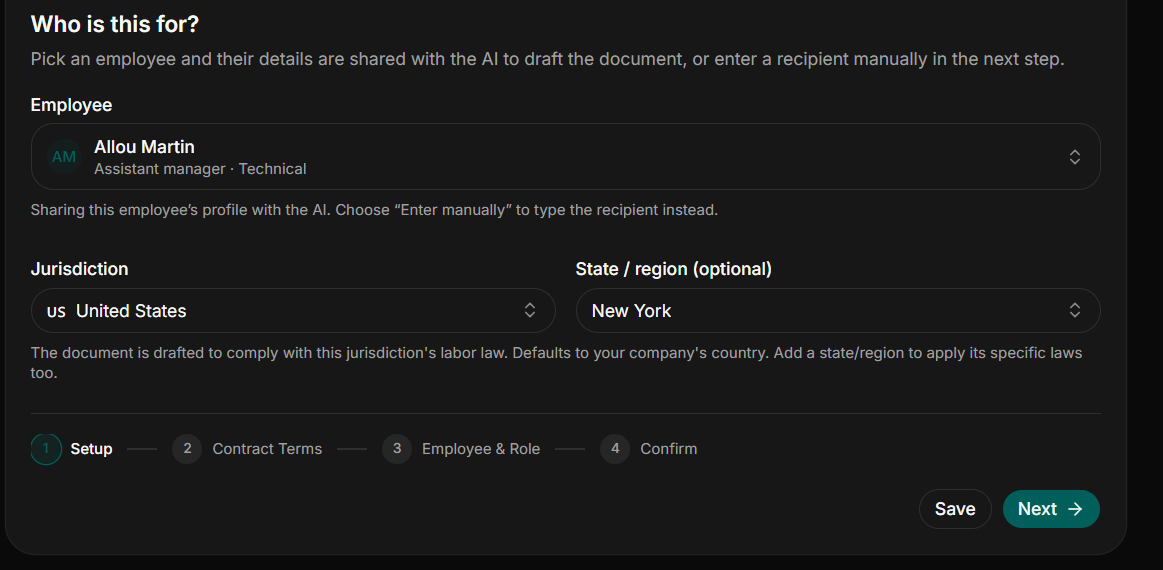
Manually drafting or editing every HR document from scratch takes a lot of time. A modern HR document solution should provide standardized and legally reviewed templates with AI-assisted drafting. This reduces repetitive drafting by using employee and company details stored on the platform.
5. Review
HR must be able to review and edit every document before it is sent or filed. Requiring documents to route through an administrative review step ensures that the document meets the company’s standards.
6. AI compliance checks
Modern AI-powered platforms can automatically scan your documents to ensure they meet required standards. These tools instantly analyze text for missing information such as inconsistencies and policy gaps.
7. Digital signatures
Once the document is approved, it needs to be signed, sent and retained without leaving the platform. Bouncing employment files out for e-signatures and then manually re-uploading the signed copy is exactly the disconnected process document management platforms are supposed to eliminate. Strong platforms help businesses to create and sign HR documents without printing and scanning.
8. Policy acknowledgement and tracking
HR managers and teams need to know who acknowledged policies and when. Document management systems outperform emails for policy distribution and acknowledgement tracking.
9. Expiration reminders
Certain employee documents like contracts, licenses, visas, and certifications expire. A strong HR document management system automatically flags these upcoming deadlines and other important dates before the record lapses.
10. History and Audit trails
Strong platforms must reserve the complete employment documentation trail. Every document version, signed acknowledgement and every action taken on an employee’s file needs to be permanently recorded with timestamps. This history is important for HR teams, especially during audits or employment disputes.
11. Role-based access controls and permissions
Not everyone in the company needs to see everyone else’s file. Roles-based permissions control who can access sensitive records.
Common HR Problems Document Management Platform Solves
| HR Problem | Traditional Approach | Document Management Solution |
|---|---|---|
| Scattered documents | Email and folders | Centralized employee records |
| Manual editing | Copy and paste | AI document generation |
| Missing signatures | Email follow-ups | E-signatures |
| Missed deadlines | Manual calendars | Expiration reminders |
| Unauthorized access | Shared folders | Role-based access |
Top document management software options this month
In this section, we are looking at some of the top HR document management software for small and growing businesses. Some of the top HR document management systems this month include HRDocket, Factorial, Justwork, BambooHR’s document automation and Rippling.
We review their key HR documentation features and pricing based on publicly available information.
HRDocket: HR Documentation, Employee Records, and Workplace Compliance Automation Software
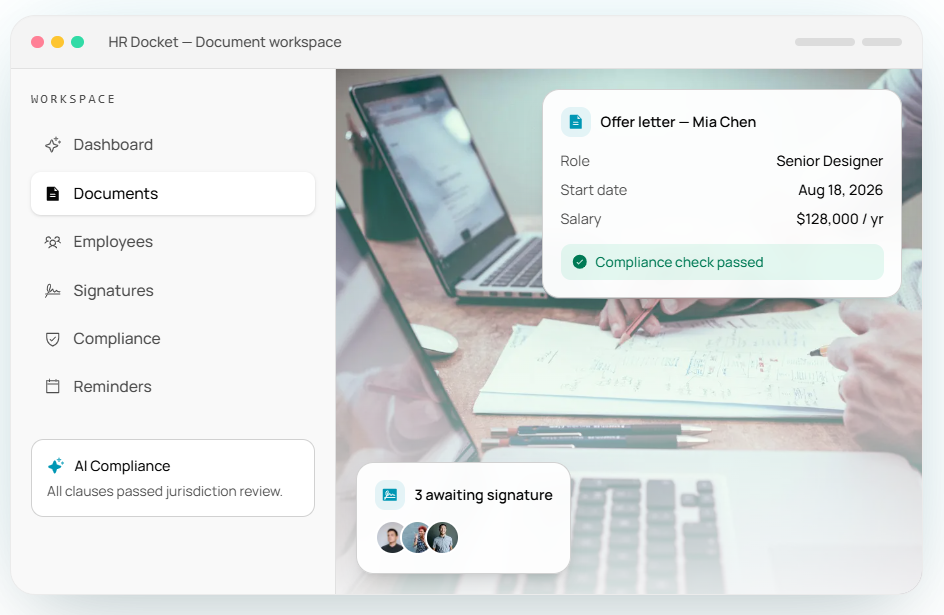
HRDocket is an AI-powered HR documentation-focused platform that helps small and growing businesses to create, review, sign, store, track, and organize HR documentation and employee records through the employment cycle.
The platform complements HRIS platforms by offering secure storage, automated document generation, e-signature, retention automation, formatting and distributing HR policy documents and audit-ready employee profiles. It is the best fit for small and growing businesses that want compliance-focused document management without paying for a full HRIS suite they may not need.
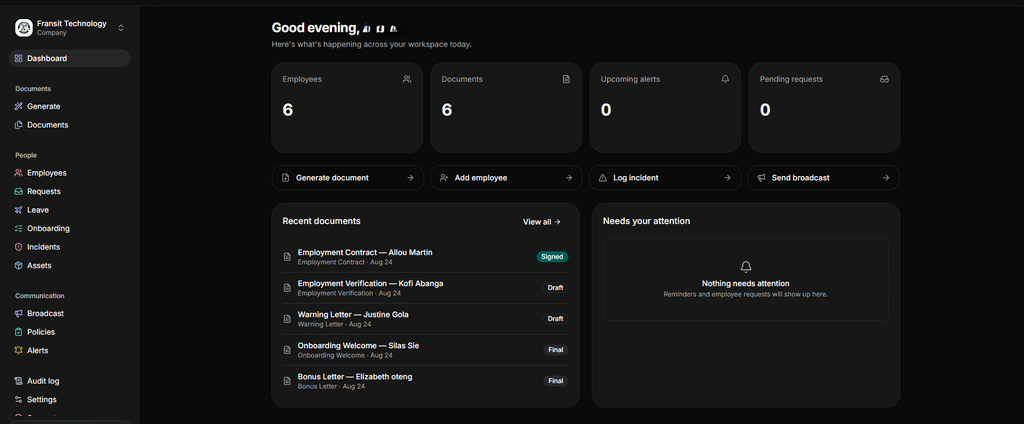
HR Dockets combines document generation with centralized employee profiles, policy management, asset management, workplace incident records, expiration reminders, and role-based assessment controls. The employee document management system is robust and modern for any HR team. It’s the best HR document management software a business can dream of.
HRDocket key features
AI HR document generator: HRDocket features an AI-powered document generator for over 25 types of professional HR documents, such as offer letters, onboarding welcome letters, employee handbook generators, NDAs, bonus letters, salary increments, warning letters, PIPs, employment contracts, and more. These tools allow you to create jurisdiction-aware HR documents in minutes.
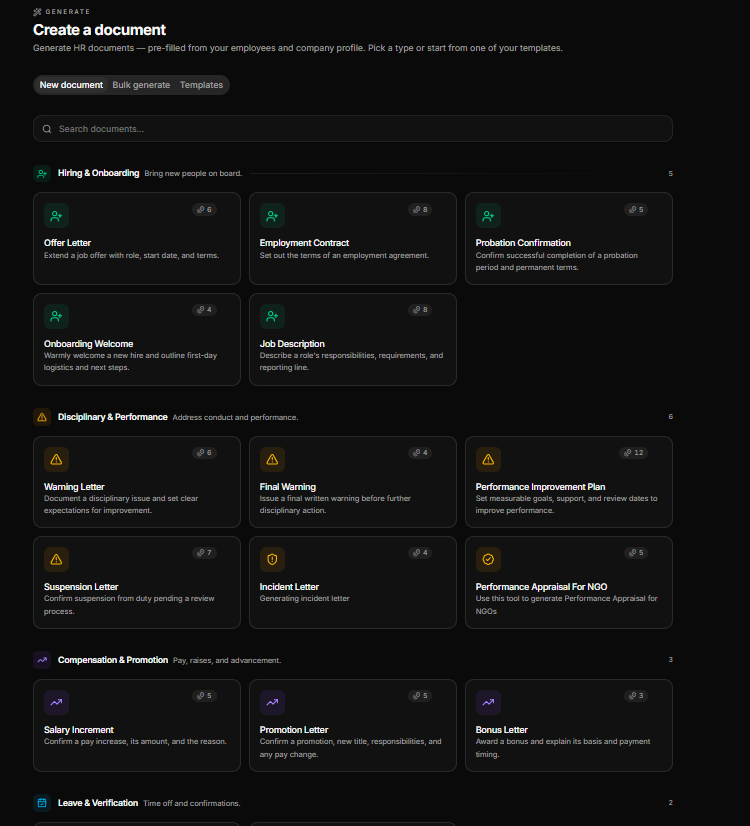
Centralized employee profiles: With HRDocket, each employee has a secure profile that acts as a single source of truth for their files. Documents created under the employee’s name are automatically filed to their profile.
E-signatures: Documented and generated, they can be signed on the platform or sent for digital signature. You do not need to print or use a third app to sign HR documents.
Policy management and acknowledgement: HR managers and teams can publish company policies, track acknowledgements, and maintain an automated update of history.
Employee self-service portal: The employee portal provides employees with secure access to their access to their documents, company policies, updates, and digital HR requests.
AI compliance review: The platform provides jurisdiction-aware guidance during drafting to help you to incorporate the right employment practices.
Document Expiree Reminder: Have you had a certificate or a very important renewal document expire without your knowledge? That’s where HRDocket comes it. The reminders saves you from authorities by giving you notice ahead of renewal dates.
Other features include audit trails and role-based access controls, broadcast messages, incident logs, company asset management, expiration reminders, bulk document generation, custom HR document builder and leave management.
Best for: HRDocket is best for small and growing businesses, HR managers, nonprofit organisations, business owners, founders, startups, and individuals who want standardised HR documentation. For businesses looking for which HR document management systems store contracts, policies, and handbooks in one place, this is your best choice.
Pros
- The platform helps businesses save significant time with its AI-powered document generators.
- HRDocket replaces scattered documents and serves as a centralized single source of truth.
- E-signatures, policy acknowledgement, and detailed audit trails enhance compliance and protection.
- It ensures proactive risk management by providing expiration reminders for contracts, licences and other documents.
- It is designed to grow with your business by supporting multi-branch and multi-company management.
- It features jurisdiction-aware drafting and AI compliance review.
- It offers transparent and affordable pricing.
Cons
- It is not a full HRIS platform.
- It might not be suitable for large enterprise-sized businesses.
- Organisation with complex enterprise HR ecosystems may need integrations.
Pricing
HRDocket uses a transparent tiered, subscription pricing model. The platform offers a free plan for individuals or businesses testing the service. Paid plans start from $19/month, which grants subscribers access to the full AI-powered document generation library, employee profiles, e-signatures, searchable storage, document history and expiration reminders. Choosing an annual subscription gives users two free months.
Factorial: AI platform for HR and business operations
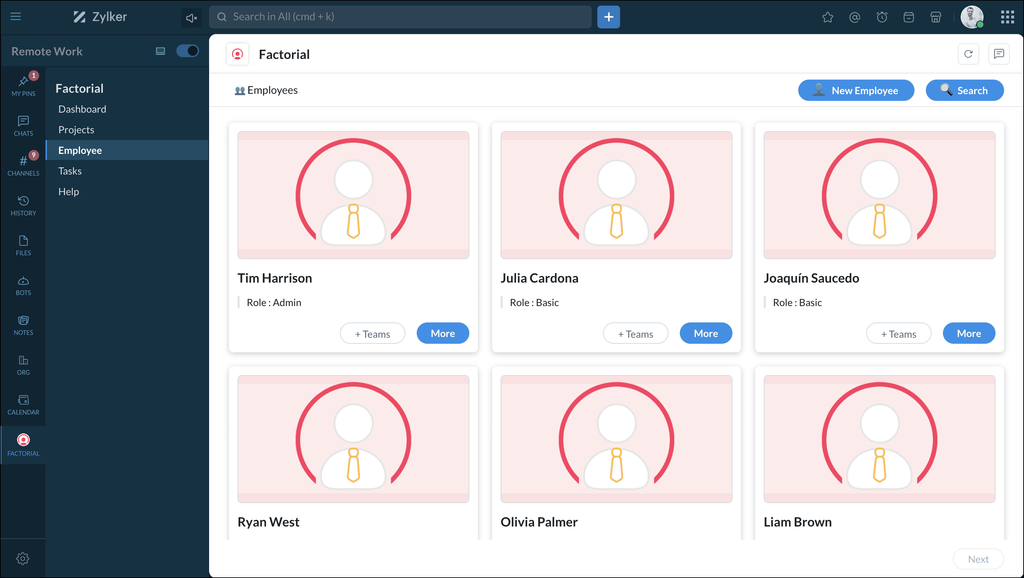
Factorial is one of the top document management software in 2026. The platform offers solutions for employee documents. Like HRDocket, Factorial features employee records, onboarding and offboarding workflows, digital signatures and document management.
Key features
Fillable document templates: Factorial allows users to create templates with dynamic variables that auto-populate employee data.
Bulk document requests: The platform allows you to send a document request to multiple employees at once.
Electronic signature: Factorial allows you to collect legally valid electronic signatures on documents directly within the platform.
Custom folder structure: You can structure your employee and company documents into configurable folders with separate storage for personal and company-wide files.
Best for: Factorial is best for customizable document approval flows.
Pros
- Centralized company documents
- Organized employee documents
- Custom document folders
- Digital signatures
- Document workflow
Cons
- Pricing is not transparent.
- It requires support when integrating with external APIs.
- It might not be suitable for larger enterprises.
- It has limited payroll features.
- Limited customization
Factorial pricing
Factorial pricing starts at $8.00/user/month with a free trial available to test the platform before committing to a paid plan. However, final pricing scales based on your exact headcount, seat minimums, and the specific modules you choose.
BambooHR’s document management system
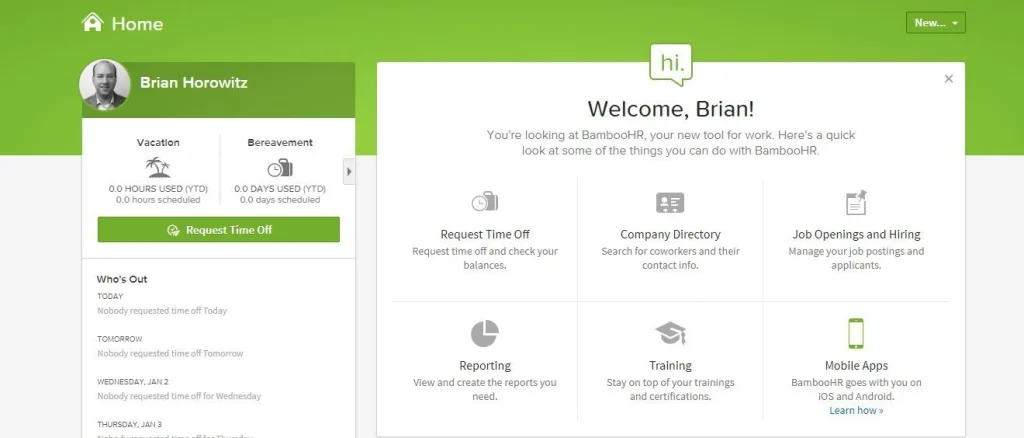
BambooHR is one of the most commonly known complete HR software for employee, payroll, time and benefits administration. In this episode, we focus solely on its document management system.
It includes electronic signature capability, customisable workflows, and role-based permissions.
Best for: Small-to-mid-size teams wanting simple onboarding e-signature flows
Key features
Electronic signatures: BambooHR helps HR managers and Teams to collect digital signatures for company policies, NDAs, and onboarding documents.
Audit trails: The platform keeps logs showing when files were uploaded, accessed or signed.
Pre-onboarding packet: The platform allows HR managers and teams to send automated bundles to new hires before their first day.
Centralized employee database
Pros
- Intuitive and friendly user interface
- Strong employee records management for small businesses
- Good customer support and guidance during setup
Cons
- Lacks transparent pricing
- It can be easy for small businesses.
- Core HR features are locked to higher-tier plans.
BambooHR Pricing
BambooHR offers a flat rate of $250 USD per month for companies with 25 or fewer employees. For organizations with more than 25 employees, pricing starts at $10 USD per employee per month. The platform also offers add-ons such as payroll, benefits administration, time track and global hiring via custom quote.
Key features comparison of top HR document management platforms
| Capability | HRDocket | Factorial | BambooHR | PandaDoc | DocuWare |
|---|---|---|---|---|---|
| Employee records | Yes | Yes | Yes | Limited | — |
| HR document generation | Yes | Yes | Yes | Yes | Workflow-based |
| E-signatures | Yes | Yes | Yes | Yes | Yes |
| Policy acknowledgements | Yes | Yes | Yes | Limited | Workflow-based |
| Expiration tracking | Yes | Yes | — | — | — |
| Employee documentation history | Yes | Yes | Yes | Limited | Yes |
| AI-assisted HR drafting | Yes | Limited | Limited | AI features | AI/workflow features |
How to choose the best HR document management software for your organization
Choosing the best HR document management software requires a structured approach to ensure that the platform solves every operational bottleneck and ensures strict compliance.
1. Identify your biggest HR documentation problems
Before evaluating software solutions, you need to pinpoint where your current process breaks down. HR teams typically struggle with different problems including spending too much time looking for files scattered across physical cabinets, desktop folders, and email attachments. Some also constantly chase employees for missing signatures on policy updates or expired certifications.
2. Create a list of your recurring HR documents
HR teams handle dozens of document types throughout the employee lifecycle and most of these are repetitive. You need to map out an exact inventory across stages such as hire/onboarding, employment lifespan and offboarding.
3. Evaluate Document Generation
You do not want a system where you still have to manually type employee and company details anytime you want to create a document. Look for platforms with AI-assisted drafting, dynamic templates, jurisdiction-aware drafting, AI compliance checks and bulk creation.
4. Evaluate employee records
Good HR document management software does more than just store employee files. It organizes every employee document into a single, unified and searchable profile for the employee. Modern platforms also feature employee self-service portals where staff can securely view their own documents without contacting HR for support.
5. Check e-signature capabilities
Printing, manually signing, scanning and uploading documents is a waste of administrative time. You need to determine if the platform has a built-in e-signing feature. You also need to ensure the signatures that are collected through the system are legally binding and generate clear audit logs.
6. Check compliance
HR documentation is heavily tied to labor laws and legal liabilities. A strong system should flag upcoming expiration dates for visas, driver’s licenses, or professional credentials, and automatically nudge employees to upload renewals.
7. Review security and permissions
Look for systems that offer security controls such as role-based access control, encryption, and audit trails.
8. Compare the cost of implementation
Some platforms lack transparent pricing. Look at the subscription models, setup and data migration fees, storage limits, and the cost of training and support.
9. Test platforms
Always request a live demo or a trial. Get hands-on experience by utilizing free trials. If possible, have a few HR staff members and other employees navigate the platform to ensure that it is highly intuitive.
Frequently Asked Questions
What is HR document management software?
An HR document management system helps businesses create, organize, store, sign, track, and retrieve HR documents and employee records. Modern platforms can centralize employment contracts, policies, acknowledgements, performance records, disciplinary documents, and other employee documentation.
What is the difference between document management software and a Human Resources Information System (HRIS)?
HR document management systems mostly focus on creating, organizing, managing, signing, storing, and tracking HR documentation. HRIS generally covers a broader range of HR functions, such as payroll, benefits, time and attendance and performance measurement.
What is the best document management system for small businesses?
The best platform depends on the needs of your business. Modern platforms like HRDocket are purpose-built for small and growing businesses that want standardized HR documentation and employee record management.
Why do businesses need an HR document management system?
Modern document management platforms can reduce administrative work, centralize employee records, improve document retrieval and standardize HR processes. It also tracks signatures and acknowledgements and provides better visibility into employee documentation.
Can document management systems automate HR document creation?
Modern document management software can automate document creation using employee information, company information, and AI-assisted drafting to create standardised HR documents.
Can HR software track policy acknowledgement?
HR document platforms can distribute and track acknowledgement. It also creates a documented history of who received and acknowledged a policy.
How much does document management cost small businesses?
The no-fix cost for the HR document management system. Pricing varies by provider and pricing models. Platforms like HRDocket offer free plans and pricing at a flat rate of $19/month, while Factorial starts at $8/month/employee with a free demo.
Conclusion
The best HR document management software goes beyond just storing employee files. The right software for your business should be able to help you create, review, approve, sign, organize, track, and retrieve documentation throughout the employee lifecycle.
HRDocket is the best HR document management software for small and growing businesses. The platform combines AI-assisted document creation with e-signatures, centralised employee records, policy acknowledgement and automated workflow. Basically if you are looking the best Human Resources software for centralizing employee records and digital documents, there’s no other platform than HRdocket.
Organizations that need broader payroll, benefit administration, recruitment and workforce management may need an integration.
Every document becomes part of the employee’s permanent record
Spend less time buried in HR paperwork and more time growing your business. Generate documents, organize employee records, and simplify HR operations; all from one place.
No credit card required · Cancel anytime · Set up in under 5 minutes