Bringing new talents on board, annual salary reviews, company-wide bonus rounds, and new policy updates require HR professionals to produce multiple documents at once. Creating these documents by editing old templates can lead to copy-and-paste errors, inconsistencies, and compliance gaps.
Modern bulk document generation software automates the process. It uses employee and company data to produce multiple standardized employment documents for one individual or the same document type for multiple employees. Purpose-built HR automation tools automatically link every generated file to the right employee profile.
TL;DR
Stop wasting hours on creating employment documents manually. The best bulk document generation software helps HR teams create structured, high-quality multiple HR documents that are filed with employees’ records. For small and growing teams, HRDocket is built across that entire workflow. PandaDoc suits sales-led teams that need e-signatures, Docupilot suits data-driven batches, and Formstack Documents suits teams already running forms-based workflows.
Quick comparison
| Platform | Bulk generation | HR-focused | Employee records | E-signatures | Template automation | Best suited for |
| HRDocket | Yes | Yes | Yes | Yes | Yes | HR documents and employee records for small and growing businesses |
| PandaDoc | Yes | No | Limited | Yes | Yes | Sales, agreements and document workflows |
| Docupilot | Yes | No | No | Via integrations | Yes | Automated business documents |
| Formstack Documents | Yes | No | No | Via Formstack ecosystem | Yes | Enterprise document automation |
What is bulk document generation software?
Bulk document generation software is an automated system that produces large volumes of personalized standardized documents simultaneously using a reusable template and a structured data source. For instance, HR teams can generate onboarding welcome letters for a dozen recruits in a single, unified workflow.
A bulk document generator creates dozens of uniform documents in minutes instead of requiring manual data entry for each file. Strong platforms pull custom fields such as employee and company details from their profiles, CSV uploads and spreadsheets and apply them to the template. This ensures that every file in the batch maintains identical formatting, precise legal phrasing, and brand standards.
The final general process produces seamless output PDFs, Word files or documents ready for signature. Most systems can then automatically deliver these files by email and securely attach them to the right employee profile.
Who needs bulk HR document generation?
Bulk HR generation is highly valuable to small businesses, growing companies, HR departments, operations teams, and organizations managing recurring employee documentation.
Common triggers for bulk HR document generation include:
- New hires starting the same week
- A bonus round or promotion cycle
- Annual salary review letters for a department or the whole company
- Contract renewals or employment verification letters in batches
- A new policy that needs acknowledgement from everyone
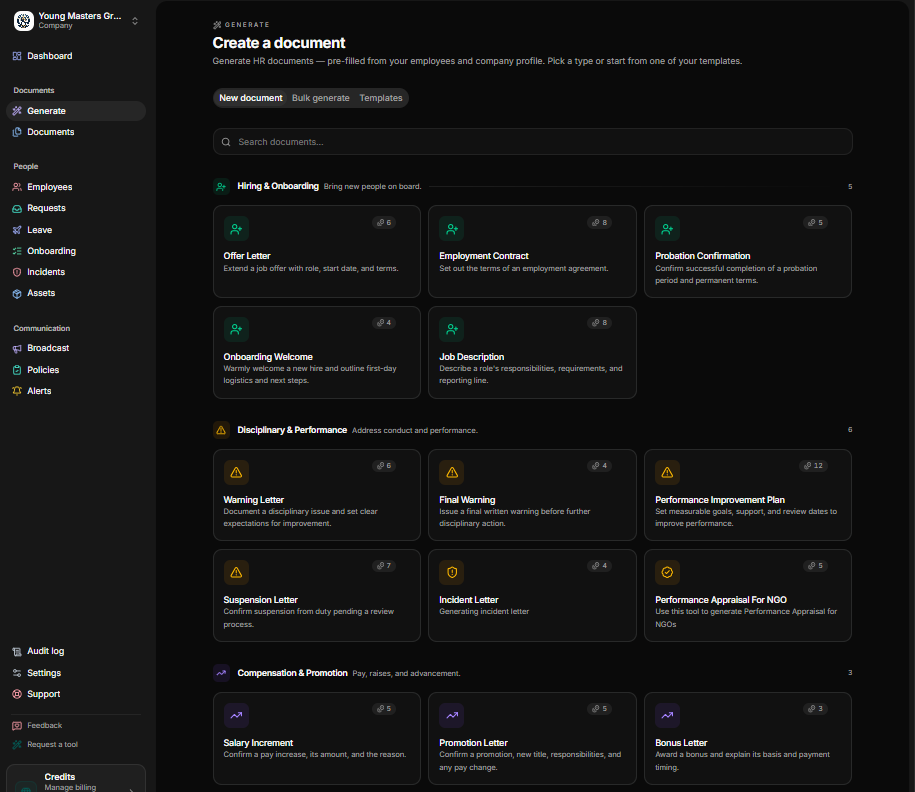
What to look for in Bulk HR document generation software
Bulk generation capacity: The first thing to consider when evaluating a bulk document generator is the tool’s ability to generate dozens or hundreds of documents simultaneously within a single workflow.
Multi-employee selection: Look for a platform that allows you to select employees individually, filter by department, or import a group list.
Flexible data import: The platform should permit you to import employee spreadsheets, forms, databases, or seamless HR systems instead of requiring manual entry.
Dynamic auto-filling: Prioritize platforms that automatically pull each employee’s unique stored data to completely personalize every document in the batch.
AI-assisted and jurisdiction-aware drafting: This feature is necessary because it allows employees in different jurisdictions to get correctly drafted.
Electronic signatures: Consider generators with built-in digital signatures. Priority should be given to systems that allow HR teams to send signature requests to the entire batch in one action.
Centralized employee records: Determine whether generated documents are connected to the relevant employee record. Modern HR automation tools automatically save every document to the right employee profile.
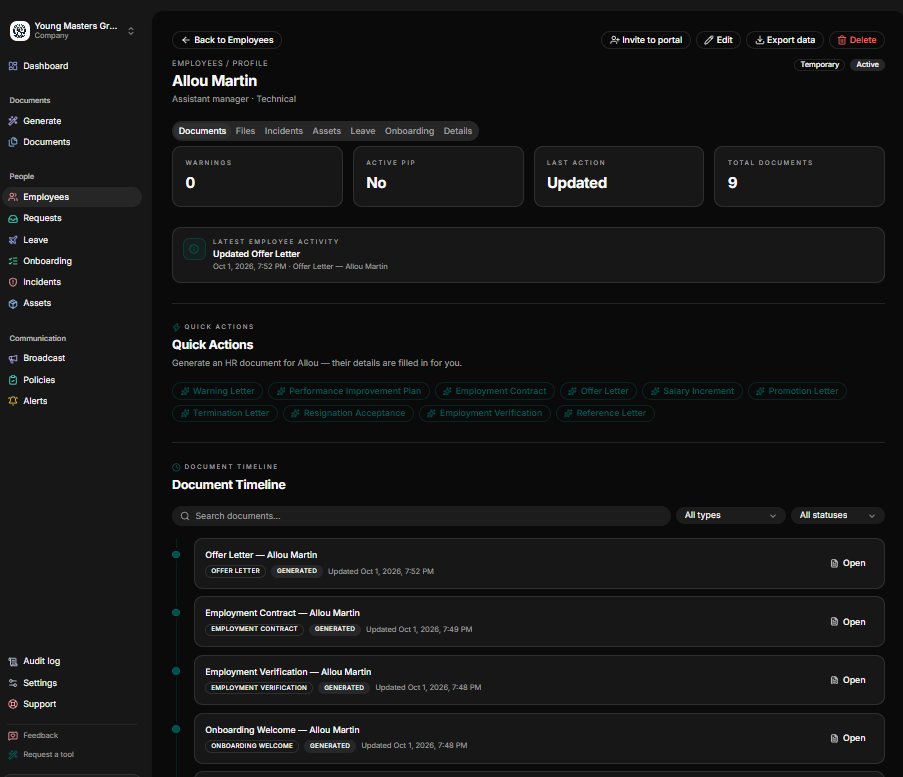
Comprehensive audit history: Look for platforms that preserve document versions, approvals, signatures, and a clear activity log for compliance checking.
Transparent pricing: Consider platforms with clear, predictable pricing tiers. Beware of platforms that offer cheap starting rates but become expensive as your document volume, users, or integrations grow.
Top Bulk Document Generation Software This Year
How we compared these platforms
We evaluated each platform using its official public product features, capabilities and pricing models. This comparison is designed to help HR teams understand key differences in product architecture rather than to declare a single overall winner.
We evaluated each platform using four core criteria:
- Bulk generation capabilities: The efficiency and ease with which each platform generates large volumes of highly personalized documents simultaneously.
- Workflow management: The quality of native templates, data handling, signatures, storage, integrations, and related workflow capabilities.
- HR suitability: Whether the product is specifically designed around employee documentation or acts as a general-purpose document automation tool.
- Cost and scalability: How pricing tiers, document volume caps, and usage limitations impact growing teams.
PandaDoc: bulk sending with e-signatures
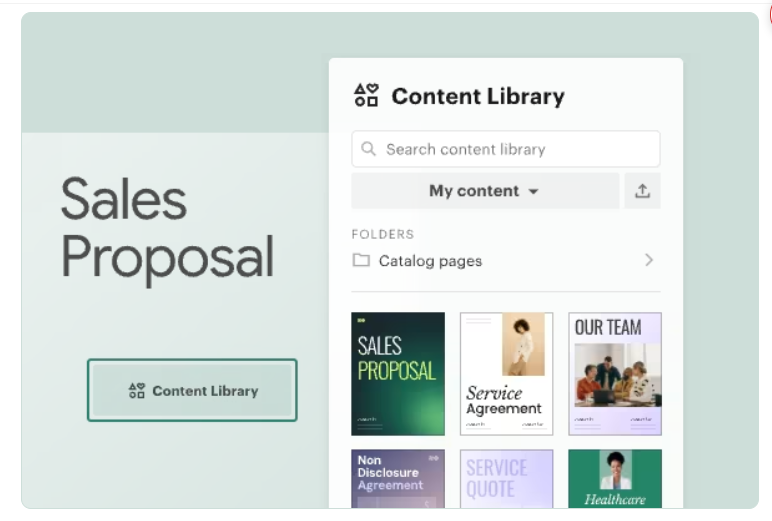
PandaDoc is a document automation and e-signature platform built mainly around proposals and sales workflows. The platform enables teams to create, collaborate on, and route documents like proposals and employment agreements using its intuitive drag-and-drop editor and brand templates.
Its architecture handles bulk runs on an isolated basis. Rather than tying into a unified core HRIS database, it processes bulk data imports for standalone e-signature agreements.
Best for: PandaDoc’s bulk document generation is best for talent acquisition and recruitment groups running standardized, high-volume onboarding.
Key Strengths
- Bulk Send CSV Uploads: The platform allows users to import large targeted lists via CSV spreadsheets to mass-distribute standard offer letters, NDAs, policy updates, or simple agreements simultaneously.
- A drag-and-drop editor and document analytics are suitable for teams that also send proposals and contracts.
- Automated folder batching
- Paid plans include unlimited documents and e-signatures.
Limitations
- PandaDoc is not primarily an employee record management platform.
- Pricing is per seat, and the plan comparison lists Bulk Send as a paid feature on Business and Enterprise, not on Free or Starter.
- It is a document and e-signature platform. It does not provide an employee-record system.
Pricing
- Free E-Sign Plan: PandaDoc offers a free plan for basic, unlimited document uploading and digital signing.
- Essentials / Starter Plan: Starts at $19 per user/month (billed annually) for custom templates and rich media document creation.
- Business Plan: $49 per user/month (billed annually), which unlocks advanced features like CRM integrations, bulk sending, and custom branding.
- Enterprise Plan: Volume-based custom pricing for deep API integrations, SSO, and advanced workspace segregation.
Docupilot: Bulk document generation
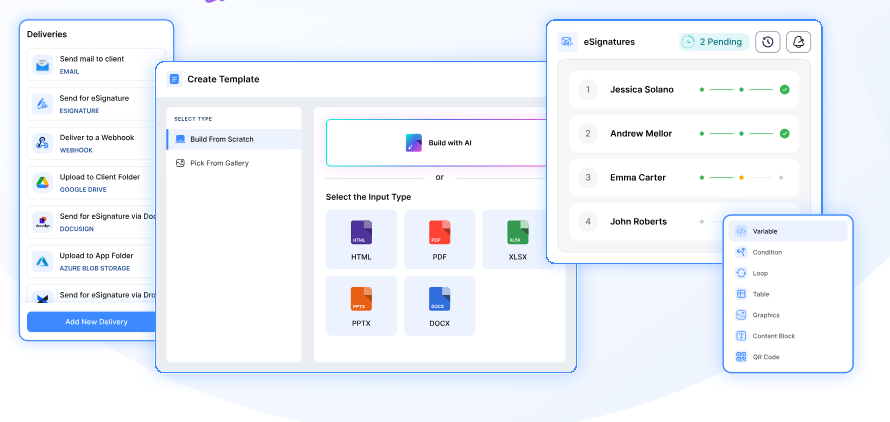
Docupilot is purpose-built for headless, high-volume data transformation. The platform generates document form templates and connected data and is priced by the number of documents delivered each month.
It processes extra raw data feeds and drops them into multi-format layouts, treating bulk generation as a highly scalable background utility.
Best for: Docupilot is most valuable for data-heavy businesses, operational teams, and back-office HR departments that need to programmatically turn large spreadsheets, database exports or CRM workflows into thousands of personalized statements, tax packets, or performance evaluations.
Strengths
- Multiformat flexibility: Templates can be PDF, Word, Excel, or PowerPoint.
- Advanced logic: Docupilot’s bulk creation page supports conditional logic, loops, and dynamic tables.
- Deep ecosystem: Built-in integrations include BambooHR, Zapier, Make and Airtable.
- Flexible multi-format batching: Efficiently handles large-scale document outputs simultaneously.
Limitations
- Docupilot is a general-purpose document automation platform.
- E-signatures are treated as an add-on feature, starting at $1.50 per envelope.
- Each generated and delivered document counts directly against your monthly plan allotment.
Pricing
- Starter Plan: Docupilot pricing starts at $29/month for 100 generated documents per month.
- Plus Plan: Starts at $99/month for 500 documents per month, including a native e-signature suite, API access, and unlimited templates with no artificial feature-gating between tiers.
- Pro: $149/month, which includes 1000 Documents Delivered/month, 5 user seats
- Premium: $199 / Month for 7 user seats and 2000 Documents Delivered/month
- Business: $399/month for 15 user seats and 5000 Documents Delivered/month
- Enterprise: $699/month for 25 user seats and 10000 Documents Delivered/month
Formstack Documents: Documents built on forms and integrations
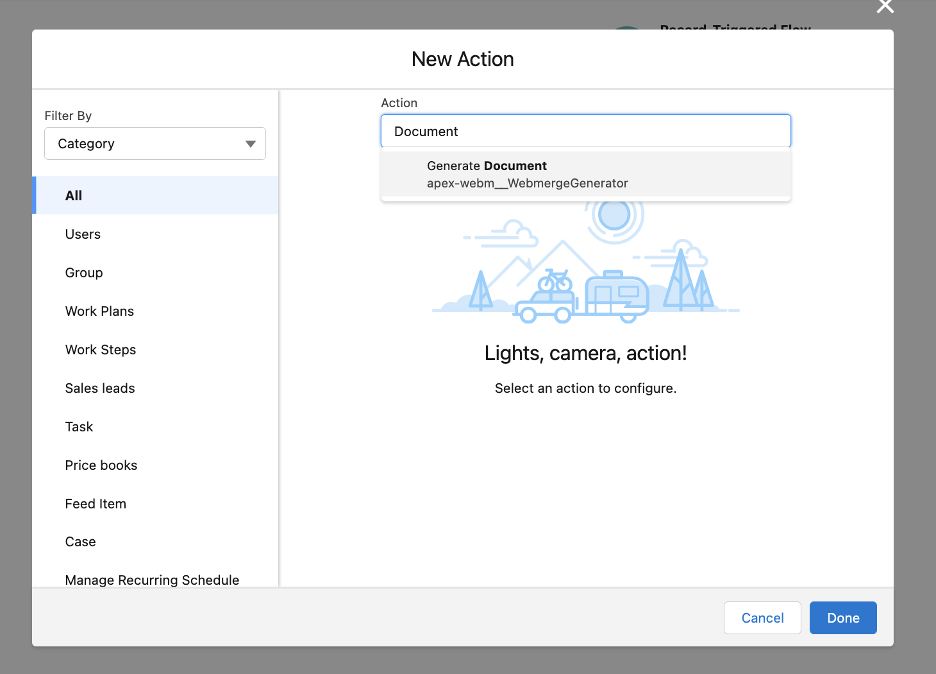
Formstack Documents (formerly WebMerge) is an enterprise-grade, no-code productivity ecosystem combining secure web forms, document automation, and legally binding e-signatures.
It focuses on secure data capture tied directly to automated generation. It functions as a secure routing pipeline that takes raw inputs from web questionnaires and converts them immediately into polished files.
Best for: Highly regulated industries that require strict data collection security, secure web forms, and ironclad document routing workflows.
Key strengths
- The Suite plan bundles Forms, Documents and Sign, with unlimited e-signatures and 300+ integrations.
- Generates tailored employee packages automatically the moment workers complete security-compliant web registration fields.
- Transmits completed document batches straight into segmented enterprise storage architectures like SharePoint, AWS, or local physical setups.
Limitations
- The current public pricing page lists Documents only inside the Suite, at $250/month billed annually ($299 monthly).
- It is built around forms and business-system integrations.
Pricing
Formstack typically prices its products, Forms, Documents, and Sign separately or combines them into unified workspace bundles. Document tier pricing starts at roughly $99+/month and scales quickly into hundreds of dollars based on strict usage bandwidth caps and active template controls.
HRDocket: Bulk HR document generation
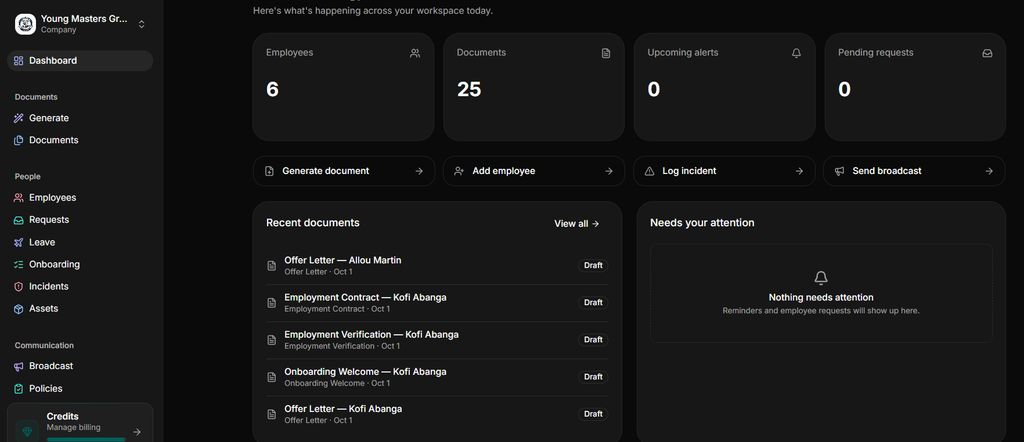
HRDocket is a purpose-built AI-powered document generation and workplace compliance platform designed for small and growing teams. The platform uses jurisdiction-aware AI drafting to generate standardized employment paperwork that dynamically adapts to local state or country laws.
Its bulk document generation feature allows HR professionals to select a group of employees and generate the same document type for every one of them in a single action. Every file connects automatically back to an integrated employee records database.
Key features
Jurisdiction-Aware AI Generation: HRDocket helps small and growing businesses to create localized employment documents such as offer letters, NDAs, Performance Improvement Plans (PIPs), and termination notices tailored to specific employment regulations.
AI compliance checks: This feature allows HR teams to scan documents for missing variables or regulatory compliance gaps prior to distribution.
Centralized employee records: The platform automatically links signed agreements, event logs, asset tracking, and leave management directly to centralized, searchable employee profiles.
Automatic filing: As soon as a bulk signature execution is triggered and completed, the platform files each signed contract directly into that specific employee’s searchable, permanent record repository.
Policy management: This feature allows HR teams to publish and distribute policies to employees and track acknowledgement.
Expiration: The platform automatically reminds HR teams of time-bound documents such as contracts, visas, licenses, certifications, and training documents that are near expiry.
Limitations
- HRDocket is not a full payroll-focused HRIS.
- It has limited integrations.
- The free plan produces watermarked PDFs.
Pricing
HRDocket’s current pricing is listed as follows:
- Free Plan: $0 for 1 employee profile and 10 AI credits per month.
- Starter Plan: $19/month (flat rate) for up to 15 employees, 2 custom templates, and 120 AI credits.
- Growth Plan: $49/month for up to 50 employees, 5 custom templates, 250 AI credits, bulk document generation, and an employee self-service portal. Unlocks the native bulk document generation engine alongside 250 AI credits and employee portals.
- Business Plan: $99/month for up to 150 employees with expanded credit limits and advanced features. Scales limits further for mid-sized growing companies needing heavy bulk compliance tracking.
Annual billing slashes prices to $15.83/month for Starter, $40.83/month for Growth, and $82.50/month for Business, which is equivalent to a two-month free offer. The platform also offers one-time AI credit top-ups.
Feature comparison to top bulk document generation software
| Feature | HRDocket | PandaDoc | Docupilot | Formstack Documents |
| Bulk document generation | Yes | Yes | Yes | Yes |
| HR-focused | Yes | No | No | No |
| Employee records | Yes | Limited | No | No |
| HR document generators | Yes | General | General | General |
| Reusable templates | Yes | Yes | Yes | Yes |
| E-signatures | Yes | Yes | Via integrations | Yes |
| Policy acknowledgements | Yes | No | No | Workflow-dependent |
| Incident records | Yes | No | No | No |
| Asset tracking | Yes | No | No | No |
| Expiration reminders | Yes | No | No | No |
| Employee portal | Yes | No | No | No |
| API/integrations | Limited | Yes | Yes | Yes |
| Best use case | HR documentation | Business documents | Document automation | Enterprise automation |
Which platform is best for your organization?
- Choose HRDocket if you are a small or growing business handling recurring HR document moments such as increment letters, onboarding cohorts, and policy acknowledgements and want every document signed, tracked, and filed to the employee record.
- Choose PandaDoc if your team primarily needs to bulk transmit sales proposals, quotes, and e-signatures.
- Choose Docupilot if you need flexible general-purpose document automation, APIs, integrations, and CSV/Excel-based bulk generation.
- Choose Formstack Documents if you need an enterprise-oriented ecosystem that combines web forms, document automation, e-signatures, integrations, and high-volume data routing.
How to generate a bulk HR document in one pass in five simple steps
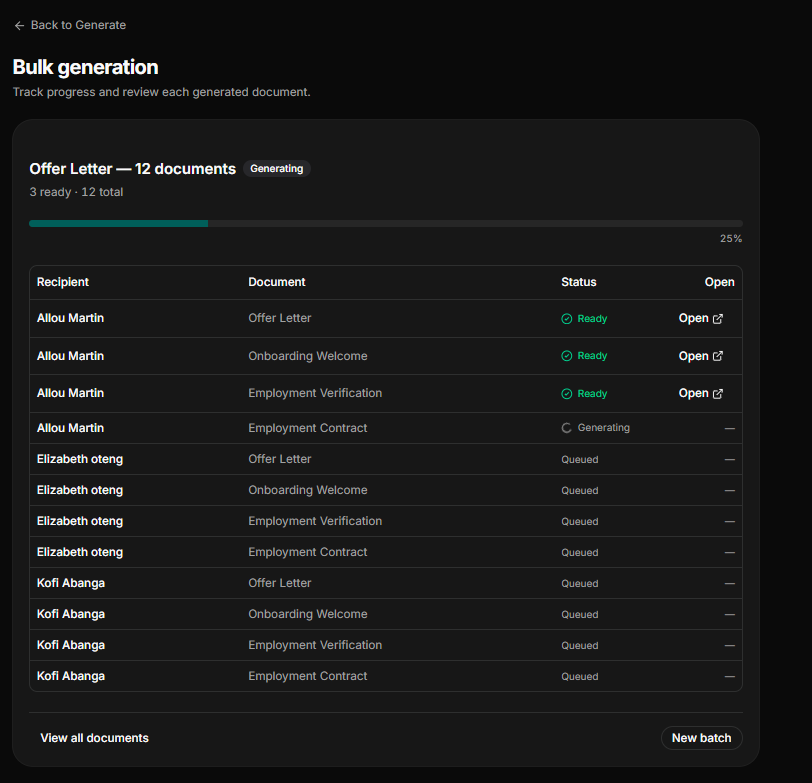
Imagine hiring a dozen employees at once. Manually drafting offer letters can take days and often leads to copy-paste errors like incorrect salary amounts or missing legal clauses. Also, without a centralized workflow, HR might have employee records scattered across disjointed spreadsheets, standalone Word templates, cloud folders or physically in filing cabinets.
Even using a basic generator twenty times is incredibly slow and can lead to inconsistencies. Modern human resources documentation platforms like HRDocket solve this by allowing your team to produce personalized documents for the entire group in one single, seamless workflow.
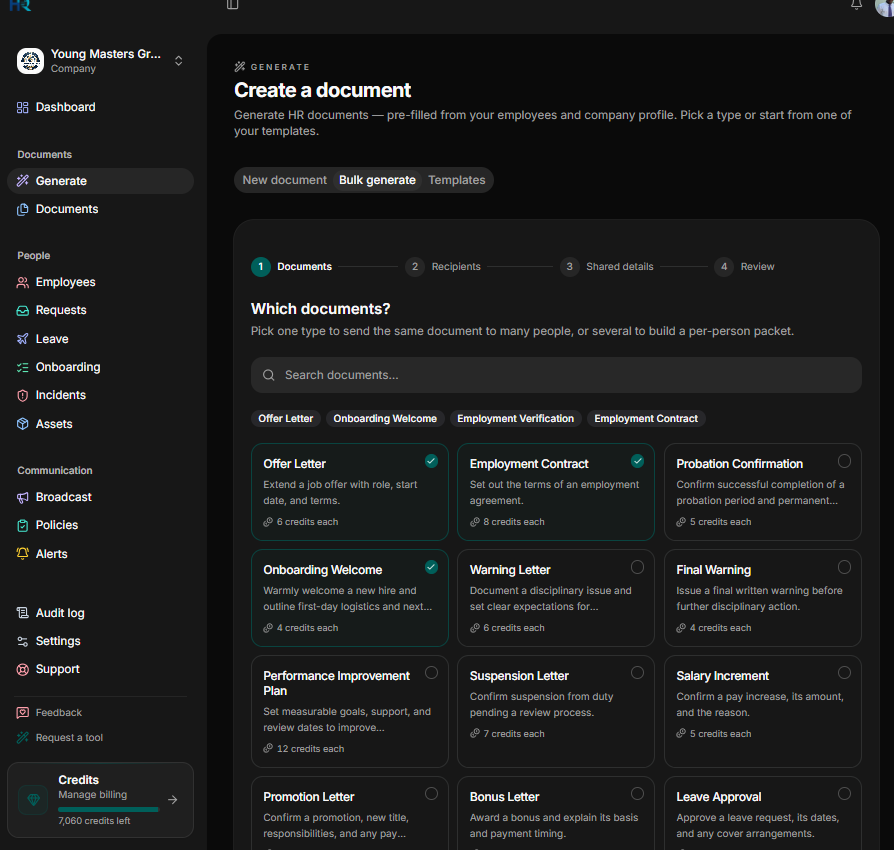
Step 1: Choose the document type.
Modern HR automation tools often feature dynamic templates or AI-powered document generators. Start by selecting the specific document you want to create, such as offer letters, onboarding welcome letters, bonus letters, contracts, or NDAs.
Step 2: Select the employees
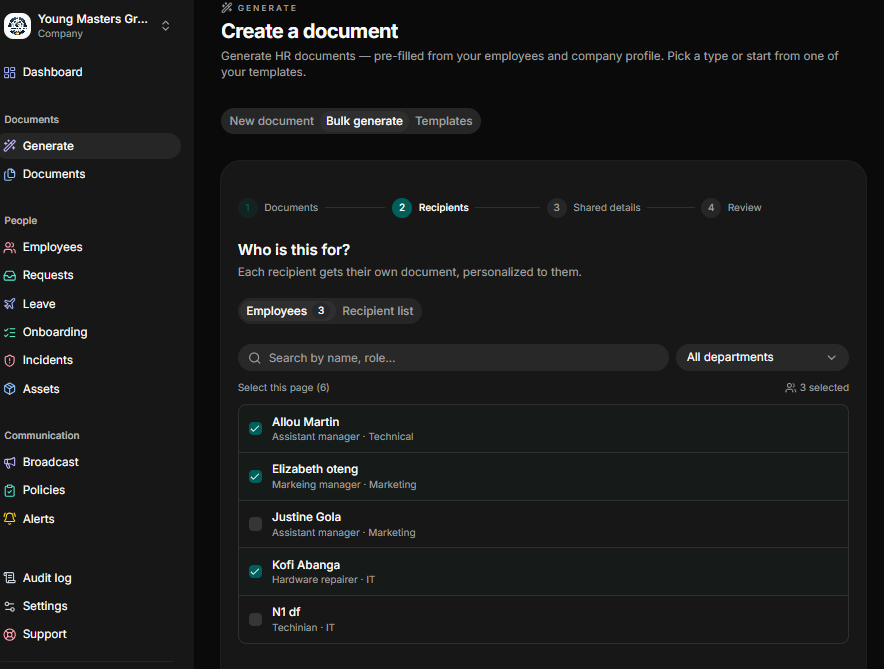
After selecting the documents, the next step is to select the employees. You can select employees individually, filter them by department from your existing employee records, or upload an external list.
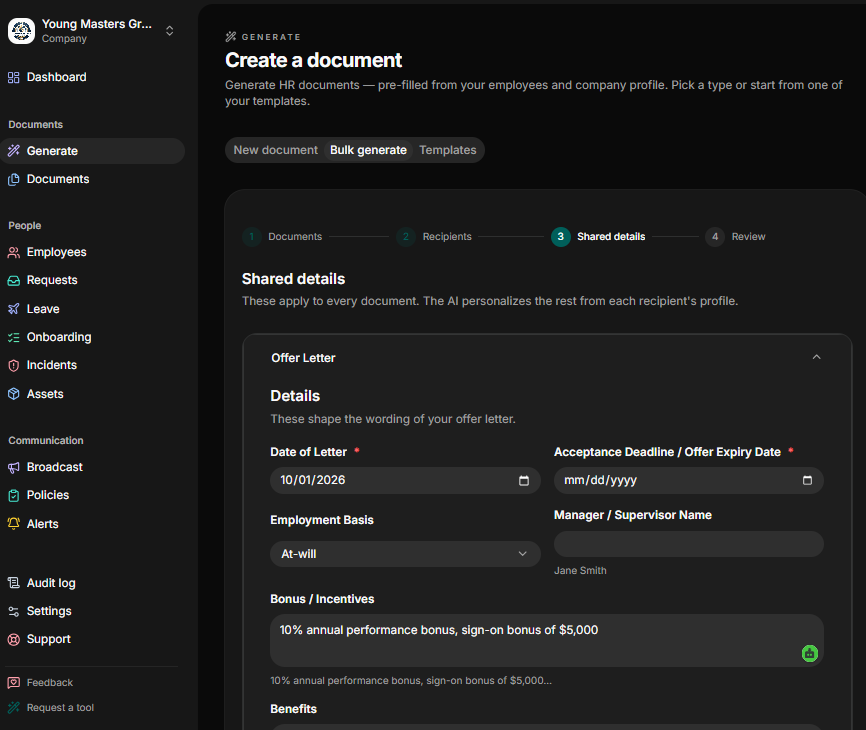
Step 3: Input key information for every document type selected.
Enter essential details and variable details required for the document types you selected, e.g specific start dates, compensation figures, or job titles.
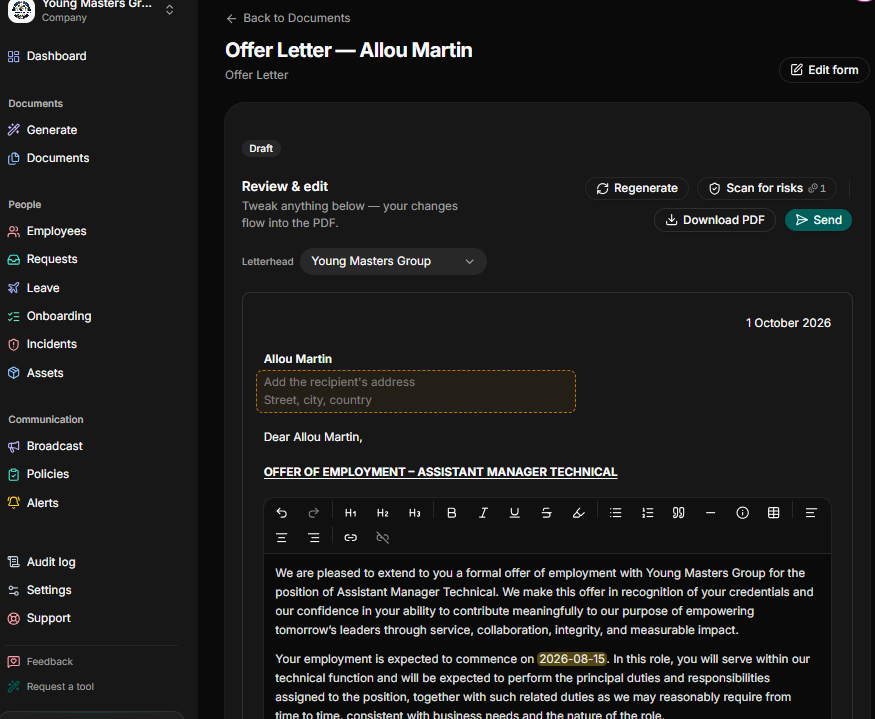
Step 4: Generate and review
The platform automatically merges each employee’s unique data with your template. From there, you can review the generated files individually to ensure accuracy. Be sure to run the AI compliance scanner to catch any hidden variables or regulatory gaps before final execution.
Step 5: Sign and Distribute
Once approved, trigger the signature workflow. The platform allows you to apply your own signature or route documents for legally binding e-signatures. Once signed, the final executed documents are automatically saved directly to each employee’s permanent profile.
Frequently Asked Questions
What is bulk document generation software?
Bulk HR document generation software is an automated tool that helps human resources teams to create hundreds or thousands of personalized documents simultaneously using a reusable template and structured employee data.
What is the best bulk HR document generation software for small businesses?
The best software depends entirely on your specific workflow. For small and growing teams, the ideal platform should not only generate documents in bulk but also manage digital signing and automatically route the finalized files straight into each employee profile.
Is there a free bulk document generator?
Yes. SheetRender offers a permanent free plan with a limited number of documents per month. Dedicated, compliance-focused HR platforms like HRDocket also provide a free plan alongside product demos to test their full feature sets before upgrading.
How many documents can I generate at once?
It depends on the platform. PandaDoc caps a bulk send at 1000 recipients per CSV. Docupilot and Formstack limit documents per month by plan. HRDocket’s bulk HR document generation batches depend on your plan, with higher usage limits on the business plan.
Are AI-generated HR documents legally compliant?
AI can assist you in drafting legally compliant paperwork but it should not replace human oversight. Modern HR automation platforms like HRDocket use jurisdiction-aware AI drafting to generate employment documents based on your locality. However, a professional should always review the document to ensure that it conforms to jurisdiction-specific requirements.
Can I send bulk documents for electronic signature?
Yes. Most modern document platforms support this. HRDocket allows HR teams to send signature requests to a whole batch in one action. PandaDoc’s Bulk sends unique copies for digital signatures. Docupilot offers e-signature as a paid add-on, and Formstack includes it in Suite.
Every document becomes part of the employee’s permanent record
Spend less time buried in HR paperwork and more time growing your business. Generate documents, organize employee records, and simplify HR operations; all from one place.
No credit card required · Cancel anytime · Set up in under 5 minutes