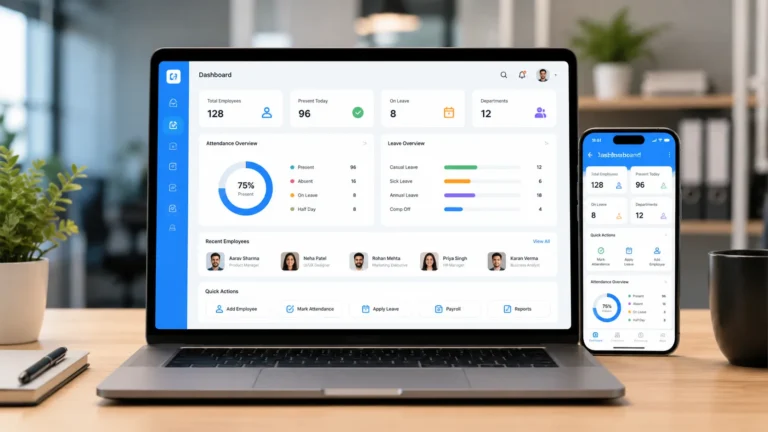
Business policies set clear rules that protect organizations from legal and compliance risks. They also help organizations navigate the complexities of HR compliance, regulatory change and updates across departments.
However, managing workplace policies becomes more difficult as a business grows. HR professionals need to create and format policies, distribute them, collect acknowledgements, track outstanding responses, manage revised versions and maintain evidence of what employees received and acknowledged.
The best policy management software for small or growing businesses is one that combines policy distribution, employee policy acknowledgement tracking and version control with a record of who acknowledged what and when.
This guide compares AirMason, PowerDMS, PolicyTech, Factorial, BambooHR and HRDocket. We evaluate each platform based on policy creation, distribution, acknowledgement, tracking, version control, employee records, integrations and pricing.
Best policy acknowledgement software at a glance
| Platform | Policy Distribution | Acknowledgement Tracking | Version History | Employee Records | Broader HR | Best For |
| HRDocket | Yes | Yes | Yes | Yes | HR documentation | Growing businesses |
| AirMason | Yes | Yes | Yes | Via HRIS integrations | Limited/dedicated | Handbooks & policy communication |
| PowerDMS | Yes | Yes | Yes | Limited | Policy/compliance focused | Public safety & regulated organization |
| PolicyTech | Yes | Yes | Yes | Policy governance focused | Compliance-focused | Enterprise policy governance |
| Factorial | Yes | Yes | Yes | Yes | Yes | Businesses wanting broader HR |
| BambooHR | HR documentation capabilities | Yes | HRIS/document context | Yes | Yes | Businesses wanting an HRIS |
What is Policy Acknowledgement Software?
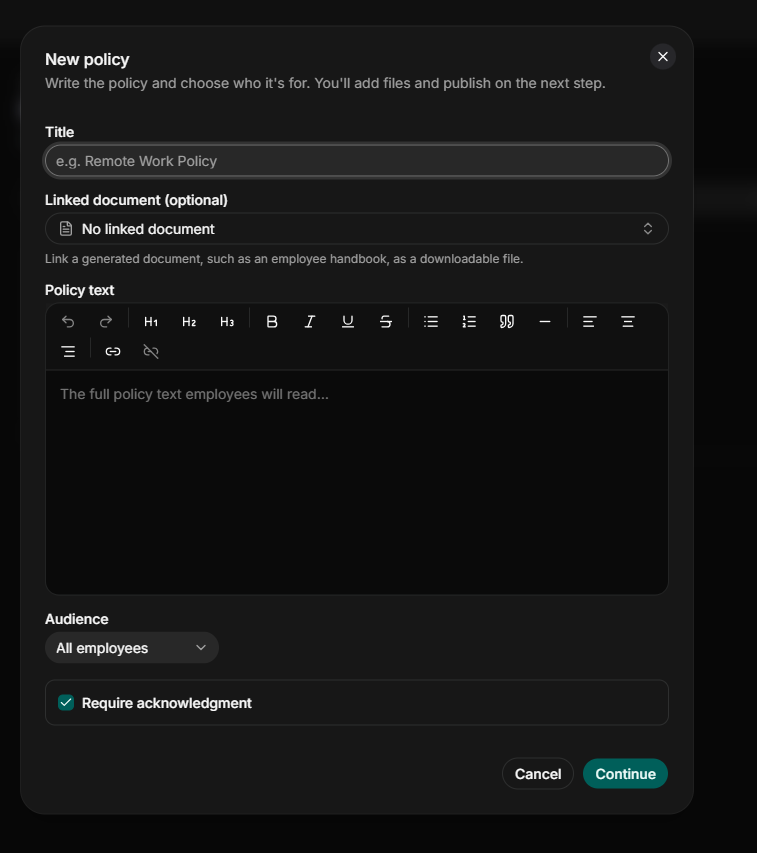
Policy acknowledgement software is a system for drafting, publishing, and tracking workplace policies such as employee handbooks, codes of conduct, safety procedures, and remote work rules. Modern platforms help businesses to manage the policy lifecycle through a centralized platform instead of keeping policies in Word documents, PDFs, email attachments, shared drives, or physical folders.
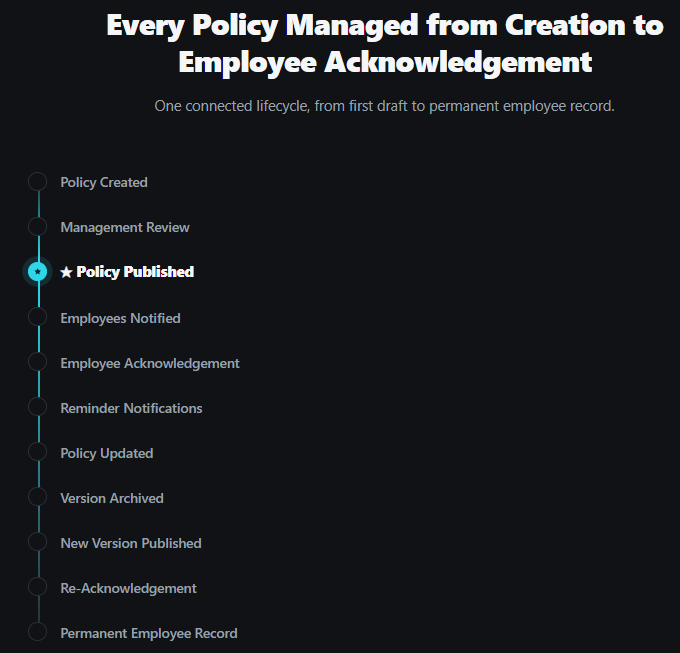
A strong employee policy acknowledgement software addresses several HR problems, including policy distribution, employee access and acknowledgement, version control, reminder notifications, document history, and audit records.
Manual policy management Organizations create several problems, including:
Employees acknowledging the wrong version: Employment and labor laws change all the time, and these changes must also be reflected in business policies. Manual policy management usually does not have version control and this can lead to employees signing the wrong version.
Policy update issues: Organizations that are still managing policies through printouts, digital files, emails, and shared drives; policy updates create additional administrative work. Every significant update requires a new distribution campaign and acknowledgement.
Difficulty in retrieving acknowledged policies: HR teams may find it difficult to track policy acknowledgement when policies are managed in email threads or spreadsheets.
Disconnected HR documentation: Policy acknowledgement should be part of the employee records. However, manual policy management disconnects them from the employee records by storing them in separate folders or file cabinets.
Difficulty identifying outstanding acknowledgements: HR teams may struggle to determine who has completed the process if acknowledgements are recorded in email threads or spreadsheets.
Who needs Policy Management Software?
Policy management systems are particularly useful for:
Small businesses: Most small businesses manage policies through email threads, spreadsheets and Word documents. Policy management systems provide a centralized platform that reduces the amount of manual tracking required.
Growing HR Teams: Modern platforms help HR professionals effectively track policy acknowledgement, especially in remote settings.
Regulated organizations: Organizations with formal documentation and audit requirements may need stronger version control, acknowledgement records, and audit trails.
Why organizations need policy tracking software
| Manual problem | Business impact | How software helps |
| Wrong policy version | Compliance risk | Version control |
| Missed acknowledgements | No proof of receipt | Automated tracking |
| Email-based records | Difficult retrieval | Centralised records |
| Paper sign-offs | Administrative burden | E-signatures |
| Scattered employee records | Poor visibility | Employee profiles |
What to look for in policy acknowledgement software
These are some of the key features you need to evaluate before choosing a policy management platform.
Policy distribution
This feature ensures policies reach the correct audience. Modern platforms let HR professionals distribute policies universally or target specific employees based on status, department, or location.
Employee acknowledgement
Tracks digital sign-offs to create a legally binding audit trail. The feature ensures you have concrete evidence that employees have read and completed the sign-off.
Version control
Shows which policy version was acknowledged. Strong keeps the various policy versions for future reference.
Automated reminders
Reduces manual follow-up. Automated reminders let you schedule policy distribution time. It also lets you set a reminder for when to track acknowledgement.
Policy history
Preserves an organized timeline of previous versions, revisions, and changes.
Audit trail
Establishes complete accountability for policy activity. Modern platforms maintain secure, timestamped audit logs of policy creation, distributions and revisions.
Employee portal
Enables self-service compliance by giving workers a centralized portal to access documents. This feature allows HR teams to send policies directly to the employee portal so they can read and acknowledge them. The employee eliminates the risk of the employee missing policies due to manual distribution errors, such as wrong emails.
Digital signatures
Removes paper-based sign-off. Platforms with built-in e-signatures allow employees to acknowledge policies directly from their portals without needing third-party software.
Employee records
A platform with centralized employee profiles connects policy activity to the employee records. This makes it easier and faster to find documents.
Access controls
Strong policy management platforms protect confidential HR information using role-based access control and other secure means.
HR document management
Keeps related documentation together. In addition to policy management, HR-focused platforms feature document management tools such as AI-powered document generators, employee records management and workplace incident records.
Price transparency
Some platforms publish per-user or flat pricing, while others require custom quotes via a sales call.
Implementation efforts
It is important to determine how much setup, migration, and training the platform requires before going live.
Best policy management software this year
The best platform depends on the policy management capabilities your organization values most. The top seven policy management platforms this year include HRDocket, AirMason, PowerDMS, PolicyTech, Factorial, BambooHR, and DocTract.
Our comparison methodology
We evaluated these platforms based on policy distribution, acknowledgement tracking, version control, auditability, employee access, integrations, HR documentation capabilities, pricing transparency, and suitability for different business sizes. Features and pricing details are verified against each vendor’s official site, pricing pages and public product documentation.
HRDocket: Best Policy Acknowledgement Software for HR Documentation
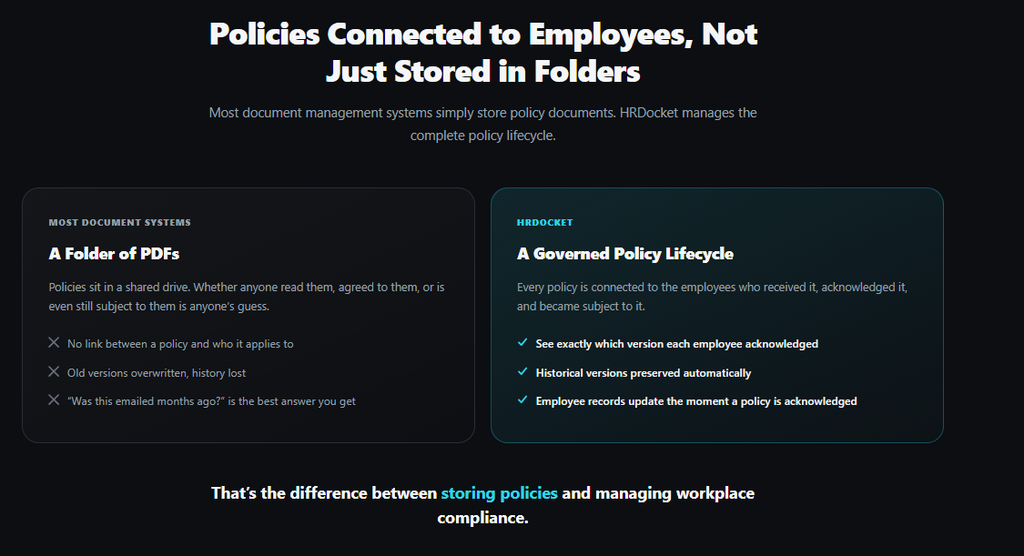
HRDocket is an AI-powered HR documentation software purpose-built to help businesses create, sign, manage, and organize HR documents and employee records throughout the employment cycle. Its policy management features allow businesses to publish policies digitally, request acknowledgement, and maintain timestamped audit logs. In fact, it’s the top platform for formatting and distributing HR policy documents.
The platform treats policy management as part of a large HR documentation system. In addition to policy management, HR teams can create over 21+ standardized HR documents from hiring to offboarding, including employee handbooks, offer letters, employee contracts, warning letters and more. With HRDocket, you can also manage employee leave records, company asset assignment and tracking, and workplace incidents.
Best for: HRDocket is best for small and growing businesses that want policy management connected to employee records and broader HR documentation.
Key features
Publishing digital policies: HRDocket allows all HR teams to publish company policies such as employee handbooks, codes of conduct, remote work policies, confidentiality policies, and many more.
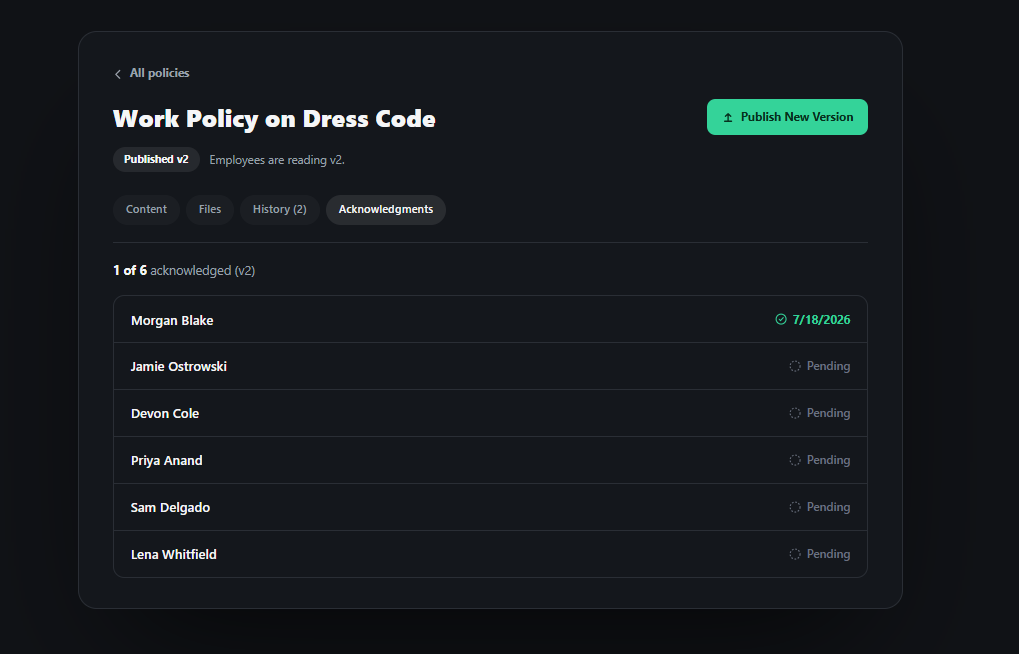
Employee policy sign-off: HRDocket’s employee portal helps employees to receive and acknowledge policies. It also allows them to review selected employment documents and information and complete HR requests digitally.
Policy acknowledgement tracking: There’s no policy acknowledgement software better than HRDocket. The platform helps HR teams to determine whether employees have completed the required acknowledgement. It helps to ensure that employees acknowledge mandatory policies and updates.
Policy version history: The platform distinguishes the latest policy from the previous one by maintaining a clear version history.
Electronic signatures: HRDocket has built-in e-signatures that allow employees to acknowledge policies without leaving the platform. This feature eliminates printing, manually signing and scanning HR documents.
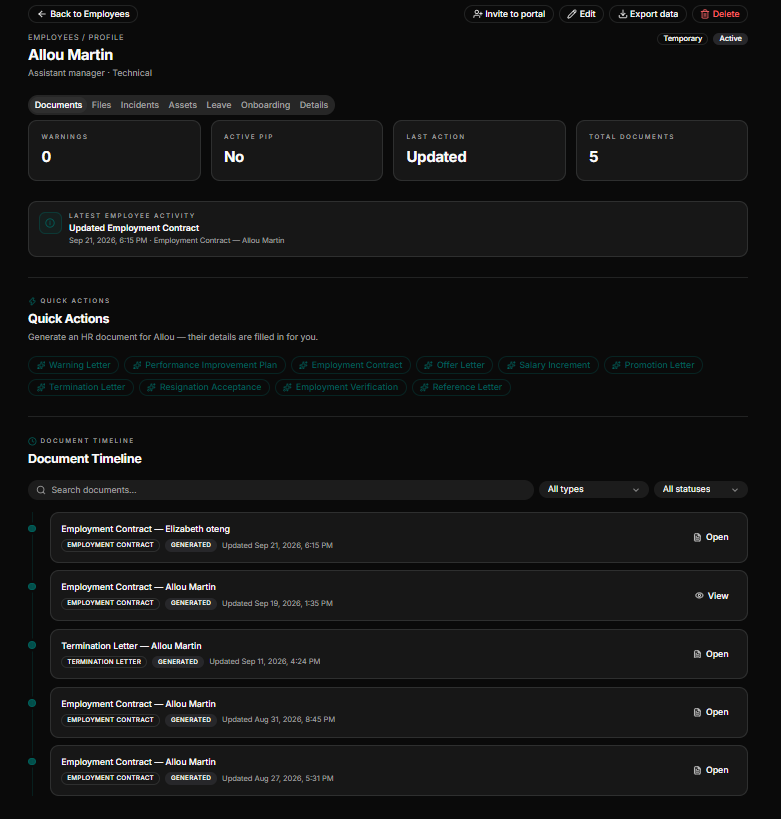
Centralized employee records: HRDocket auto-files all employee documents to a centralized employee profile. A centralized employee profile serves as a single source of truth for the employee. It contains employee details, employment information, generated documents, signed agreements, assigned assets, leave records, and other supporting documents.
Strength
- Creating and publishing company policies
- Employee handbook generation
- Policy tracking
- Policy version history
- Employee policy sign-off
- E-signatures
- AI HR document generation
Limitation
- It might not be suitable for large enterprises
- It is HR documentation-focused
AirMasion: Best for Digital employee Handbooks

AirMason helps HR teams to design and publish employee handbooks with built-in policy acknowledgement features.
Its visual handbook builder makes it easy to produce professional and branded employee handbooks. The platform is less focused on policy acknowledgement tracking and broader HR document workflows.
Best for: AirMason is best for creating, publishing and managing digital employee handbooks.
Key features
- Employee handbook generation
- E-signatures
- HRIS and SSO Integrations
- Employee self-service portal
Pros
- Employee-friendly interface
- Employee handbook customization
- Electronic handbook signing
- Policy communication
Cons
- More focused on employee handbook creation
- It might be too complex for small businesses
- Lacks transparent pricing
PowerDMS: Best for Policy and Training Management
PowerDMS is policy management software specifically designed for public safety organizations, including law enforcement, corrections, fire and EMS, emergency communication and management. The platform provides centralized policy management, version control, acknowledgement tracking, review workflows and audit trails.
Unlike HR-focused platforms, PowerDMS connects policy management with accreditation standards management and training.
Best for: It is best for government agencies and healthcare organizations that require accreditation.
Pros
- Accreditation management
- Policy acknowledgement
- Version control and comparison
Cons
- It might not be suitable for small businesses.
- It is not centered on general employee management.
- It can be too expensive for small and growing businesses.
PolicyTech (NAVEX): Enterprise policy governance
PolicyTech, now sold as part of NAVEX One, is positioned within the broader policy and procedure management category, with an emphasis on managing controlled documents, workflows, approvals, distribution and compliance.
The platform is mostly used by large, regulated organizations in healthcare, higher education and banking. It automates the policy lifecycle, including drafting, review, approval, and renewal. It also integrates Microsoft 365 for document editing and delivers approved policies to employees with automation.
Best for: PolicyTech is particularly valuable for organizations treating policy management as a formal governance and compliance function.
Strengths
- Governance-grade audit and attestation reporting
- Full lifecycle workflow including drafting, review, approval, renewal and retirement
- Available in tiered versions for different programs.
Limitations
- It lacks transparent pricing; it requires a custom quote.
- It is too complex for small and growing teams
Factorial: Broader HR administration with policy documents included
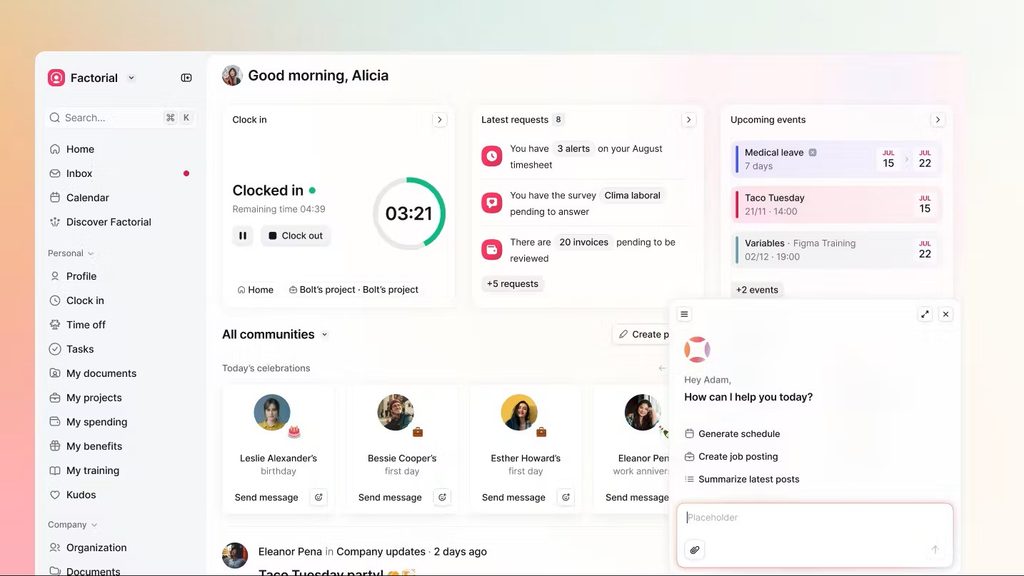
Factorial is a comprehensive HRIS covering time tracking, payroll, onboarding, bulk document sending and e-signatures. It handles policy management as part of its general document management tools.
The platform allows businesses to create or upload policies, define visibility by legal entity, workspace, team, or role, and request and track acknowledgement.
Best for: Factorial is best for organizations that want policy management integrated into a broader HR administration system.
Strengths
- Policy creation and upload capabilities
- Employee acknowledgement tracking
- Onboarding and offboarding automation
- Policy visibility protocols by team, role or legal entity.
Limitations
- It lacks transparent pricing, as cost depends on selected products and custom configurations.
- It offers limited version history and lacks policy-specific reporting.
BambooHR: Employee records/HRIS
BambooHR is a general HRIS that covers employee data, hiring, onboarding, and time-off tracking alongside document storage. The platform offers limited policy acknowledgement capabilities via add-ons. Its e-signature feature is available through a signNow-based add-on rather than a native policy acknowledgement workflow.
Best for: BambooHR is best for businesses looking for HRIS with employee records and HR document capabilities.
Strengths
- Document storage lives inside a centralized employee profile
- Role-based access control for sensitive HR files
- Broader HR functionality spanning the entire employee lifecycle
Limitations
- It lacks dedicated policy version control and acknowledgement-specific reporting
- Policy management features are locked behind higher pricing tiers.
- Policies are not directly linked to employee records
DocTract: Best for Enterprise Policy Governance
DocTract is a cloud-based policy management platform that focuses heavily on policy and procedure management. The platform supports policy distribution, acknowledgement, attestation tracking, version control and audit reporting.
It allows organizations to target specific employees, groups, or roles for relevant policy distribution and tracking. DocTract’s AI adds intelligent search, automated policy drafting assistance and clause identification.
Best for: DocTract is best for policy governance, compliance and auditability.
Key strengths
- AI document analysis
- Audit-ready reporting
- Native document editing
- Role-based workflow
- Attestation tracking and reporting
- Policy distribution and tracking
Limitations
- DocTract is a standalone SaaS platform.
- Overkill for small businesses
- Less focused on employee lifecycle documentation
Feature-by-feature comparison
| Feature | HRDocket | AirMason | PowerDMS | PolicyTech | Factorial | BambooHR |
| Policy distribution | ✓ | ✓ | ✓ | ✓ | ✓ | Limited |
| Employee acknowledgement | ✓ | ✓ | ✓ | ✓ | ✓ | Via add-on |
| Built-in e-signature | ✓ | ✓ | ✓ | ✓ | ✓ | Add-on (signNow) |
| Version control | ✓ | ✓ | ✓ | ✓ | Limited | — |
| Automated reminders | ✓ | ✓ | ✓ | ✓ | Limited | Limited |
| Audit trail / reporting | ✓ | Basic | Accreditation-focused | Governance-grade | Limited | Limited |
| Employee self-service portal | ✓ | ✓ | ✓ | ✓ | ✓ | ✓ |
| Native employee record link | ✓ | — | — | — | HRIS | HRIS |
| Broader HR document generation | ✓ | — | — | — | Limited | — |
| Published, transparent pricing | ✓ | Partial | — | — | ✓ | ✓ |
Price comparison
Policy management pricing varies across various platforms. Some vendors offer plans, while others use custom pricing based on employee count, policy volume, integrations, compliance requirements, and implementation services.
| Software | Starting price | Enterprise/top tier | Pricing model |
| HRDocket | $19/month (billed $15.83/month annually) | $99/month (billed $82.50/month annually) | Flat subscription, published |
| AirMason | $149/month (from ~$999/year) | Custom, quote-based | Quote-based above entry tier |
| PowerDMS | Custom quote | Custom quote | Quote-based |
| PolicyTech (NAVEX) | Custom quote | Custom quote | Quote-based, tiered (Essentials/Professional/Enterprise) |
| Factorial | From $8/user/month | Custom, quote-based | Per-user subscription |
| BambooHR | Flat rate of $250/month for businesses with 25 or fewer employees. From $10/employee/month (Core) for companies with over 25 employees | Higher tiers add features; enterprise pricing on request | Per-employee subscription |
Implementation consideration
- HRDocket and Factorial are self-serve platforms that allow teams to set up accounts easily and publish policies within a day.
- AirMason involves a dedicated design and build phase for the handbook itself.
- PowerDMS and PolicyTech generally require a sales and implementation process.
- BambooHR’s policy management system requires an additional configuration step beyond core HRIS setup.
How to choose the right policy management software
In order to select the best policy management platform for your organization, you need to first assess your organization’s compliance and team capacity. For small and growing businesses balancing HR documentation and employee records management, HRDocket offers unified policy management and HR document automation in one secured platform.
It is also important to evaluate user experience and pricing.
- Choose HRDocket if you want policy management to be part of a broader HR documentation workflow.
- Choose AirMason if your primary goal is the creation and distribution of a modern employee handbook
- Choose PowerDMS if you operate a public safety organization.
- Choose PolicyTech if you need enterprise-grade policy management
- Choose Factorial or BambooHR if you need policy documents managed as part of a broader payroll-and-time HRIS
- Choose DocTract if you want sophisticated policy governance, attestation and audit reporting.
Conclusion
No single policy management platform fits every organization perfectly. For small and growing businesses, HRDocket connects policy management to employee document workflow, such as onboarding paperwork, contracts, and performance records, helping HR teams maintain complete and audit-ready documentation.
A company focused primarily on digital handbooks may prioritize handbook design, distribution, and policy. Enterprise suites like PowerDMS and PolicyTech are too complex and expensive for small and growing businesses.
Frequently Asked Questions
What is policy acknowledgement software?
Policy acknowledgement software is a platform that helps businesses publish and track policies. The modern platform replaces manual policy management processes with timestamped, audit-ready logs, automated reminders and version control.
Why should businesses track policy acknowledgement?
Tracking company policies gives HR teams records of distributed policies and employees who signed off. It makes it easier to identify outstanding acknowledgements.
Can employees sign company policies electronically?
Modern policy management platforms allow employees to sign policies directly in their employee portals. These acknowledged policies form part of the employee’s employment history.
Can policy management platforms track different policy versions?
Dedicated policy management platforms can track versions through version control. This allows organisations to maintain a history of policy change and determine which version is current.
How much does policy management cost?
Policy management pricing varies across various platforms and markets. The HR-focused platform provides policy management as part of a broader HR documentation package and pricing starts from $19 per month (flat). Platforms like Folderit offer subscription-based pricing, while DocTract, PowerDMS, and Mitratech generally require custom quotes.
Every document becomes part of the employee’s permanent record
Spend less time buried in HR paperwork and more time growing your business. Generate documents, organize employee records, and simplify HR operations; all from one place.
No credit card required · Cancel anytime · Set up in under 5 minutes