Hiring an employee is only the beginning; bringing new hires on board requires a lot of paperwork and HR coordination. After the offer letter is accepted, organizations still need to collect employee information, prepare contracts and policies, obtain signatures, assign onboarding tasks, communicate expectations, and maintain accurate records.
The right employee onboarding software helps HR professionals manage onboarding checklists, deliver training, and help employees feel welcome. It transforms the process into an automated workflow instead of collecting emails, spreadsheets, and Word documents.
This guide reviews the best employee onboarding software for small businesses and compares how they handle automation, compliance, approval workflows and the overall onboarding experience. We evaluated Gusto, BambooHR, HiBob, Waybook and HRDocket based on their product pages, publicly available prices and user reviews.
Comparison at a glance
| Software | Best for | Onboarding strength | Starting pricing |
| Gusto | Payroll-first onboarding | Payroll + employee self-service | $49/mo + $6/person |
| BambooHR | Complete SMB HR management | HR workflows and employee lifecycle | From $10/employee/mo; small teams have flat-rate pricing |
| HRDocket | HR documentation, employee records and compliance management | AI-powered document generation, signatures, policies, records | Free; paid from $19/mo |
| HiBob | Growing and international teams | Custom workflows and employee experience | Custom quote |
| Waybook | Training and operational onboarding | Learning paths, SOPs and process training | $99/month annual Core plan |
What is Employee Onboarding Software?
According to SHRM research on new hire experience, structured onboarding is linked to 50% higher new-hire retention and employees who are 69% more likely to stay past three years.
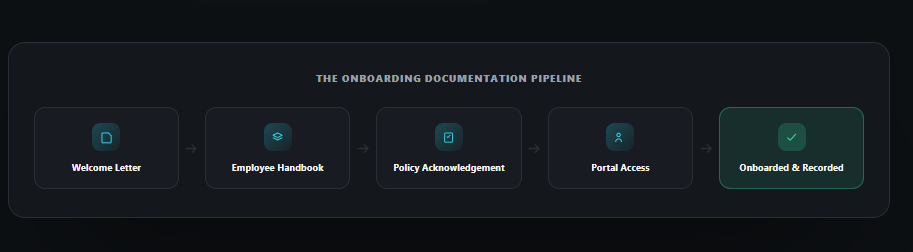
New hire onboarding software helps organizations automate and manage the process of bringing new hires on board. Modern platforms can centralize activities such as employee data collection, employment contracts, company policies, training materials and employee self-service.
Onboarding automation reduces manual paperwork and makes it easy for HR teams to track what needs to be done without missing important steps. A strong platform should be able to send more than just onboarding welcome letters or emails.
HR onboarding software can be a full Human Resources Integration System with built-in onboarding, a lightweight workflow or a dedicated HR documentation platform with built-in onboarding capabilities.
The 5 Best Employee Onboarding Software for Small Businesses
We assessed platforms based on the criteria that matter most for small businesses evaluating HR onboarding software: onboarding-specific automation, pricing transparency, compliance support for multi-state hiring, and ease of setup without a dedicated HR department.
BambooHR: Best dedicated HRIS for onboarding workflows
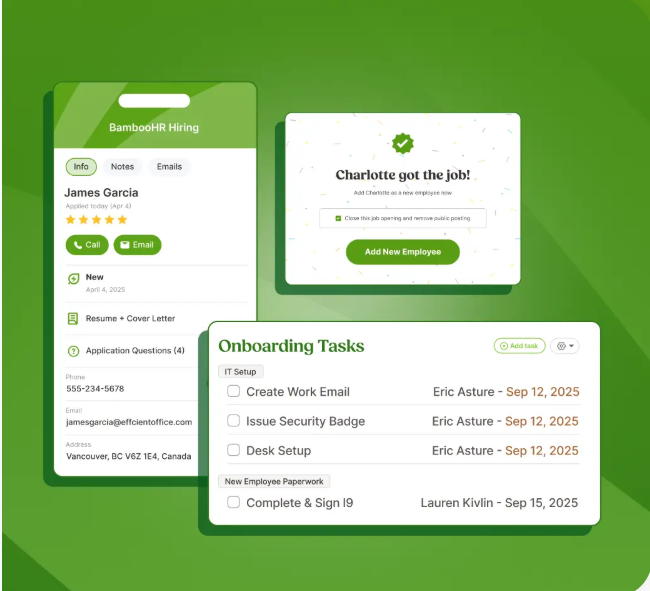
BambooHR is widely recognized as the best Human Resource Integration Software (HRIS) for small businesses. It helps growing businesses send a pre-boarding package that collects signatures, tax forms, and policy acknowledgement before the start date.
The platform covers employee records, time off, onboarding, payroll, automated workflows, and e-signatures.
Best for: The platform is best for small businesses that need broader HR functionality.
Key onboarding features
New hire packets: BambooHR assists HR teams in creating custom template sets for new hires across various departments, locations, or seniority levels.
Central document management: It collects electronic signatures and securely stores the data in employee records.
Automated manager notifications: The platform sends automated emails and alerts to managers.
Pros and Cons
Pros
- Its onboarding workflows feature pre-boarding, checklists, and e-signatures.
- It has a central employee database that scales well past the onboarding phase.
- Strong reporting and 150+ integrations, including payroll and background checks
Cons
- It lacks transparent pricing.
- Its custom deployment takes time.
- The platform does not include operational learning paths or interactive modules.
Pricing
BambooHR pricing starts at a flat rate of $250/month for businesses with 25 employees or fewer. Organizations with more than 25 employees use the per-employee-per-month pricing module. BambooHR’s current prices are as follows:
- Core: $10/employee/month
- Pro: $17/employee/month
- Elite: $25/employee/month
Gusto: Best for Payroll-Integrated Onboarding
Gusto has established itself as a one-in-a-million all-in-one payroll and HR onboarding software platform for small and growing businesses. The platform allows employees to onboard themselves and access pay-related information, enroll in benefits, and make PTO requests.
The platform is most attractive to businesses that want an efficient way to combine onboarding automation with day-one payroll readiness.
Best for: Gusto is most suitable for small businesses that want employee onboarding connected directly to payroll and benefits administration.
Key Onboarding Features
Self-service preboarding: HR professionals can grant new hires logins before day one. This helps them input deposit details, complete tax documents and sign employee handbooks.
Benefits management: The platform allows employees to enroll themselves in medical, dental, vision or retirement plans seamlessly alongside payroll setup.
Pros and Cons
Pros
- It eliminates double data entry by pulling onboarding data into payroll, tax filings and benefits enrollment.
- New hires can complete paperwork before day one through the self-service portal.
- The platform offers transparent pricing.
Cons
- Limited structured training for new hires
- Pricing increases with employee count and add-ons.
- Limited international capability outside standard contractor management.
Pricing
Gusto offers three pricing tiers as follows:
- Simple plan that starts at $49/month plus $6 per employee per month
- Plus ($80/month + $12/employee) adds multi-state payroll, time tracking, and deeper HR tools.
- Premium ($180/month + $22/employee) adds a dedicated HR support layer.
HRDocket: Best for HR documentation and employee onboarding
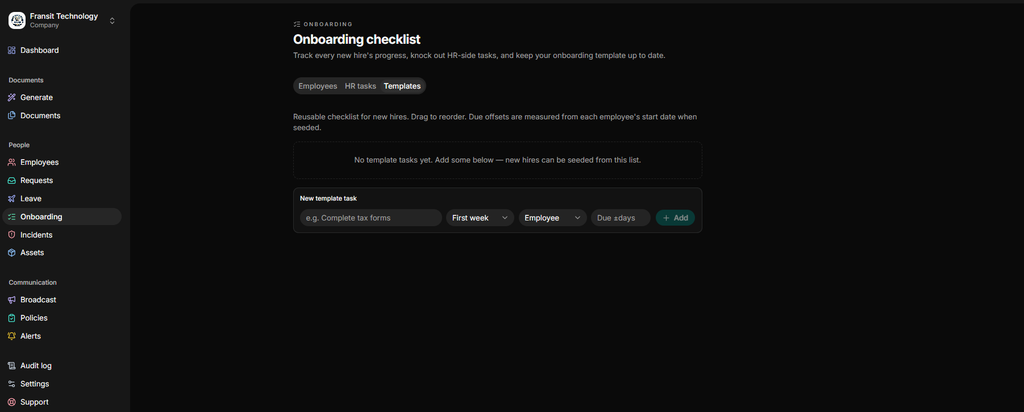
HRDocket is modern AI-powered documentation, employee records and compliance management software. Its employee onboarding automation helps HR teams to send welcome letters, share employee handbooks and employment contracts, distribute policies and grant portal access.
With HRDocket, every onboarding activity becomes part of the employee central profile. This helps new hires start their employment journey with a complete history instead of scattered documents across emails and folders.
Key onboarding features
- Grant portal access: HR professionals can grant new hires self-service portal access to log in, review, sign electronically, and acknowledge everything from their own portal.
- AI-powered HR document generation: HRDocket helps HR teams generate professional HR documents such as welcome letters, employee handbooks, contracts, and NDAs in minutes.
- Distribute and request acknowledgement.
- Consistent onboarding for every new hire
- Centralized employee records
- Stronger first-week experience
Pros and Cons
Pros
- Strong focus on HR documentation
- Centralized employee records
- Custom HR document templates
- Automated expiration reminders
- Employee self-service portal
Cons
- It does not have payroll functionality.
- Training functionality is not its primary focus.
Pricing
The platform offers a free plan with limited features. Its current pricing is as follows:
- Starter: $19/month for up to 15 employees.
- Growth: $49/month for up to 50 employees.
- Business: $99/month for unlimited employees.
The annual subscription gives users a two-month free offer. See HRDocket pricing.
HiBob: Best for employee engagement and broader HCM functionality
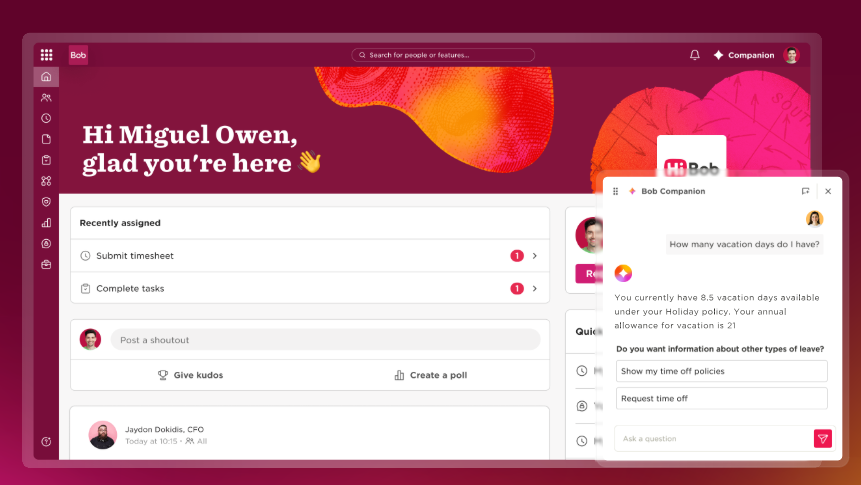
HiBob is a broader HCM solution covering core HR, talent, payroll, planning, compensation, analytics, and employee lifecycle management.
It combines employee experience with a social and app-like interface that new hires actually engage with. It helps businesses create personalized onboarding workflows and assign tasks based on employee characteristics, location, role, or other requirements.
Key features
Social introductions: The platform features digital clubs, superpowers, and about me profiles so current staff can socialize new hires based on common hobbies.
Collaboration tools integration: HiBob can be directly linked to communication technology stacks like Slack and Microsoft Teams to auto-alert the company when someone joins.
It embeds direct milestone tracking and team-specific goals immediately into the new user portal.
Pros and Cons
Pros:
- Its modern design boosts employee experience.
- It is highly scalable for global and hybrid businesses.
- Highly customizable onboarding workflows
Cons:
- It lacks transparent pricing.
- It might be overkill for small businesses.
- Its implementation may require more planning.
Pricing
HiBob’s pricing is custom quoted based on your company’s size, needs, and the modules you choose.
Waybook: Best for Onboarding Training
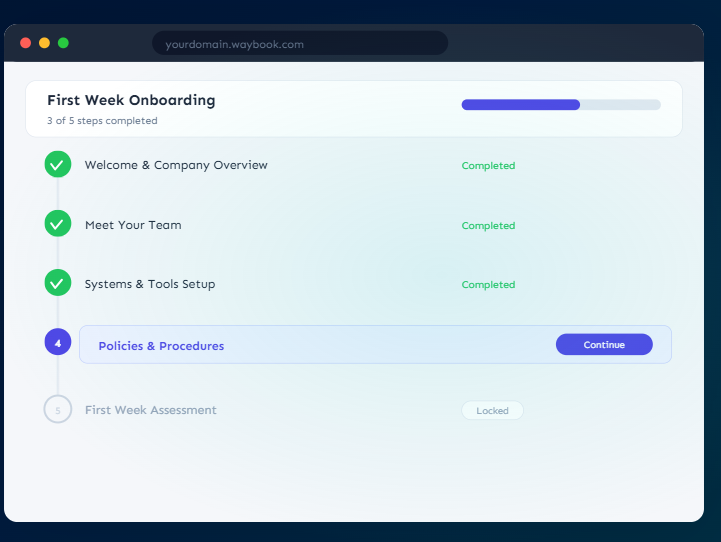
Waybook is a knowledge and training platform that turns your standard operating procedures (SOPs), policies, and role-specific processes into structured onboarding paths. It combines employee onboarding with training, documentation, SOPs, and company knowledge.
New hires work through assigned content with read receipts and quizzes so managers can verify training actually happened.
Key onboarding features
AI playbook generation: The platform leverages internal AI capabilities to transform disjointed files, emails or policies into structured operational workflows.
Knowledge verification: The platform users pass built quizzes and compliance milestones to confirm they understand company procedures.
Role-based learning paths: Waybook restricts and delivers instructional tracks automatically.
Pros and Cons
Pros:
- Strong onboarding and training capabilities
- Searchable company knowledge
- Integrations with common business tools
- Useful for operational consistency
Cons:
- It is not a payroll platform.
- It has limited employee records functionality.
- It can be expensive for very small teams.
Pricing
As of September, Waybook’s pricing starts around $99/month for the Core tier, with a Pro tier around $198/month adding automation and advanced reporting. Plans include AI content writing, progress tracking, tests, integrations, mobile access, unlimited documents, and Waybook Shots.
Onboarding capabilities comparison
| Capability | BambooHR | Gusto | HRDocket | HiBob | Waybook |
| New-hire onboarding | Strong | Strong | Strong | Strong | Strong |
| AI HR document creation | Available in selected capabilities | Limited | Core capability | Available | No |
| Automated workflows | Strong | Strong | Strong | Strong | Strong |
| Employee documents | Strong | Strong | Excellent | Strong | Limited |
| Contracts | Yes | Yes | Yes | Yes | No |
| Offer letters | Yes | Yes | Yes | Yes | — |
| E-signatures | Yes | Yes | Yes | Yes | Limited |
| Policy acknowledgement | Yes | Yes | Yes | Yes | Yes |
| Employee profiles | Yes | Yes | Yes | Yes | Limited |
| Employee timeline | Yes | Limited | Yes | Yes | — |
| Incident records | Limited | Limited | Yes | Yes | — |
| Asset tracking | Limited | Limited | Yes | Yes | — |
| Expiration alerts | Yes | Limited | Yes | Yes | — |
| Training/SOPs | Moderate | Limited | Limited | Moderate | Excellent |
| Payroll | Available | Excellent | — | Available | — |
| Employee self-service | Yes | Yes | Yes | Yes | Yes |
| Custom HR documents | Limited | Limited | Yes | Limited | — |
How to choose the best employee onboarding software for your business
The best onboarding automation software depends on your specific business needs.
- Choose BambooHR if you want onboarding packets as part of employee records, performance, benefits administration and HR workflows.
- Choose Gusto if you want your employees to complete onboarding while keeping payroll, benefits, PTO, and employee information within the platform in the United States.
- Choose HRDocket if you want an employee onboarding workflow that integrates with HR documentation, centralized employee profiles, and compliance management.
- Choose HiBob if you want customized workflows and broader HCM capabilities.
- Choose Waybook if you need training and operational knowledge.
Frequently Asked Questions
What is employee onboarding software?
Employee onboarding software helps HR teams automate, organize, and track the activities required to bring a new employee into the organization.
Can new hire onboarding software collect employee information?
Yes. Modern onboarding platforms provide self-service portals for collecting employee information, viewing HR documents, and acknowledging policies.
Can onboarding software automate paperwork?
Strong onboarding platforms reduce manual paperwork by automating HR documents and processes. Modern software platforms feature document generators, e-signatures, reminders, approval workflows and record storage.
What is the difference between employee onboarding software and HR software?
Human Resources software covers functionalities such as payroll, employee records, document generation, performance, benefits administration, onboarding, and offboarding. HR onboarding software, on the other hand, focuses on the process of bringing new hires on board.
How do organizations choose onboarding software for remote or hybrid teams?
Onboarding platforms with employee self-service portals, document management, electronic signatures, and integrations are particularly attractive to remote and hybrid teams. These teams also benefit from platforms that feature welcome letters, employee handbooks, and real notifications.
Can the new hire start onboarding before day one?
Yes. HR teams can grant self-service portal access to new hires so they can review the employee handbook, sign documents, acknowledge policies, and complete the onboarding checklist before their first day.
Can onboarding documents be signed electronically?
Yes. Strong platforms feature native digital signatures so that new hires can sign onboarding documents without leaving their portals.
Every document becomes part of the employee’s permanent record
Spend less time buried in HR paperwork and more time growing your business. Generate documents, organize employee records, and simplify HR operations; all from one place.
No credit card required · Cancel anytime · Set up in under 5 minutes