Writing a non-disclosure agreement (NDA) for a small business without a lawyer can be challenging, as you need a lawyer to help you write a legally binding, jurisdiction-based NDA. This because an NDA is a standard practice that helps businesses protect trade secrets, internal data, and proprietary information.
However, hiring a lawyer is not cheap, especially for small businesses that are trying to save costs. The problem of thinking of how to hire the service of a lawyer when drafting an NDA is now a thing of the past thanks to HRDocket. HRDocket non-disclosure agreement (NDA) generator can write an NDA in less than 15 minutes.
HRDocket is an AI-powered HR documentation, employee records, and workplace management platform that helps businesses manage employment documentation from hiring to offboarding.
- How to Write an NDA for a Small Business
Here are the step-by-step details on how to write an NDA for a small business with a lawyer.
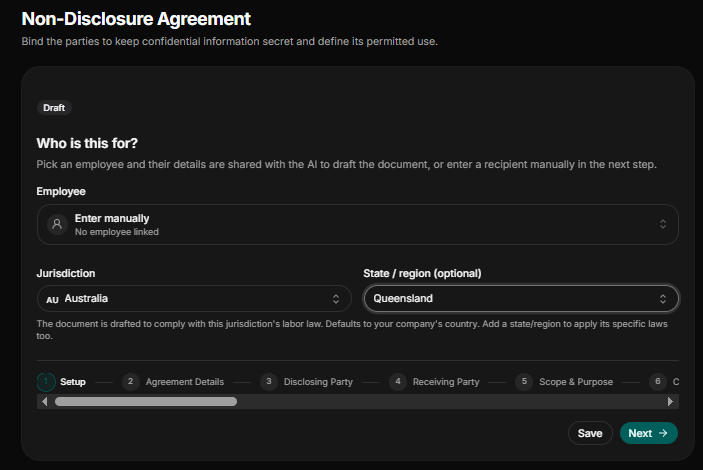
Step 1: Selection of Recipient and Jurisdiction
Since every jurisdiction, state or region has its own set of labor and employment laws, it is important to select the right jurisdiction and region before drafting the non-disclosure agreement (NDA) to enable the AI to draft the agreement based on your jurisdiction.
Selection of Recipient: Select the employee from the employee records or database or choose Enter manually.
Select jurisdiction: select the right jurisdiction and region to prevent using a different state or country labor law in drafting the NDA (e.g., Australia, Queensland).
Step 2: Provide Agreement Details
The details you provide here help shape the wording of the NDA.
NDA Title/Reference Name: State the reference name or title given to the NDA for the purpose of record keeping and audit trail (e.g., NDA-Project Appollo 2026)
NDA Reference Number: State if there is any reference number of the NDA
Date of the Agreement: State the precise date the agreement was drafted in month-days-years format (e.g., 09/29/2026).
Effective Start Date: State the exact date the NDA will take effect in month-days-year format (e.g., 09/29/2026).
Language of Agreement: State the language you want the AI to draft the NDA (e.g., English).
Step 3: Provide Details of Disclosing Party
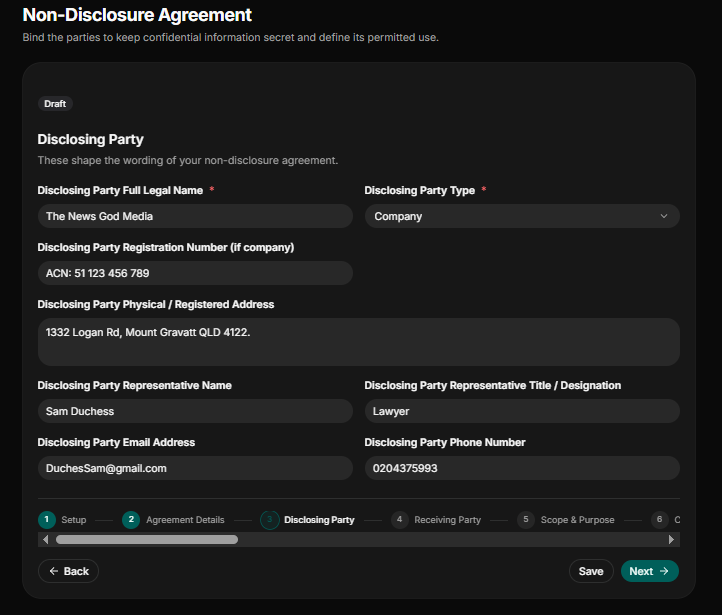
State all the full details of the disclosing party, whether it is either a company or an individual and their associate representatives.
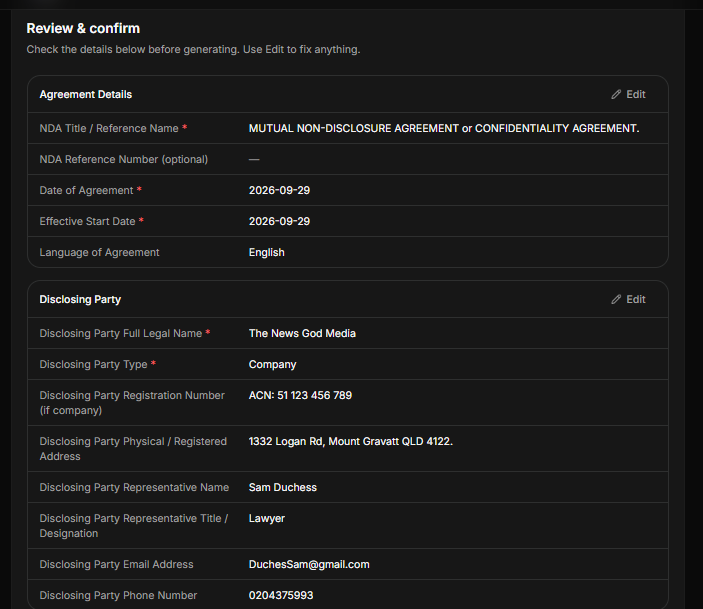
Disclosing Party Full Legal Name: State the full legal name of the disclosing party (e.g., The News God Media).
Disclosing Party Type: Indicate whether the disclosing party is a company, an individual, a partner, a government entity, an NGO, or other.
Disclosing Party Registration Number: If the disclosing party is a company, state their registration number (e.g., CAN: 51 123 456 789).
Disclosing Party Physical/Registered Address: State the physical address of the disclosing party. In our case, the disclosing party is an Australian registered company in Queensland. (e.g., 1332 Logan Rd, Mount Gravatt, QLD 4122).
Disclosing Party Representative Name: State the full legal name of the representative of the disclosing party.
Disclosing Party Representative Title? Designation: State the title of the representative of the disclosing party (e.g., lawyer).
Disclosing Party Email Address: State the official email address of the representative of the disclosing party.
Disclosing Party Phone Number: State the phone number of representatives of the disclosing party.
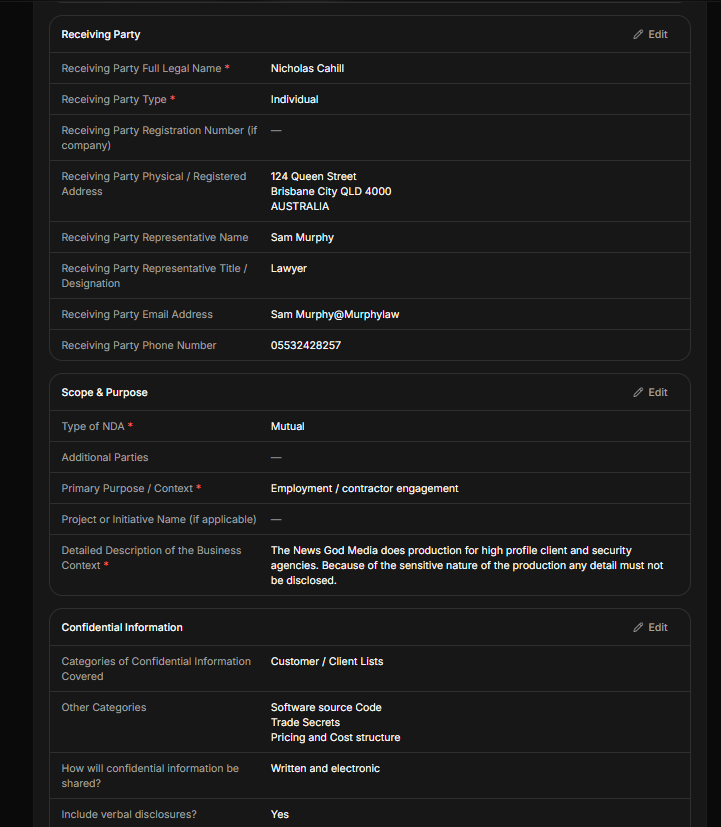
Step 4: Provide Receiving Party Details
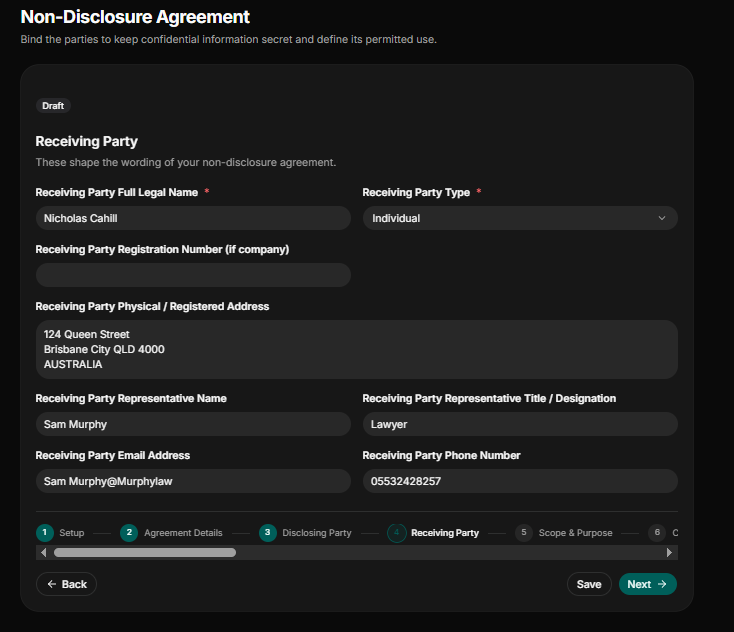
An NDA is not complete with a receiving party. Provide in detail all the information of the receiving party to the NDA.
Receiving Party Full Legal Name: State the full legal name of the receiving party (e.g., The News God Media).
Receiving Party Type: Indicate whether the receiving party is a company, an individual, a partner, a government entity, an NGO, or other.
Receiving Party Registration Number: If the disclosing party is a company, state their registration number, but in our case the receiving party is an individual or an employee of the company.
Receiving Party Physical/Registered Address: State the physical address of the receiving party. In our case, the receiving party lives in Queensland. (e.g., 124 Queen Street, Brisbane City, QLD 4000, Australia).
Receiving Party Representative Name: State the full legal name of the representative of the receiving party.
Receiving Party Representative Title? Designation: State the title of the representative of the receiving party (e.g., lawyer).
Receiving Party Email Address: State the official email address of the representative of the receiving party.
Receiving Party Phone Number: State the phone number of representatives of the disclosing party
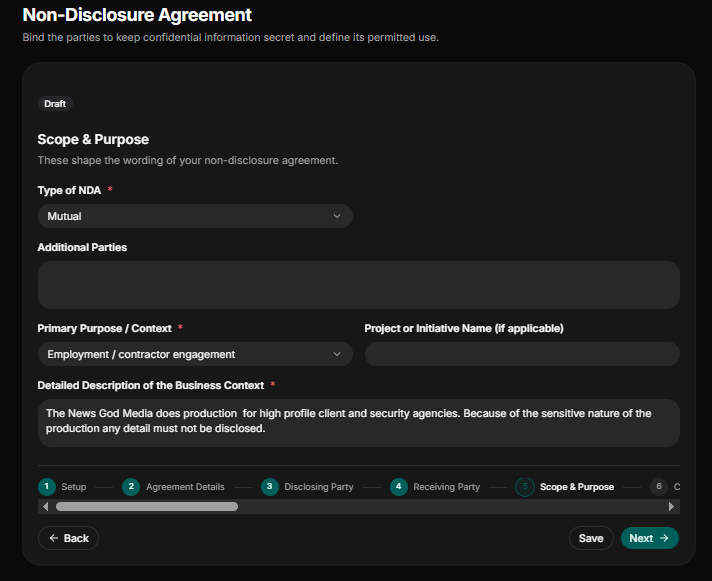
Step 5: Document Scope and Purpose
An NDA is not complete and legally solid when the type, purpose, and description of the project are not provided.
Type of NDA: Indicate the type of NDA. Whether mutual, multilateral, or unilateral.
Additional Parties: State if there were additional parties to the NDA (e.g., other employees, legal counsels, and clients).
Primary Purpose/ Context: Indicate the primary purpose or context of the NDA. Whether employment/contractor engagement, investment/fundraising discussions, product or technology evaluation, client or vendor relationship, M$ A or acquisition discussions, joint ventures or collaborations, or others.
Detailed Description of the Business Context: Provide in detail the business you are engaged in.
Step 6: Provide Detailed Confidential Information
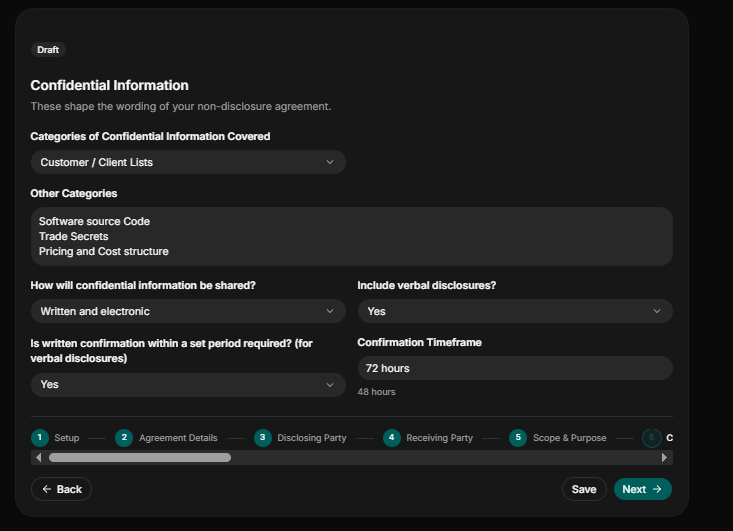
State the detailed confidential information to shape the wording of the non-disclosure agreement.
Categories of Confidential Information Covered: Indicate the category the confidential information covers. Indicate whether it is customer/client lists, employee information, legal documents and agreements, or others.
Other Categories: State any other categories you want the NDA to cover.
How will the confidential information be shared? Indicate whether the NDA will be written and electronic, written only, electric only, case by case, or all from.
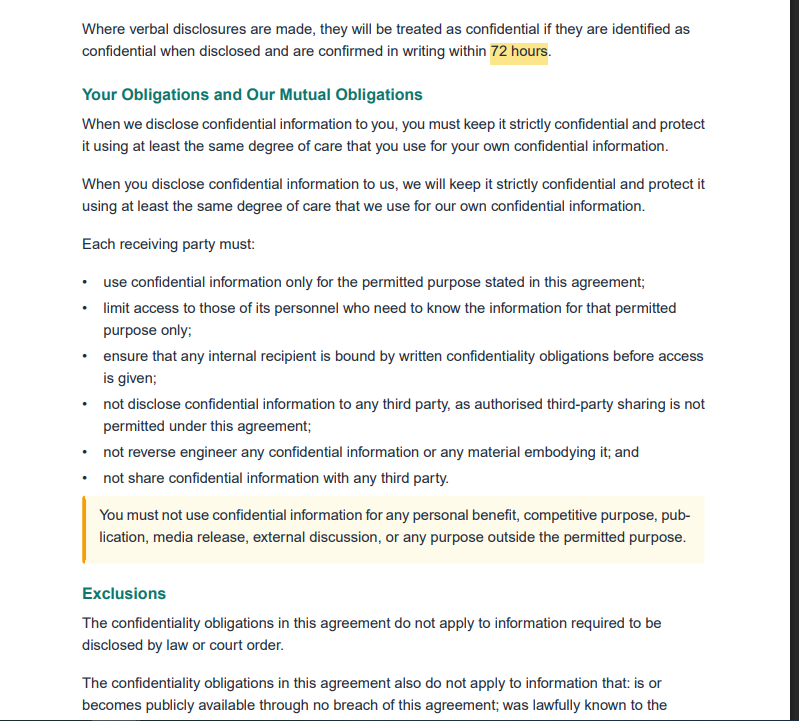
Include Verbal Disclosures? Indicate “yes” or “no” to include verbal disclosures.
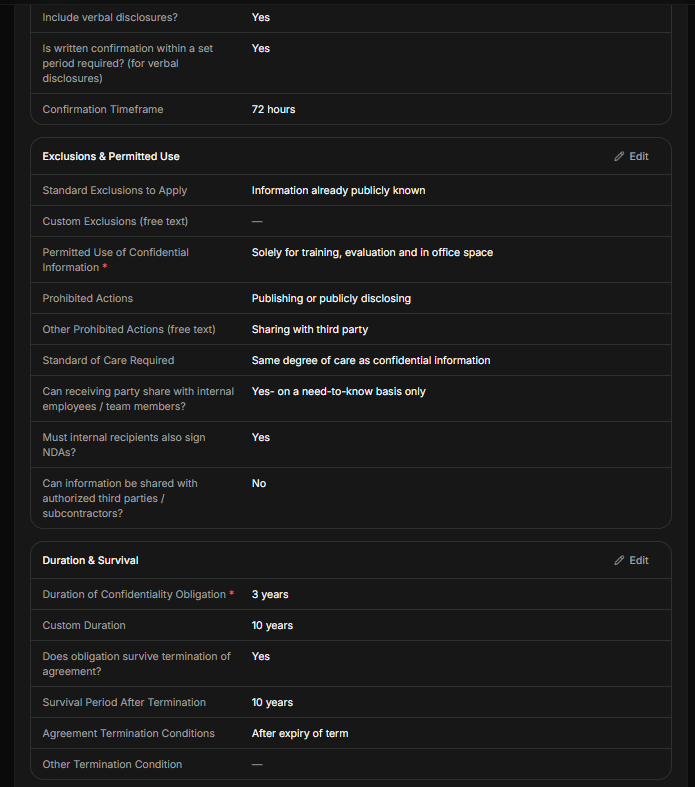
Is Written Confirmation Within a Period Required? (For Verbal Disclosures): indicate “yes” or “no” on whether to include verbal disclosure.
Confirmation Timeframe: State the timeframe of confirmation (e.g., 72 hours).
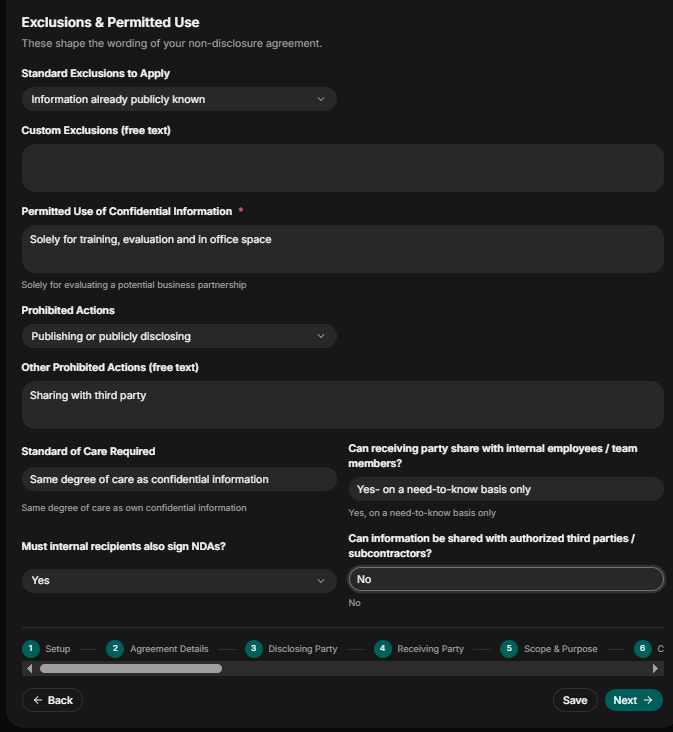
Step 7: Exclusions and Permitted Use
State the things the receiving party is permitted to use or disclose.
Standard Exclusions to Apply: Indicate the standard exclusions to apply (e.g., information already publicly known, information already known to the receiving party before disclosure, information independently developed by the receiving party, information lawfully received from a third party, or information required to be disclosed by law or court order).
Custom Exclusions: State the specific types of information that are exempt from confidentiality obligations.
Permitted Use of Confidential Information: State how or the occasions the receiving party can use confidential information (e.g., solely for training, evaluation, and in office space or for evaluating a potential business partnership).
Prohibited Actions: Indicate actions the receiving party is prohibited to engage in (e.g., publishing or publicly disclosing, copyright or reproducing information, using for competitive purposes, sharing with third parties, or reverse engineering).
Other Prohibited Actions: State the prohibited actions the receiving party cannot engage in.
Standard of Care Required: State the standard care required (e.g., the same degree of care as confidential information).
Must Internal Recipients Also Sign NDAs? Indicate “yes” or “no” if an internal recipient must sign.
Can the Receiving Party Share with Internal Employees / Team Members? Indicate “yes” or “no” if a receiving party can share the NDA with an internal employee.
Can Information Be Shared with Authorized Third Parties / Subcontractors? Indicate “yes” or “no” if the receiving party can share information with an authorized third party.
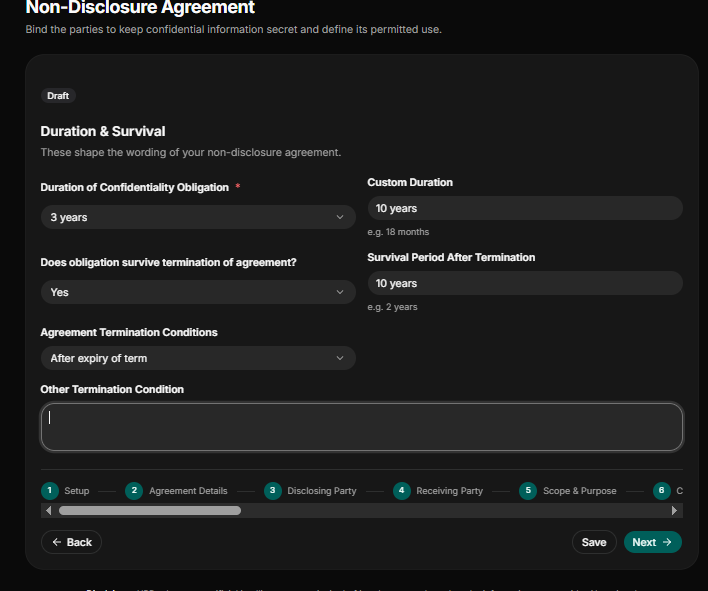
Step 8: Provide Duration and Survival Details
Indicate the duration of confidentiality, survival period after termination, and agreement termination conditions.
Duration of Confidentiality Obligation: Sets how long the shared information must stay secret (e.g., 3 years, or custom).
Custom Duration: if custom, set the number of duration (e.g., 18 months)
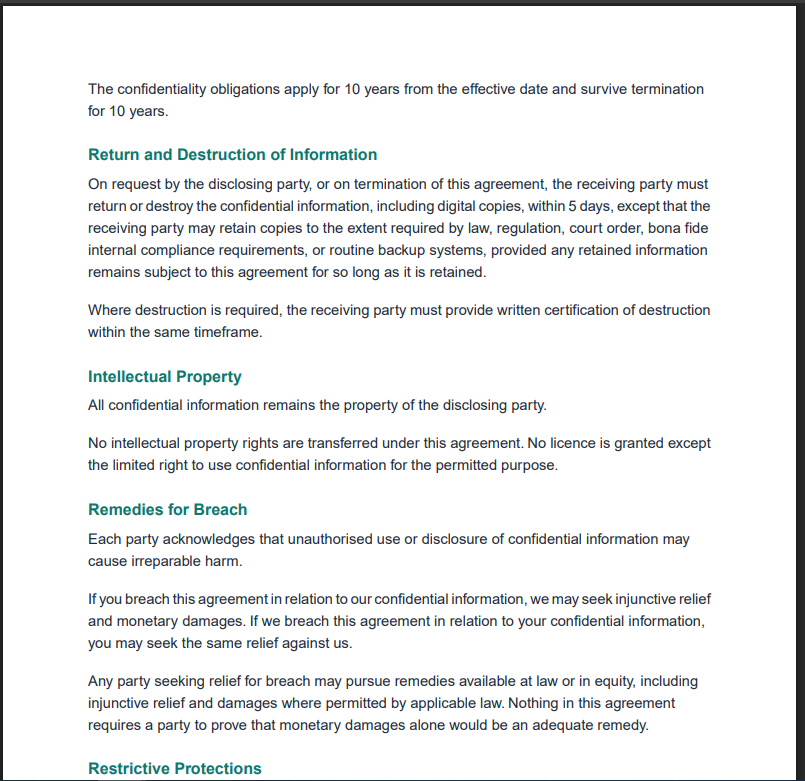
Survival Period After Termination: State how long the confidentiality rules last after the agreement officially ends (e.g., 10 years).
Agreement Termination Conditions: indicate the agreement termination conditions (e.g., after expiry of term, upon completion of the purpose, by mutual written consent, or other).
Other Termination Condition: State any other termination condition (e.g., upon written notice or completion of a specific project).
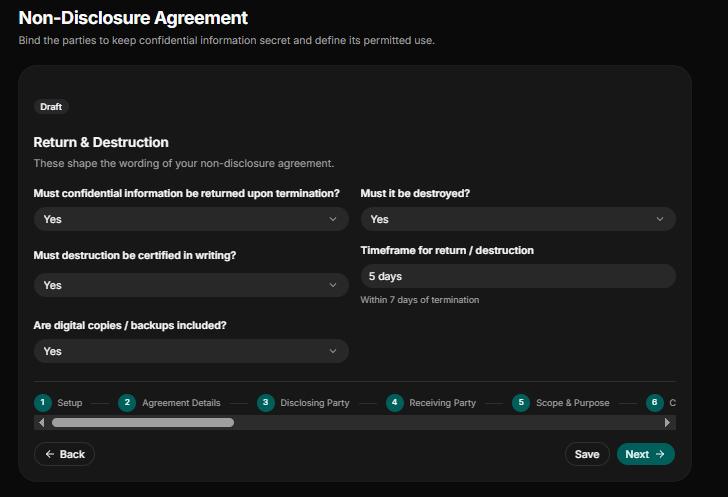
Step 9: Provide Return & Destruction of Confidential Information
State how confidential information will be returned or destroyed.
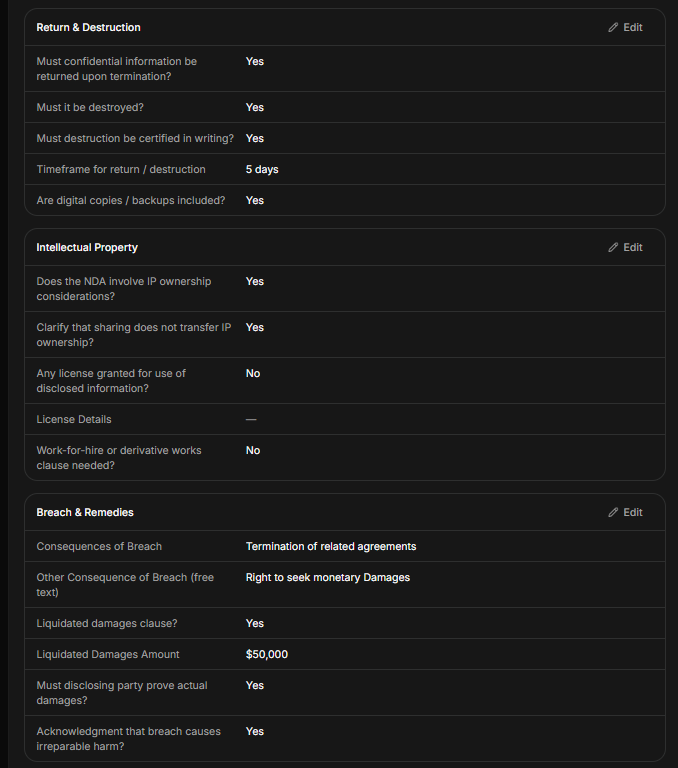
Must Confidential Information Be Returned Upon Termination? Indicate “yes” or “no” if confidential information will be returned upon termination.
Must It Be Destroyed? Indicate “yes” or “no” if it must be destroyed.
Must Destruction Be Certified in Writing? Indicate “yes” or “no” if the destruction must be certified in writing.
Timeframe for Return/Destruction: State the timeline of return or destruction (e.g., 5 days).
Are Digital Copies/Backups Included: Indicate “yes” or “no” if digital copies or backups are to be returned.
Step 10: Intellectual Property Details
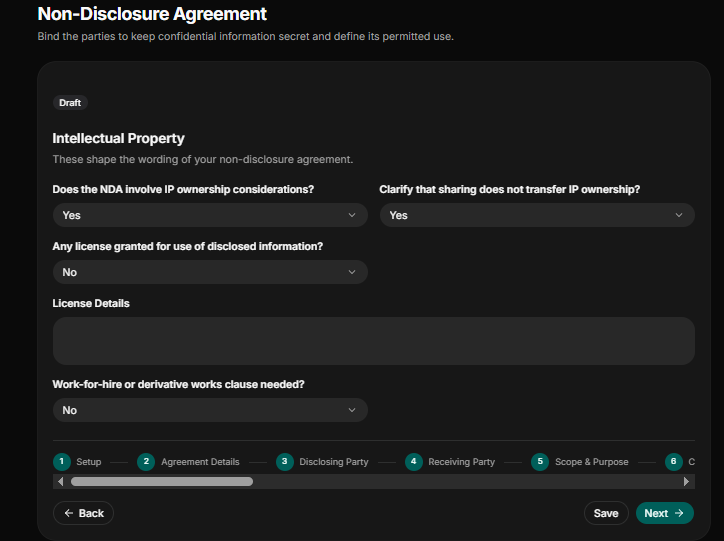
Indicate other intellectual property details to shape the drafting of the NDA.
Does the NDA Involve IP Ownership Considerations? Indicate “yes” or “no” if the NDA involves IP ownership consideration.
Clarify That Sharing Does Not Transfer IP Ownership? Indicate “yes” or “no” if sharing of information does not mean transferring of IP ownership.
Any License Granted for Use of Disclosed Information? Indicate “yes” or “no” if there is a license granted for use of disclosed information.
License Details: State if there are additional license details.
Work-For-Hire or Derivative Works Clause Needed? Indicate “yes” or “no” if there is a work-hire clause needed.
Step 11: State Breach and Remedies
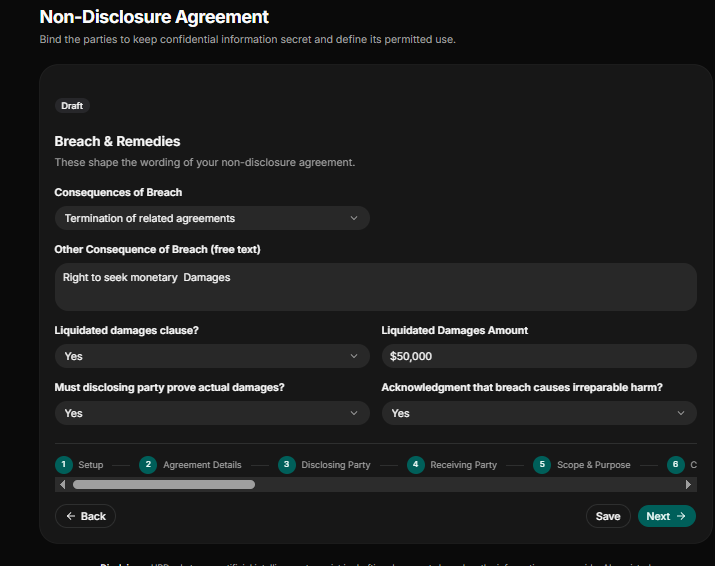
Provide in detail what the remedies will be when there is a breach in the NDA.
Consequences of Breach: Indicate the consequences will when there is a breach of the NDA (e.g., termination of related agreements, specific performance, right to claim monetary damages, or right to seek injunctive relief).
Other Consequence of Breach: State any otherconsequences will when there is a breach of the NDA (e.g., right to seek monetary damages)
Liquidated Damages Clause? Indicate “yes” or “no” if there is a liquidated damages clause.
Liquidated Damages Amount: State the liquidated damages amount (e.g., $50,000).
Must Disclosing Party Prove Actual Damages? Indicate “yes” or “no” if the disclosing party must prove actual damages.
Acknowledgment That Breach Causes Irreparable Harm? Indicates “yes” or “no” if the acknowledgment that the breach causes irreparable harm.
Step 12: State Dispute Resolution Process
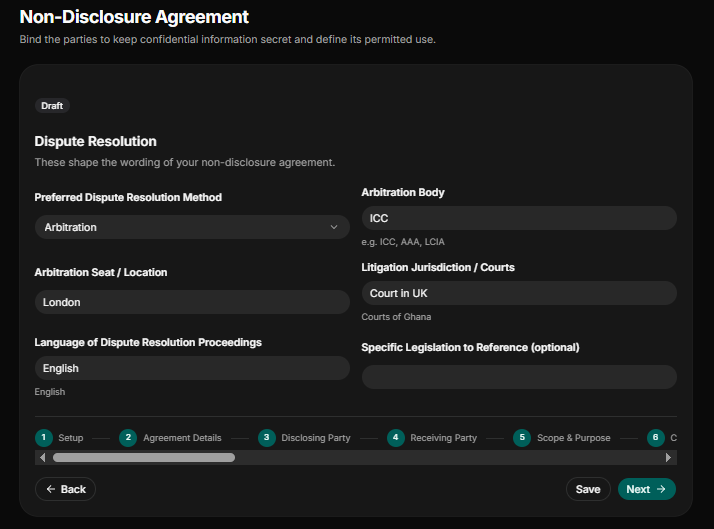
State how the dispute will be resolved when there is a breach of the NDA.
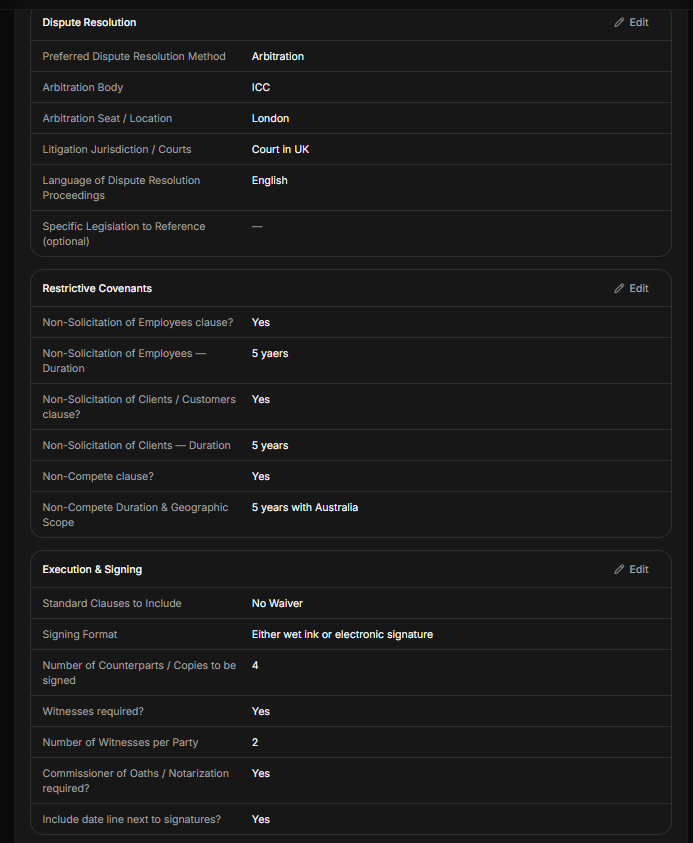
Preferred Dispute Resolution Method: State whether the dispute will be resolved through arbitration, litigation, mediation, or negotiation.
Arbitration Body: State the arbitration body (e.g., ICC, AAA, LCIA)
Arbitration Seat / Location: State the location the arbitration will take place (e.g., London)
Litigation Jurisdiction / Courts: State the court the litigation will take place in (e.g., court in the UK or
Courts of Ghana).
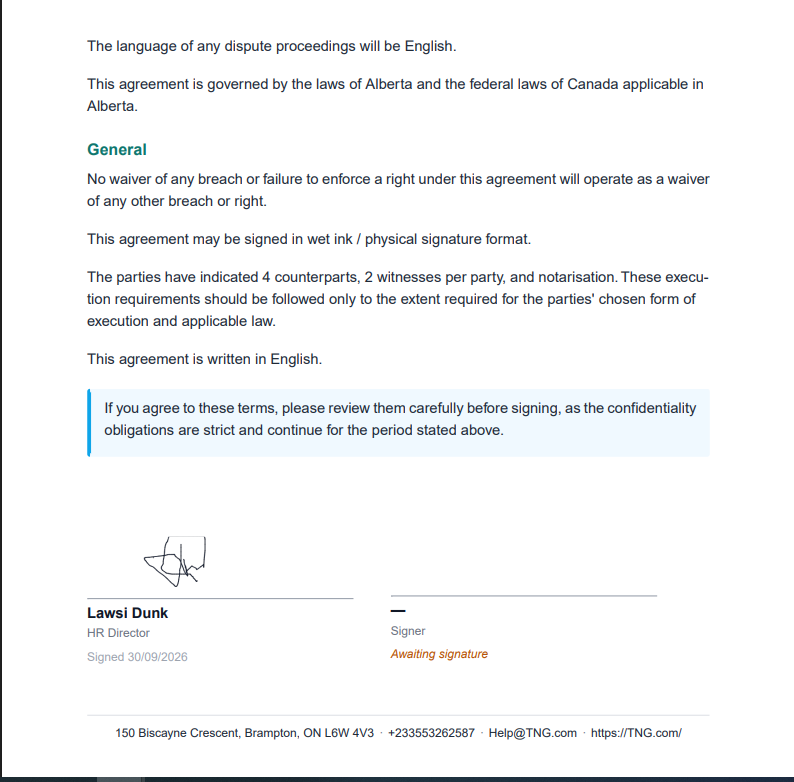
Language of Dispute Resolution Proceedings: State the language the resolution proceeding will take place in (e.g., English).
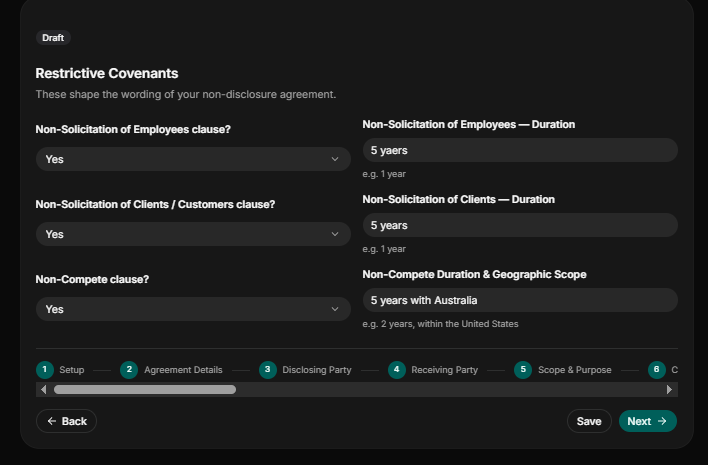
Step 13: State Restrictive Contractual Clauses
State clearly all restrictive contractual clauses in the NDA.
Non-Solicitation of Employees Clause? Indicate “yes” or “no” if there is a non-solicitation of Employees clause.
Non-Solicitation of Employees — Duration: State the number of years of non-solicitation of employees (e.g., 5 years)
Non-solicitation of Clients/Customers clause? Indicate “yes” or “no” if there is none—solicitation of clients.
Non-Solicitation of Clients—Duration: State the duration of non-solicitation of clients (e.g., 5 years).
Non-Compete clause? Indicate “yes” or “no” if there is a non-compete clause.
Non-Compete Duration & Geographic Scope: State the duration and geographic location of the non-compete clause (e.g., 5 years with Australia).
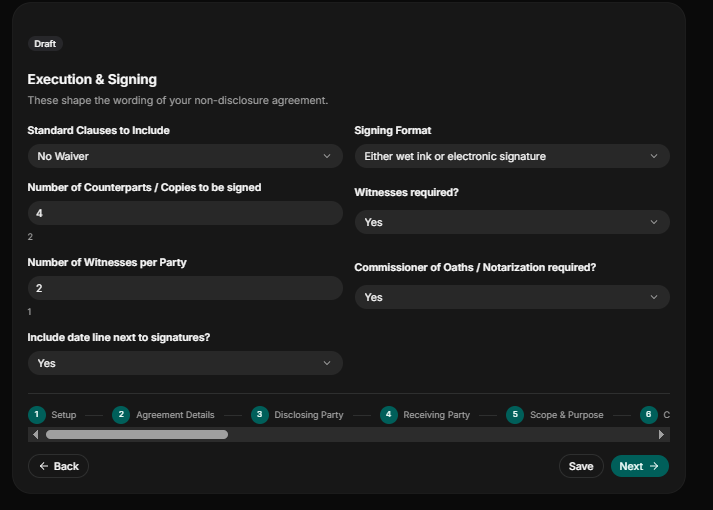
Step 14: Execution & Signing
Indicate how the final NDA document will be signed.
Standard Clauses to Include: Indicate the standard clauses to include (e.g., Entire Agreement (supersedes all prior discussions), Severability (invalid provisions don’t void the whole agreement), Amendment (changes require written consent), No Waiver, Assignment (rights can be transferred to a third party), Force Majeure).
Number of Counterparts/Copies to be Signed: State the number of the NDA copies to be signed (e.g., 4).
Number of Witnesses per Party: State the number of witnesses per party.
Include Date Line Next to Signatures? Indicate “yes” or “no” if a date line next to the signature will be included.
Signing Format: Indicate the format the NDA will be signed(e.g., either wet ink or electronic signature, electronic signature, or wet ink/physical signature).
Witnesses required? Indicate“yes” or “no” if there will be witnesses.
Commissioner of Oaths/Notarization required? Indicate “yes” or “no” if a commissioner of oaths will be required.
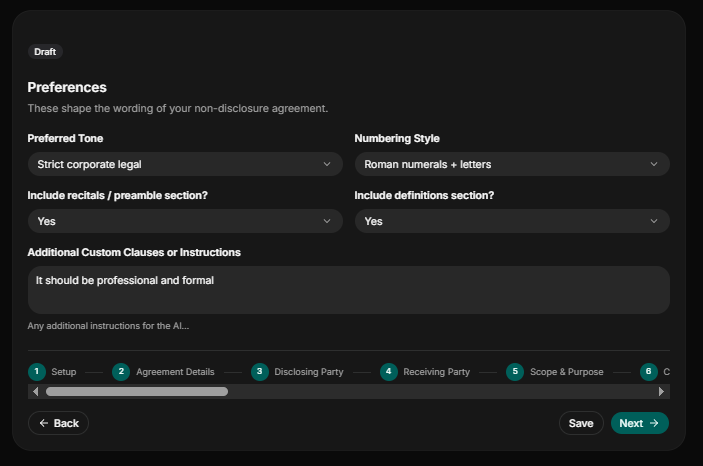
Step 15: State Your Preferences
Indicate how you want the NDA to be in terms of wording and tone.
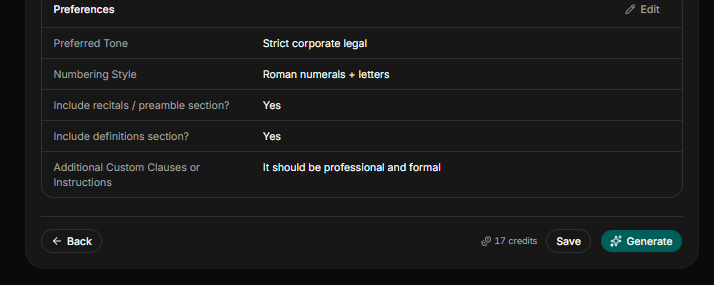
Preferred Tone: Indicate the preferred tone (e.g., strict corporate legal, Plan English, balanced legal English, or formal legal).
Numbering Style: Indicate the numbering style (e.g., Roman numerals + letters)
Include the Recitals/Preamble Section? Indicate “yes” or “no” if a recital or preamble section will be included.
Include a Definitions Section? Indicate “yes” or “no” if a definitions section will be included.
Additional Custom Clauses or Instructions: State if you have any additional instruction or clause you want the AI to include.
Review and Confirm
Review to confirm that all the information provided about the NDA is correct. Once you have confirm all input are correct, click on generate to create a draft.
Review and Edit
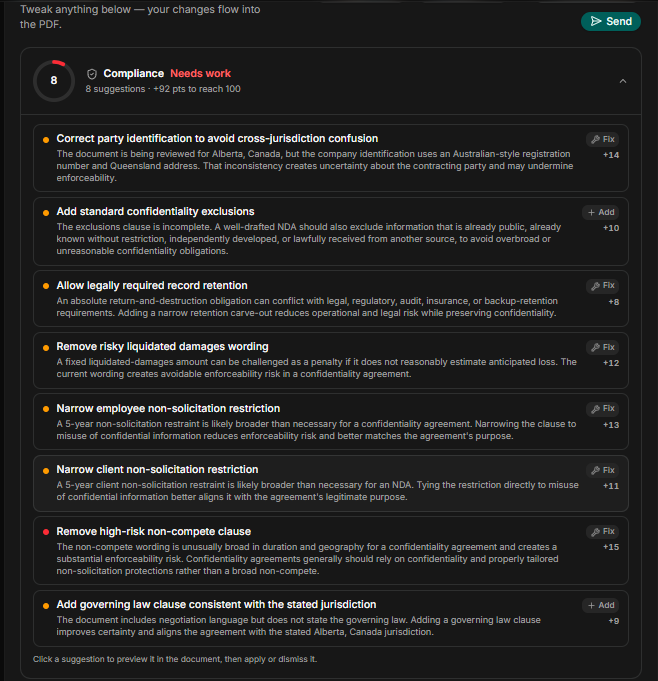
After generating the draft, click on the recan function to review the draft of any legal and compliance gap. Once the portion of the draft that needs to be corrected are highlighted you click on them the AI will automatically correct them.
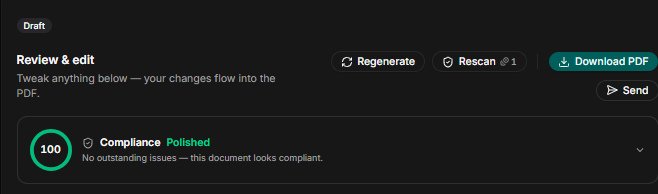
After applying the rescan function and the editing is done, your NDA is 100% compliance polished with no outstanding issues, the final document is ready to send out for digital signature, or filed to the employee record.
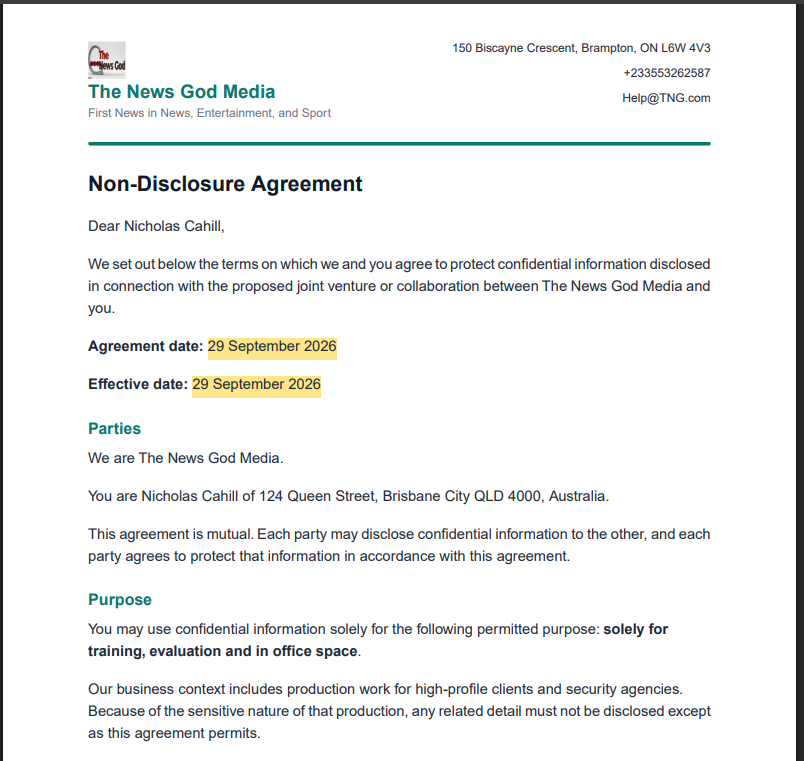
Once the NDA is 100% polished, here how your final written NDA will look like:
Conclusion
As a small business, the days of paying lawyers huge sum of money tp draft a non-disclosure agreement is over. Sign up on HRDocket to generate NDA, offer letter, employment contract, termination letter, onboarding document, and more in less than 15 minutes. Our prices are affordable and the planform is easy and simple to operate.