
Drafting a warning letter may seem like a normal HR routine, it is one of the most delicate workflows in human resource management. When the whole process is handled properly, it does not just another complete duty or responsibility for the HR manager or officer but creates a fair and solid way of addressing workplace performance or conduct issues.
In the same vein, if the process and procedure involved in the drafting and issuing of the warning letter are not properly handled, vague or flawed, it can expose the organization to future legal issues and labor union disputes, especially when it leads to termination.
It has been the headache for most HR professionals on how to avoid legal and labor disputes when dealing with warning letters over the years. Thankfully, due to the rise in modern document generation and HR platforms, this issue is gradually becoming a thing of the past.
However, these tools can draft a standard warning letter with a minute but the legal and operational effectiveness of the letter depends on the accuracy of the details provided and the platforms you use.
Here is where HRDocket comes in: it is a freemium AI-powered HR documentation, employee records, and workplace management platform that helps businesses manage employment documentation from hiring to offboarding. The platform can create jurisdiction-based warning letters and fact-check them to make sure the warning letter generated is professionally, operationally, and legally solid.
How To Draft a Warning Letter
Below is the detailed guild break down step by step on how to draft a solid warning letter to protect your business against future legal disputes and labor issues.
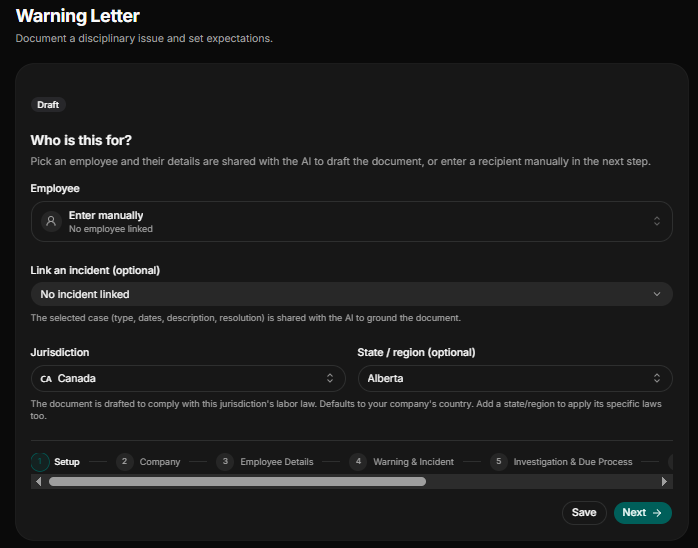
Step 1: Basic Setup and Select Jurisdiction
Employment and labor laws differ by jurisdiction, state, and region. Before you draft any document on HRDocket, make sure you select the right jurisdiction, state, or region. This helps the platform draft a jurisdiction-specific letter for you based on the location of the employee you are for (e.g., Canada, Alberta). At the setup stage, if your employee is already added to the employee database on HRDocket, you go to the employee section, click on the employee list of employees and choose the one you are drafting the letter for. If the employee is not in the database, choose “Enter employee manually.” Once that is done, there is an optional link to an incident section; if the employee has no record of previous incidents, click “no incident” and proceed to the next level.
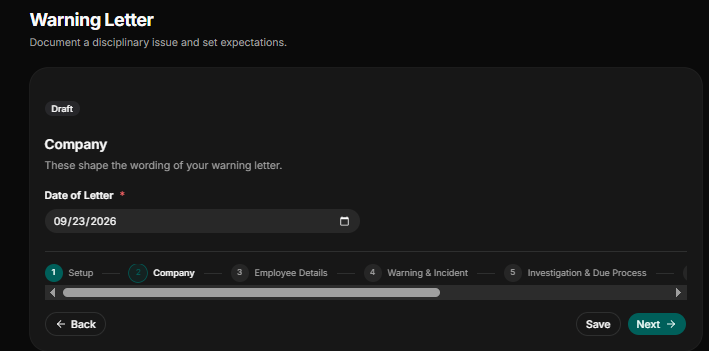
Step 2: Company Details and Date of the Letter
If you have already added your company profile to HRDocket, when boarding the platform, there is no need to add any details for your company. The most crucial thing you must do at this stage is add the date of the letter in the format Month, Day, Year (e.g., 06/21/2026). The date must be set on the day of drafting the letter for the purpose of recording keeping and audit trail.
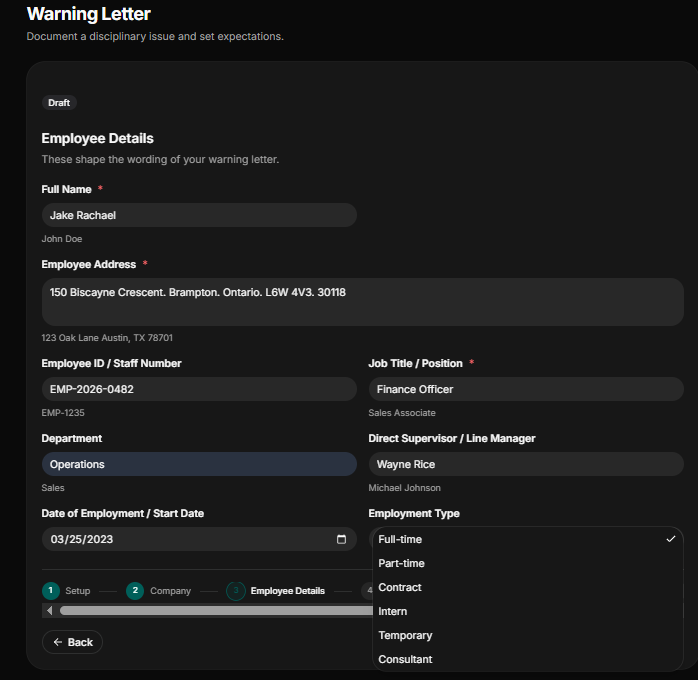
Step 3: Input Precise Employee Details
This stage is important because the warning letter is being written to a person, so you much provide the correct and precise details of the employee in question to prevent any misrepresentation:
- Name of Employee: As explained in step 1, if the employee is not already in the employee records on HRDocket and you have chosen to enter the employee manually, then provide the correct name of the person as it appears on his issued government ID, driver license, or employee ID (e.g., Declan Rice).
- Employee Address: Input the employee’s correct residential address. The address must be the current location the employee has been working from if he is a remote worker or if he works from the office (e.g., if the employee is from Canada, ABC Company, 123 Main St W Apt 4b, Toronto on M5v 2h1, Canada).
- Job Title/Position and Employee ID/Staff Number: You must input the job title of the employee (e.g., Finance Officer) and his employee ID (e.g., EMP-2026-0482).
- Department and Direct Supervisor/Line Manager: The department in which the employee works must be inputted correctly (e.g., Finance), and the legal name of his direct reporting supervisor as it appears on his employee or government-issued ID must also be entered correctly.
- Employment Type: Under what employment contract was the employee engaged? Full-time, part-time, contract staff, intern, temporary staff, or a consultant. You must choose the one that is correct and aligns with the employee’s employment contract.
- Date of Employment/Start Date: You must start the date the employee resume work at the company as stated in his offer letter in the format (e.g. Month, Day. Year).
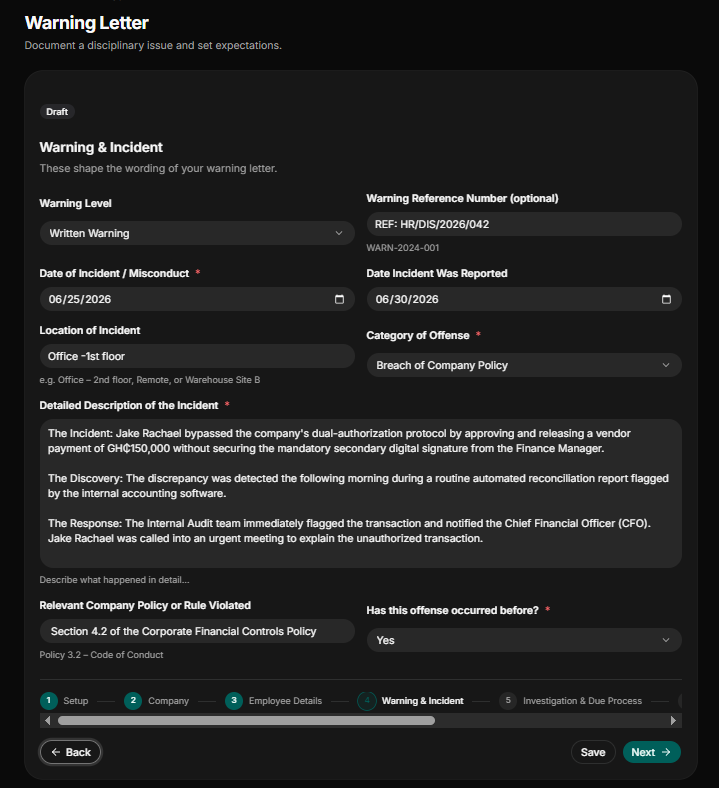
Step 4: Document The Warning Letter and Incident Based on Fact
To prevent future legal or labor disputes, you document and provide everything about the warning and the incident that prompted the warning letter to drafted in the first place with fact not emotions:
- Warning Level and Warning Letter Reference Number: Indicateinthe letter if it is a verbal warning letter, written warning, final warning letter, or final notice. The selection of the right level determines the weight behind the warning letter issued. You must also input the warning letter reference number according to company policy, if any exist.
- Date Of Incident/Misconduct and Date Incident Was Reported: Input the date the incident happened and the date the incident was reported to the appropriate authority in the right format (e.g., month, date, year).
- Location of Incident: Again, you indicate the location the incident took place, whether the incident happened in the office or outside, which department, and which floor of the office building.
- Category of Offense: Indicate the category of the offense, whether it is Attendance & Punctuality, Insubordination, Poor Performance, Harassment or Bullying, Breach of Company Policy, Misconduct, Substance Abuse, Fraud / Dishonesty, or Other not listed above.
- Detailed Description of the Incident: Provide in detail how, what, where, and when he incident occurred, if possible, and include time stamps.
- Relevant Company Policy or Rule: State the company policy or rule the action or offense of the employee violated according to the company’s bylaws (e.g., Section 4.2 of the Corporate Financial Controls Policy).
- Has this offense happened before: You must indicate, yes or no, if the said offense had happened before.
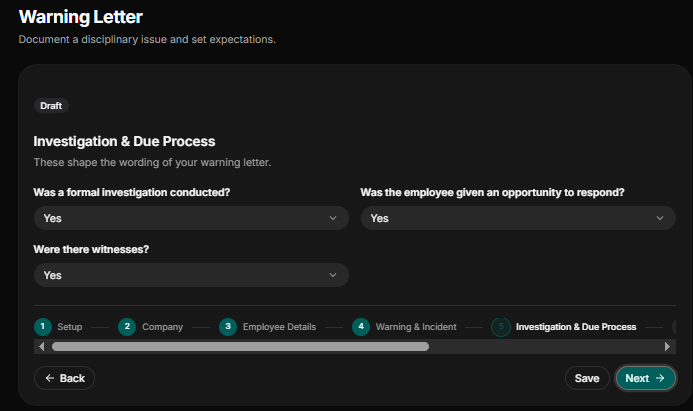
Step 5: Investigation and Due Process
This stage is important in the context of the rule of fair hearing and ensuring justice:
- Was a Formal Investigation Conducted: Indicate whether an internal investigation was conducted before issuing final action.
- Was the Employee Given an Opportunity to Respond: For the purpose of a fair hearing, you must indicate if the employee was given the right to respond to the allegation and alleged misconduct level against him.
- Were There Witnesses: Note if a witness was interviewed before the final decision was taken.
Step 6: Document Actionable Consequence and Road to Improvement
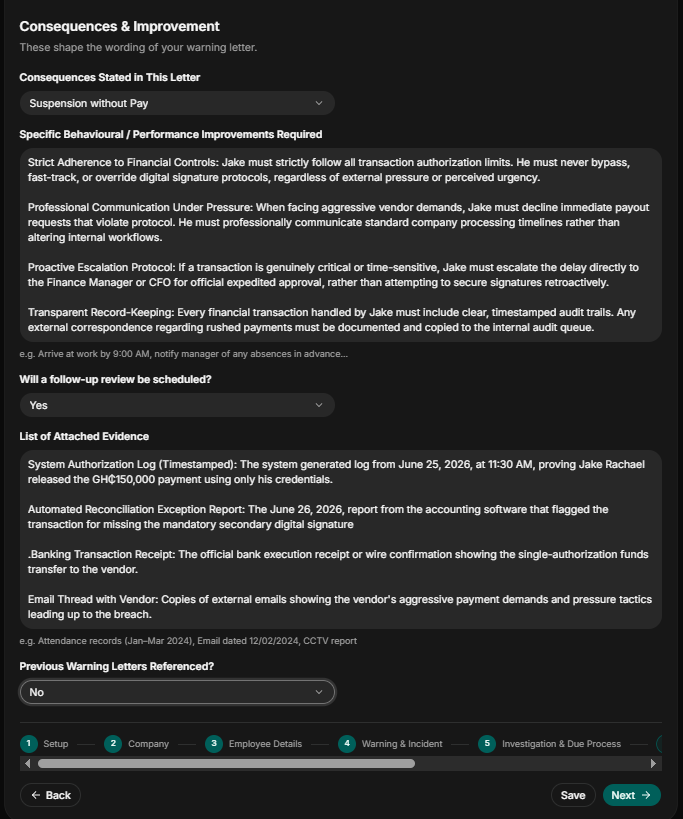
The employee must be made known what the consequences of his misconduct are:
- Consequences stated in this letter: Indicate what the consequence of the employee’s action in the letter is. Indicate whether the action taken in the letter will be a written warning letter on paper, suspension with pay, suspension without pay, demotion, performance improvement plan (PIP), termination of contract if the offense is repeated or any other form of punishment.
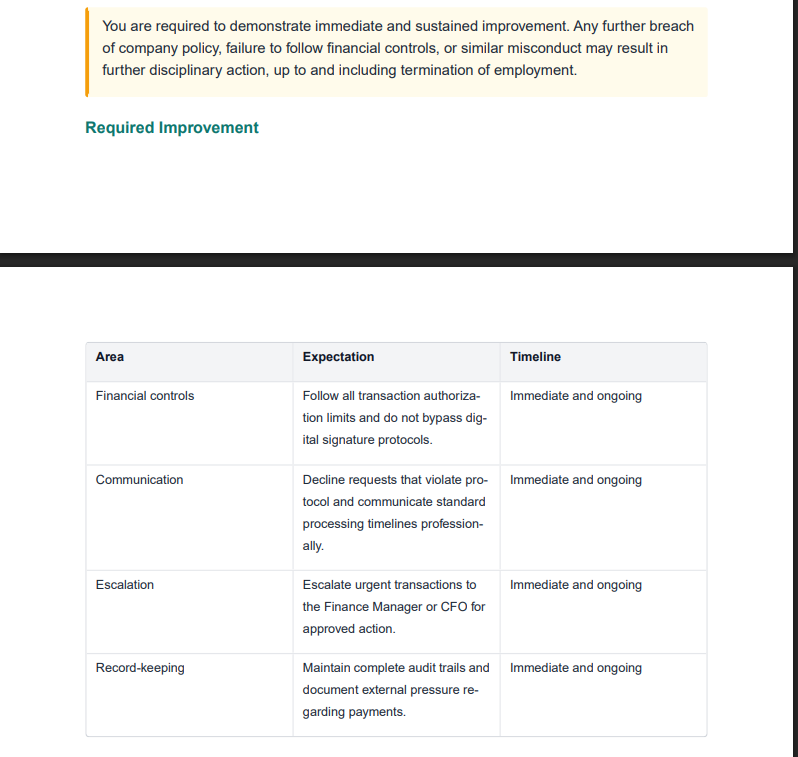
- What specific behavior/performance improvement plan is required: You document the specific behavior that is required of the employee going forward or if there is an improvement plan designed for the employee.
- Will a follow-up review be scheduled: Indicate Yes/No if there will be a follow-up review interview or meeting.
- List of Attached Evidence: List all material and supporting documents used in determining the final decision because a warning letter is strong when backed with strong evidence.
- Previous Warning Letters Referenced: You must indicate if any previous warning letter was referenced when drafting this letter.
Step 7: Indicate Right to Appeal
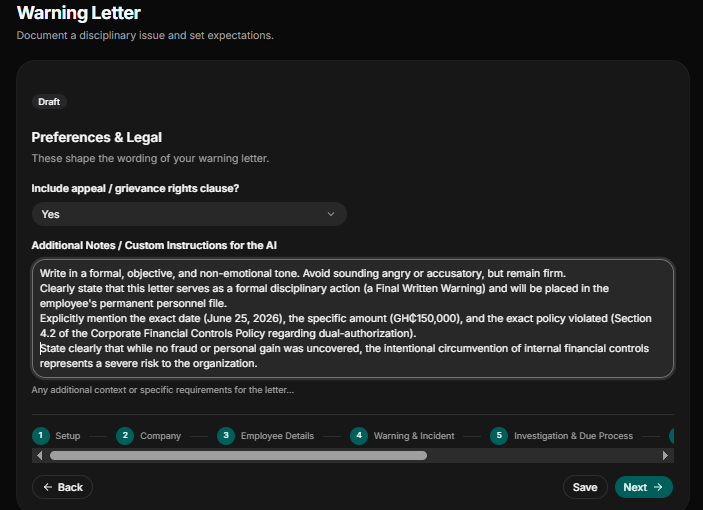
You must indicate whether or not the employee has the right to appeal the final decision of the company’s board if he is found to violate the bye-laws of the organization. In this section you also add additional notes or information you want the AI to include in the final draft.
Step 8: Review and Confirm the Details
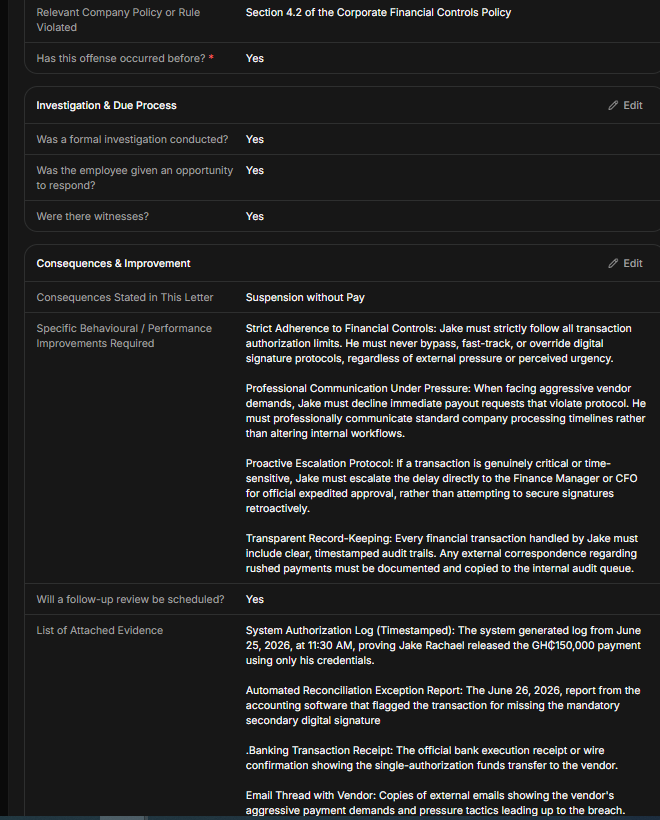
To make sure you provided the right and correct details (e.g., dates, name, clauses, and more) for the AI to draft the final warning letter, take a minute or two to review and confirm the information provided or inputted by you. If you find any information not accurate, you can go back to change it before generating the document.
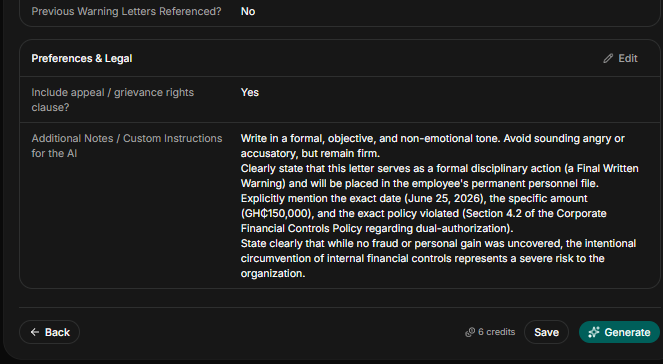
Step 8: Review and Edit
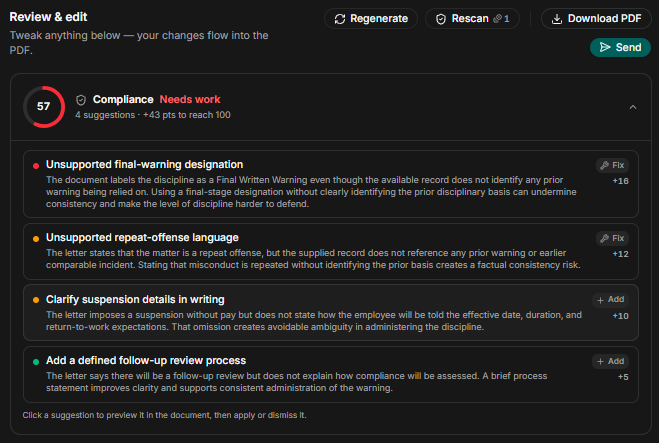
Once the letter is generated, take another minute to review the warning letter generated to make sure everything is as solid as you expected. The final trick that makes HRDocket the best tool in the market now is the Scan for Risk function to check for any compliance and legal gaps. After applying the rescan function and the final corrections and adjustments have been made, the final draft is ready to send out for digital signature or filed to the employee record.
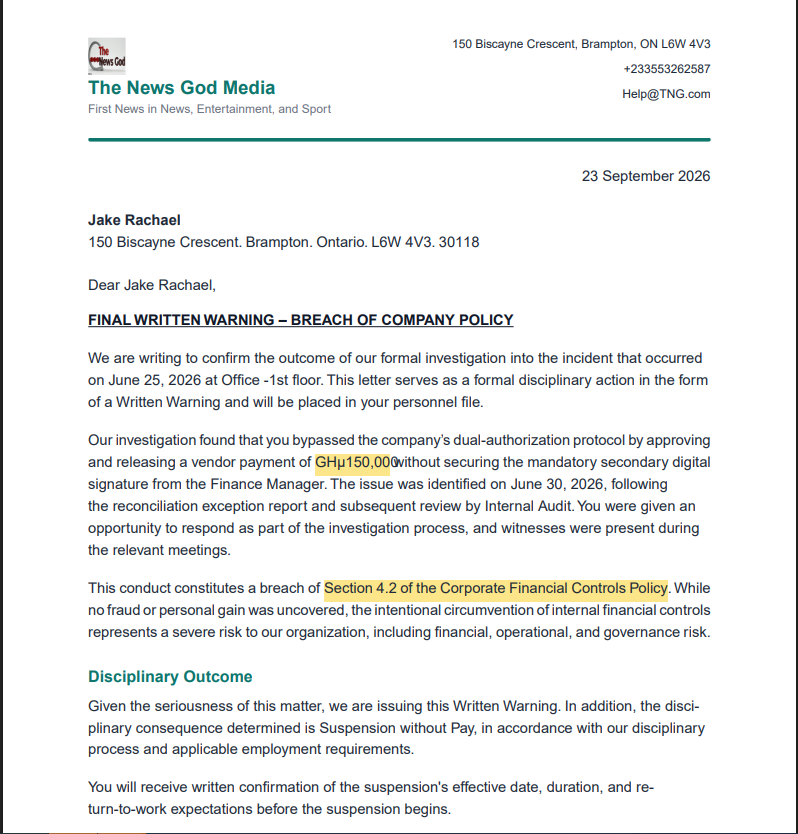
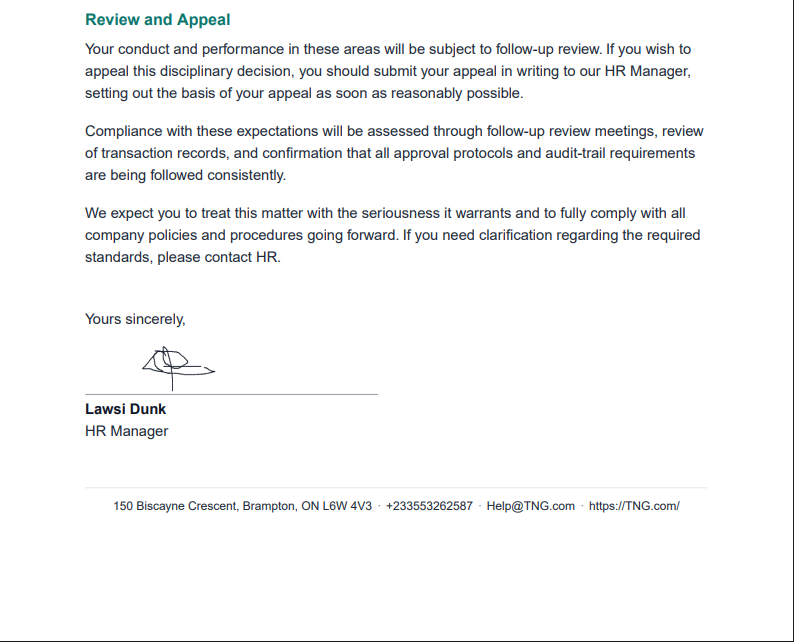
How a Warning Letter Generated with HRDocket Looks like?
After going through the eight steps listed above, the platform generates a legal, solid, and well-structured warning letter that can protect your business from future legal and labor disputes.
Is HRDocket Expensive?
HRDocket is a freemium tool with four plans: free, starter, growth plan, and business. Get on board and choose the plan that suits your business or organizational needs. The prices start from $0 to $99 per month.
Pricing
Simple plans that grow with your team
Start free, then upgrade as your HR workload grows. Every paid plan includes clean PDFs, audit-grade e-signatures, and the full document generator.
Free
$0
Freelancers, solo founders, and businesses testing the platform
- Up to 1 employee profile
- Add 1 company
- 10 AI credits (5 HR documents approx.)
- Limited access to tool templates (warning letters, offer letters, contracts, etc.)
- PDF downloads (watermarked)
- Company profile setup
- Jurisdiction-based document drafting
Starter
$19
/mo
$15.83
/mo
Billed annually ($190) · 2 months free
Small businesses and growing teams
- Up to 15 employees
- 120 AI credits (15 HR documents approx.) per month
- Add up to 2 companies
- Full HR document generator access
- Up to 2 custom templates
- Employee database & profiles
- Auto-fill employee data into documents
- Digital signatures
- Signed & unsigned PDF downloads
- Expiration reminders
- Document storage & history
- AI-assisted document drafting
- Email delivery for generated documents
- Custom HR document builder
Most popular
Growth
$49
/mo
$40.83
/mo
Billed annually ($490) · 2 months free
SMEs managing active teams and HR workflows
- Everything in Starter
- Up to 50 employees
- 250 AI credits (32 HR documents approx.) per month
- Up to 5 custom templates
- Add up to 3 companies
- AI compliance & risk assessment checks
- Incident logs
- Asset/property tracking
- Leave management
- CSV employee import
- Document uploads/attachments to employee profiles
- Bulk document generation
- Employee self-service portal
- 15 company-wide message broadcasts per month
- Advanced HR records & operational tools
- 5 distribution & acknowledgement tracking
Business
$99
/mo
$82.50
/mo
Billed annually ($990) · 2 months free
Established companies and HR-focused organizations
- Everything in Growth
- Unlimited employees
- 600 AI credits (75 HR documents approx.) per month
- Up to 7 custom templates
- Add up to 4 companies
- Advanced compliance workflows
- 40 company-wide message broadcasts per month
- Request custom HR document builder tuning
- Ask HR Docket admins for a custom generator tool (1)
- Multi-user management
- Advanced audit logs
- Reusable company templates
- Signature authorization without login
- Unlimited policy distribution & acknowledgement tracking
- Dedicated support
Conclusion
Join the HRDocket family today and enjoy simple HR documentation and automation. HRDocket creates AI-assisted HR documents, manages employee records, collects digital signatures, tracks document expirations, manages policies and acknowledgements, handles employee requests and leave, documents workplace incidents, and keeps every important employment record organized in one centralized HR workspace.
Sign up today at https://hrdocket.com/.