Every company has policies. Some live in a polished handbook. Others hide in old emails, a shared folder nobody opens, or a PDF from 2019 that still mentions an office you closed years ago. When policies such as remote work guidelines, anti-harassment standards, or data protection protocols are drafted informally or circulated via static documents, business and HR managers face version control conflicts, compliance gaps, and an inability to prove that employees actually read and acknowledged the rules.
To fix this you need more paperwork. You need a better system. That is a standardized HR policy generator with e-signature. This platform helps you create consistent policies from proven templates, publish them in one place, and collect a signed acknowledgment from every employee without chasing anyone down with a pen.
What Is a Standardized HR Policy Generator with E-Signature?
The policy generator tools help you create HR policies, such as anti-harassment, code of conduct, remote work, leave, and data privacy, using standardized templates. You answer a few questions about your company, and the tool builds policy language that fit your business culture and core values.
The e-signature function. This lets employees read each policy and sign electronically to confirm they received and understood it. The system stores the signed record with a timestamp.
Standardized simply means your policies follow a consistent structure, tone, and set of rules across the whole organization. That is especially useful when you have several teams, locations, or managers who might otherwise interpret things differently.
Some platforms are full HR platforms with policy tools built in. Others are specialist policy management tools, and some teams pair a document or handbook tool with a separate e-signature service. All of these approaches can work if the pieces connect well.
Why Standardized HR Policy Generators with E-Signature is Important for SMBs
Below are the reason why small and medium companies need to adopt standardized hr policy generators with e-signature
Consistency across the company
When everyone works from the same policy guidelines, employees get the same expectations no matter which manager or office they belong to. That supports fair treatment and fewer surprises.
A clear record of acknowledgment
A signed, timestamped acknowledgment shows who received which policy and when. If a dispute arises, you have documentation instead of guesses.
Faster rollouts
Publishing a new or updated policy takes minutes. The system can notify employees, track who has signed, and send reminders automatically.
Less administrative work
No more printing, scanning, filing, or chasing signatures by email. Everything is captured digitally and stored with the employee’s record.
Easier updates
Laws and practices change. A central system makes it simple to revise one policy, issue a new version, and collect fresh acknowledgments.
Better compliance habits
Many jurisdictions expect certain policies to exist and be communicated to staff. Having a documented, trackable process helps you show that you took reasonable steps.
A better employee experiences
A clean, searchable library of policies is far friendlier than a buried PDF. When policies are easy to find and understand, people are more likely to follow them.
Key Features to Look for In Standardized HR Policy Generators with E-Signature is Important for SMBs
Template library
Look for a broad set of well written, plain-English templates covering common policies. They should be easy to edit and brand so they sound like your company.
Location-aware content
Employment rules vary by state, province, and country. Check whether the tool adapts policies to where your employees work, or at least flags where local requirements may apply.
Guided policy creation
The best generators ask simple questions, then assemble policy language based on your answers. That is faster and safer than starting from a blank page.
Version control
You should be able to see which version of a policy was in force on a particular date, and who approved it. This is invaluable if a dispute looks back at past practice.
Legally sound e-signature
A strong e-signature feature captures the signer’s identity, the date and time, and often an audit trail. Check that it meets the requirements for electronic signatures in the places where you operate.
Acknowledgment tracking and reminders
Dashboards should show who has signed, who has not, and automatically nudge people who are overdue. Reports help you prove completion.
Approval workflows
Before a policy goes live, it may need review by HR, legal, or leadership. Workflows keep that process organized and documented.
Role-based access
Only authorized people should be able to edit or publish policies. Employees should see only what is relevant to them.
Integrations
Connections to your HRIS, onboarding tools, and messaging apps reduce double entry. For example, new hires can automatically receive the policies they need to sign on day one.
Search and accessibility
Employees should be able to find policies quickly on desktop or mobile. Good search, clear headings, and a clean layout matter more than you might think.
Security and data protection
Check how documents are stored, encrypted, and backed up. Ask where data is hosted and how long records are retained, especially if you operate internationally.
Pricing and support
Compare pricing models, such as per employee per month or tiered plans. Ask what is included, and check how good onboarding and customer support are.
Top Standardized HR Policy Generators with E-Signature In 2026
Here is detail analysis of the leading software solutions for generating standardized HR policies and capturing electronic acknowledgments:
1. HRDocket

HRDocket is a HR document automation and workflow platform designed to help small business owners and HR mangers generate legally sound, region-specific documentation without hiring expensive legal counsel. Its Policy Generator module features a guided input where admins select their governing jurisdiction first. HRDocket then use those inputs to write underlying policy language, integrates custom company rules, and dispatches documents directly to employees for digital sign-off and central records.
Best For: Automated HR document generation, standardized policy workflows, multi-jurisdiction compliance, and SMB administration.
Pros:
- Purpose built to eliminate manual document drafting and disconnected signing tools.
- Combines policy creation with daily HR tools like equipment ledgers and probation management.
- It is easy to setup with zero technical complexity.
- Affordable for growing businesses seeking audit-grade compliance.
Cons:
- Focuses on HR documentation and administrative workflows rather than enterprise-level corporate ethics helplines.
2. Rippling
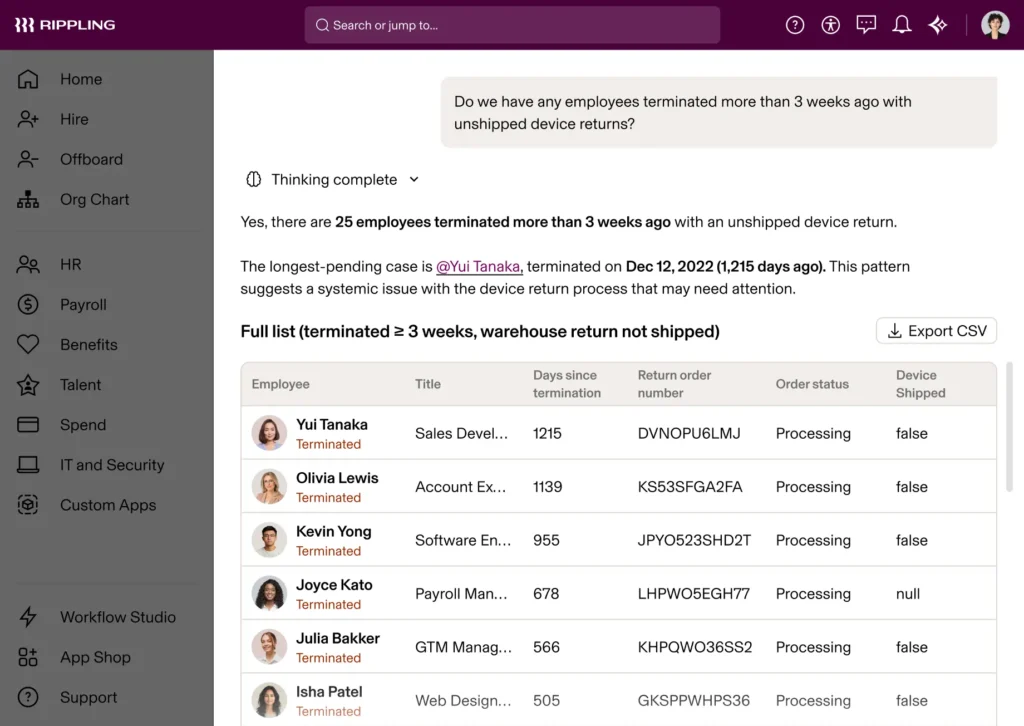
Rippling brings HR, IT, and Finance together into a single operating system. Its Policy Management module is known for it automated distribution and automatically assigning specific policies to employees based on location, role, or department data.
Best For: Attribute-based policy routing, HR & IT automation, and multi-state US compliance.
Pros:
- It automated workflow triggers based on central employee data updates.
- Combines document sign-offs with payroll and IT provisioning.
- Powerful custom automation engine for complex organizations.
Cons:
- Pricing scales rise as you add IT, global payroll, and compliance modules.
- Implementation requires more time compared to standalone document tools.
3. NAVEX PolicyTech
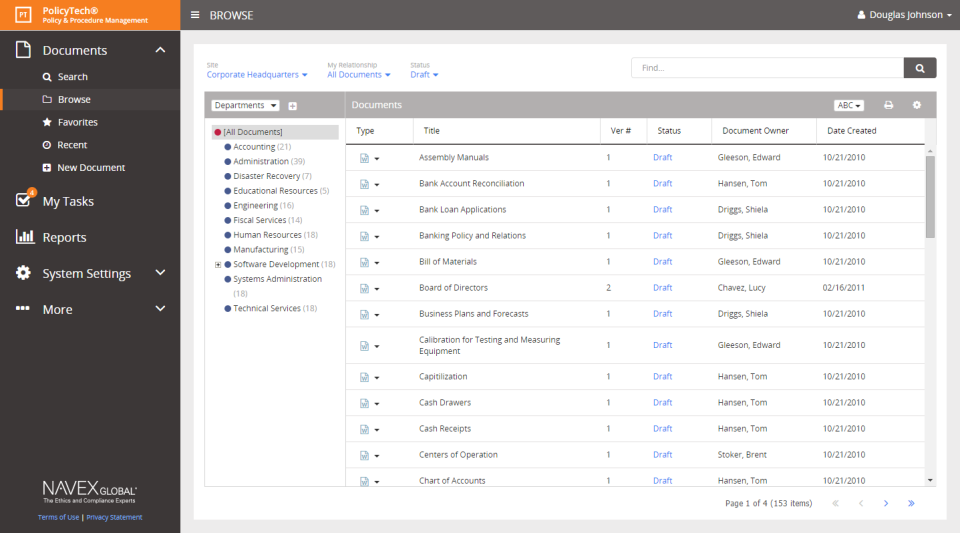
NAVEX PolicyTech is an enterprise-grade policy management platform designed for large organizations operating in heavily regulated industries (such as healthcare, finance, and manufacturing). It manages the entire policy lifecycle—from legal drafting and multi-stage executive approvals to automated employee distribution and attestation tracking.
Best For: Enterprise governance, risk management (GRC), and complex policy approval hierarchies.
Pros:
- Enterprise level governance and risk mitigation controls.
- Deep version control for historical compliance defense.
- Integrates with ethics hotline and reporting software.
Cons:
- Complex interface and high implementation costs make it expensive for small and medium business.
4. Factorial
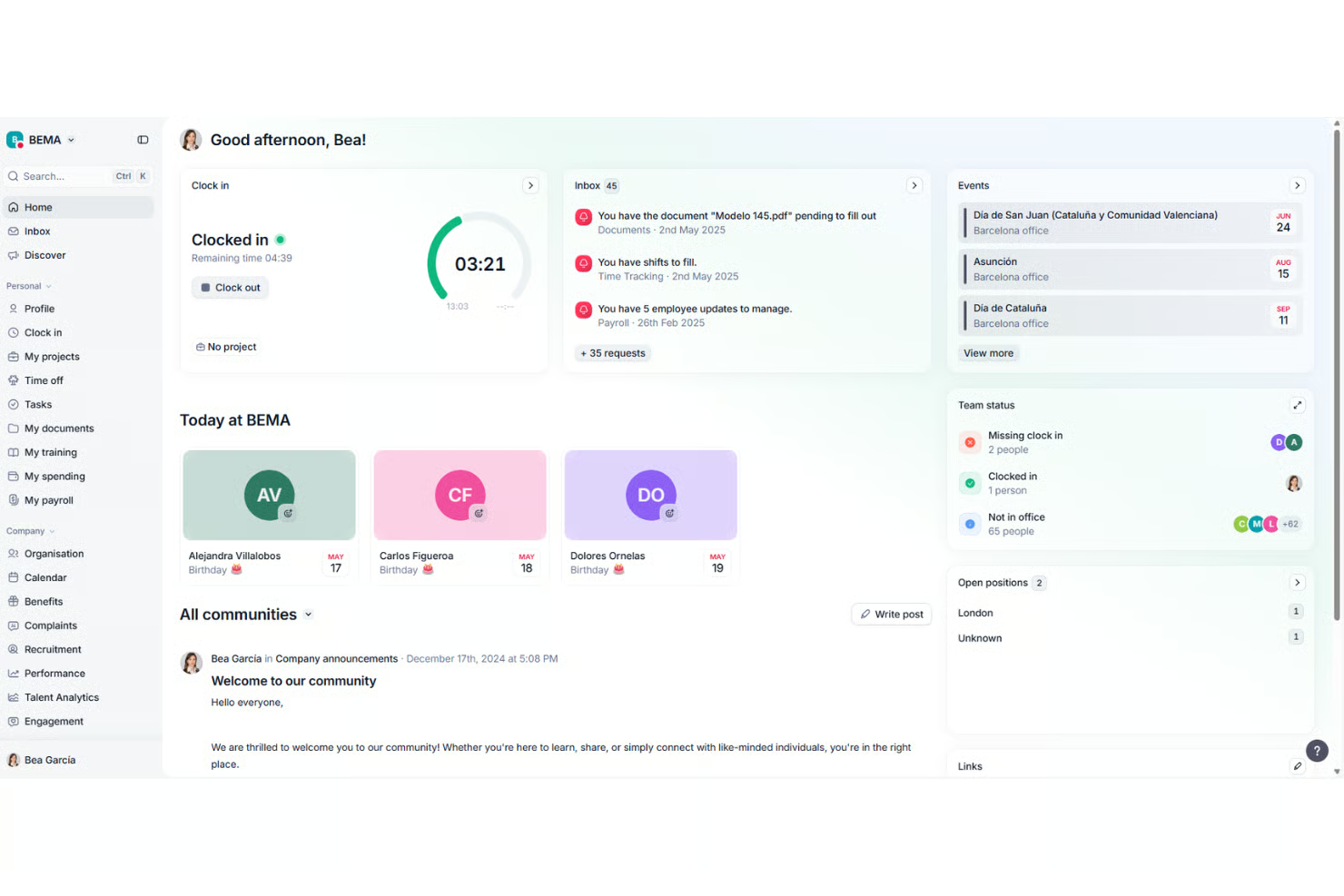
Factorial is an AI-powered HR platform that link employee records, document management, time tracking, and e-signatures. Its document module allows HR admins to standardize internal policies, upload fillable PDFs, and send policies out for bulk e-signatures across teams.
Best For: AI-powered HR operations, document centralization, and European SMB compliance.
Pros:
- User-friendly and modern interface for both admins and employees.
- Strong employee self-service portal for signing documents on mobile devices.
- Centralizes policy sign-offs alongside time tracking and performance reviews.
Cons:
- Custom policy generation relies heavily on pre-made PDF templates uploaded by the user.
5. SixFifty (Employment Docs)

The platform is developed by the technology subsidiary of law firm Wilson Sonsini, SixFifty functions like an automated legal interview tool. HR managers answer guided questions about their company size and operational footprint to generate customized, legally sound HR policies and standalone handbooks.
Best For: Attorney-backed policy customization and continuous employment law updates.
Pros:
- It has a high legal confidence backed directly by employment attorneys.
- Excellent for multi-state employers navigating complex state laws.
- Proactive notifications when law updates require policy adjustments.
Cons:
- Premium pricing model is designed toward mid-market and enterprise budgets.
Frequently Asked Questions
What is an HR policy generator?
It is a tool that helps you create HR policies from templates and guided questions, so you can produce clear, consistent documents without starting from scratch.
Are electronic signatures legally valid for HR policies?
In many places, electronic signatures are widely accepted for documents like policy acknowledgments, but rules vary by jurisdiction and document type. Check requirements where you operate and consult a qualified professional.
Do I need separate software for policies and e-signature?
Not necessarily. Many HR platforms include both. If your current system is strong on one but weak on the other, get a tool that integrates with it may be enough.
Is this suitable for small businesses?
Yes. Many tools are designed for small teams, and a standardized, signed set of policies can save a lot of trouble as you grow.
How often should policies be updated?
Review them at least once a year, and update them whenever laws, your locations, or your practices change. Collect new acknowledgments when you make significant updates.
Can software guarantee my policies are compliant?
No. Good software reduces the risk of missing required content and keeps language current, but you remain responsible for compliance. Have an employment attorney or qualified HR professional review your policies.
How much does it cost?
Pricing varies widely depending on the tool or product. Some tools are included in HR or payroll subscriptions, while others charge per employee or by plan tier. Request a clear quote and ask what is included.
Final Thoughts
The best standardized HR policy generator with e-signature is the one that is affordable, easy to use, and it is jurisdiction aware. It should help you create clear, consistent policies, make them easy to find, and give you a reliable record that people have read and agreed to them.
Start by listing the policies you need and the places where you operate, then test two or three platforms with real examples. Keep your language plain and your records clean. Do that, and policies stop being a dusty folder and become a living tool that supports a fair, well-run workplace.