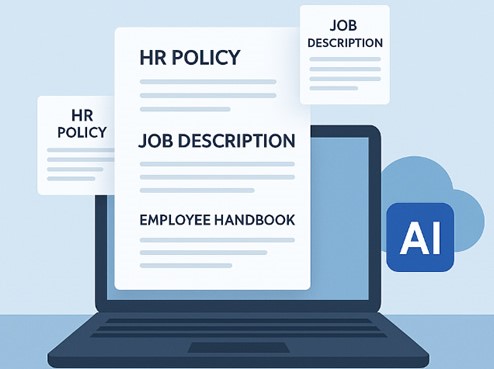
Managing employment contracts by hand is slow and risky. HR teams end up drafting agreements from scratch, chasing signatures, tracking revisions, and storing signed paperwork wherever it lands which invites inconsistency, missed approvals, compliance gaps, and slower onboarding.
This guide compares six leading employment contract platforms HRDocket, PandaDoc, Deel, DocuSign, Adobe Acrobat Sign, and Jotform on contract automation, AI capabilities, e-signatures, security, integrations, and pricing, so you can pick the right fit for your team.
What Is Employment Contract Software?
Employment contract software is a digital solution that helps organizations create, approve, sign, store, and track employment contracts throughout the employee lifecycle, instead of relying on manual paperwork, email attachments, or disconnected files. Most platforms include customizable templates, automated generation, approval workflows, e-signatures, secure cloud storage, version control, and audit trails, and many now use AI to draft contracts, suggest clauses, and extract key information covering offer letters, internship agreements, consultant contracts, renewals, and probation confirmations along the way.
Key Features to Look For
- Automated contract generation from customizable templates
- AI-assisted document creation
- Electronic signatures and approval workflows
- Version control and audit trails
- Secure cloud storage
- Integration with HR systems and renewal reminders
Why Automate Employment Contracts?
Manually creating, reviewing, signing, and storing contracts is slow and error-prone, and the problems compound as a company grows delayed hiring, inconsistent terms, misplaced documents, and compliance risk. Automation lets HR generate standardized contracts from templates, route them through approval workflows, and store everything in one searchable repository, while AI drafts language and flags inconsistencies before a document goes out.
Common Challenges of Manual Contract Management
- Time-consuming contract creation and editing
- Inconsistent contract language across departments
- Manual approval delays and lost or misplaced contracts
- Slow onboarding due to paperwork
- Compliance and legal risk with limited status visibility
How We Evaluated the Software
Each platform was assessed on contract automation, AI features, e-signatures, ease of use, security, integrations, and pricing drawing on each vendor’s official pricing pages plus verified reviews on G2 and Capterra.
Best Employment Contract Software Compared
HRDocket
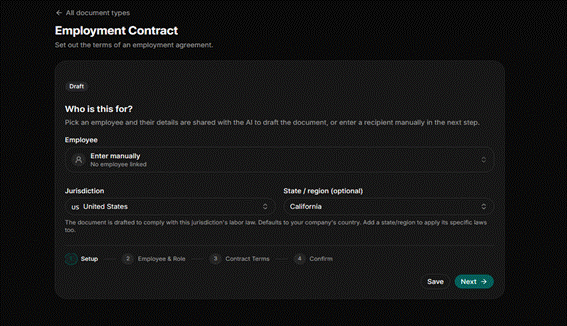
HRDocket is an AI-powered HR document automation platform that generates employment contracts from customizable templates, automates approvals, collects e-signatures, and keeps employee records centralized built for SMEs replacing manual contract management.
Best For
SMEs, HR professionals, growing organizations, and businesses wanting AI-powered contract automation.
Key Features
- AI-powered contract generation
- Customizable templates and e-signatures
- Automated approval workflows
- Centralized employee records with audit trails
Pros
- Minimal learning curve
- AI cuts contract drafting time
- Centralizes contracts and employee records
Cons
- Some advanced features are plan-dependent
- Third-party integrations are still expanding
Pricing
Free plan for testing; Starter $19/mo (15 employees); Growth $49/mo (50 employees); Business $99/mo (unlimited) each with monthly AI credits; annual billing gets two months free.
Why Choose HRDocket?
Best for AI-driven contract automation and employee records in one HR-focused, transparently priced platform.
PandaDoc
PandaDoc is a cloud-based document automation platform for creating, sending, and e-signing employment contracts, with a drag-and-drop editor and AI-assisted drafting.
Best For
HR teams, recruiters, sales and legal teams, and businesses needing document automation with strong e-signatures.
Key Features
- Employment contract templates
- AI-assisted, drag-and-drop editor
- Automated approval workflows
- Real-time tracking and CRM integrations
Pros
- Easy-to-use editor
- Strong e-signature capabilities
- Large template library
Cons
- Advanced automation sits on higher-tier plans
- Built for general document workflows rather than HR specifically
Pricing
Free plan (60 docs/year); Starter $19/user/mo annual ($35 monthly); Business $49/user/mo annual ($65 monthly); Enterprise quoted per seat or document.
Why Choose PandaDoc?
Best for powerful document automation and e-signatures with broad integrations.
Deel
Deel is a global HR and workforce management platform for hiring, payroll, compliance, and employment contracts across distributed teams, with localized templates for international hiring.
Best For
Companies hiring internationally, remote and distributed teams, and organizations needing global employment compliance.
Key Features
- Global employment contract templates
- AI-assisted document generation
- Country-specific compliance support
- Payroll and HR system integrations
Pros
- Strong international hiring and compliance support
- Built-in contract automation
- Integrates with payroll and HR systems
Cons
- Some features are premium-plan only
- Can be more than needed for single-country businesses
Pricing
Deel HR is free up to 200 employees (paid tiers $5–$56/employee/mo). Global hiring is priced separately: EOR from $599/employee/mo, Global Payroll from $29/employee/mo, contractors from $49/contractor/mo.
Why Choose Deel?
Best for global workforces that need contracts to comply with local labor rules automatically.
DocuSign
DocuSign is one of the world’s best-known e-signature and agreement management platforms, offering document automation, approval workflows, audit trails, and AI-assisted agreement analysis via its newer IAM tier.
Best For
Enterprises, HR and legal departments, and organizations managing high volumes of contracts that prioritize compliance and auditability.
Key Features
- Legally binding e-signatures
- AI-assisted agreement analysis
- Multi-party signing and signing order
- Audit trails and integrations
Pros
- Industry-leading e-signature experience
- Strong security and compliance
- Scales for large organizations
Cons
- Advanced AI/automation requires higher-tier or IAM plans
- Focused on agreements more than full HR management
Pricing
Personal $10–$15/mo (annual, 5 envelopes/mo); Standard $25/user/mo (100 envelopes/user/yr); Business Pro $40/user/mo. Enterprise and AI-powered IAM tiers are quoted separately.
Why Choose DocuSign?
Best for a trusted, secure e-signature experience with enterprise-grade compliance.
Adobe Acrobat Sign
Adobe Acrobat Sign is a cloud-based e-signature and document workflow solution inside Adobe’s Document Cloud, letting HR teams create, sign, and manage employment contracts with AI-assisted document preparation.
Best For
Medium and large organizations, businesses already using Adobe products, and teams needing secure e-signatures with document workflow automation.
Key Features
- Legally binding e-signatures
- AI-assisted document preparation
- Multi-party and mobile signing
- Integrations with Microsoft 365, Salesforce, and Workday
Pros
- Trusted Adobe ecosystem
- Strong security and compliance
- Integrates with many enterprise tools
Cons
- Advanced features require higher-tier plans
- Better for document management than full HR management
Pricing
Individual plans run roughly $13–$25/mo (Standard, Pro, Studio tiers); team pricing runs a bit higher per seat. Larger orgs use custom-quoted Acrobat Sign Solutions.
Why Choose Adobe Acrobat Sign?
Best for businesses already in Adobe’s ecosystem wanting enterprise-grade e-signatures.
Jotform
Jotform is a versatile no-code form builder that also handles document automation and e-signatures, letting HR teams generate employment contracts through customizable online forms.
Best For
Small businesses and startups wanting an affordable, flexible way to automate contract creation and e-signatures.
Key Features
- Employment contract templates
- Drag-and-drop form builder
- Electronic signatures
- Automated approval workflows
Pros
- Easy no-code platform
- Flexible customization
- Free plan available
Cons
- Primarily a form builder, not a dedicated contract platform
- Limited HR-specific functionality
Pricing
Free (5 forms/100 submissions monthly); Bronze $34/mo annual; Silver $39/mo annual; Gold $99/mo annual (adds HIPAA). Enterprise is custom-quoted
Why Choose Jotform?
Best for small businesses wanting affordable, no-code contract creation and e-signatures.
Feature Comparison
| Feature | HRDocket | PandaDoc | Deel | DocuSign | Adobe Sign | Jotform |
| Contract Automation | Yes | Yes | Yes | Yes | Yes | Yes |
| AI Contract Generation | Yes | Yes | Yes | Limited | Limited | Limited |
| Electronic Signatures | Yes | Yes | Yes | Yes | Yes | Yes |
| Approval Workflows | Yes | Yes | Yes | Yes | Yes | Yes |
| Employee Records Integration | Yes | Limited | Yes | No | No | Limited |
| Renewal Reminders | Yes | Limited | Yes | Limited | Limited | No |
| Audit Trails | Yes | Yes | Yes | Yes | Yes | Yes |
| Reporting & Analytics | Yes | Yes | Yes | Limited | Limited | Limited |
Pricing Comparison
| Software | Starting Price | Free Plan | Free Trial |
| HRDocket | $19/mo (Starter) | Yes | N/A, free plan available |
| PandaDoc | $19/user/mo (annual) | Yes | Yes |
| Deel | Free (HR, up to 200 employees) | Yes | Contact sales for paid tiers |
| DocuSign | $10/mo (Personal, annual) | No | Yes |
| Adobe Acrobat Sign | $13/mo (Standard, annual) | No | Yes |
| Jotform | Free / $34/mo (Bronze, annual) | Yes | Yes |
HRDocket, Deel, and Jotform offer a genuine free tier; DocuSign and Adobe Acrobat Sign lead with free trials instead.
How the 6 Tools Compare
| Software | Best For | Starting Price | Free Plan | AI Contract Gen. |
| HRDocket | SMEs digitizing HR contracts | $19/mo | Yes | Yes |
| PandaDoc | Document workflows & e-sign | $19/user/mo | Yes | Yes |
| Deel | Global/international hiring | Free HR tier | Yes | Yes |
| DocuSign | Enterprise agreement mgmt. | ~$10/mo (Personal) | No (trial) | Limited |
| Adobe Acrobat Sign | Adobe-ecosystem businesses | ~$13/mo (Standard) | No (trial) | Limited |
| Jotform | Small businesses, custom forms | Free / $34/mo (Bronze) | Yes | Limited |
Pros & Cons Summary
| Software | Pros | Cons |
| HRDocket | AI contract generation, HR-focused automation, employee records, transparent pricing | Some features are plan-dependent |
| PandaDoc | Document automation, e-signatures, large template library, AI assistance | Advanced features need higher tiers; not HR-specific |
| Deel | Global compliance, contractor management, AI-assisted workflows | Pricing depends on services used |
| DocuSign | Industry-leading e-signatures, strong security, enterprise scale | Higher pricing; agreement-focused, not full HR |
| Adobe Acrobat Sign | Enterprise-grade compliance, Adobe ecosystem integration | Can be costly for small businesses; not a full HR platform |
| Jotform | Affordable, no-code, built-in e-signatures, free plan | Fewer HR-specific features and advanced automation |
How to Choose the Right Software
Contract Automation
- Generates contracts from customizable templates to cut manual work.
- AI Capabilities
- Prioritize AI-powered drafting, suggestions, and workflow automation.
- Electronic Signatures
- Confirm legally binding, multi-party, and mobile signing support.
- Security & Compliance
- Check for encryption, role-based access, and audit logs.
- Integrations & Scalability
- Should connect to your HR/payroll tools and grow with your headcount.
- Pricing & Value
- Compare features and long-term value, not just the sticker price.
Frequently Asked Questions
What is employment contract software?
A digital solution for creating, approving, signing, storing, and tracking employment contracts electronically, reducing paperwork and speeding up hiring.
What are the benefits of automating employment contracts?
Time savings, fewer errors, standardized templates, faster approvals, better compliance, and centralized, searchable storage.
Is an electronic signature legally valid on employment contracts?
Yes, in most jurisdictions all six platforms here support legally binding e-signatures, though it’s worth confirming local requirements.
Which employment contract software is best for small businesses?
HRDocket for HR-focused automation, PandaDoc for document workflows, and Jotform for an affordable, simple option.
Can employment contract software integrate with HR systems?
Yes most platforms connect with HR management systems, payroll software, and cloud storage tools.
How much does employment contract software cost?
Costs range from free plans (HRDocket, Deel HR, Jotform) to $19–$99/month on paid tiers, up to enterprise pricing for DocuSign, Adobe Acrobat Sign, and Deel’s global hiring products.
Is there a free employment contract tool?
HRDocket, Deel (HR up to 200 employees), PandaDoc (60 docs/year), and Jotform (5 forms/month) all offer genuine free tiers.
Which platform is best for AI-powered contract generation?
HRDocket and Deel lead here, with PandaDoc close behind; DocuSign and Adobe Acrobat Sign offer more limited AI assistance.
Which software is best for international hiring?
Deel, thanks to its localized contract templates and country-specific compliance support.
Do these platforms support multi-party and mobile signing?
Yes, for HRDocket, PandaDoc, Deel, DocuSign, and Adobe Acrobat Sign; Jotform’s multi-party signing is more limited.
Is employment contract software worth it for a small team?
Usually yes the time saved on drafting and chasing signatures, plus reduced compliance risk, tends to outweigh the subscription cost.
Final Verdict
All six platforms handle contract creation and e-signatures competently, but they serve different priorities. HRDocket stands out for AI-powered, HR-focused contract automation with transparent pricing; PandaDoc and DocuSign excel at document workflows and e-signatures; Deel is the clear choice for global hiring and compliance; Adobe Acrobat Sign suits Adobe-invested enterprises; and Jotform offers an affordable, flexible option for smaller teams. Compare your organization’s size, compliance needs, and budget against each vendor’s official pricing page before committing.