HR documentation is the foundation of effective human resource management. From employment contracts and offer letters to employee records, policy documents, performance improvement plans, and disciplinary notices, organizations generate and manage a large volume of HR documents throughout the employee lifecycle. Relying on paper files, spreadsheets, or scattered digital folders can lead to lost documents, inconsistent processes, compliance risks, and unnecessary administrative work.
In this guide, we compare six of the best HR documentation platforms available today, HRDocket, BambooHR, Rippling, Zoho People, Deel, and Jotform evaluating each on document automation, AI capabilities, employee record management, security, integrations, ease of use, pricing, and overall value, to help you choose the right solution for managing HR documentation efficiently.
What Is HR Documentation Software?
HR documentation software is a digital solution that helps organizations create, organize, manage, store, and retrieve HR-related documents throughout the employee lifecycle, instead of relying on paper files, spreadsheets, or scattered folders. Modern platforms automate document creation using customizable templates, streamline approval workflows, support electronic signatures, and securely store employee records in the cloud many also use AI to generate documents, recommend content, and automate repetitive tasks.
These solutions support a wide range of HR documents, including employment contracts, offer letters, appointment letters, promotion letters, warning letters, performance improvement plans (PIPs), leave approval letters, employee handbooks, company policies, transfer and resignation letters, termination letters, training certificates, and employee records improving efficiency, strengthening compliance, and keeping employee information securely maintained.
Key Features of HR Documentation Software
- AI-powered HR document generation
- Customizable HR document templates
- Employment contract management
- Employee records management
- Electronic signatures
- Approval workflows
- Secure cloud storage
- Version history and audit trails
- Role-based access control
- Document search and retrieval
- Multi-company support
- Integration with HR and payroll systems
- Reporting and analytics
- Mobile accessibility
Why Businesses Need HR Documentation Software
Managing HR documents manually becomes overwhelming as an organization grows HR teams create, approve, store, and retrieve hundreds or thousands of documents across the employee lifecycle. When these are scattered across paper files, emails, or spreadsheets, businesses face delays, inconsistent documentation, compliance risks, and security challenges.
HR documentation software fixes this by centralizing documents in one secure platform, automating creation through reusable templates, streamlining approvals, supporting e-signatures, and letting HR retrieve records within seconds. Many platforms also use AI to generate documents, automate repetitive tasks, and improve accuracy, freeing HR teams to focus on employee development rather than paperwork.
Common Challenges of Manual HR Documentation
- Time-consuming document creation and editing
- Inconsistent HR document formats
- Misplaced or lost employee records
- Slow approval processes
- Compliance and legal risks
- Inefficient document retrieval and increased administrative workload
Benefits of HR Documentation Software
| Benefit | Description |
| Centralized Document Management | Store all HR documents securely in one location. |
| Faster Document Creation | Generate documents instantly using reusable templates. |
| Improved Accuracy | Reduce human errors with standardized documentation. |
| AI-Powered Automation | Automate document generation and repetitive HR tasks. |
| Electronic Signatures | Approve and sign HR documents digitally from anywhere. |
| Better Compliance | Maintain audit trails and consistent documentation practices. |
| Enhanced Security | Protect sensitive employee data through encryption and role-based access. |
| Faster Document Retrieval | Locate employee records and HR documents within seconds. |
| Improved Collaboration | Enable HR teams and managers to work together through automated workflows. |
| Business Scalability | Support growing organizations without increasing administrative complexity. |
How We Evaluated the Software
| Criteria | What We Evaluated |
| HR Document Automation | Ability to create documents using templates and automated workflows. |
| AI Features | AI-powered generation, content suggestions, and workflow automation. |
| Employee Record Management | Centralized storage, organization, and retrieval of records. |
| Electronic Signatures | Support for legally binding e-signatures and approval workflows. |
| Security & Compliance | Encryption, role-based access, audit logs, and compliance support. |
| Pricing & Value | Overall value based on features, scalability, and pricing structure. |
Best HR Documentation Software Compared
Choosing the right HR documentation software depends on your organization’s size, HR processes, compliance requirements, and long-term business goals. While some platforms focus on employee record management, others specialize in AI-powered document generation, workflow automation, electronic signatures, or comprehensive HR management. Whether you’re a startup digitizing HR paperwork or a large enterprise managing thousands of employee records, the platforms below offer solutions for different business needs.
HRDocket
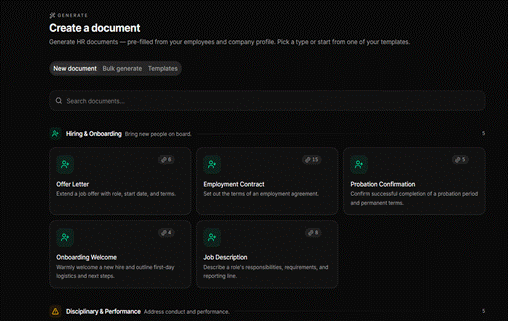
HR Docket is an AI-powered HR documentation platform that helps organizations create, manage, approve, and securely store HR documents throughout the employee lifecycle from contracts and offer letters to warning letters, PIPs, and employee records combining AI generation, customizable templates, approval workflows, e-signatures, and secure cloud storage in one place.
Best For
- Small and medium-sized businesses (SMEs)
- HR professionals
- Growing organizations
- Businesses digitizing HR documentation
- Organizations seeking AI-powered HR document automation
Key Features
- AI-powered HR document generation
- Employment contract, offer, warning, and termination letter templates
- Employee record management
- Electronic signatures and automated approval workflows
- Secure cloud storage with audit trails and role-based access
Pros
- AI reduces manual document preparation
- Extensive library of HR document templates
- Easy-to-use, HR-first interface
Cons
- Some advanced capabilities depend on the selected subscription plan
- Third-party integrations are still expanding
Pricing
HRDocket uses a tiered monthlyand yearsly subscription model based on the number of employees and included features. It offers a Free plan for trying the platform, while paid plans include Starter ($19/month) for up to 15 employees, Growth ($49/month) for up to 50 employees, and Business ($99/month) for up to 150 employees. vising HRDocket pricing on their website to check plan and their available features.
Each higher-tier plan includes more AI credits and advanced features such as branded documents, e-signatures, workflow automation, employee management tools, and compliance capabilities. HRDocket also offers optional one-time AI credit packs for businesses that need additional document generation capacity.
Why Choose HRDocket?
Best for organizations wanting a dedicated HR documentation platform with AI generation, employee records, workflows, and centralized storage in one HR-first tool.
BambooHR
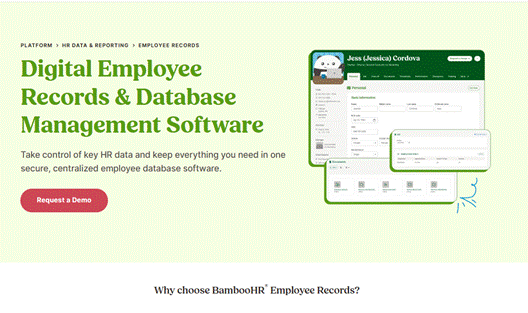
BambooHR is a cloud-based HRMS that helps organizations manage employee information, HR documentation, onboarding, and core HR processes from a centralized platform. It’s a comprehensive HR platform rather than a dedicated document tool, but its documentation capabilities make it a strong choice for growing businesses.
Best For
- Small and medium-sized businesses
- Growing organizations
- HR departments
- Employee record management
- Businesses seeking an all-in-one HR platform
Key Features
- Centralized employee records and document management
- Electronic signatures
- Employee onboarding and time-off management
- Secure cloud storage
- Performance management and reporting
Pros
- User-friendly interface
- Excellent employee record management
- Reliable onboarding workflows
Cons
- AI features are limited compared to specialized HR documentation platforms
- Advanced functionality requires higher-tier plans
Pricing
For companies with more than 25 employees: Core $10, Pro $17, Elite $25 per employee/month. 25 or fewer employees pay a flat rate from $250/month; payroll and other modules cost extra.
Why Choose BambooHR?
Best for businesses wanting HR documentation as part of a complete HR platform, combining records, onboarding, reporting, and storage in one place.
Rippling
Rippling is a cloud-based workforce management platform that combines HR, IT, and payroll into a single system, letting businesses automate employee onboarding, manage HR documents, track employee records, and streamline administrative tasks through robust workflow automation.
Best For
- Medium to large businesses
- Fast-growing companies
- Organizations wanting HR, IT, and payroll in one platform
- Businesses seeking advanced workflow automation
Key Features
- Employee records management and HR document storage
- Automated onboarding and offboarding
- Payroll and time/attendance management
- Workflow automation
- Device and app management
Pros
- Comprehensive HR, payroll, and IT platform
- Powerful automation
- Wide range of integrations
Cons
- Can feel complex for smaller businesses
- Pricing isn’t fully published; most modules require a custom quote
Pricing
Rippling’s modular pricing starts with a base fee of $35/month plus $8/employee/month. The total cost varies entirely depending on the specific workforce modules selected, such as HR, IT, Payroll, and Finance, which generally require a custom quote from the Rippling Pricing page.
Why Choose Rippling?
Best for organizations wanting HR, payroll, and IT on one platform, with strong automation to cut manual admin work.
Zoho People
Zoho People is a cloud-based HR platform that helps businesses manage employee records, documentation, attendance, leave, performance, and onboarding from a centralized system. As part of the Zoho ecosystem, it integrates seamlessly with other Zoho apps, making it attractive for businesses already using Zoho products.
Best For
- Small and medium-sized businesses
- Organizations using the Zoho ecosystem
- HR teams seeking workflow automation
- Employee record management
- Businesses looking for an affordable HR solution
Key Features
- Digital employee records and document management
- Employee self-service portal
- HR workflow automation
- Leave and attendance management
- Role-based access control and integration with Zoho apps
Pros
- Affordable pricing
- Excellent integration with Zoho products
- Good workflow automation
Cons
- AI capabilities are limited compared to AI-focused HR platforms
- Advanced features require premium plans
- Best suited for organizations already using Zoho applications
Pricing
Zoho People use a tiered per-user, per-month pricing model with five plans designed to suit businesses of different sizes. It offers a Free plan for small teams, while paid plans start at Essential HR ($0.84/user/month), followed by Professional ($1/user/month), Premium ($1.50/user/month), and Enterprise ($2.50/user/month) when billed annually.
Each higher-tier plan includes additional HR features such as document management, attendance tracking, performance management, advanced analytics, and HR help desk capabilities, allowing organizations to upgrade as their HR needs grow
Why Choose Zoho People?
Best for businesses wanting affordable HR documentation with strong Zoho ecosystem integration.
Deel
Deel is a global HR and workforce management platform that simplifies employment documentation, onboarding, payroll, compliance, and employee record management for international teams, with localized documentation and compliance tools for businesses hiring across multiple countries.
Best For
- Global businesses
- Remote and distributed teams
- International hiring
- HR and legal teams
- Contractor management
Key Features
- Global HR document management and contract automation
- Employee record management
- Electronic signatures and automated onboarding
- Compliance management
- Payroll and HR system integrations
Pros
- Excellent international compliance support
- Strong onboarding workflows
- Extensive HR functionality
Cons
- More comprehensive than needed for businesses operating only locally
- Pricing depends on selected services
- Some advanced features require premium plans
Pricing
Deel HR is free for up to 200 employees. Confirmed on Deel’s pricing page: contractor management from $49/contractor/month (Contractor of Record $325/month), US PEO from $125/employee/month, and EOR from $599/employee/month.
Why Choose Deel?
Best for organizations managing international employees and contractors that need documentation, compliance, and onboarding in one place.
Jotform
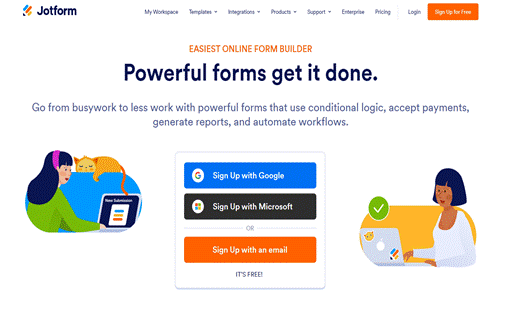
Jotform is a flexible online form builder that also supports HR documentation through customizable forms, document generation, e-signatures, and workflow automation, letting HR teams collect employee information and generate documents without technical expertise.
Best For
- Small businesses
- Startups
- HR teams
- Organizations seeking affordable HR documentation
- Businesses requiring customizable forms
Key Features
- HR document templates and employee information forms
- PDF document generation and e-signatures
- Workflow automation
- Secure cloud storage and team collaboration
Pros
- Easy no-code platform
- Affordable, with a free plan available
- Flexible document customization
Cons
- Primarily a form builder rather than a dedicated HR documentation platform
- Limited AI capabilities
- Fewer HR-specific features than specialized HR software
Pricing
Jotform uses a tiered subscription pricing model with plans based on usage limits such as the number of forms, submissions, storage, and advanced features. It offers a free Starter plan, while paid plans include Bronze ($34/month), Silver ($39/month), and Gold ($99/month) when billed annually.
Enterprise plans are available through custom pricing.
Why Choose Jotform?
Best for a simple, cost-effective way to create HR documents and automate approvals without a full HR platform.
How the 6 Tools Compare
| Software | Best For | Starting Price | Free Plan | AI Doc Gen. |
| HRDocket | SMEs digitizing HR documentation | $19/mo (Starter) | Yes | Yes |
| BambooHR | SMBs wanting an all-in-one HRIS | $10/employee/mo | No (trial) | Limited |
| Rippling | Mid-large businesses needing HR+IT+payroll | $8/employee/mo + fee | No (demo) | Limited |
| Zoho People | Budget-conscious teams in the Zoho ecosystem | $0.84/user/mo (annual) | Yes | Limited |
| Deel | Global and remote teams | $49 per month for contractor management | Yes | Yes |
| Jotform | Small businesses, custom forms | Free / $34/mo (Bronze) | Yes | Limited |
Feature Comparison
| Feature | HRDocket | BambooHR | Rippling | Zoho People | Deel | Jotform |
| HR Document Automation | Yes | Yes | Yes | Yes | Yes | Yes |
| AI Document Generation | Yes | Limited | Limited | Limited | Yes | Limited |
| Employee Records Management | Yes | Yes | Yes | Yes | Yes | Limited |
| Electronic Signatures | Yes | Yes | Yes | Limited | Yes | Yes |
| Approval Workflows | Yes | Yes | Yes | Yes | Yes | Yes |
| Audit Trails | Yes | Yes | Yes | Yes | Yes | Yes |
| Role-Based Access Control | Yes | Yes | Yes | Yes | Yes | Limited |
| Multi-Company Support | Yes | Limited | Yes | Limited | Yes | No |
| Reporting & Analytics | Yes | Yes | Yes | Yes | Yes | Limited |
| Mobile Accessibility | Yes | Yes | Yes | Yes | Yes | Yes |
AI Features Comparison
| AI Feature | HRDocket | BambooHR | Rippling | Zoho People | Deel | Jotform |
| AI Document Generation | Yes | Limited | Limited | Limited | Yes | No |
| AI Content Suggestions | Yes | No | Limited | No | Limited | No |
| AI Workflow Automation | Yes | Limited | Yes | Limited | Yes | Limited |
| AI Compliance Assistance | Yes | Limited | Limited | No | Yes | No |
Pricing Comparison
| Software | Pricing Model | Free Plan | Free Trial |
| HRDocket | Free, Starter $19, Growth $49, Business $99/mo | Yes | Free plan available |
| BambooHR | Per-employee/month (Core/Pro/Elite) or flat rate | No | Demo available |
| Rippling | Custom, modular per-employee pricing | No | Demo available |
| Zoho People | Free, Essential HR, Professional, Premium, Enterprise | Yes | Yes |
| Deel | Free HR tier; service-based pricing (EOR, payroll, contractor) | Yes | Contact sales |
| Jotform | Free, Bronze, Silver, Gold, Enterprise | Yes | Yes |
Pros & Cons Summary
| Software | Pros | Cons |
| HRDocket | AI-powered HR documentation, extensive templates, employee records, workflow automation, transparent pricing | Some advanced features depend on the selected plan |
| BambooHR | Excellent employee record management, easy to use, complete HR platform | Limited AI functionality compared to specialized HR documentation software |
| Rippling | Comprehensive HR, payroll, and IT management, powerful automation | More complex and may require additional modules |
| Zoho People | Affordable, employee self-service, good workflow automation, strong Zoho integration | Limited AI capabilities and advanced HR document automation |
| Deel | Excellent for global workforce management, compliance, onboarding, and employment documentation | Best suited for international businesses; pricing depends on services used |
| Jotform | Easy no-code platform, affordable, flexible forms, free plan available | Primarily a form builder with fewer HR-specific capabilities |
How to Choose the Right HR Documentation Software
Choosing the right HR documentation software requires evaluating your organization’s current HR processes, compliance requirements, workforce size, and future growth plans. The ideal solution should simplify document creation, improve collaboration, strengthen security, and reduce administrative workload.
1. HR Document Automation
Choose software that generates documents from customizable templates to improve consistency and cut manual work.
2. AI Capabilities
Look for AI features that assist with document generation, workflow automation, and repetitive tasks.
3. Employee Record Management
Pick a platform that securely stores and makes employee records easy to retrieve.
4. Electronic Signatures
Ensure the software supports legally binding e-signatures and approval workflows.
5. Security and Compliance
Verify encryption, audit trails, role-based permissions, and secure cloud storage.
6. Integrations
Consider compatibility with payroll systems, HR software, and productivity tools.
7. Scalability
Choose software that supports growth without requiring a major system change.
8. Pricing and Value
Compare features, support, and long-term value, not just the sticker price.
Recommendation
If your organization needs an all-in-one HR documentation solution with AI-powered document generation, employee records management, workflow automation, and centralized document storage, HRDocket is an excellent choice. Businesses seeking broader HR management may prefer BambooHR or Rippling, while Zoho People, Deel, and Jotform each provide strong capabilities for specific use cases.
Frequently Asked Questions (FAQs)
What is HR documentation software?
HR documentation software is a digital solution that helps businesses create, organize, manage, store, and retrieve HR documents such as employment contracts, employee records, offer letters, and company policies.
Why should businesses automate HR documentation?
Automation reduces paperwork, improves document accuracy, strengthens compliance, speeds up approvals, and enables HR teams to access employee documents quickly.
What types of documents can HR documentation software manage?
Most platforms support employment contracts, offer letters, employee records, promotion letters, warning letters, leave approvals, company policies, performance improvement plans (PIPs), termination letters, and other HR documents.
Is HR documentation software secure?
Most modern platforms include encryption, secure cloud storage, role-based access controls, and audit trails to protect sensitive employee information.
Which HR documentation software is best for small businesses?
The best option depends on business needs. HRDocket is ideal for HR document automation, Zoho People offers an affordable HR platform, and Jotform is suitable for businesses seeking a simple, flexible solution.
How much does HR documentation software cost?
Costs range from free plans (HRDocket, Zoho People, Deel HR, Jotform) to $19–$99/month on document-focused platforms, with per-employee pricing on full HRIS platforms like BambooHR and Rippling running roughly $8–$25+ per employee/month.
Is there a free HR documentation tool?
HRDocket, Zoho People, Deel HR (up to 200 employees), and Jotform all offer genuine free tiers; BambooHR and Rippling offer demos rather than an ongoing free plan.
What’s the difference between HR documentation software and a full HRIS?
HR documentation software focuses specifically on generating, signing, and organizing HR documents and records; a full HRIS like BambooHR or Rippling folds documentation in alongside payroll, benefits, and performance management.
Which HR documentation software has the strongest AI features?
HRDocket and Deel offer the deepest AI-assisted document generation and compliance support among the platforms compared here.
Which platform is best for global or remote teams?
HRDocket, given its focus on international compliance, localized contract templates, and global payroll.
Is HR documentation software worth it for a growing business?
Generally, yes, the time saved on drafting, approving, and storing documents, plus reduced compliance risk, tends to outweigh the subscription cost.