Managing employment paperwork manually might seem fine at the beginning but as a business grows, HR documentation slowly scatters across emails, threads, spreadsheets, computer desktops and filing cabinets. This messy system does not only slow down HR operations but also leads to compliance risks such as missing paperwork, chasing signatures and costly errors.
HR document automation software helps businesses create standardized employment documents and streamline their HR processes. Modern platforms connect employee information, document generation, review, approval, electronic signatures, policy acknowledgements, document storage, and employee records. Instead of treating every employment document as a separate file, the ideal workflow keeps the documentation connected to the employee throughout the employment lifecycle.
This guide compares HRDocket, PandaDoc, BambooHR, Rippling, Deel, and Jotform based on their approach to HR document automation, employee records, workflows, signatures, usability, scalability, and pricing.
Quick Comparison
| Platform | Primary focus | HR document generation | Employee records | E-signatures | Workflow automation | Starting price | Best suited to |
|---|---|---|---|---|---|---|---|
| HRDocket | HR documentation and employee records | Yes | Yes | Yes | Yes | $19/month/ up to 12 employees | Small and growing businesses |
| PandaDoc | Document automation and e-signatures | Yes, general-purpose | Limited HR focus | Yes | Yes | $19/user/month | Teams focused on documents and signatures |
| BambooHR | HRIS and employee management | Limited/HR workflow | Yes | Yes | Yes | $250/month flat rate for businesses with 25 or fewer employees $10/employee/month | SMBs wanting broader HR management |
| Rippling | Workforce management | Yes, within broader workflows | Yes | Yes | Yes | Custom quote | Businesses combining HR, IT and payroll |
| Deel | Global workforce management | Yes, within global HR workflows | Yes | Yes | Yes | $14/worker/mo | International teams |
| Jotform | Forms and workflow automation | Yes | Limited HR focus | Yes | Yes | $39/month | Businesses building custom HR forms |
What Is HR Document Automation Software?
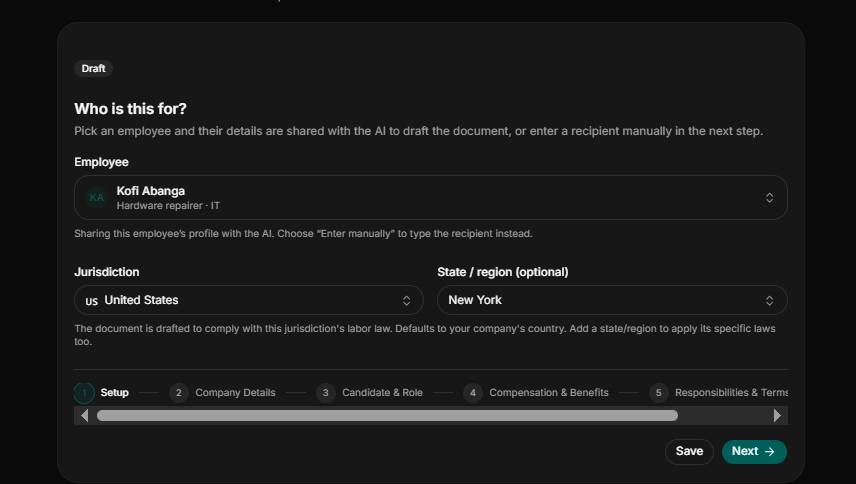
HR document automation software is a system that helps organizations create, manage, store, and track standardized HR documents using templates populated with employee and company details instead of manual drafting.
Dedicated HR document workflows connect employee information, document generation, review, signatures and employee records in one process. For a small business, the most important capabilities are templates that pull data from the employee record, approval and e-signature steps, and signed documents that automatically file back to the right employee.
Automating documentation and HR processes helps organizations gain more consistency, less administrative burden, fewer errors, and more accurate employee records overall. That, in turn, frees up HR professionals to spend less time on paperwork and more time on the things that actually move the business forward.
Who needs HR document automation
Document automation for HR can be particularly useful for:
- Small business: For small businesses drafting employment documents such as offer letters and contracts manually, automating repetitive documentation can reduce the amount of time spent creating and filing routine documents.
- Growing HR teams: As headcount increases, manual document processes become harder to standardize. Without a dedicated documentation tool, HR teams might draft the same document type differently which often leads to inconsistency.
- Business owners and HR professionals: HR teams, business owners and freelancers can use employee document automation platforms to create standardized HR documents without implementing a full, complex enterprise Human Resources Integration System (HRIS).
Why Businesses Need HR Document Automation
As companies grow, HR teams end up managing more employee documents across every stage of the employee lifecycle. Sticking with manual processes, paper files, or scattered digital folders slows things down, creates inconsistency, and makes it harder to find important records when you actually need them.
HR document automation solves much of this by standardizing how documents are created, automating approval workflows, and keeping employee records securely stored in one central place. That means less administrative work and better accuracy, collaboration, and compliance with internal policies and regulations.
The benefits go beyond efficiency, too. Automated HR documentation also improves the employee experience employees can fill out forms, sign documents electronically, and access their records faster, while HR professionals spend less time on repetitive paperwork and more time on strategic priorities.
What to look for in HR Document Automation Software
Most platforms in this category share a similar core feature set, including:
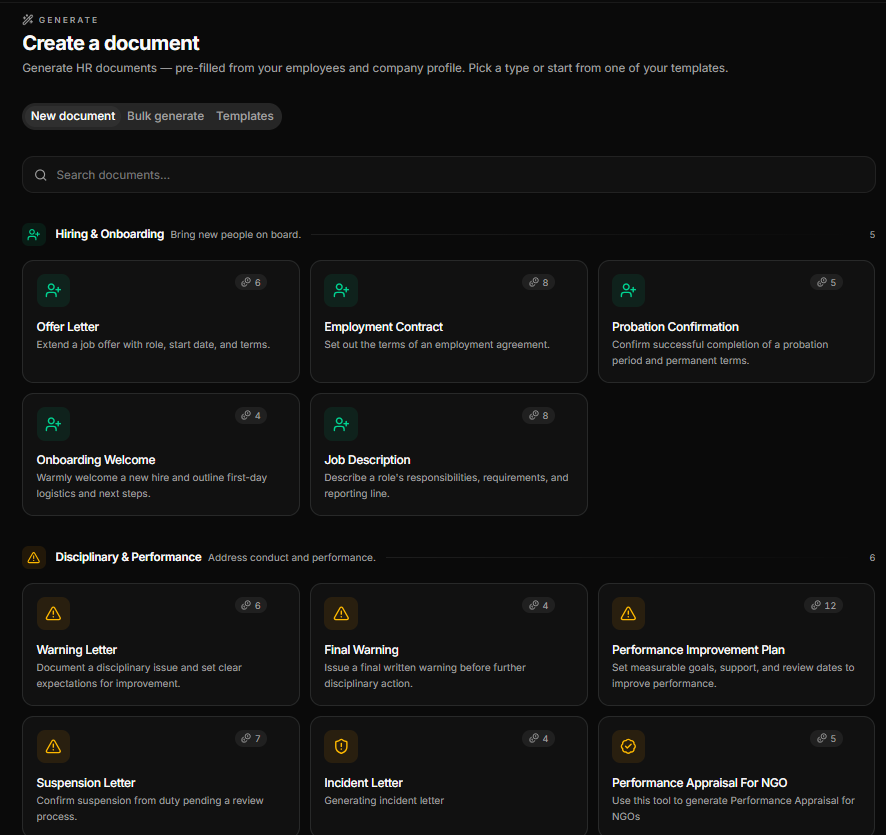
HR document generation: Look for platforms that can help you create standardized documents your business actually uses.
Employee data integration: Some platforms only offer templates for document creation without AI-assisted or jurisdiction-aware drafting. Modern document automation software reuses employee and company details seamlessly across templates, eliminating the need for HR teams to manually fill in fields every time.
Electronic signatures: Consider platforms that allow your team to sign documents or route documents for digital signatures and the completed document is automatically filed to the correct employee profile.
Employee records: Document creation has become much easier due to generative AI. Modern HR document automation software goes beyond generating documents faster; it automatically files the final version to employee records within one workflow.
Approval workflows: Prioritize platforms that allow HR professionals to review, edit and approve the draft before it is sent out.
Secure document storage: The platform should be able to securely store HR documents during and after the employment.
Customizable document templates: Modern platforms allow HR teams to customize templates to suit their daily operations.
Policy management and acknowledgements: Beyond creating documents, the platforms should allow HR professionals to publish policies and track whether employees received and acknowledged them.
Access controls: Consider a platform that allows your team to restrict access to sensitive HR information based on user roles.
Expiration reminders: The system should be able to automatically remind HR professionals about expiring contracts, certifications, licenses, permits, or other documents.
Audit trails and document history: Previous document versions and activity history should be maintained in time-stamped logs.
Common Challenges Without HR Document Automation
Organizations still relying on manual HR documentation tend to run into the same set of problems:
- Document preparation that eats up too much time
- Inconsistent formats and templates
- Employee records that go missing or get duplicated
- Approvals and signatures that drag on
- Difficulty keeping track of document versions
- Higher compliance and audit risk
- Little to no visibility into where a document stands
Benefits of HR Document Automation
| Benefit | How It Helps |
| Increased Efficiency | Automates repetitive document work and cuts down on manual effort. |
| Improved Accuracy | Standardized templates help reduce errors and inconsistencies. |
| Better Compliance | Keeps records organized and audit ready. |
| Faster Approvals | Speeds up review and electronic signature workflows. |
| Enhanced Security | Keeps sensitive HR documents in a secure, centralized system. |
| Better Employee Experience | Makes HR documents easier to find, complete, and track. |
Best HR Document Automation Software Compared
The right HR document automation software for you depends on your business needs, budget, and existing HR processes.
How We Evaluated the Software
We assessed each HR document automation platform on the features and capabilities that matter most to HR professionals and businesses, such as employee records, e-signatures, automation, usability, pricing and scalability.
Specifically, we looked at:
- Document Automation: how well the platform creates, customizes, and manages HR documents.
- Ease of Use: how intuitive the interface and navigation are for HR teams.
- Employee Record Management: the tools available for organizing and maintaining employee documentation.
- Workflow Automation: support for approval workflows, notifications, and task automation.
- Electronic Signatures: whether e-signature functionality is built in or integrated.
- Security & Compliance: features that protect sensitive employee data and support compliance.
- Integrations: compatibility with other HR, payroll, and business applications.
- Pricing & Value: affordability, pricing transparency, and value across different business sizes.
Below, we break down HRDocket, PandaDoc, BambooHR, Rippling, Deel, and Jotform by features, pricing, strengths, and ideal use cases, so you can find the best fit for your organization.
HRDocket
Overview
HRDocket is an AI-powered HR documentation and employee records management platform purpose-built for the employee lifecycle. Rather than juggling manual paperwork or several disconnected tools, HRDocket gives HR teams one centralized workspace to generate standardized HR documents, organize employee records, automate workflows, and maintain compliance from onboarding to offboarding.
The platform is designed to work for businesses of all sizes, with tools that streamline everyday HR tasks and help organizations run more efficiently, reduce administrative load, and keep documentation consistent.
Best For
- Small and medium-sized businesses (SMEs)
- Growing organizations
- HR professionals and consultants
- Companies looking to digitize their HR documentation
- Organizations wanting an AI-powered HR documentation solution
Key Features
AI HR document generation: HRDocket uses AI-assisted and jurisdiction-aware drafting to create standardized HR documents that HR teams can review and customize before sending.
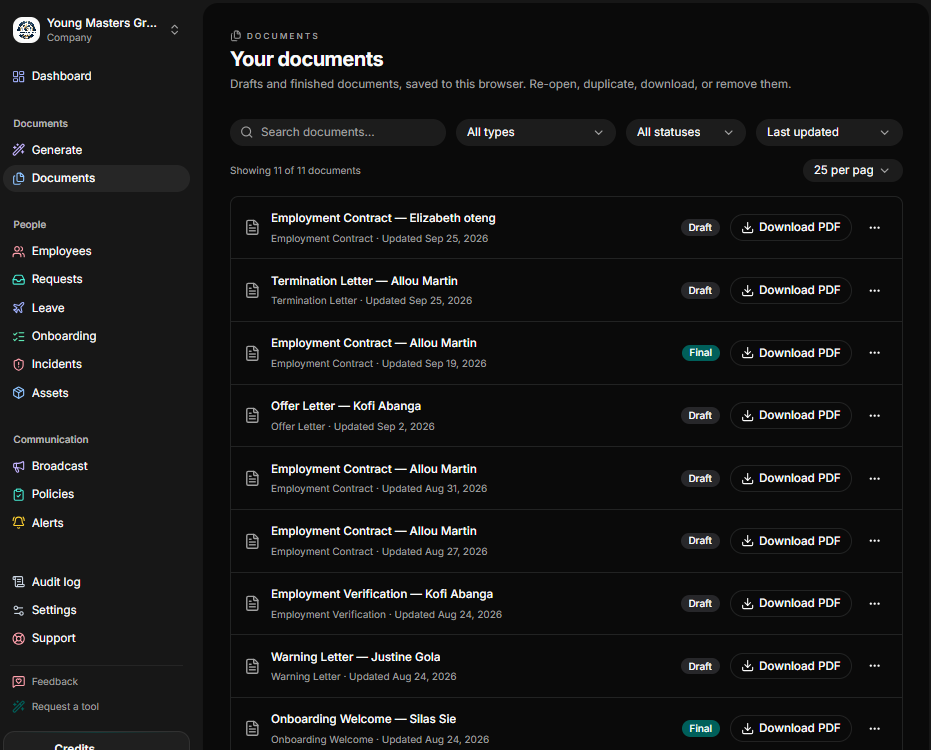
Employee records: The platform goes beyond basic document generation by automatically linking completed files to employee records. Each employee has a centralized profile containing employment information, generated documents, assigned assets, incidents, leave records, and supporting documentation.
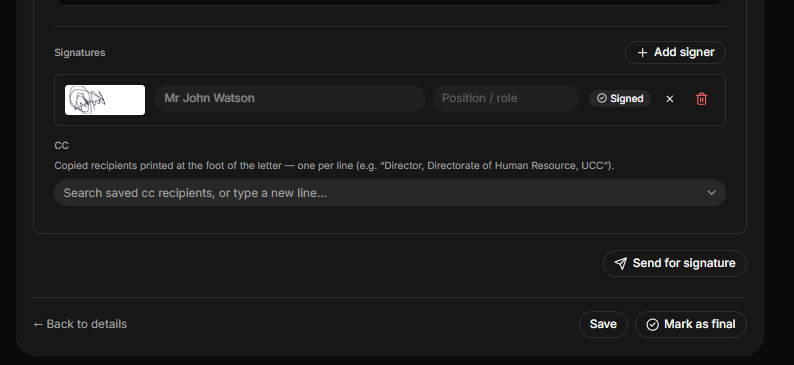
Electronic signatures: The platforms allow HR teams to route documents for legally binding e-signatures and ensures signed files are automatically filed to the correct employee profile.
Employee self-service portal: The platform features a self-service portal where employees can view HR documents and other information assigned to them. They can also use the portal to require HR services without direct assistance for HR teams.
Expiration reminders: HRDocket features a proactive expiration reminder that automatically alerts HR professionals about important employment dates, certifications, contracts, licenses, permits, visa and training expirations.
Incident records: The platform helps businesses document workplace incidents, complaints, investigations, disciplinary matters, follow-up actions, and supporting evidence.
Policy management and acknowledgement: This feature allows businesses to distribute policies, collect acknowledgements, track acceptance of the latest version and maintain policy history.
Pros and Cons
Pros
- Purpose-built for HR document automation
- AI helps speed up document creation
- Keeps employee documentation centralized
- Easy-to-use interface
- Supports standardized HR processes
- Secure cloud-based storage
- Scales well as businesses grow
Cons
- It is not might not be suitable for large businesses that need payroll, IT and benefits administration.
- It has limited integrations
- Some advanced features depend on your subscription plan
- Free plan have watermarked pdfs
Pricing
HRDocket uses a transparent tiered pricing model billed monthly or annually. It offers a Free plan for individuals or small teams to try the platform. Paid plans include Starter ($19/month) for up to 15 employees, Growth ($49/month) for up to 50 employees, and Business ($99/month) for unlimited employees. Annually subscription on any plans give users two months free offer.
The free plan includes limited AI credits and watermarked PDFs, while paid plans expand document generation, employee records, signatures, templates, reminders, workflows, and other capabilities. Businesses can also purchase one-time AI credit packs if they need additional document generation beyond their monthly allocation.
Why Choose HRDocket?
HRDocket makes sense for organizations that want to modernize their HR documentation without piling on unnecessary complexity. By bringing AI-powered document generation, employee record management, workflow automation, and secure storage together in one platform, it helps HR teams cut down on manual work, stay consistent, and manage employee documentation more efficiently.
PandaDoc
Overview
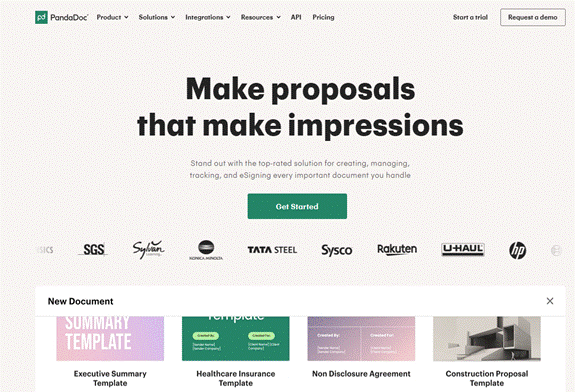
PandaDoc is a document automation and e-signature platform that helps businesses create, send, approve, and track digital documents. While it’s built to serve multiple business functions beyond HR, it does help HR teams simplify the creation and signing of employment contracts, offer letters, onboarding paperwork, and other HR documents.
Best For
- Businesses of all sizes
- HR teams that need e-signature capabilities
- Organizations managing contracts and approvals
Key Features
- Document templates
- Electronic signatures
- Approval workflows
- Real-time document tracking
- Cloud storage
- Integrations with business applications
Pros
- Easy-to-use interface
- Strong e-signature functionality
- Large template library
- Solid integration options
Cons
- Built more for document management than full HR administration
- Advanced features sit behind higher-tier plans
Pricing
PandaDoc uses a tiered per-user subscription model with plans designed for businesses of different sizes. It offers a Free plan with basic e-signature features, while paid plans include Starter ($19 per user/month) for document creation and e-signatures, Business ($49 per user/month) for advanced document workflows and CRM integrations, and Enterprise with custom pricing for organizations requiring advanced automation, API access, single sign-on (SSO), and enterprise-grade features.
Why Choose PandaDoc?
PandaDoc is a solid pick for organizations that prioritize document creation, approvals, and electronic signatures, especially HR teams that regularly handle employment contracts and onboarding paperwork.
BambooHR
Overview
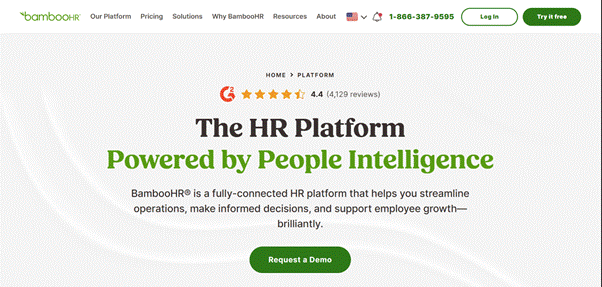
BambooHR is a cloud-based human resource management system (HRMS) built to help small and medium-sized businesses manage employee information, automate HR processes, and improve workforce management. Beyond HR document management, it also offers onboarding, leave tracking, performance management, and employee self-service tools, making it a fairly complete HR solution.
Best For
- Small and medium-sized businesses
- Growing organizations
- HR teams wanting an all-in-one HR platform
- Companies looking to streamline employee management
Key Features
- Employee record management
- Digital document storage
- Electronic signatures
- Onboarding and offboarding workflows
- Time-off and leave management
- Performance management
- Employee self-service portal
- Reporting and analytics
Pros
- Easy to implement and use
- Comprehensive HR management features
- Strong onboarding experience
- Secure, cloud-based employee records
Cons
- Pricing scales with employee count
- Some capabilities are available only in higher plans or add-ons
- Broader HR functionality may exceed the needs of a business seeking only document automation
Pricing
BambooHR uses a tiered per-employee, per-month pricing model with three plans: Core ($10 per employee/month), Pro ($17 per employee/month), and Elite ($25 per employee/month). For organizations with 25 employees or fewer, pricing starts at a flat rate of $250 per month instead of per-employee billing.
Why Choose BambooHR?
BambooHR works well for organizations looking for a complete HR management solution that brings employee records, document management, onboarding, and performance tracking together in one platform. It’s particularly well suited for growing businesses that want to centralize their HR operations.
Rippling
Overview
Rippling is a cloud-based workforce management platform that combines HR, IT, and payroll into a single system. It lets businesses automate employee onboarding, manage HR documents, track employee records, and streamline administrative tasks through robust workflow automation.
Best For
- Medium to large businesses
- Fast-growing companies
- Organizations that want HR, IT, and payroll in one platform
- Businesses seeking advanced workflow automation
Key Features
- Employee records management
- HR document storage
- Automated onboarding and offboarding
- Payroll management
- Time and attendance tracking
- Workflow automation
- Device and app management
- Reporting and analytics
Pros
- Comprehensive HR and workforce management platform
- Powerful automation capabilities
- Scales well for growing organizations
- Wide range of integrations
Cons
- Can feel complex for smaller businesses
- Some features require additional modules
Pricing
Rippling currently directs prospective customers to a custom quote rather than a public pricing. Its pricing model is modular with products generally priced per employee per month and some products include a monthly base. According to secondary sources, pricing for the Core HR starts at $35 monthly base plus $8 per employee/month, with payroll and other modules extra.
Why Choose Rippling?
Rippling is a strong choice for organizations that want to manage HR, payroll, and IT from a single platform. Its automation capabilities make it especially useful for businesses looking to cut down on manual administrative work and improve overall efficiency.
Deel
Overview
Deel is a global HR and payroll platform built to help businesses hire, manage, and pay employees and contractors across multiple countries. Beyond global workforce management, Deel also offers HR document management, onboarding workflows, compliance tools, and electronic document signing, making it a strong option for distributed and international teams.
Best For
- Remote and distributed teams
- Global businesses
- Companies hiring international employees and contractors
- Organizations managing global compliance
Key Features
- Global hiring and payroll
- HR document management
- Employee onboarding and offboarding
- Electronic signatures
- Compliance management
- Contractor management
- Employee self-service
- Reporting and analytics
Pros
- Excellent support for international hiring
- Built-in Global Compliance Tools
- User-friendly interface
- Comprehensive payroll and HR capabilities
Cons
- Better suited to businesses with international teams
- Some advanced services can add to overall costs
Pricing
Deel uses a modular pricing model, allowing businesses to subscribe only to the services they need. Pricing starts at $14 per worker/month for Find Talent, $29 per employee/month for Global Payroll, $49 per contractor/month for Deel Contractor, $79–$95 per employee/month for Deel US PEO, $325 per contractor/month for Contractor of Record, and $599 per employee/month for Employer of Record (EOR) services.
Why Choose Deel?
Deel is a great fit for organizations managing a global workforce. By combining international hiring, payroll, HR document management, and compliance tools in one platform, it simplifies workforce management across countries while helping businesses stay compliant.
Jotform
Overview
Jotform is a cloud-based form builder that lets businesses create online forms, collect data, and automate document workflows. It’s not a dedicated HR management platform, but its document generation and workflow automation capabilities make it useful for HR teams handling onboarding forms, leave requests, employee surveys, and other HR-related documents.
Best For
- Small businesses
- HR teams that need customizable forms
- Organizations collecting employee data digitally
- Businesses wanting a flexible document workflow solution
Key Features
- Drag-and-drop form builder
- Automated document generation
- Electronic signatures
- Approval workflows
- Secure cloud storage
- Integrations with popular business applications
- Workflow automation
Pros
- Easy to build and customize forms
- No coding required
- Wide range of integrations
- Flexible workflow automation
Cons
- Not a complete HR management system
- Advanced features sit behind higher-tier plans
Pricing
Jotform uses a tiered subscription pricing model based on usage limits such as the number of forms, submissions, storage, signed documents, and advanced features. It offers a free Starter plan, while paid plans include Bronze ($34/month), Silver ($39/month), and Gold ($99/month) when billed annually.
Why Choose Jotform?
Jotform is a good fit for businesses that need a flexible way to create HR forms, collect employee information, and automate document workflows especially if you want something simple and customizable without implementing a full HR management system.
Feature by feature comparison
| Capability | HRDocket | PandaDoc | BambooHR | Rippling | Deel | Jotform |
| HR document generation | Native | Native/general | Limited/broader HR workflow | Available within HR workflows | Available within HR workflows | Native/general |
| Employee records | Native | Limited HR focus | Native | Native | Native | Limited HR focus |
| Employee document history | Native | Document history | HR records | Document management | HR records | Document workflow |
| E-signatures | Native | Native | Available | Available | Available | Native |
| Policy acknowledgements | Native | Limited HR focus | Available through HR capabilities | Available | Available within HR workflows | Workflow-based |
| Incident records | Native | No dedicated HR incident focus | HR functionality | Broader workforce functionality | Broader workforce functionality | Custom workflow |
| Role-based access | Yes | Yes | Yes | Yes | Yes | Enterprise capabilities |
| Custom HR templates | Native | Native | HR workflows | Available | Available | Native |
| Expiration reminders | Native | Workflow-based | HR workflows | Automation | Global compliance workflows | Workflow-based |
| Payroll | No | No | Available/add-on | Yes | Yes | No |
| IT management | No | No | No | Yes | No | No |
| Global workforce management | No | No | Limited/broader HR | Yes | Core focus | No |
Which platform is best for your organiation
- HRDocket is particularly relevant an organization’s primary challenge is managing HR documentation and employee records throughout the employee lifecycle. For companies already using full Human Resource Integration Software (HRIS), the platform serves as powerful complement by tackling documentation bottlenecks that broader systems often ignored.
- PandaDoc is best for general business documentation and e-signatures.
- BambooHR is relevant for businesses that want document automation as part of employee management, HR workflows, reporting, performance, and related HR functions.
- Rippling is most valuable to organizations that need HR document automation as part of a much larger requirement involving workforce, payroll, IT, and operational automation.
- Deel is most relevant when document automation is connected to global hiring, contractor management, payroll, or international employment operations.
- Jotform is best for custom forms and data collection, rather than a centralized employee documentation system.
How to Choose the Right HR Document Automation Software
Choosing the right HR document automation software comes down to your organization’s size, HR processes, budget, and long-term goals. Before you decide, it’s worth considering the following
1. Identify Your Business Needs
Work out whether you need a dedicated HR document automation tool or a fuller HR management platform that also covers payroll, onboarding, performance management, and employee self-service.
2. Evaluate Key Features
Look for the essentials of document automation, employee record management, electronic signatures, approval workflows, secure document storage, and reporting.
3. Consider Ease of Use
Choose a platform with an intuitive interface that keeps the learning curve short and lets HR teams work efficiently from day one.
4. Review Security and Compliance
Make sure the platform offers strong security, role-based access controls, audit trails, and compliance support to keep sensitive employee data protected.
5. Assess Scalability and Pricing
Pick a solution that can grow alongside your organization, with pricing that fits your budget and business needs.
Frequently Asked Questions (FAQs)
1. What is HR document automation software?
HR document automation software helps organizations create, manage, store, and automate HR documents like employment contracts, offer letters, policy acknowledgements, performance reviews, and employee records cutting down on manual work and improving efficiency.
2. Which HR document automation software is best for small businesses?
It really depends on what you need. HRDocket is a strong fit if you’re focused specifically on HR document automation, while platforms like BambooHR and Rippling offer broader HR management capabilities.
3. Does HR document automation software support electronic signatures?
Yes. Most modern HR document automation platforms include built-in e-signature features or integrate with e-signature tools to make document approvals easier.
4. Is HR document automation software secure?
Most reputable platforms rely on encryption, role-based access controls, audit trails, and secure cloud storage to keep sensitive employee information protected.
5. How do I choose the right HR document automation software?
Weigh your organization’s size, the features you need, ease of use, security, integration options, scalability, and budget before deciding.
6. How much does HR document automation software cost?
Costs vary by platform. HRDocket runs $19-$99/month depending on team size, PandaDoc runs $19-$49 per user/month, and Jotform runs $34-$99/month on paid tiers. Full HR platforms like BambooHR ($10-$25 per employee/month) and Rippling ($35 base plus $8 PEPM for core HR, with add-on modules priced separately) scale with headcount, while Deel prices each product separately, from $14 per worker/month for talent sourcing up to $599 per employee/month for Employer of Record.
7. Is there a free HR document automation tool?
Yes. HRDocket, PandaDoc and Jotforms offers a free plan for individuals or small teams to get started, though each comes with usage limits.
8. Which HR document automation software works best for global or remote teams?
Deel HR offers leading global hiring, payroll, and Employer of Record services across international teams. However, purpose-built HR document automation platforms like HRDocket helps small and growing businesses generate standardize jurisdiction-aware employment documents including offer letters, contract, NDAs, and performance letters and link them directly to the correct employee profile.
9. Does HR document automation software integrate with payroll and other HR systems?
HRDocket connect with common business and CRM tools, while BambooHR, Rippling, and Deel are built around payroll and broader HR system integrations.
10. Is HR document automation software worth it for a small business?
For most growing small businesses, yes. The time saved on drafting, approving, and storing HR documents, plus the reduced risk of compliance mistakes, tends to outweigh the cost of a subscription plan.