Documentation is one of the key functions of HR teams. Every employee creates a trail of paperwork and managing these documents manually wastes valuable time and increases the risk of errors, inconsistencies, and compliance issues. Document automation for HR helps your team work faster and maintain consistency across the employee lifecycle, whether you manage a team of five, twenty, fifty, or even five hundred.
HR document automation software solutions like HRDocket assist your team in generating, checking, and filing every HR document, such as offer letters, contracts, employee handbooks, policy acknowledgements, and more.
Learn how digital HR workflow works, why businesses are replacing manual paperwork, and which features matter most when choosing software.
What Is HR Document Automation?
HR document automation is the use of software to generate, route, sign, and file human resources (HR) documents such as offer letters, contracts, handbooks, warning letters, and more. Modern platforms like HRDocket use reusable templates and pre-filled employee data instead of building each document manually in Word or PDF editors.
Employee documentation platforms help businesses generate employment contracts, employee handbooks, offer letters, policy acknowledgements, and other HR documents using reusable templates and AI while maintaining centralised employee records.
This guide will help HR teams, managers, founders, freelancers, and nonprofit organizations that are still creating HR documents manually and want to understand what automation actually replaces before evaluating software.

Why HR teams need document automation
Manual HR documentation creates several challenges such as inconsistent formatting, difficult document retrieval, lost paperwork, delayed approvals and compliance risks.
According to research, HR teams spend hours and even days searching for records or recreating lost documents. This not only delays HR processes but also contributes to significant productivity losses across the business.
Automating HR documents and processes speeds up hiring, onboarding, compliance, and policy management, while improving the employee experience. HRDocket gives HR teams a single platform to create over 25 standardised HR documents, collect signatures, manage assets, automate updates, and manage employee records. During internal testing with HRDocket, generating an employment contract took under five minutes compared with approximately 20 minutes using Microsoft Word.
Manual HR Documents vs. HR Document Automation
| Task | Manual Process | With Document Automation |
| Document drafting | Copy an old file, edit by hand, hope nothing’s outdated | Guided fields auto-generate a complete draft in minutes |
| Applying the right state law | Manually check or guess which clauses apply | Jurisdiction-based drafting applies the right terms automatically |
| Collecting signatures | Print, sign, scan, or chase email replies | Built-in e-signature with automatic reminders |
| Tracking who signed what | Manually maintained spreadsheet | Centralized, searchable signature and acknowledgment log |
| Reusing employee info | Re-type name, role, salary into each new document | Auto-filled from the employee’s existing profile |
| Finding a document later | Search email, shared drives, or filing cabinets | One click from the employee’s record |
What to Look for in HR Document Automation Software
1. AI-Powered Document Generation: Software solutions optimised for document automation for HR can be used to generate core HR documents such as offer letters, employment contracts, NDAs, promotion letters, termination letters, and job descriptions. HRDocket was used to generate an employment contract under four minutes. After selecting the employment jurisdiction, employee and company details were auto-filled, AI highlighted two missing clauses, and the document was sent for e-signature without leaving the platform.
2. Smart data auto-fill: A modern platform uses previous information such as company details, employee info, previous compensation, and role specifics automatically.
3. Jurisdiction-aware drafting: Every state has its own employment and labour laws. It is therefore important to look for a platform that drafts against your selected jurisdiction, rather than one generic template. This helps to prevent state-specific clauses from ending up in the wrong document.
4. AI Compliance: Look for platforms that flag missing clauses, suggest jurisdiction-relevant language, and highlight potential risks.
5. Centralised employee records: Prioritise platforms that automatically link documents generated to the right employee profile.
5. Digital signing and filing: You should be able to send documents for signatures without having to print them. Modern platforms like HRDocket automate your workflow for obtaining signatures.
6. Expiration and renewal alerts: Strong platforms flag upcoming expirations for organizations that automatically renew instead of relying on someone remembering to check.
7. Policy management and acknowledgement: The platform should be able to generate, publish and track policy acknowledgement.
8. Custom template: Look for a platform that allows you to create reusable templates tailored to your unique company policies and processes.
Key HR processes and automation impact
| Stage | Common Documents | What Automation Adds |
| Hiring | Offer letter, employment contract, NDA | Jurisdiction-correct drafting, instant generation |
| Onboarding | Welcome letter, policy acknowledgments, job description | Sequenced delivery, tracked signatures |
| Performance | Reviews, promotion letters, PIPs | Consistent structure, auto-filled history |
| Compliance & Discipline | Warning letters, final warnings, incident records | Standardized language, dated audit trail |
| Leave & Time Off | Leave approvals, return-to-work confirmations | Centralized record tied to the employee profile |
| Offboarding | Resignation acceptance, termination letter, reference letter | Consistent process, complete document trail |
How Document Automation for HR Works
1. Choose a template: Select the document type, like offer letter, contract, warning letter, etc., from a pre-built library instead of starting from a blank page.
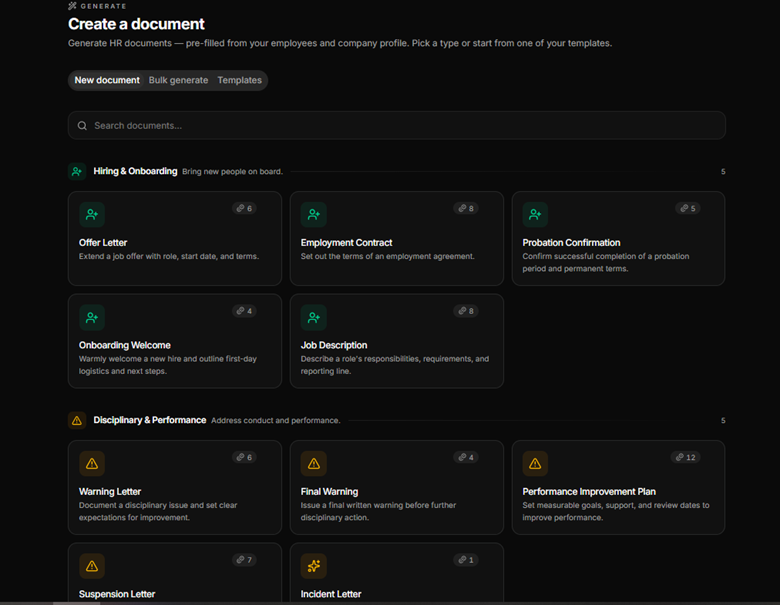
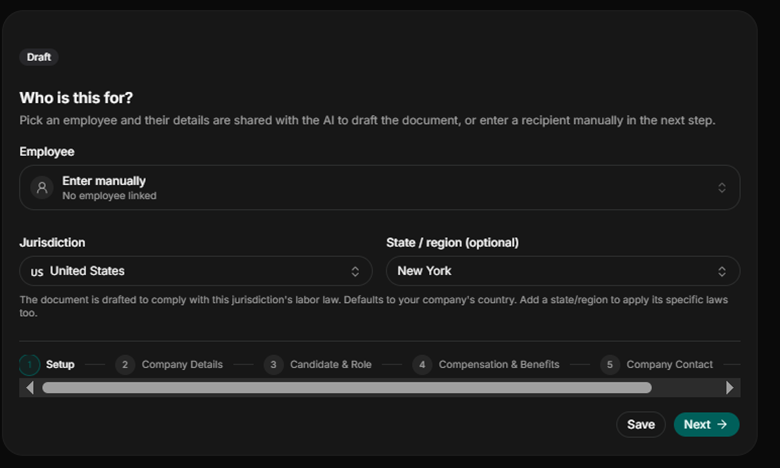
2. Add key details: Employee details and company details can be auto-filled. Enter the specific jurisdiction and other key information.
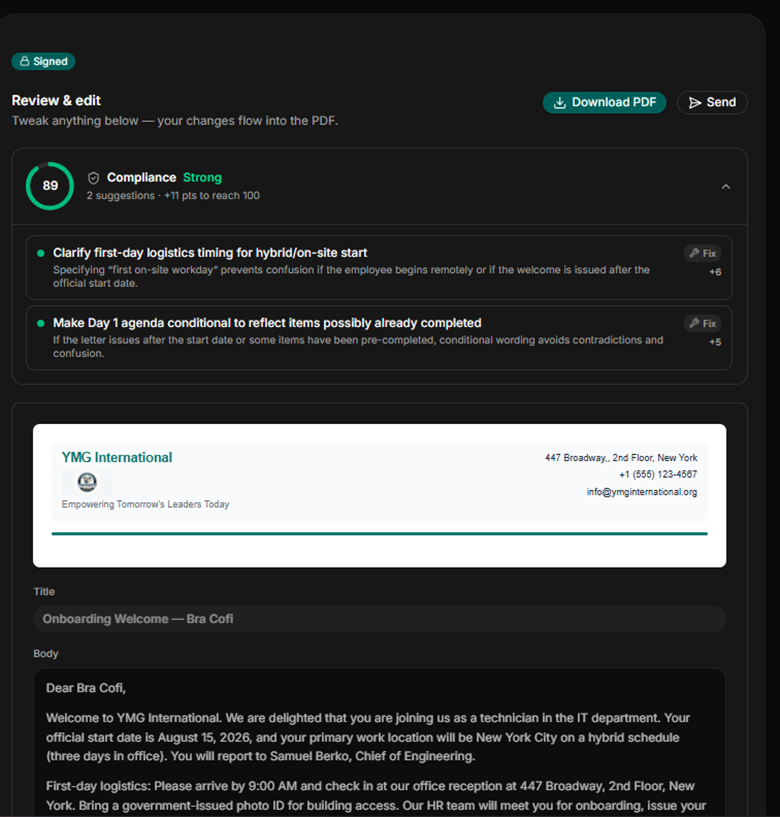
3. Review and customise: Adjust language for the specific situation; on HR-specific tools, an automated check flags missing fields or jurisdiction mismatches.
4. Send, sign and file: The route for e-signature and the completed document attach automatically to the employee’s file. No separate saving or filing step needed. Proactive reminders and alerts handle documents that need further attention or acknowledgement.
How HRDocket automates HR documentation
HRDocket is a modern AI-powered HR documentation platform designed to help businesses generate, manage, organise and store HR documents and employee records throughout the entire employee lifecycle. It automates the entire HR documentation lifecycle by replacing manual paperwork with a centralised digital system.
HRDocket is purpose-built for small and medium-sized businesses, HR teams, non-profit organisations, and professionals who want to automate and standardise HR documentation and operations.
HRDocket offers simple pricing that grows with your team. You can start free without a credit card and upgrade as your workload increases. Pricing starts from $19 per month, and every paid plan includes clean PDF exports, audit-grade e-signatures, and the full document generator.
Annual billing gets two months free. Additional AI credits are available as one-time top-up packs ($9 for 50 credits, $19 for 150, and $49 for 500) on any paid plan valid for 60 days. Compare pricing plans
Pros:
- Purpose-built for HR documentation and employee database management
- Simple, transparent, and affordable pricing
- Free plan with no credit card required
- AI compliance check flags jurisdiction gaps before signature
- Custom document builder for company-specific templates
Cons:
- Does not run payroll
- Free-plan PDFs are watermarked.
Key features of some top HR documentation platforms
| Features | HR-specific templates | Jurisdiction-based drafting | Centralized employee records | E-signature | Starting Price |
| HRDocket | Yes (over 25 templates) | Yes | Yes | Yes | Free / $19 month |
| AirMason | Yes | Yes | Yes | Yes | No transparent pricing |
| Docupilot | Yes | ||||
| PandaDoc | No. Sales-focused templates | No | No | Yes | ~$49+/user/month |
| DocuSign | No | No | No | Yes | ~$40/user/month |
Frequently Asked Questions
What is HR document automation?
HR document automation means generation, signing, and filing of HR paperwork such as offer letters, contracts, handbooks, etc. using reusable templates and pre-filled employee data instead of manual drafting.
Is HR document automation worth it for a small business?
All businesses, especially small businesses, need document automation systems. Document automation for HR replaces hours of manual document creation with a guided, few-minute workflow while centralising records that would otherwise be scattered across email and folders.
What’s the difference between HR document automation and e-signature software?
Document automation covers the full HR documentation process, from generating documents with employee data to routing them for signature and filing them automatically. E-signature tools like DocuSign only handle the signing step.
Can document automation generate legally compliant contracts?
Automation can draft documents based on a selected jurisdiction and flag missing clauses or gaps, but the business retains responsibility for reviewing.
What HR documents can be automated?
Document automation for HR software can handle almost all documents used during an employment cycle. Common documents include offer letters, employment contracts, job descriptions, employee handbooks, NDAs, warning letters, performance improvement plans, and termination letters.
Is employee data secure in a document automation platform?
Strong HR document automation platforms store records in encrypted, access-controlled workspaces with audit trails. Always review a vendor’s security and privacy documentation before uploading sensitive employee data.
Can employees sign automated documents electronically?
Yes. Most document automation platforms like HRDocket include built-in e-signature tools, so employees can sign offer letters, contracts, and acknowledgements online without printing or scanning.
What is jurisdiction-based document drafting?
It’s a feature that generates document language based on the employee’s selected state or country, so clauses reflect that jurisdiction’s requirements instead of one generic template used everywhere.
What’s the difference between HR-specific and general-purpose document automation?
HR-specific platforms come with employment-law-aware templates and centralised employee records built in. General-purpose tools like PandaDoc or DocuSign handle documents and signatures broadly but require you to build HR templates from scratch.
Can I build custom document templates?
Document automation software for HR like HRDocket features a custom document builder that allows you to create reusable templates that reflect your company’s specific policies and clause language, rather than relying only on generic defaults.
Conclusion
Automating HR documents removes the hassle of repetitive work and frees the HR team to focus on strategic decision-making. With modern platforms like HRDocket, you only need to key in your essentials, and the platform will handle all the weightlifting. All documents generated can be signed and filed with the right employee without printing and scanning.
Compliance features such as an AI compliance checker and jurisdiction-aware drafting ensure that your document meets legal and state requirements without the assistance of an attorney. Streamline your workflow with the right platform.
Every document becomes part of the employee’s permanent record
Spend less time buried in HR paperwork and more time growing your business. Generate documents, organize employee records, and simplify HR operations; all from one place.
No credit card required · Cancel anytime · Set up in under 5 minutes