
One of the headaches as a business owner or HR is missing document deadlines and expirations. Not only is this dangerous but could cost your company huge sum of money, legal battles and authorities pulling here and there.
What is Document Expiration Reminder?
By its purpose, a document expiration reminder is an automatic alert that warns HR before an employee document expires, such as work permit, employment contracts, probation end dates, professional licenses, certifications, work permits and visas, mandatory training, medical certificates, insurance documents and more.
HRDocket is the employee license tracking software that sends reminders 30, 7 and 3 days before expiry by email, in-app and on the employee’s dashboard, and ties each one to the employee and the document, so HR can renew, re-sign and file the replacement in one place.
Why expired employee documents are a real risk
If you run a business in countries with strict employment rules like the United States, United Kingdom or Canada, every document matters. Authorities expect each one to be current and valid at every point in the employee’s time with you.
In fact as an HR, when an employee document expires unnoticed, the business can face fines, lose the right to keep that person working, or fail an audit. The risk is rarely the paperwork itself, it’s that nobody saw the date coming.
Below are few reasons expired employee documentation is a real risk for you as an HR and the business at large:
Legal risk such as right-to-work documents
Risk to US companies:
This is the biggest of all risks for missing document expiration. In the United States the Form I-9 reverification is a crucial requirement for companies and this is not a one time deeds. Companies that hires workers who are temporary in the United states, the employer must reverify their work permits no later than the date it expires. This must be done on the Supplement B of Form I-9.
It’s important to note that re-verification does not apply to US citizens and nationals or permanent residents of the United states who owns a green card (Form I-551).
What does this cause you as the employer? This paperwork violation carry civil penalties of $288 – $2,861 per form. As of writing this post, this is the valid amount for such violations and could be adjusted in future times. Be sure to verify current charges for such violations.
Risk to UK companies:
In the United Kingdom employers must check that every worker has the right to work before they start. For anyone whose permission to work is time-limited, they must check again on or before the date that permission ends. Missing that follow-up check removes the employer’s legal defense and can lead to a civil penalty of up to £60,000 per illegal worker.
What a “statutory excuse” is
In the UK, the law calls your protection a “statutory excuse”. Simply put, if you checked the person’s right to work before they started, and checked again before their permission ran out, you’re protected if something later turns out to be wrong. Miss that second check and you lose that protection, even if the first check was perfect. Find more on the UK’s right to work checklist.
The three ways to check
| Method | Used for |
|---|---|
| Manual document check | Checking original documents in person, then copying and dating them |
| Home Office online check | People with digital immigration status (eVisas), using a share code they give you |
| Digital verification service provider | British and Irish citizens with valid passports, checked through a certified provider |
Note: Biometric residence permits stopped being issued on 31 October 2024, so most non-British and non-Irish workers now prove their status online with a share code.
When follow-up checks are due
| Situation | When to check again |
|---|---|
| Time-limited permission to work | On or before the date the permission ends |
| Pending application, confirmed through the Home Office’s Employer Checking Service | Within 6 months of the date on the Positive Verification Notice |
| Pending in-time application, confirmed by online check | Within 6 months |
| Settled status, or EU Settlement Scheme settled status | No follow-up check needed |
The Employer Checking Service aims to reply within five working days, so leave time before the deadline to use it.
Current laws:
- Under the Border Security, Asylum and Immigration Act 2025, right-to-work rules now also cover people engaged under a worker’s contract, individual sub-contractors, and some online matching services.
- Civil penalties for these groups apply where the work began on or after 2026. Businesses that use contractors or freelancers now need to track their documents too, not just employees.
What happens if you get it wrong
The fines are serious. The Home Office can charge up to £60,000 for each person working illegally, and knowingly employing someone without the right to work can lead to up to five years in prison.
Record keeping
- Keep copies of right-to-work checks for as long as the person works for you, and for two years after they leave, then destroy them securely.
- Every check should be dated, so you can prove when it was done. That’s the evidence for your statutory excuse.
How HRDocket helps with UK companies follow-up checks
- Record the permission end date on the employee’s right-to-work document in HRDocket.
- Add an early reminder at 60 to 90 days, on top of the default 30, 7 and 3 days, to allow time for the worker’s visa application or an Employer Checking Service request.
- Reminders go to HR and to the employee’s dashboard, so the employee knows to start their renewal too.
- Store each check on the employee’s record: the share code result, or the dated document copy. Version history keeps every earlier check, so you can prove each one was done on time.
- Pending applications: when you get a Positive Verification Notice, add it as a document with an expiry date 6 months from the date on the notice. HRDocket then reminds you before the follow-up check is due.
4 ways teams track document expiry, compared
| Method | Automatic alerts | Reminder channels | Linked to employee record | Renew and re-sign in place | Version history | Best for |
|---|---|---|---|---|---|---|
| Spreadsheet | No | None | No | No | No | Very small teams |
| Calendar reminders | Yes | Calendar only | No | No | No | A few documents |
| Standalone reminder tools | Yes | Usually email | Partly | No | Varies | Tracking only |
| HRDocket | Yes | Email, in-app, employee dashboard | Yes | Yes | Yes | HR teams who want tracking and action together |
How HRDocket’s document expiration reminders work
Below, I’m going to walk you through how HRDocket’s document expiration tracking actually works. In case you haven’t signed up for an account yet, please visit the Sign-Up page for your free 7 days Business trial account, No Credit Card required. You have a full business plan access to test and try the feature for 7 days with the options to import or add employees to your database. What makes HRDocket superior over other competitors in the employee license tracking software industry is the fact that every action is tied directly to the employee profile, thus making it a centralized document management platform for employers and HRs. Below is the Step-by-step guide on how to set up expiration reminders in five minutes.
- Sign-in into your account. You would land on a page as shown below if it’s your first time. It’s the onboarding process that allows you to enter your business name, location and your team size.

2. Add your employees, or import them with CSV. You should find a dashboard that looks like below. You have free 10 ai credit for document generation and several other features.
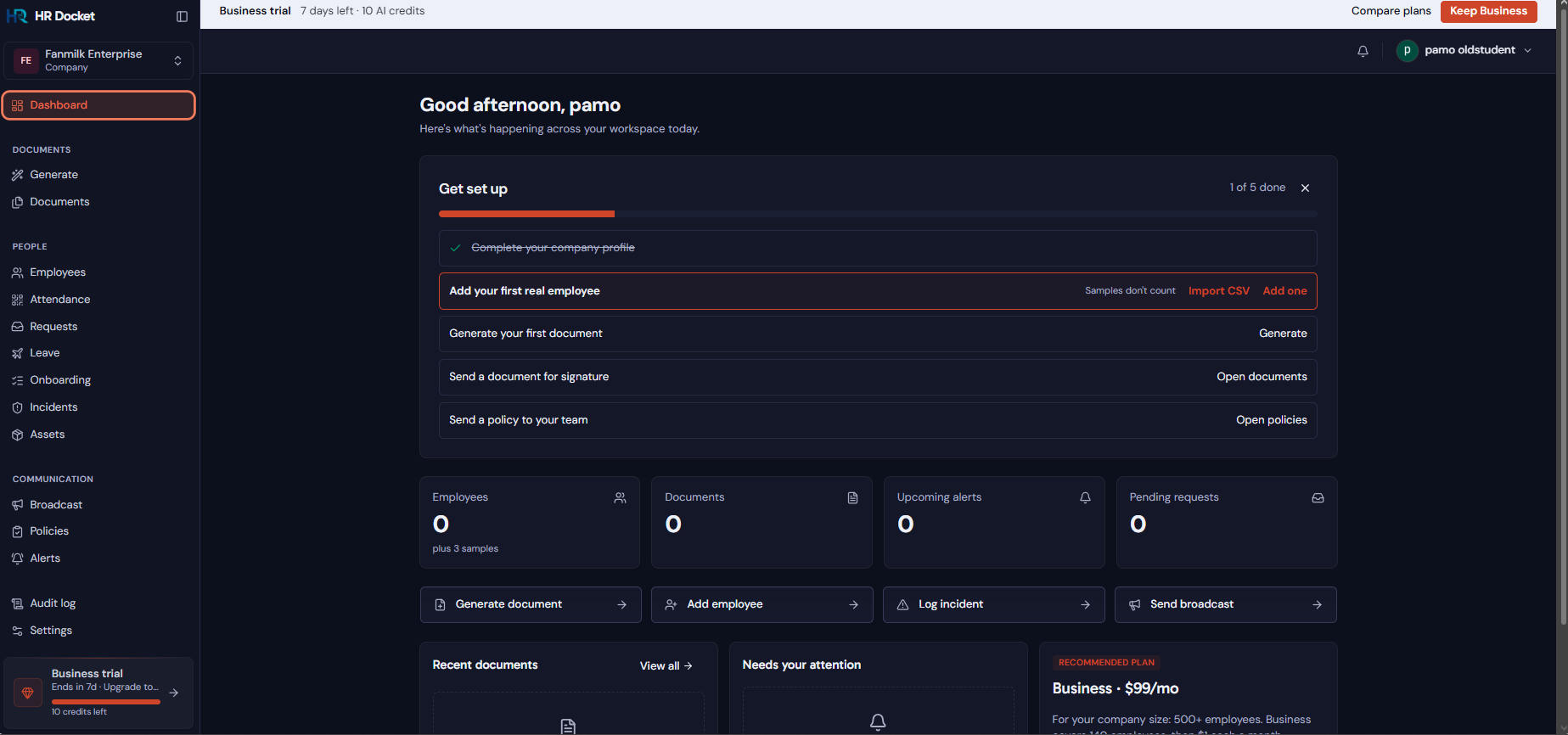
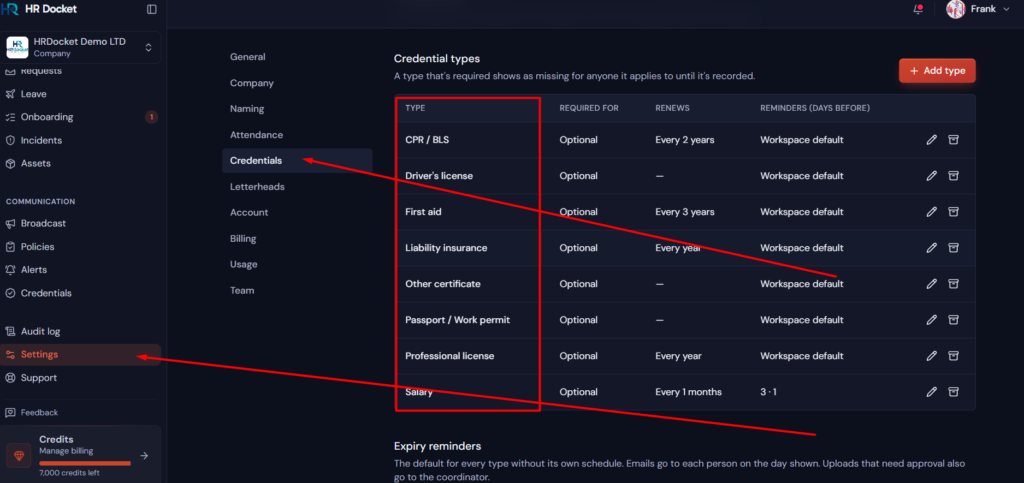
3. Upload existing documents that expire and set each expiry date. Look on your left, scroll down and select settings then Credentials. This allows you to update which document types your organization needs. By default our HRDocket has seven inbuilt credentials to start with and you are free to modify them or add extra document types. Keep the 30/7/3-day defaults, or adjust them per document (see the next section).
4. Edit or add new document type: To add new document, click “add type” and you would see an interface with document name, whether or not it applies to all employees or just specific departments, individuals etc. Turn on the Schedule section and configure who receives alerts for expiration. Those to receive the alerts could be the employees, HR/Coordinator, manager etc. Adjust as it suits you and save. See screenshot below;
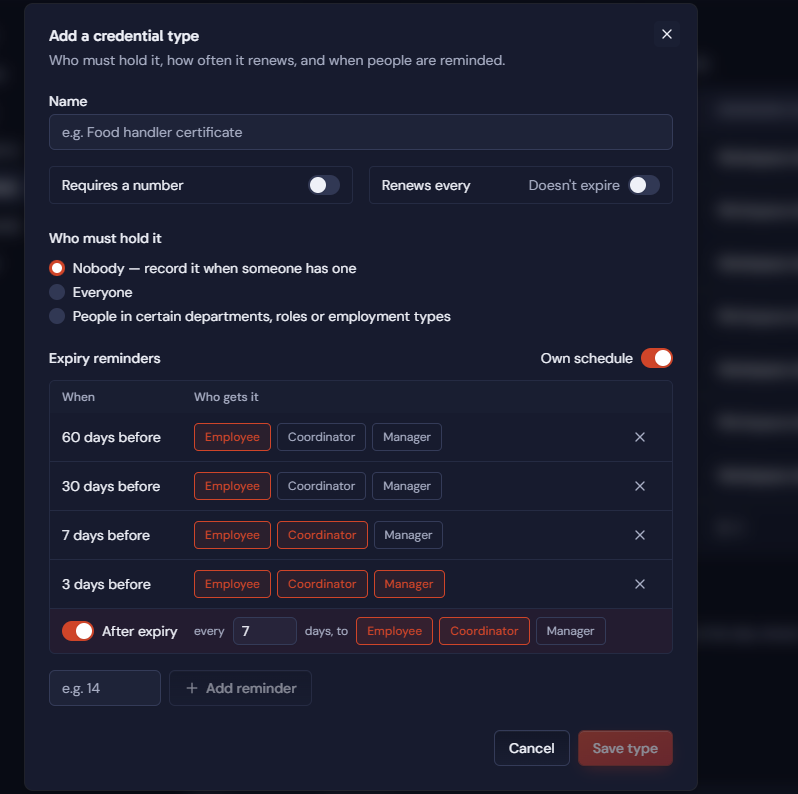
Turn on recurring reminders for documents that renew every year.
5. Check the Upcoming Expirations view: On both dashboard and the alerts menu, you will see documents that has expired, nearing expiration etc base on your reminder configurations.
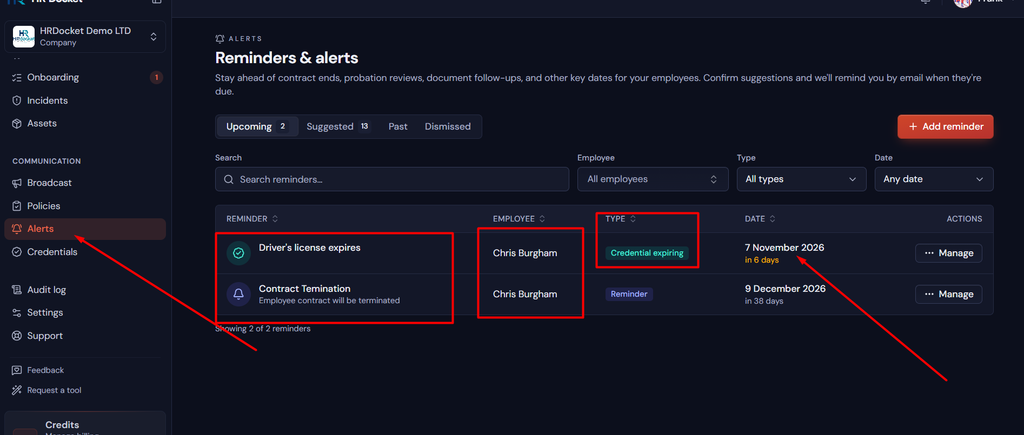
When a reminder arrives, generate the renewal document, send it for e-signature, and file it. You can do that by selecting document and generating a reminder document and send to the employee digitally.
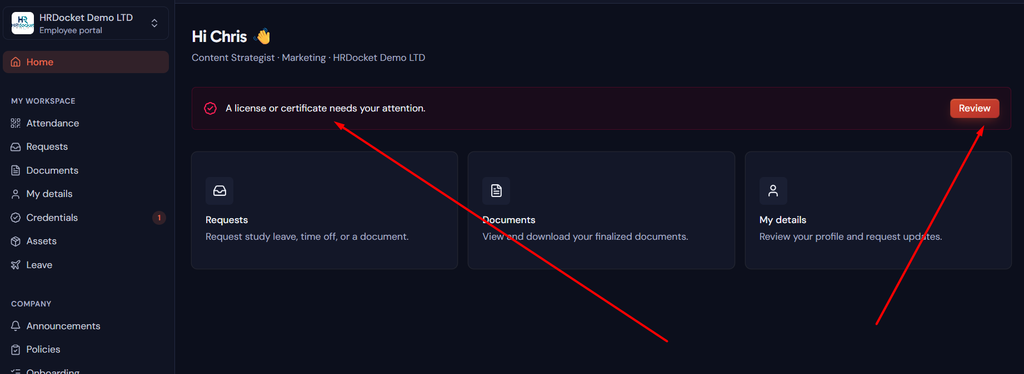
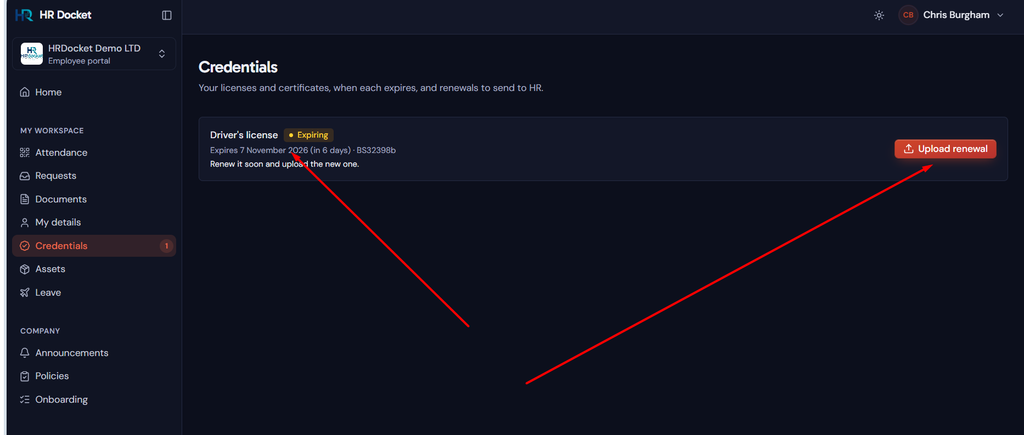
The employee dashboard shows expired documents to the employee as displayed in screenshot below. First it alerts and prompts the employee, then allow the employee to upload new documents as shown in the second screenshot.
What you will get with HRDocket’s Document Reminder;
- Add an expiry date when you generate or upload a document.
- Automatic monitoring across every employee record. Nothing to run manually.
- Three reminders by default: 30, 7 and 3 days before expiry. You can change the timing for each document.
- Reminders arrive in three places: email, in-app notifications for HR, and the employee’s own dashboard, so the employee knows to act too.
- The Upcoming Expirations view shows the next 90 days on one timeline.
- Renew in one step. Upload or generate the new version; the old one is kept in version history, never deleted.
- Recurring reminders (paid plans): documents that renew on a cycle, like annual training, can repeat automatically.
- Employee doesn’t need to send document by email, system by default allow employees to replace or upload document to HR directly.
- Documents are automatically linked to the employee profile.
In my years studying and working in HR counselling, the same problem kept coming up: the paperwork wasn’t missing, nobody was watching the dates. That’s why we built reminders straight into the employee profile.
HRDocket’s reminders are not limited to upcoming alerts only. What makes us unique is that the you can configure “after expiry reminder” until the document is renewed. Example after expiry, every 7 days reminders until the document is renewed. You won’t find this feature on any platform aside HRDocket.
Recommended reminder lead times by document type
Our defaults of 30, 7 and 3 days work for most documents. For documents that take longer to renew, like work permits, add an earlier reminder.
| Document | Suggested first reminder | Why |
|---|---|---|
| Work permit or visa | 90 to 120 days | Renewals can take months |
| Professional license | 60 to 90 days | Applications and fees |
| Safety certification and training | 30 to 60 days | Booking a course takes time |
| Fixed-term contract | 30 to 60 days | Decide whether to renew, extend or end |
| Probation end | 14 to 30 days | Time for the review meeting |
| Medical certificate | 30 days (default) | Appointment lead time |
What happens when a document is renewed
- The new version becomes current; earlier versions are labeled archived or renewed and kept.
- The audit history shows who renewed what and when, which is your evidence for audits and disputes.
HRDocket review: strengths, limits and who it’s for
- Strengths: reminders tied to the employee and document; three channels; sensible defaults you can adjust; renew, generate and sign in one platform; version history.
- Limits: Recurring reminders and attachments aren’t on the Free plan. We don’t have SMS and Whatsapp alerts at the moments. We believe what the notifications strategies avaialable are enough and best suit for corporate businesses.
- Best for: HRdocket is best for small and medium businesses and HR teams without a dedicated compliance tool or department.
- Not for: HRdocket is HR compliance tool and not suitable for tracking non-employee items like vehicles or domains.
Pricing
| Plan | Expiration reminders | Recurring reminders | Attachments on reminders |
|---|---|---|---|
| Free ($0, 3 employees) | ✓ | No | No |
| Starter ($19, 15 employees) | ✓ | 25 active | ✓ |
| Growth ($49, 50 employees) | ✓ | Unlimited | ✓ |
| Business ($99, 140 employees) | ✓ | Unlimited | ✓ |
For full features and all our pricing check here.
- Reminders are unlimited within each plan’s employee limit.
- Annual billing gives 2 months free.
- Every new account starts with a 7-day Business trial, with no credit card.
Frequently asked questions
What is a document expiration reminder?
A document expiration reminder is an automatic alert that warns you before an employee document expires, like a work permit, passport, license or certification, so you can renew it in time.
How far in advance does HRDocket send reminders?
30, 7 and 3 days before expiry by default, and you can change the timing for each document.
How are reminders sent?
By email, in-app, and on the employee’s dashboard.
Can employees see their own expiring documents?
Yes, on their dashboard. They can also upload the renewed document themselves.
Are document expiration reminders free?
Yes, the Free plan includes them for up to 3 employees. Recurring reminders and attachments start on Starter.
Can reminders repeat?
Yes, on paid plans: 25 active on Starter, unlimited on Growth and Business.
What happens to the old document after renewal?
It’s kept in version history, never deleted.
Is a calendar reminder enough?
For a handful of documents, maybe. It isn’t linked to the employee or the document, and it can’t help you renew or re-sign.
Every document becomes part of the employee’s permanent record
Spend less time buried in HR paperwork and more time growing your business. Generate documents, organize employee records, and simplify HR operations; all from one place.
No credit card required · Cancel anytime · Set up in under 5 minutes