Most performance improvement plans (PIP) fail to achieve the intended objective for which they were written. This is because the HR officer or associate drafting the document perhaps feels he is just undertaking another routine task assigned to him by his supervisor to write a document after management has already taken a decision but not write a plan to help a struggling employee. The unfortunate thing is that everyone in the room can tell, including the employer, HR, and eventually a lawyer, that this plan will not achieve any object but a mean to an end.
A Performance Improvement Plan (PIP) is one of the most important tools in workforce management. When written and implemented correctly, it provides an underperforming employee with a clear roadmap to turn things around, but when written or done as another HR task or daily routine and done poorly, it creates ambiguity and frustration and makes an struggling employee even worse.
For a performance improvement plan to stand the test of time and truly support a struggling employee or a team, the PIP must be clear, measurable, objective, and procedurally fair. Below is a complete step-by-step guide on how to build a legally defensible Performance Improvement Plan using the best modern HR platform, HRDocket. The document will be generated within 15 minute using Performance Improvement Plan generator.
How to Write a Solid Performance Improvement Plan
Step 1: Select Jurisdiction and Enter Recipient
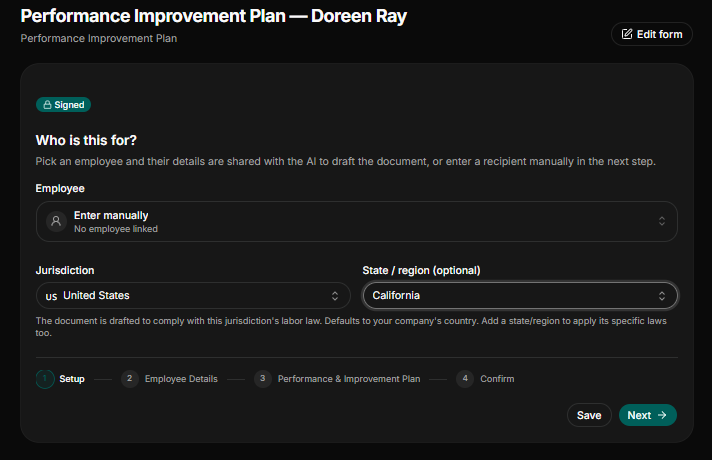
Before drafting a performance improvement plan, select the correct jurisdiction for your employee’s physical location, not your office location. Labor laws and employment standards vary by jurisdiction, state, and region, which makes selecting the right geographical location important.
Select Receiving Employee: Select the employee a from your employee records or database, if he has been added, or if not, select Enter manually.
Assign Jurisdiction and Select State or Region: Select the primary governing country (e.g., United States) and the exact region or state (e.g., California). In our case, the employee Doreen Ray was in California, United States. Selecting the correct jurisdictions and state ensures that document comply with local statutory labor laws and human rights to prevent any future labor disputes.
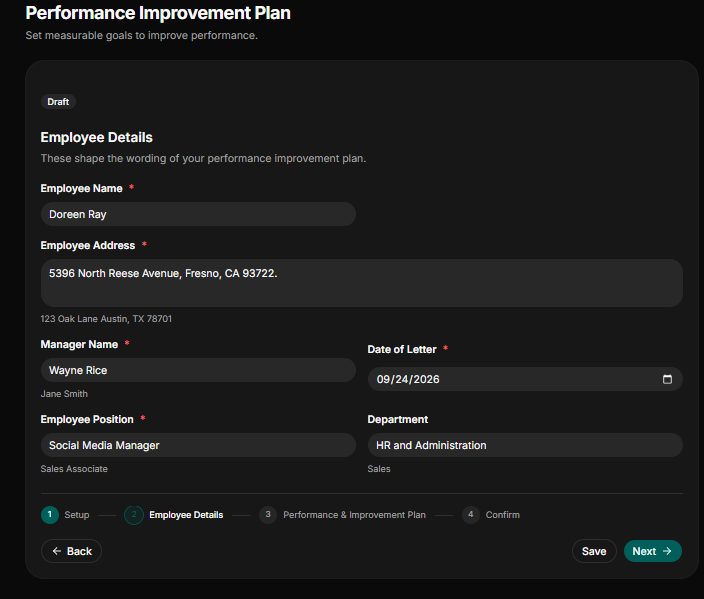
Step 2: Provide Accurate Employee Details
Providing the accurate employee details helps prevent misrepresentation disputes later in the review process. Record all basic employment details completely:
Employee Name: If the employee is already in the databases’ records, you will skip this part, but if you selected “enter manually,” you must provide the employee name as it appears on her government-issued ID (e.g., Doreen Ray).
Employee Address: State the precise physical address of the employee. In our case, the employee lives in California, US (e.g., 5396 North Reese Avenue, Fresno, CA 93722).
Manager Name: State the legal name of the manager the employee will be reporting while following the performance improvement plan. (e.g., Wayne Rice).
Date of Letter: State the exact date the performance improvement plan was prepared and issued to the employee for the record-keeping purpose and audit trail in month-day-year format.
Job Title: State the job title of the employee whom the performance improvement plan is being given to (e.g., social media manager).
Department: State the department the employee works under (e.g., HR and Administration).
Step 3: Define the Performance and Improvement Plan
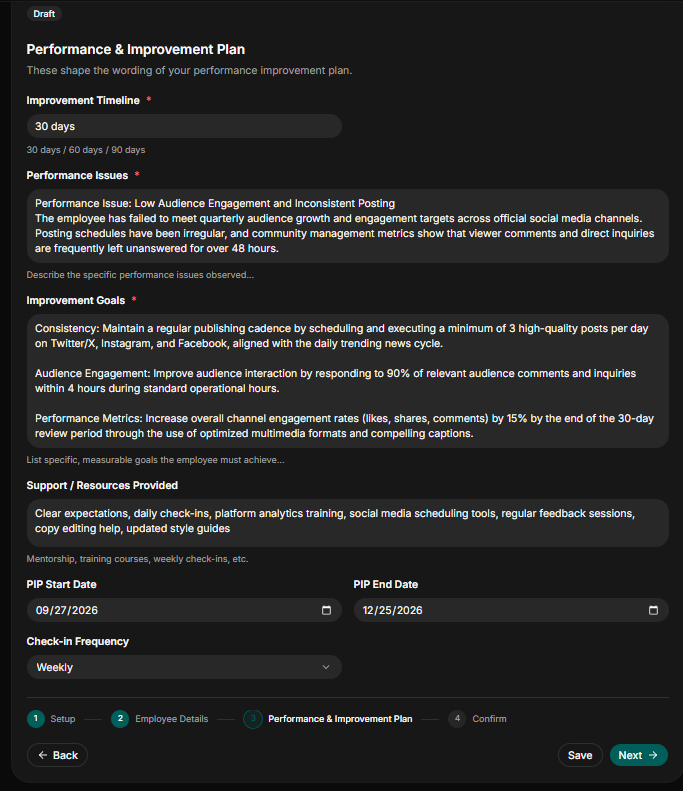
This step is the main reason for writing the performance improvement plan. To make the plan complete, state precisely the timeline of improvement, the performance issue, the improvement goals, and the support the organization is going to provide for the employee to be able to achieve those goals.
Improvement Timeline: State the improvement timeline (e.g., 30 days, 60 days, or 90 days).
State Performance Issues: State clearly and accurately the performance issues that have led to the organization writing a performance improvement plan for the employee (e.g., for our case, the employee is a social media manager, so the performance issue observed is low audience engagement and inconsistent posting).
- Improvement Goals: State clearly and precisely the specific improvement goals you want the employee to achieve within the timeline provided, and they must be achievable, not vague. For our case and the performance issue listed above, the improvement goals are:
- Consistency Cadence: Schedule and execute a minimum of 3 high-quality daily posts across Twitter/X, Instagram, and Facebook aligned with trending news cycles.
- Response Responsiveness: Respond to 90% of relevant audience comments and inquiries within 4 hours during standard operational hours.
- Channel Engagement Growth: Increase overall engagement metrics (likes, shares, and comments) by 15% over the review period using optimized multimedia formats.
Support and Resources Provided: Provide in detail the resources and support the employer is committing to to make sure the employee meets his improvement objectives (e.g., training, daily check-ins, monitoring, and more).
PIP Start Date: Select the PIP start date in month-day-year format.
PIP End Date: Select the PIP end date in month-day-year format. The start date and the end date must align with the improvement timeline.
Check-in Frequency: State clearly the mandatory check-in the employee must follow in order to meet the improvement goals (e.g., weekly check-ins, biweekly check-ins, or monthly check-ins).
Step 5: Review and Confirm
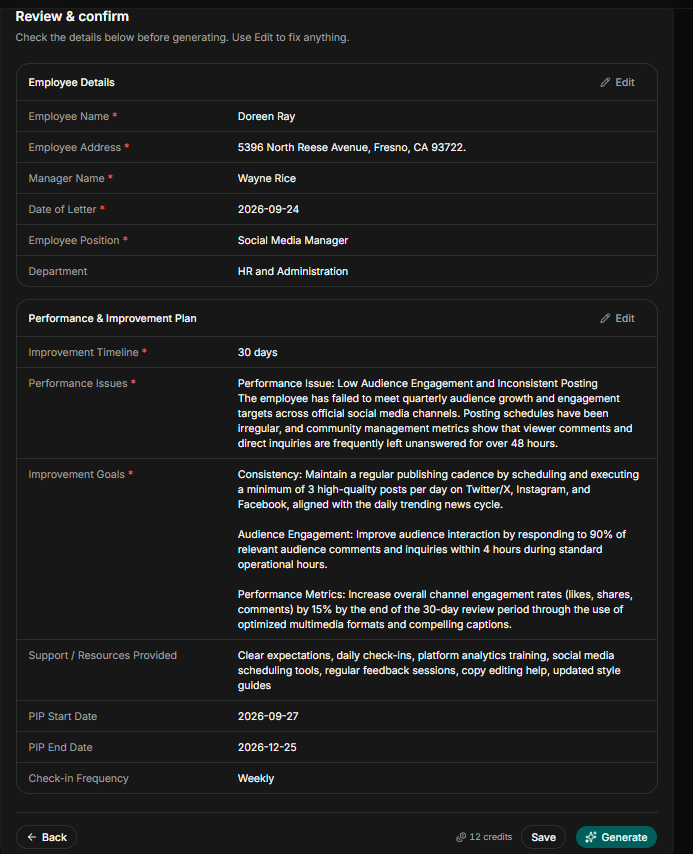
Review to verify that all the information provided, including employee name, address, date of the letter, check-in frequency, improvement goals, and start and end date of PIP, all align and are well structured to meet the performance improvement plan intended objectives.
Once you can confirm that all the details are accurate and precise, generate your draft.
Step 6: Review and Edit
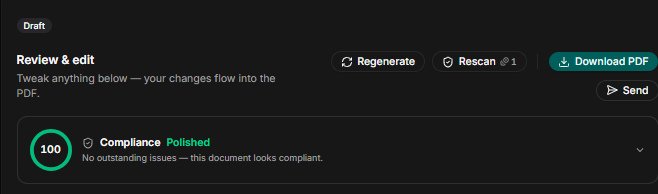
Once you have generated your performance improvement plan, edit again to make sure it legally solid, jurisdiction-specific, and compliant. You can do this by using the rescan function.
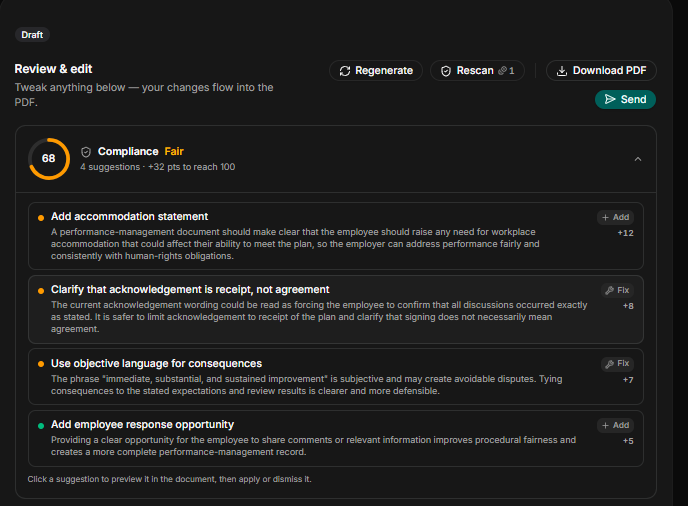
Once you rescan and the document is 100% compliant with no outstanding issues, the final document is ready to send out for digital signature or filed to the employee record.
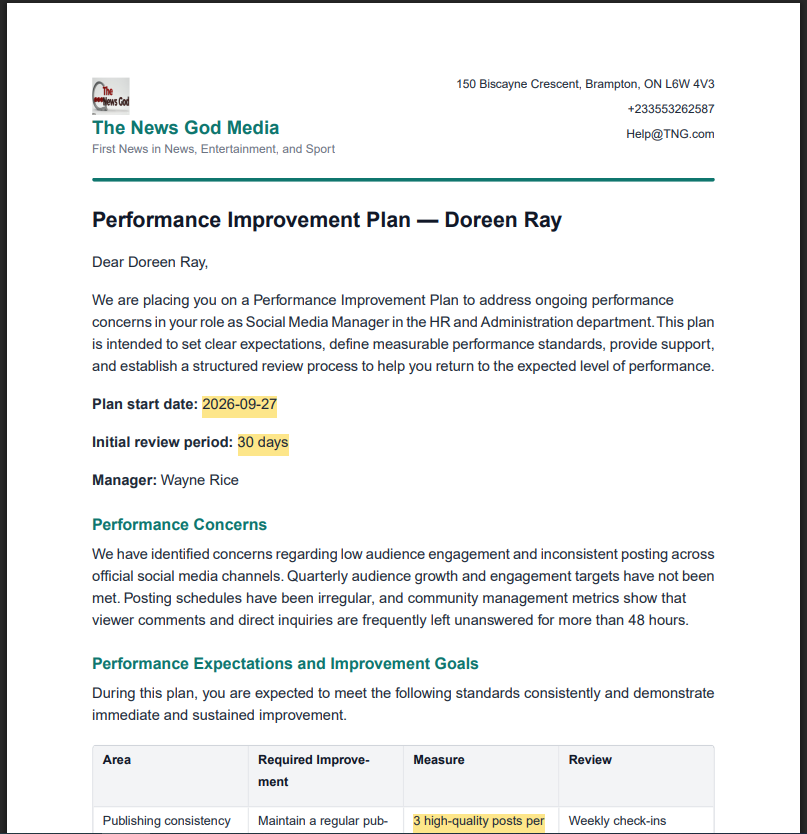
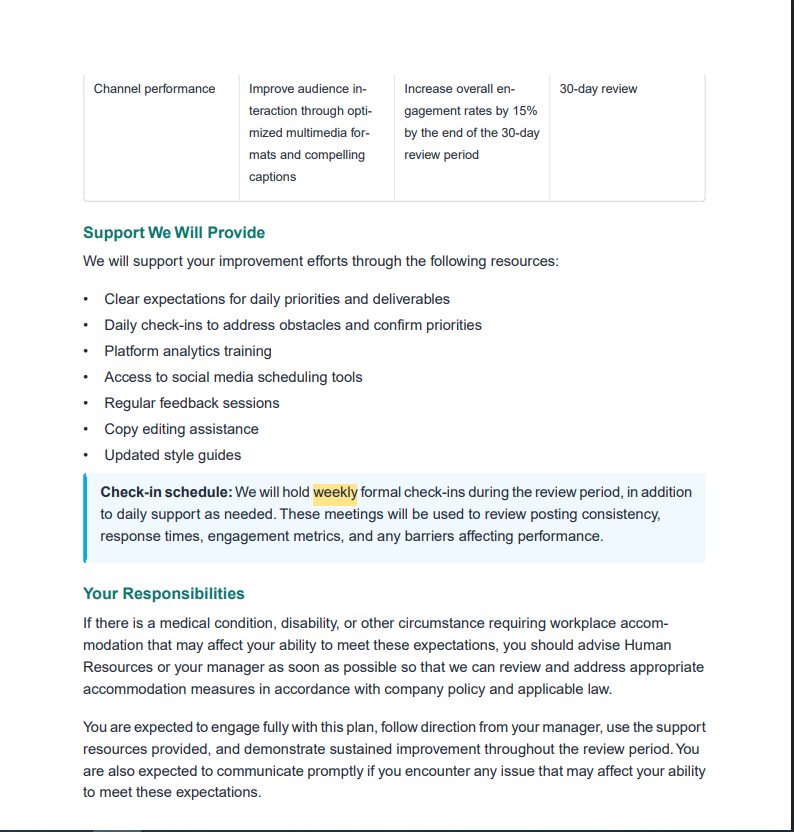
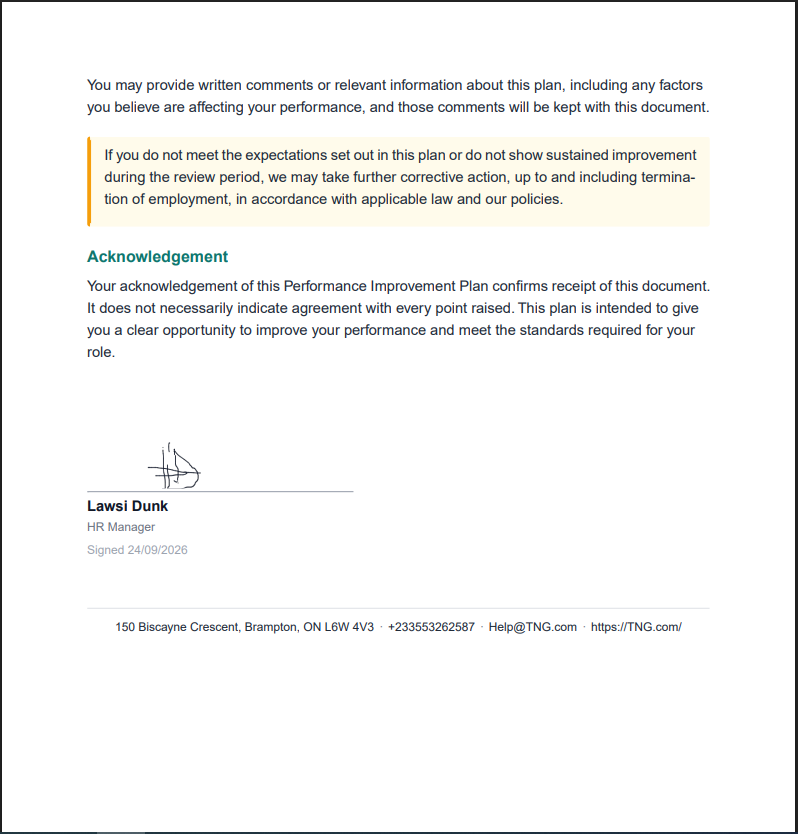
Sample of Performance Improvement Plan
Once you have gone through all the steps and provided all the required details, the right jurisdiction, stated the performance issues, given the improvement timeline, and listed the support and the resources to be provided by the employee. This is how your document generated by HRDocket will look.
Is HRDocket Free?
HRDocket is a freemium AI-powered HR documentation, employee records, and workplace management platform that helps businesses manage employment documentation from hiring to offboarding. Our prices range from $0 to $99 per month. We have four plans, namely: Free Plan, Starter Plan, Growth Plan, and Business Plan.
Pricing
Simple plans that grow with your team
Start free, then upgrade as your HR workload grows. Every paid plan includes clean PDFs, audit-grade e-signatures, and the full document generator.
Free
$0
Freelancers, solo founders, and businesses testing the platform
- Up to 1 employee profile
- Add 1 company
- 10 AI credits (5 HR documents approx.)
- Limited access to tool templates (warning letters, offer letters, contracts, etc.)
- PDF downloads (watermarked)
- Company profile setup
- Jurisdiction-based document drafting
Starter
$19
/mo
$15.83
/mo
Billed annually ($190) · 2 months free
Small businesses and growing teams
- Up to 15 employees
- 120 AI credits (15 HR documents approx.) per month
- Add up to 2 companies
- Full HR document generator access
- Up to 2 custom templates
- Employee database & profiles
- Auto-fill employee data into documents
- Digital signatures
- Signed & unsigned PDF downloads
- Expiration reminders
- Document storage & history
- AI-assisted document drafting
- Email delivery for generated documents
- Custom HR document builder
Most popular
Growth
$49
/mo
$40.83
/mo
Billed annually ($490) · 2 months free
SMEs managing active teams and HR workflows
- Everything in Starter
- Up to 50 employees
- 250 AI credits (32 HR documents approx.) per month
- Up to 5 custom templates
- Add up to 3 companies
- AI compliance & risk assessment checks
- Incident logs
- Asset/property tracking
- Leave management
- CSV employee import
- Document uploads/attachments to employee profiles
- Bulk document generation
- Employee self-service portal
- 15 company-wide message broadcasts per month
- Advanced HR records & operational tools
- 5 distribution & acknowledgement tracking
Business
$99
/mo
$82.50
/mo
Billed annually ($990) · 2 months free
Established companies and HR-focused organizations
- Everything in Growth
- Unlimited employees
- 600 AI credits (75 HR documents approx.) per month
- Up to 7 custom templates
- Add up to 4 companies
- Advanced compliance workflows
- 40 company-wide message broadcasts per month
- Request custom HR document builder tuning
- Ask HR Docket admins for a custom generator tool (1)
- Multi-user management
- Advanced audit logs
- Reusable company templates
- Signature authorization without login
- Unlimited policy distribution & acknowledgement tracking
- Dedicated support
Conclusion
Stop setting up your struggling employees to fail by issuing them a performance improvement plan that is not well written and structured. It is not just a waste of time but makes their performance worse.
Use the HRDocket Performance Improvement Plan generator to generate a jurisdiction-based, legally solid, and well-structured performance improvement plan with 15 minute to help your struggling employee turn things around and save you from paying needless severance fees and future legal challenges.