Hiring a lawyer to draft an employment contract is the best in any situation but this option does not come cheap. Hiring a new employee requires a lot of paper works and fortunately, you don’t need a legal team on retainer to draft a solid legally binding employment contract. In this Era of technological advancement, modern HR software and document builders can handle and draft a solid, enforceable contract with a minute. All that is require is you adopt or choose the right tool and provide the right information.
Here is how to properly draft a solid legal employment contract with hiring the services of a lawyer using HRDocket.
What is an Employment Contract and What Must it Contain?
An employment contract is an agreement between an employer and employee that sets out the terms and conditions of employment including job description salary and compensation, bonus and incentives, and more.
If not all, every employment contract, no the jurisdiction, or the role of the employee should answer and contain the following:
- Who is this for? The employee’s name. address and the employers’ details.
- What is the Job? The job title, department, who the employee reports to, and job decryptions and other duties to be assigned.
- What is the compensation? Salary, working hours, and type of employment (full-time, part-time, fixed-term or at will.
- What are the guardrails? Probation, notice period, benefits and incentives.
- What is the jurisdiction? The state, province, or religion laws that governs the contract.
Drafting an employment contract
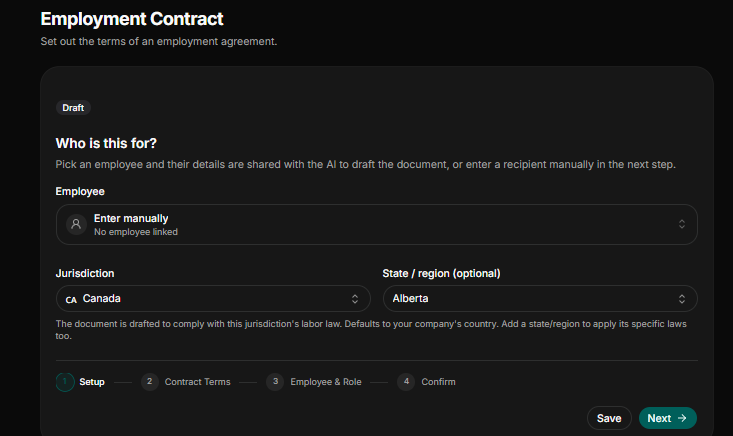
1. Select The Right Jurisdiction
Employment and labor laws varies by country, state, region or province. Minimum wage, statutory holiday pay, mandatory notice periods, and overtime eligibility differs depending on the location.
An employment contract written for an employee in Alberta, Canada does not automatically work for an employee in Ontario, Canada. Select the correct jurisdiction and the state or region. Making sure your contract fellows the local statutes can save you from future non-compliance penalties. Once you have selected the right jurisdiction make sure you pick the employee you drafting contract if he already in the employee records or database if not enter manually.
2. Input Contract Terms
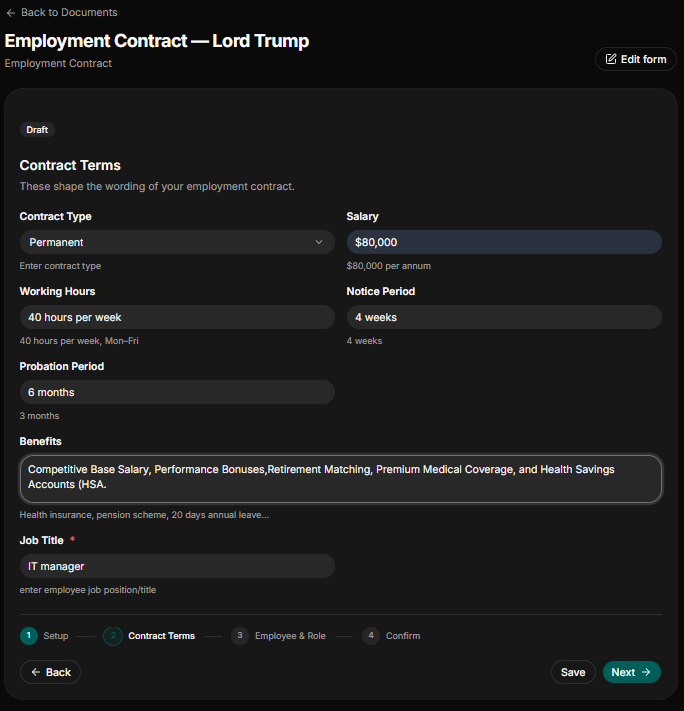
Once you have selected the right jurisdiction, proceed to enter the terms of the role
- Contract Type: Specify whether the is permanent, fixed-term, full-time or part time
- Salary: State the annual bases salary, example $90,000 per annum.
- Working Hours: State clearly the weekly working hours. Example 40 hours per week Monday-Friday. If there any addition working hours, mention that clearly to align with standard local overtime hours.
- Probation Period: Cleary define and state the duration of the probation period and must conform to local labor law. Example 3 month or 6 months’ probation period.
- Benefits: State the benefit the employee will be entitled to. This must be stated clearly without any ambiguity. Mention if the employee is eligible for company health plan, pension contribution, annual leave allocation, the number of vacations, public holidays and more.
3. Fill Employee Details and Role
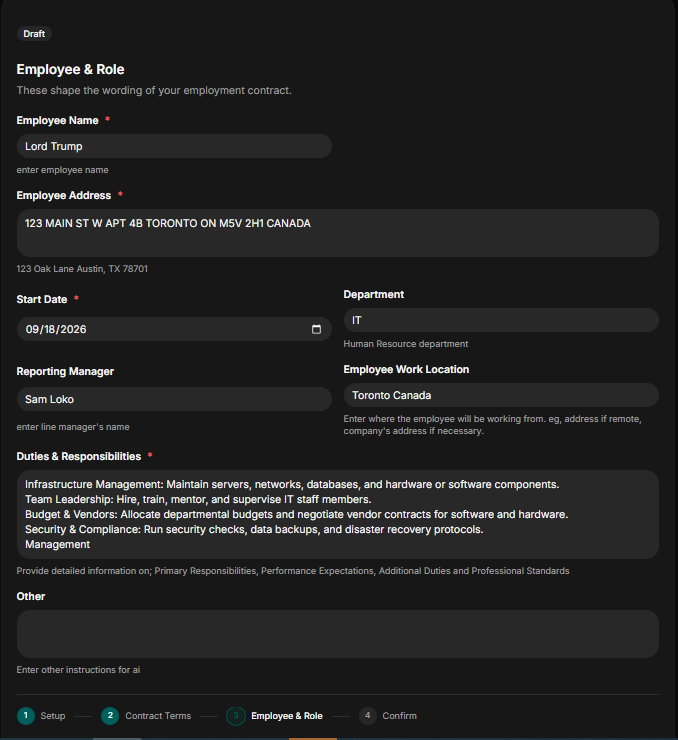
This step is crucial because it maps out who the employee is and what is expected of him when he joins the organization.
- Employee Name: Provide employee full legal name, if the employee is not already in the employee database.
- Employee Address and Start sate: State clearly the employee residential address and official start date. Example of employee address 123 Oak Lane Austin, TX 78701. The start date should be in this format Month/Day/Year.
- Department: Clearly state the department the employee is being assigned. Example Human Resources, Finance and Administration, Operation, sale, and more.
- Reporting Manager: Who is the employee direct supervisor? Clearly date the name of the reporting manger.
- Employee Work Location: Specify if work is conducted on-site at a specific office, hybrid, or remote from home.
- Duties & Responsibilities: Outline 3 to 5 core duties. The duties and responsibilities must clearly state without ambiguity.
- Other: Clearly state if the employee will be assigned to other assignment or anything assigned to him by the reporting manager or supervisor.
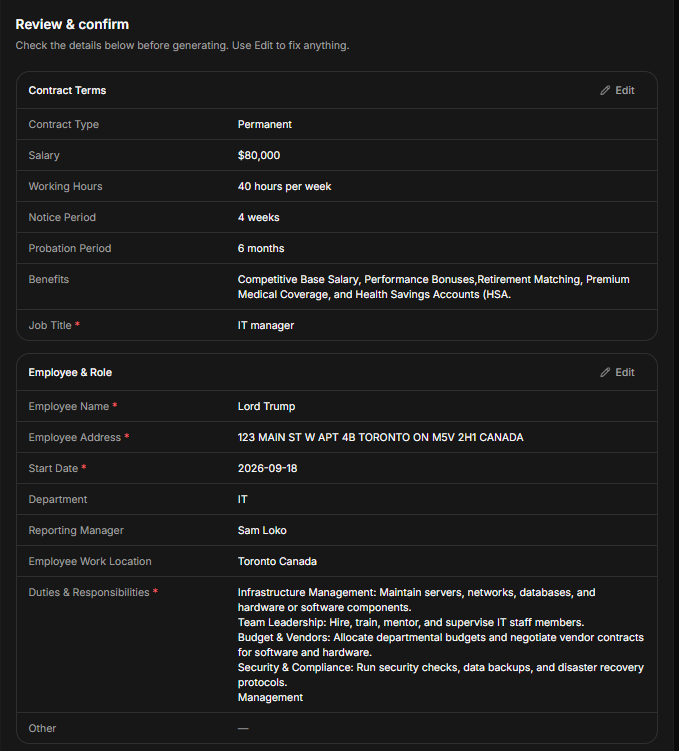
- Review and Confirm
Review and check to confirm that all the information and details provided are accurate including employee name, address, salary, benefits, and core duties. Failure to review these details to check if it matches the right one could lead to future employee dispute.
The minute spent in reviewing the document could save you millions in the future. Once you satisfy with the details provided, you save it and generate the employee contract.
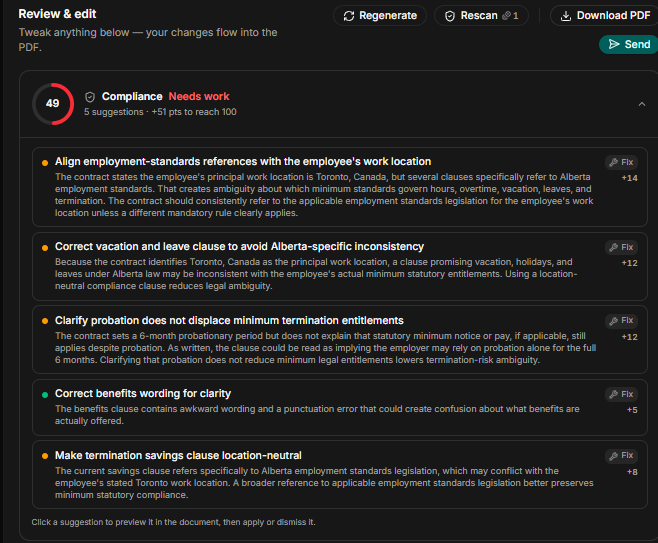
3. Review And Edit
After generating the employee contract, you have to review the final draft and edit to suit your preference. To make it easy, HRDocket has an in bult- risk review, that identify missing fields, unclear clauses, and jurisdiction-specific gaps.
Once all the checks have been done, before your document is ready to go out use the rescan function to check for any compliance and legal gaps. Ater applying the rescan function, the draft is ready to send out for digital signature, or filed to the employee record.
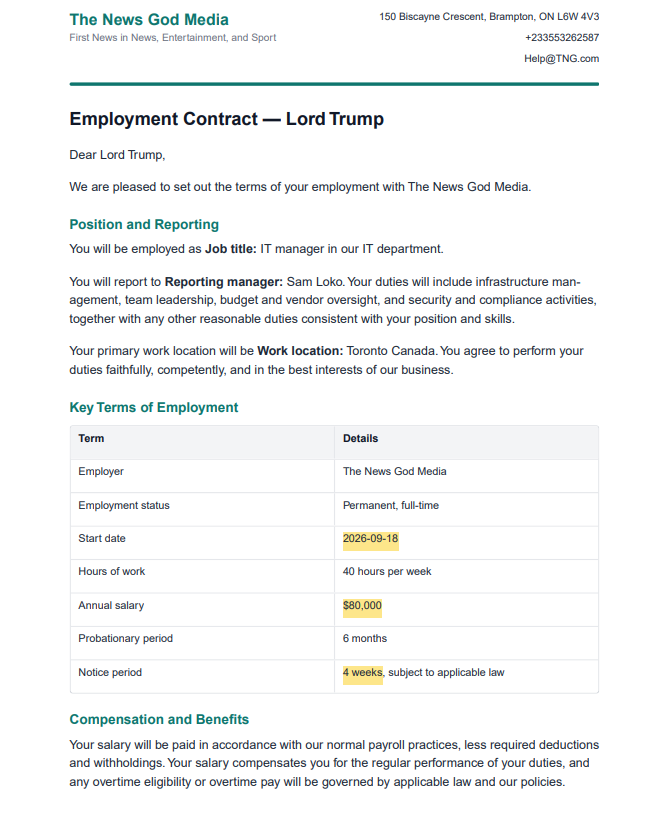
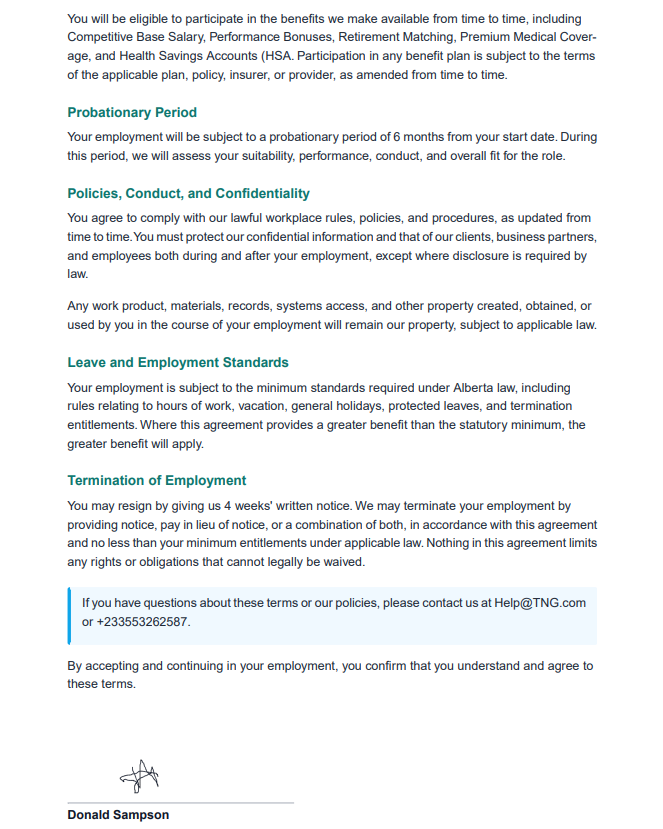
How Does a Generated Employee contract looks like
After gone through all the five steps listed above and confirm and generated the contract, HRDocket produces a fully drafted employment on the review and edit screen. You can:
Edit inline: The editor allows you to manually edit any section directly.
Download PDF: A clean and very formatted PDF is ready to be downloaded and sheared
Send for signature: Routes the contract directly for e-signature without exporting to a separate platform. The signature block at the bottom of the document handles the signing workflow natively.
HRDocket is freemium with four plans: free plan, starter plan, growth plan, and business plan. Below is each plan, price and features:
Pricing
Simple plans that grow with your team
Start free, then upgrade as your HR workload grows. Every paid plan includes clean PDFs, audit-grade e-signatures, and the full document generator.
Free
$0
Freelancers, solo founders, and businesses testing the platform
- Up to 1 employee profile
- Add 1 company
- 10 AI credits (5 HR documents approx.)
- Limited access to tool templates (warning letters, offer letters, contracts, etc.)
- PDF downloads (watermarked)
- Company profile setup
- Jurisdiction-based document drafting
Starter
$19
/mo
$15.83
/mo
Billed annually ($190) · 2 months free
Small businesses and growing teams
- Up to 15 employees
- 120 AI credits (15 HR documents approx.) per month
- Add up to 2 companies
- Full HR document generator access
- Up to 2 custom templates
- Employee database & profiles
- Auto-fill employee data into documents
- Digital signatures
- Signed & unsigned PDF downloads
- Expiration reminders
- Document storage & history
- AI-assisted document drafting
- Email delivery for generated documents
- Custom HR document builder
Most popular
Growth
$49
/mo
$40.83
/mo
Billed annually ($490) · 2 months free
SMEs managing active teams and HR workflows
- Everything in Starter
- Up to 50 employees
- 250 AI credits (32 HR documents approx.) per month
- Up to 5 custom templates
- Add up to 3 companies
- AI compliance & risk assessment checks
- Incident logs
- Asset/property tracking
- Leave management
- CSV employee import
- Document uploads/attachments to employee profiles
- Bulk document generation
- Employee self-service portal
- 15 company-wide message broadcasts per month
- Advanced HR records & operational tools
- 5 distribution & acknowledgement tracking
Business
$99
/mo
$82.50
/mo
Billed annually ($990) · 2 months free
Established companies and HR-focused organizations
- Everything in Growth
- Unlimited employees
- 600 AI credits (75 HR documents approx.) per month
- Up to 7 custom templates
- Add up to 4 companies
- Advanced compliance workflows
- 40 company-wide message broadcasts per month
- Request custom HR document builder tuning
- Ask HR Docket admins for a custom generator tool (1)
- Multi-user management
- Advanced audit logs
- Reusable company templates
- Signature authorization without login
- Unlimited policy distribution & acknowledgement tracking
- Dedicated support
Getting Started
If you have a new employee coming onboarding and you need to get an employee contract without spending more on legal firms and lawyers here is what you need to:
Go to HRDocket’s Employment Contract Generator. Work through the five steps above, select jurisdiction, fill contract terms, provide employee details, and confirm. Review the generated draft, run the risk scan, make any edits, send for signature within less than fifteen minute you have a complete legal compliance employee contract without the service of a lawyer.