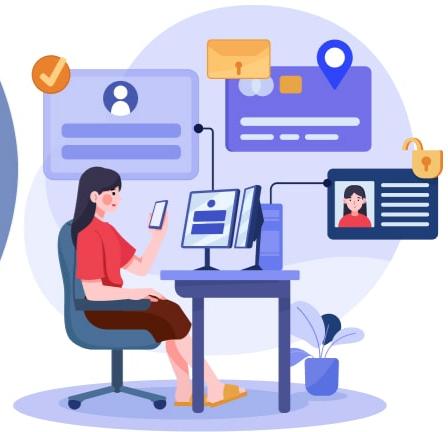
Employees frequently contact the HR department for various needs, such as checking leave balances, requesting documents, and signing forms. Each time this happens, an HR professional has to pause their work and respond to these requests. This can lead HR teams to spend more time on repetitive requests instead of focusing on strategic work.
Paper-based processes only slow requests down. Imagine having to dig through a pile of papers anytime an employee requests a document. An Employee Self-Service (ESS) portal reduces administrative burden on HR teams by moving data management, shift schedules, document signing, and benefits tracking directly to the workforce.
This guide provides a balanced evaluation of the top employee self-service portal software platforms designed to optimize HR operations.
Quick comparison
| Software | Best For | Employee Self-Service | HR Records | Documents | Payroll | Pricing |
| BambooHR | Growing companies needing a full HRIS | Excellent | Excellent | Very good | Add-on | From $10/employee/month |
| Zoho People | Budget-conscious businesses wanting flexible HR software | Excellent | Excellent | Good | Integrations | Free plans for up to 5 users. From $1.25/user/month annually |
| HRDocket | Businesses focused on HR documentation and employee records | Excellent | Excellent | Excellent | Not its focus | From $0; paid plans from $19/month |
| Gusto | Small businesses prioritizing payroll and benefits | Very good | Good | Good | Excellent | From $49/month + $6/person |
| HiBob | Mid-market and global organizations | Excellent | Excellent | Very good | Available | Custom quote |
What is employee self-service portal software?
An employee self-service portal is a secure software platform that allows staff to access, update and interact with HR information and processes independently without needing manual assistance from HR professionals.
Research from Paychex showed that many business organizations spend hundreds of dollars each year and several hours each week to meet the mounting challenges of workforce administration. According to SHRM’s research on HR technology, employee portal software is one of the most reliable ways to reduce the administrative load on HR teams. Modern portal software platforms are commonly used for tasks such as onboarding, training, and benefits enrollment.
They allow employees to view their profiles, update personal information, access HR documents, view leave balances, and acknowledge policies. It also helps new hires to complete onboarding tasks, complete forms, access company policies, and complete employee-related workflows.
How HR self-service software works
Employee self-service systems mostly cover document management, information accessibility, and approval workflow management. They also come in different forms, including web portals, desktop applications, or mobile apps.
Staff members can access HR documents such as employment contracts, bonus letters, salary increase letters, and company policies within a document management system. They can also request information and complete tasks assigned to them without contacting HR directly.
Key benefits of employee self-service software
Strong employee portal software doesn’t just reduce the administrative work of HR teams; it significantly boosts the engagement of HR teams. Businesses that still rely on email threads and shared spreadsheets often miss out on the numerous benefits of employee portal software.
Some of the key benefits of ESS portals include:
- HR teams love employee self-service software because they no longer have to process every request from scratch. These tools allow employees to lay the groundwork themselves and HR teams only have to act on it.
- It standardizes and speeds up administrative processes, freeing HR professionals to focus on strategic work like recruiting, personal development and employee retention.
- Employee HR portals improve data quality since employees update their own details directly instead of routing requests through emails.
- Employees appreciate the convenience and transparency of self-service portals because they shorten communication channels.
- They also signal trust from the employer and support employee loyalty.
Key features to look for in modern employee self-service portal software
Security and compliance: Security is one of the important features HR teams should look for in a strong self-service HR tool for employees. The platform should have key security features like data encryption, audit logs and Role-based access.
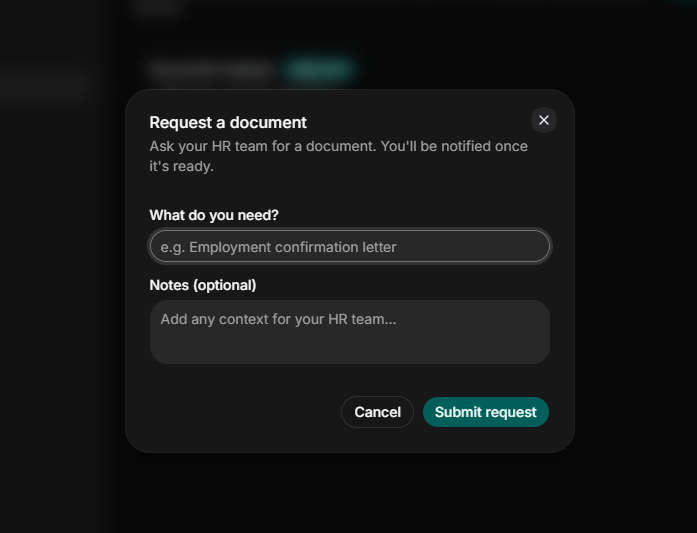
Document access and management: This feature helps HR teams securely share important documents such as contracts, employment records, and other forms with employees. It also allows employees to request documents directly at their comfort zones.
Employee records: Platforms with employee personal information management options allow staff to update contact details, dependents’ information, and bank information with proper approvals.
Digital signatures: Modern HR portals allow employees to sign documents without hitting the printer.
Policy management: HR teams mostly look for platforms that allow them to distribute company policies and track acknowledgements easily.
Automatic alerts and expiration reminders: HR teams should look for platforms that will automatically remind them of upcoming contract expirations, important events and compliance deadlines.
Leave management: A strong platform should be able to assist employees in applying for leave and checking balances with an approval workflow.
Top employee self-service portals this year
We evaluated over ten HR management software platforms with employee self-service capabilities before making this list. During the evaluation process, we discovered that some employee self-service portals are built into a full Human Resource Information System (HRIS), while others are built on payroll engines. But dedicated HR documentation and employee management platforms design employee self-service portals around document generation, central records, e-signatures, and policy acknowledgement.
We made a comparison based on verified user reviews, publicly available vendor pricing, ease of use and scalability.
Some of the best employee self-service portals this year are BambooHR, Zoho People, Gusto, HiBob and HRDocket.
BambooHR’s employee self-service portal
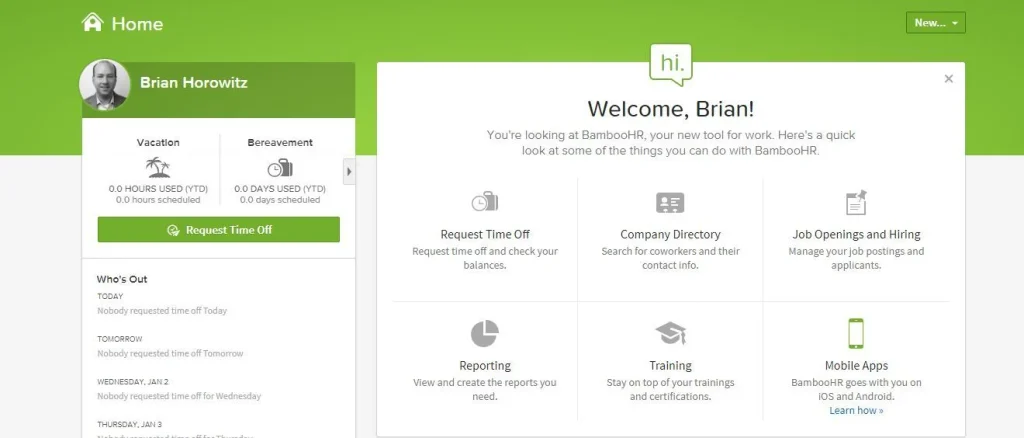
BambooHR is a common name in the human resources universe. It is a full cloud-based HRIS for small and medium businesses with roughly 25 to 500 employees. It is designed to make managing employee records and broader HR processes, including approval workflows, reporting, and performance management, easier.
Its ESS portal centralizes standard HR requests such as paid time off (PTO) tracking, peer directories, performance check-ins, and onboarding checklists.
Best for: BambooHR’s HR portal is most suitable for growing businesses that want a full HRIS with employee records and employee functionality.
Key employee self-service capabilities
- Time off requests and approvals with team calendar visibility.
- Employee information access and digital signatures
- Performance-related workflows
- Employee records and approval workflows
Pros and Cons
Pros
- User-friendly interface: BambooHR makes it easy for non-technical employees to navigate for time-off requests or view information in their portals. Hundreds of G2 reviews appreciate BambooHR’s user-friendly interface and intuitive design.
- Smooth onboarding: Employees can fill out tax documentations, sign handbooks and complete other onboarding documentations before day one. Users praise its ease of use and streamlined interfaces.
- It centralizes employee records, compensation and documents in a searchable employee profile.
Cons
It might be expensive for small and micro-teams: The platform imposes a pricing floor of roughly $250/month for organizations with fewer than 25 employees.
Limited capabilities: Some G2 reviews disclosed that the platform has limited approval hierarchies and reporting flexibility.
User reviews revealed that BambooHR has limited features that hinder functionality and better management and reporting.
Pricing
BambooHR’s pricing starts at $250/month for businesses with 25 employees or fewer. As of September 2026, its pricing is as follows:
- Core: $10 per employee/month
- Pro: $17 per employee/month
- Elite: $25 per employee/month
Zoho People
Zoho People is part of the Zoho ecosystem. It offers attendance tracking, leave management, onboarding workflows and an employee self-service portal for small and growing businesses.
The platform allows employees to access and manage personal information as well as interact with HR processes and services. It also provides attendance, time sheets, and other self-service capabilities.
Best for: Zoho People is best for small and growing businesses looking for flexible HR software with broad HR functionality.
Key features of Zoho People
Affordability: Zoho People is known for its affordability and deep configurability without premium fees. The platform offers a baseline free plan for up to five users.
Transparent pricing: The platform offers transparent pricing tiers rather than a quote-based sales process.
Ease of use: Many users appreciate Zoho People’s ease of use. Hundreds of G2 reviews mentioned the platform’s ease of use in leave management, onboarding and daily HR tasks effectively.
Deep integrations with the Zoho ecosystem.
Pros and Cons
Pros
- Strong payroll functionality
- Simple pricing structure
- Strong benefits administration
Cons
- The platform has a steeper learning curve.
- Advanced features require higher plans.
- Broad functionality makes configuration complex
Pricing
Zoho People offers a free plan for up to 5 users with limited features. Premium tiers are as follows:
- Essential HR: $1.25/user/month
- Professional: $2/user/month
- Premium: $3/user/month
- Enterprise: $4.50/user/month
HRDocket
HRDocket is a modern AI-powered HR management software built around documentation and employment through the employee lifecycle. The platform connects AI-powered document generation, centralized employee records, an employee self-service portal, digital signatures, and core HR functionality in one secure platform.
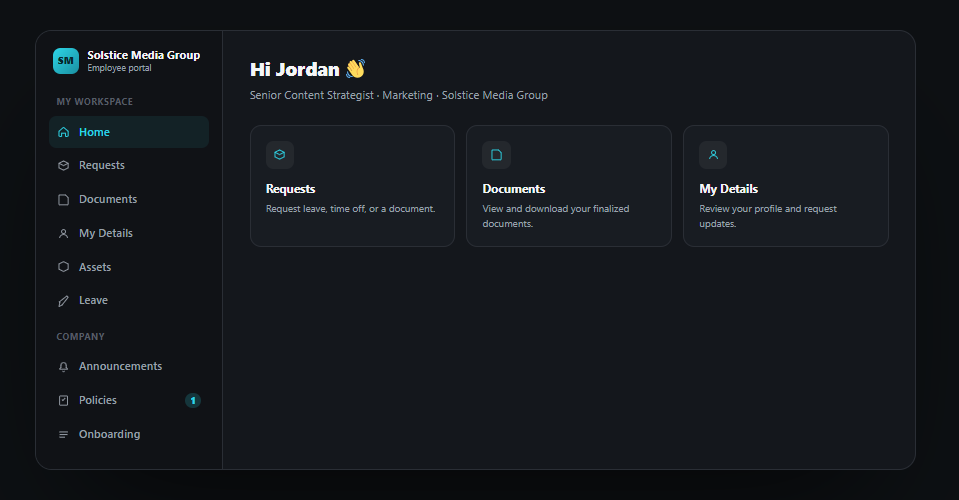
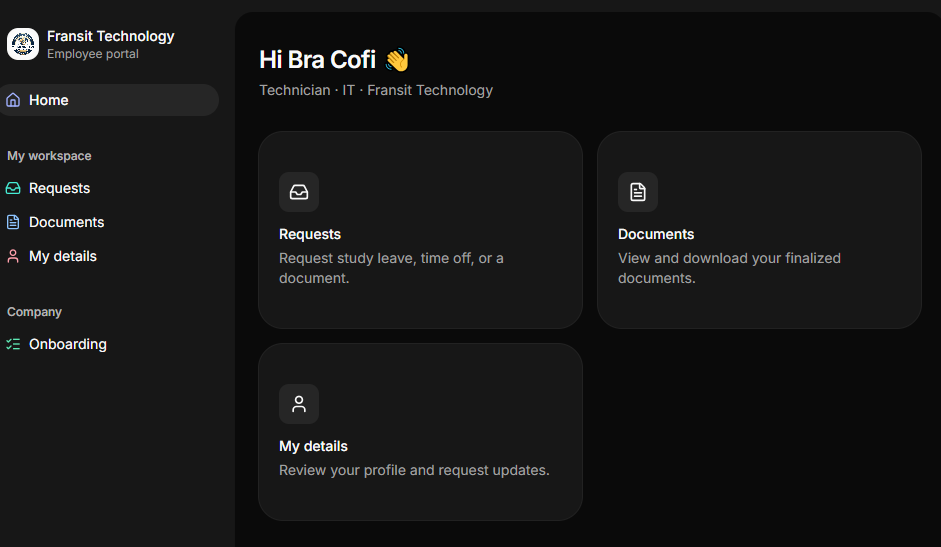
HRDocket’s employee portal serves as a secure workspace where employees can review employment documents, receive company policies, acknowledge updates, access selected employment information, and complete HR requests digitally.
The platform allows HR teams to invite employees into their HR workspace and control exactly which documents, policies, requests, and information each employee can access. It also features an onboarding checklist for new hires, e-signatures, updates on requests, leave management, company asset tracking, and more.
Best for: HRDocket is best for small and growing businesses that need employee self-service software with AI-powered document generation, centralized HR documentation, employee records, digital signatures, policy management and approval workflows.
Key features of HRDocket’s self-service portal
Secured employee workspace: The platform reduces HR inquiries by providing secure access to documents.
Centralized communications: It helps HR teams to manage employee interactions from one secure platform.
Automate document delivery: HRDocket allows human resources professionals to share documents with their teams without manually emailing them.
Digital signatures: It allows employees to sign documents and acknowledge policies without leaving their portal.
Simplify HR operations: Its self-service software reduces repetitive admin tasks while improving service delivery.
It features expiration reminders and alerts for documents and important events.
Pros and Cons
Pros
- It offers a free plan for businesses testing the platform.
- The platform connects every document to the employee’s centralized records
- It offers transparent pricing tiers.
- HRDocket has a standardized AI-powered HR document generation library for over 21 professional HR documents.
- It features jurisdiction-aware drafting and an AI compliance checker that flags missing fields, inconsistencies or risky clauses before the document is sent.
Cons
It lacks payroll and other integrations.
It might not be suitable for large enterprises at that time and for benefits administration. However, it complements HRIS that focuses less on HR documentation.
Pricing
HRDocket offers a free plan. Its current pricing tiers are as follows:
- Starter: $19/month — up to 15 employees
- Growth: $49/month — up to 50 employees
- Business: $99/month — unlimited employees
An annual subscription on any of the plans gives you a two-month free offer. See HRDocket’s detailed pricing.
Gusto
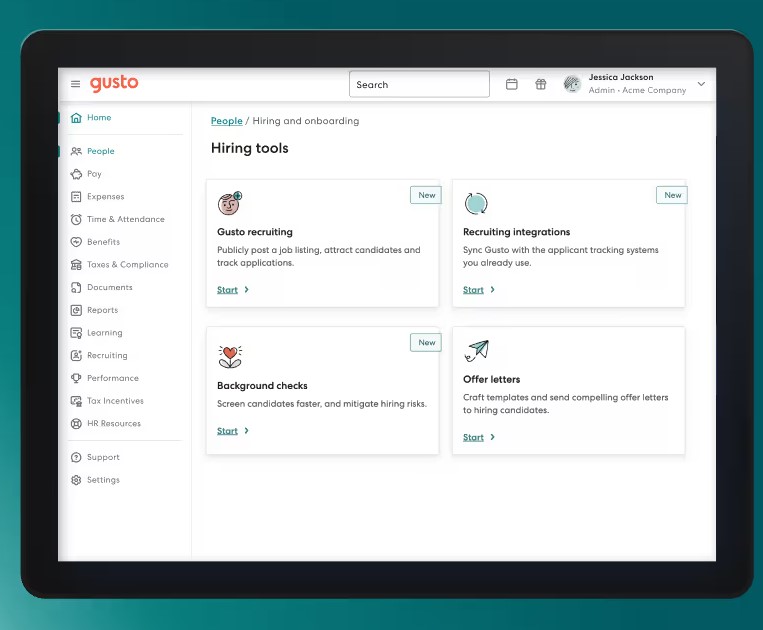
Gusto is an HRIS that combines payroll, benefits, HR, time tracking, and employee-related services.
Its premium tiers include advanced payroll, benefits, HR, and time and attendance management. It also features dedicated HR support, performance and compensation management, custom reports and other capabilities.
Best for: Gusto is particularly attractive to small and growing businesses that want employee self-service portals with payroll, benefits, and time management.
Key features of Gusto
Onboarding and personal data: The platform allows new hires to enter their personal and bank details as well as complete tax forms during digital onboarding.
Benefit management: Gusto allows employees to self-enroll in and manage health insurance and retirement plans.
Attendance and time tracking: Employees can clock in and out, submit timesheets, request paid time off, and check live PTO accruals.
Pros and Cons
Pros
- Gusto offers a transparent flat base fee plus per-employee pricing.
- Its setup is straightforward.
- The platform has excellent payroll functionality.
Cons
- Gusto is known for its user-friendly interfaces, but hundreds of users mentioned its lack of intuitive features like automated expense management and comprehensive reporting options.
- The platform also has poor customer support according to over six hundred user reviews.
- It is less focused on HR documentation.
Pricing
As of September 2026, Gusto’s pricing is listed as
- Simple: $49/month + $6/person
- Plus: $80/month + $12/person
- Premium: $180/month + $22/person
The platform also offers a contract-only plan and a range of optional add-ons, including HR, priority support, performance and attendance.
HiBob
HiBob, also known as Bob, is an HR platform with core HR functionality, payroll, performance, engagement, hiring, compensation, planning and analytics.
Its employee self-service portal covers profile updates, time-off requests, and pay stubs. The platform also features payroll, people-analytics dashboards, recognition tools, and dynamic organizational charts.
Best for: Bob is best suited for growing and medium-sized businesses that want employee experience and workforce management capabilities.
Key features
Personal data management: HiBob allows employees to update their own contract details, personal information and emergency contact information.
Time-off and leave management: The platform helps HR teams to streamline leave requests, track balances, and view the vacation calendar.
Directory and organizational chart: HiBob provides dynamic and visual organizational charts. It also offers a searchable employee directory to view team structures, direct reports and colleague availability.
Pros and Cons
Pros
- User-friendly interface: The platform features an intuitive and social media-style layout that encourages high adoption among employees.
- Centralized information: HiBob allows employees to easily access company directories, update personal information and check time-off balances in one place.
- It has strong people analytics and engagement features.
Cons
- It lacks transparent pricing.
- Its implementation fees are widely reported to be around 10% – 20% of the first-year contract.
- G2 user reviews noted that the platform’s limited customization options make it less suitable for complex organizations.
Pricing
HiBob’s pricing is customized based on your organization’s size, needs and the module you choose. The platform offers core HR functionalities and additional modules, including performance and compensation
Feature by feature comparison
| Self-Service Feature | BambooHR | Zoho People | HRDocket | Gusto | HiBob |
| Employee profiles | Yes | Yes | Yes | Yes | Yes |
| Employee profiles | Yes | Yes | Yes | Yes | Yes |
| Document management | Yes | Yes | Yes | Yes | Yes |
| Expiration alerts and reminders | Yes | Yes | Yes | Limited | Yes |
| Personal info updates | Yes | Yes | Yes | Yes | Yes |
| Document e-signatures | Add-on | Limited | Yes | Limited | Add-on |
| Policy acknowledgment tracking | Yes | Yes | Yes | Limited | Yes |
| Custom HR document builder | Limited | Customization | Yes | Limited | Custom workflows |
| Mobile app | Yes | Yes | Browser-based | Yes | Yes |
| Transparent self-serve pricing | No | Yes | Yes | Yes | No |
| Pay stub / payslip access | Add-on payroll | Add-on payroll | No | Yes | Add-on payroll |
| PTO / time-off requests | Yes | Yes | Roadmap | Yes | Yes |
Which employee self-service portal is best for your business?
The best employee self-service portal software depends on what you want employees to accomplish without HR intervention.
| Platform | Why choose |
|---|---|
| BambooHR | BambooHR is a strong choice for businesses that want employee self-service as part of a broader HRIS. |
| Zoho People | Choose Zoho People if you want an employee self-service HRIS with a wide range of HR features. |
| HRDocket | HRDocket is the best choice for companies that want affordable employee self-service portal with AI-powered document generation, electronic signatures, centralized employee records and compliance management. |
| Gusto | Gusto is best for companies that prioritize payroll and benefits administration |
| HiBob | HiBob is your best choice if you need core HR, employee experience and broader workforce management. |
Frequently Asked Questions
What is employee self-service portal software?
The employee self-service portal is an HR platform that gives employees secure logins to access and manage selected information without requiring manual assistance from HR professionals.
What are the key features of an employee self-service portal?
Strong employee self-service portals should include employee profiles, document access, HR requests, policy acknowledgements and employee information management.
Can employees sign documents from the self-service portal?
Strong ESS portals allow employees to view and electronically sign HR documents directly from their portals and the signed version is automatically filed to the employee profile.
Can employees update their own personal information?
Yes. Some ESS platforms allow employees to update approved personal details but HR professionals retain control over which fields are editable.
Is the employee portal accessible on mobile?
Yes. ESS portals work securely from desktop, tablets and mobile. This makes it accessible to everyone.
Can new hires use ESS portals before their first day?
Yes. HR teams can give new hires ESS portal logins to complete onboarding tasks, policy acknowledgement and initial paperwork.
What can an employee see in the portal?
Employees can only see HR documents, properties, and processes that were assigned to them. Common documents include employment contracts, offer letters, salary letters, policies and other authorized documents.
How much does employee self-service portal software cost?
ESS portal pricing varies across different vendors and modules. While platforms like HRDocket and Zoho People offer free plans with limited features, other vendors offer free trials to test their full capabilities.
Conclusion
An employee self-service portal assists teams to staff to access assigned information and make HR requests without relying on HR professionals for assistance. The best ESS portal depends on the needs of your company.
If you need an employee self-service portal primarily for payroll, choose a payroll-centric platform like Gusto. If your priority is managing a broader employee lifecycle, consider an HRIS like BambooHR. However, if your biggest problem is HR documentation and employee records, HRDocket is your best fit.
Every document becomes part of the employee’s permanent record
Spend less time buried in HR paperwork and more time growing your business. Generate documents, organize employee records, and simplify HR operations; all from one place.
No credit card required · Cancel anytime · Set up in under 5 minutes