Terminating an employee is one of the highest risks an organization or employer can take even if the employee has violated or committed serious offenses. No matter the offense, if the process and procedure from the investigation to the drafting and issuance of the termination letter are not handled properly, it can lead to wrongful termination lawsuits, labor disputes, and legal penalties.
For these reasons, it is important for businesses to streamline their documentation of termination letters properly using modern tools and platforms like HRDocket. Platforms like HRDocket do not only ensure that you input precise details and document checks, but they also make sure your draft is legal and defensible and is based on the labor law of the jurisdiction you find yourself in.
To draft a solid, legally enforceable, and jurisdiction-based termination letter with HRDocket, follow the steps outlined below.
How to Draft a Termination Letter
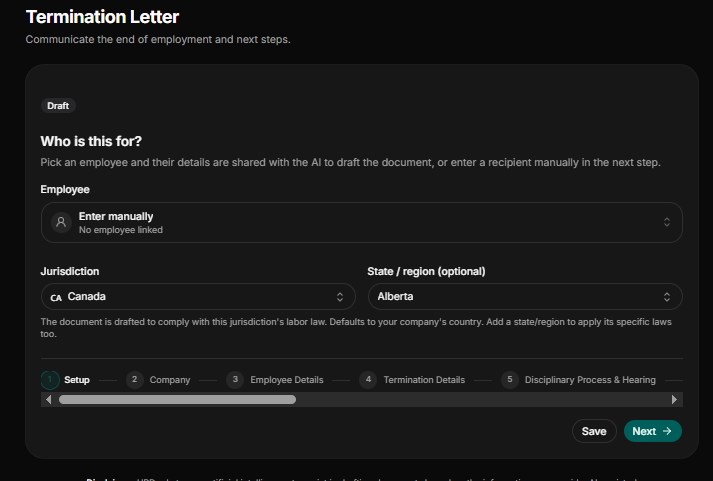
Step 1: Select who the recipient is and the jurisdiction
To begin with, select the employee the termination letter is meant for. If the said employee is already in the employee records or databases, select him (e.g., Larry Drinkwater). If he is not in the database, select “enter manually.”
Once the recipient of the letter is known, select his precise jurisdiction, where he is based. If the employee is a remote worker. Choose the country he has been working from, not the business headquarters or office. After selecting the jurisdiction, select the state or the region within the jurisdiction the employee is located in since labor law and employment law differ from each state and region.
Step 2: Input Precise Company Details
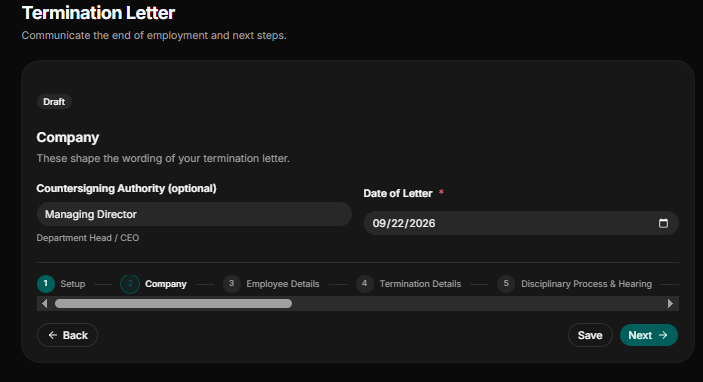
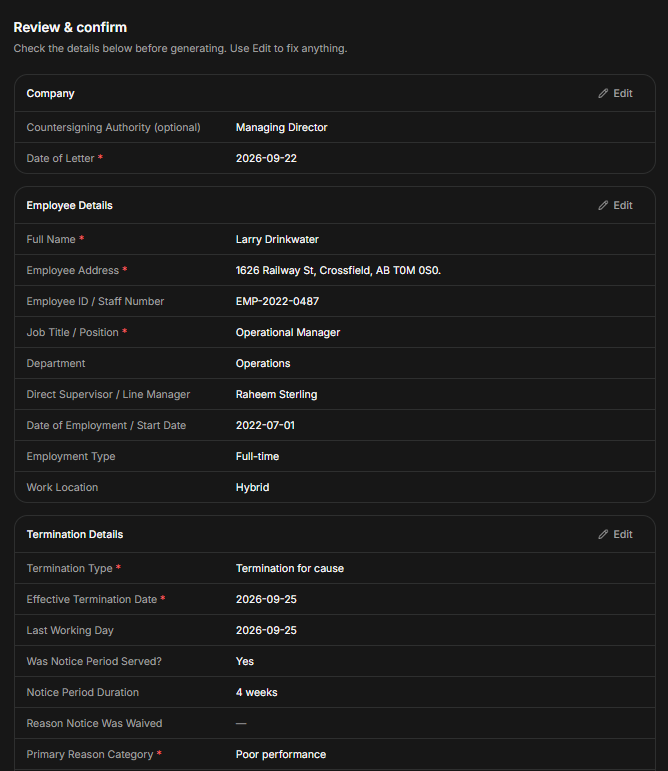
Because this is a termination letter, certain company details, including the countersigning authority, are included. The countersigning employee must be a top management employee, including the chief executive officer. Head of Department or Director. Another important section at this stage is the date of the letter in month-day-year format.
Step 3: Input Correct Employee Details and Position
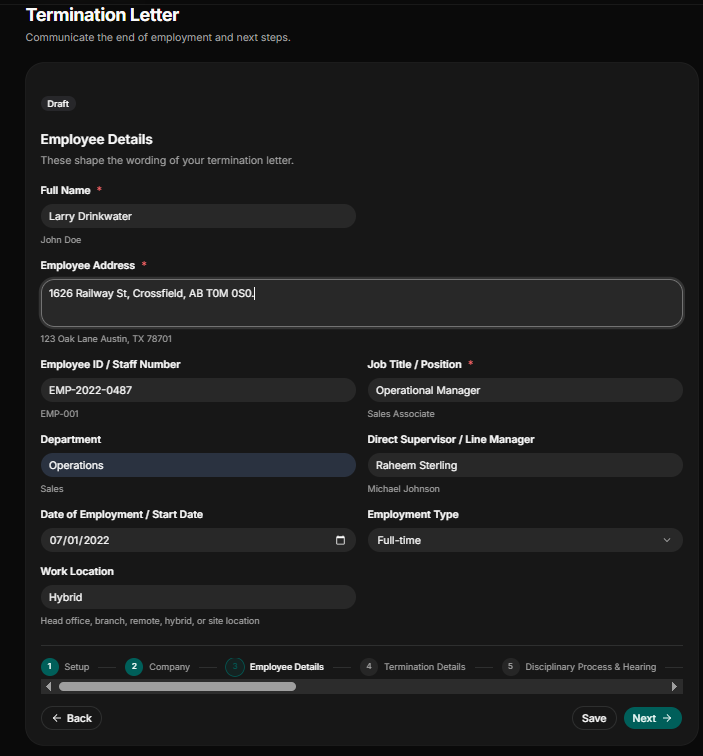
Administrative inconsistencies in employee details can have serious legal repercussions. For this reason, when drafting a termination letter, the correct employee details must be captured. The employee names must be his legally registered names on his government-issued ID.
Full Name of Employee: state the fully registered name of the employee. e.g., Larry Drinkwater.
Employee Address: Input the employee’s residential address. In our case the employee works and stays in Alberta, Canada. e.g., 1626 Railway St, Crossfield, AB T0M 0S0.
Job Title/ Position: the position of the employee must be documented. e.g., operation manager.
Employee ID/Staff Number and Department: State the employee’s ID, e.g., EMP-2022-0487, and his department, e.g., Operations.
Date of Employment/Start Date: Because it is a termination letter, the date the employee resumes work at your business must be started in month-day-year format.
Employment Type: Indicate the type of contract the employee is engaged in. e.g., full-time, part-time, contract, intern, temporary, and consultant.
Work Location: Indicate if the employee is working remotely, in the head office, in a branch, in a hybrid location, or in a site location.
Direct Supervisor/Line Manager: Input the name of the employee’s direct supervisor or line manager.
Step 4: Document Termination Details
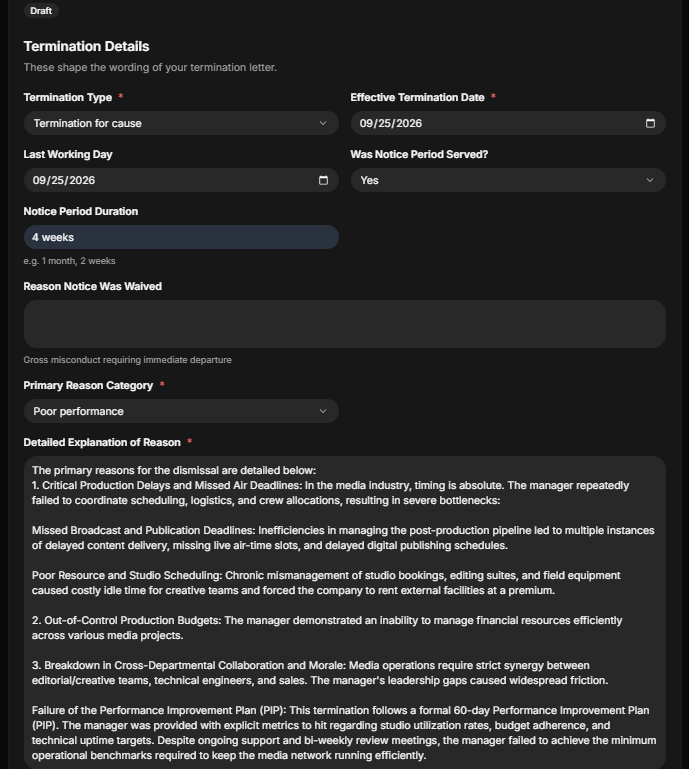
State the specific termination classification, timeline, and reason for the termination.
Termination Type: Indicate the termination type, e.g., termination with cause, termination without cause, redundancy/layoff, end of contract, probation termination, or mutual separation.
Effective Termination Date: State the exact date the termination takes effect in month-day-year format.
Last Working Date: Indicate the employee’s last working day in month-day-year format.
Was Notice Period Served: Indicate “yes” or “no” if a notice period was served to the employee.
Notice Period Duration: State the duration of the notice period. E.g., 1 month, 2 months, or 4 months.
Reason Notice Was Waived: If the employee was not served notice, you must indicate why the notice was waived. E.g., gross misconduct requiring immediate departure.
Primary Reason Category: Indicate the primary season for the termination. E.g., contract, probation failure, incapacity/ill health, absenteeism, resignation accepted, or other.
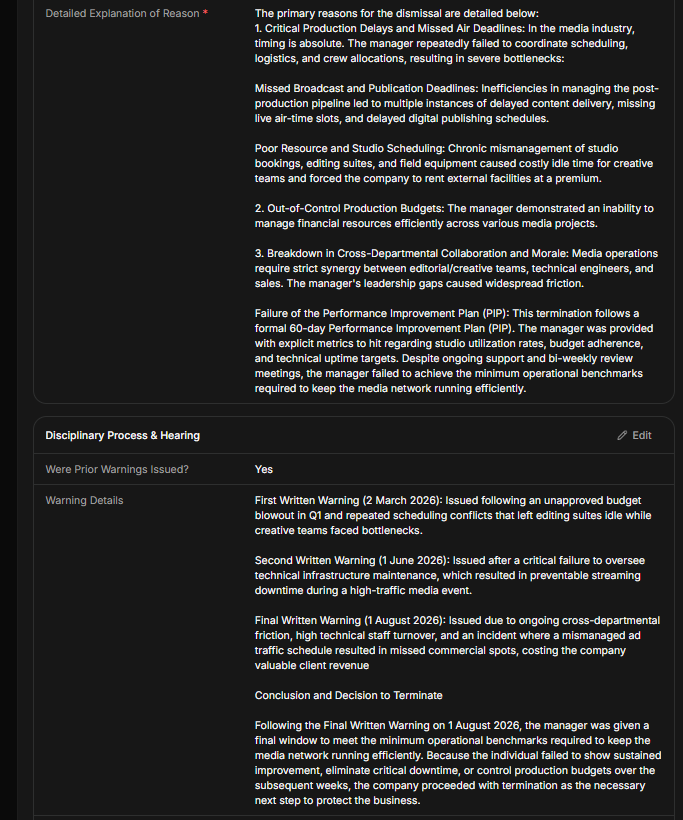
State the detailed explanation of the reason: This is one of the most important sections of the letter. After selection of the primary season for the termination, provide in detail the reason for the cause of the termination. E.g., you must state if the reason was performance-related, violation of company bylaw, or criminal proceedings.
Step 5: Step 4: Document Disciplinary Progression and Hearing Outcomes
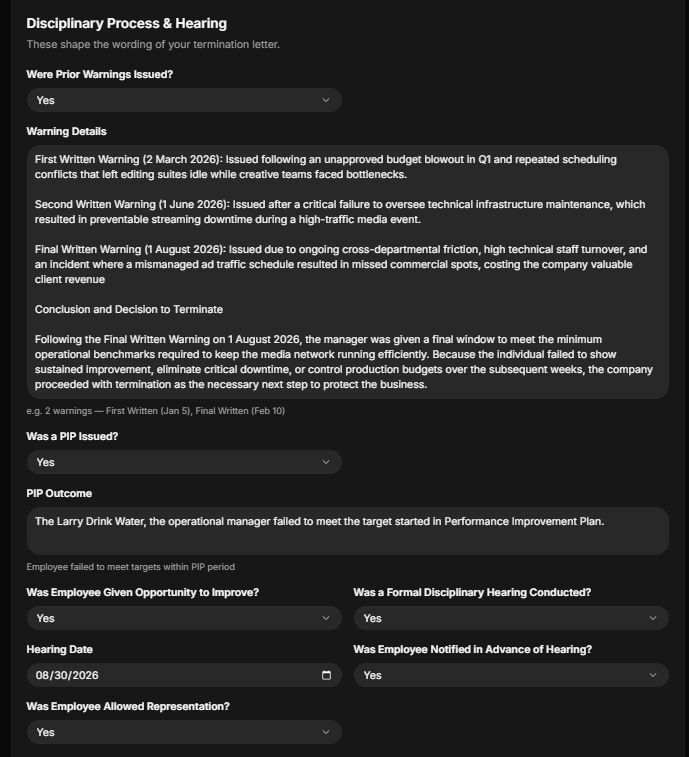
A termination letter that can be defended in court must show that the employee was given a clear warning, support to resolve the issues, and the due process procedure.
Was Prior Warnings Issued: Indicate “yes” or “no” if the employee was issued a warning before the final process started.
Warning Details: Provide accurate details and the timestamp when the warning was issued. E.g., first warning (March, 2026), second warning (June, 2026), and final warning (August, 2026).
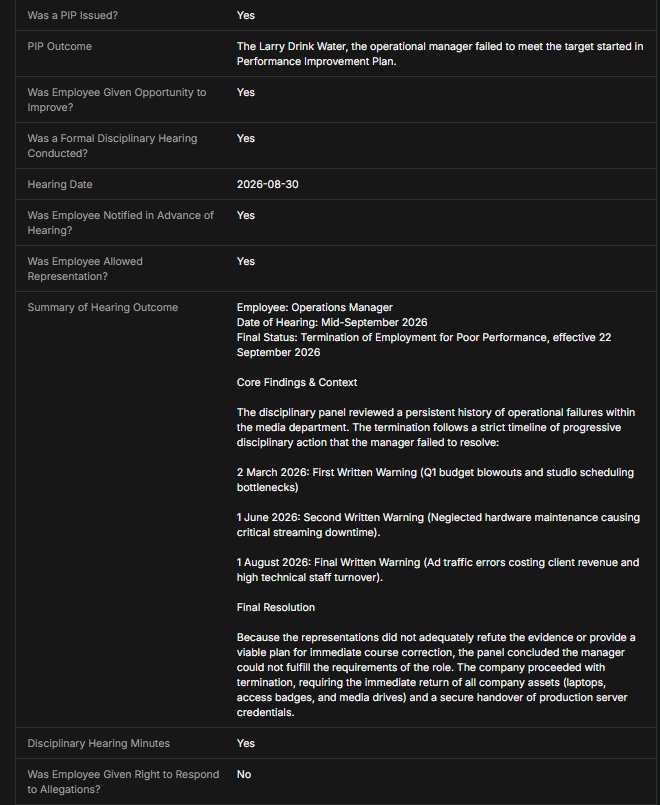
Was a Performance Improvement Plan (PIP) Issued: Indicate “yes” or “no” if a Performance Improvement Plan (PIP) was issued to the employee.
Performance Improvement Plan (PIP) Outcome: State whether the employee was able to meet the target of the PIP issued.
Was Employee Given Opportunity to Improve: Indicate “yes” or “no” if the employee was given an opportunity to improve his performance.
Was a Formal Disciplinary Hearing Conducted? : indicate “yes” or “no” there was a formal disciplinary hearing conducted for the employee to have a fair hearing.
Hearing State: State the hearing date in month-day-year format.
Was Employee Notified in Advance of Hearing: Indicate “yes’ or “no” if the employee was notified in advance before the hearing.
Was Employee Allowed Representation?: Indicate “yes’ or “no” if the employee had a representation at the hearing.
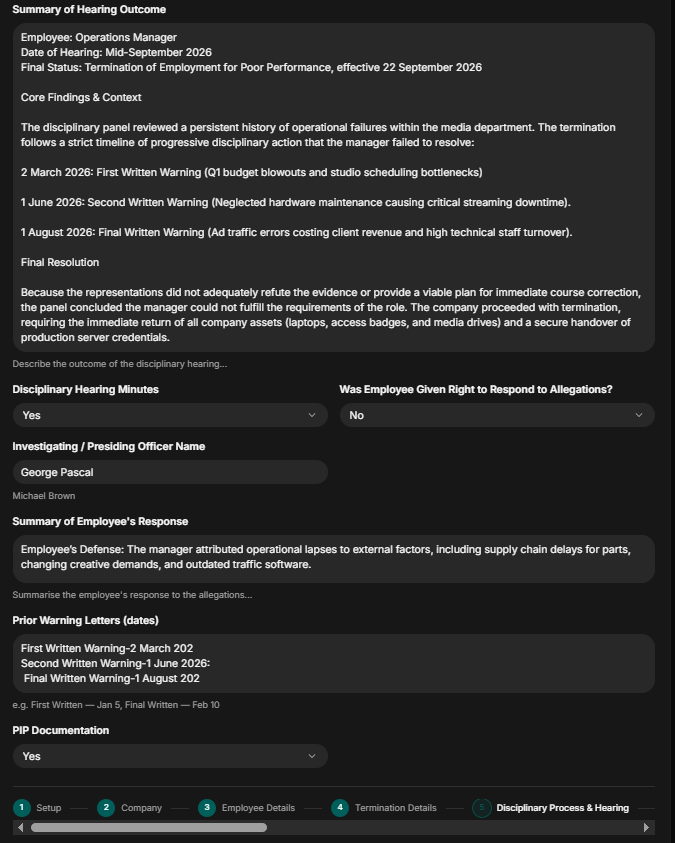
Summary of Hearing Outcome: Provide in detail the summary of the hearing, including what was discussed, who was present, and the final resolution.
Disciplinary Hearing Minutes: Indicate “yes” or “no” whether there was a minute for the disciplinary hearing.
Was the Employee Given the Right to Respond to Allegation: Indicate “yes” or “no” if the employee was given the right to respond to the allegation level against him.
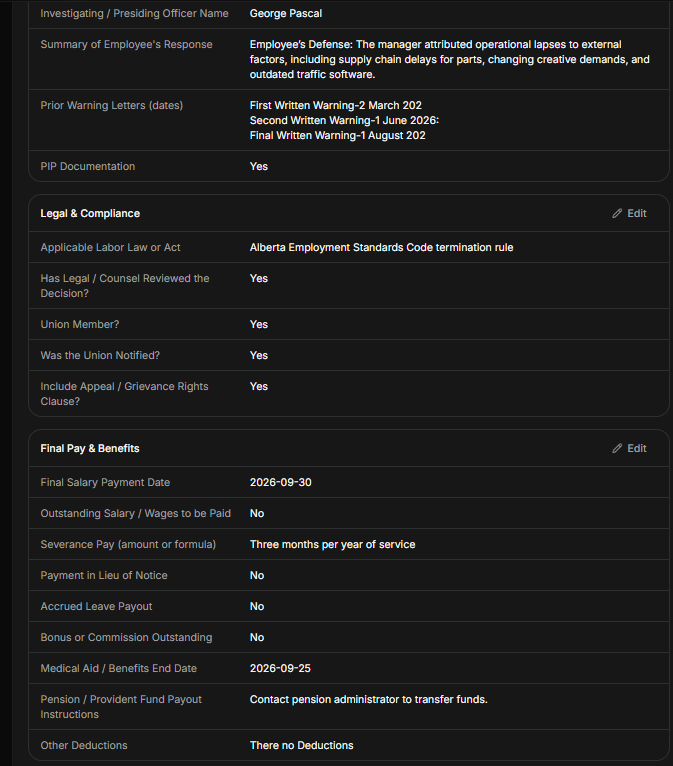
Investigating/Presiding Officer: Name the officer who was in charge of the investigation.
Summary of Employee’s Response: Provide precisely the summary of the responses given by the employee against the allegation level against him.
Prior Warming Letter Date: State the date the employee was issued the warning letter. E.g., first written warning letter—March 3 and final written warning letter—June 2.
PIP Documentation: Indicate “yes” or “no” if the performance improvement plan given to the employee was documented.
Step 6: Indicate Applicable Labor Law or Act
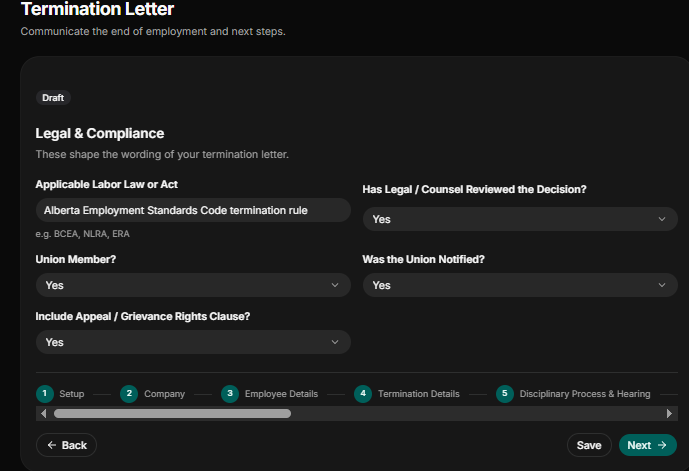
A termination letter that does not conform with the labor laws or act of the jurisdiction the employee is located in can lead to legal and labor disputes.
Applicable labor law or Act: State the applicable labor law or act based on the location or jurisdiction of the employee. e.g., the Alberta employment standard code of termination rule. However, if the job is federal, the labor law of Canada will be applied if the employee lives in Alberta, Canada.
Has legal counsel reviewed the decision? Indicate “yes” or “no” if the final decision was review by a legal expert.
Union Member/Was Union Member Notified?: First, indicate if the employee is a member of a union and if “yes” indicate if the union member was notified of the decision.
Indicate Appeal/Grievance Rights Clause: Indicate “yes” or “no” if the employee has the right to appeal the final decision.
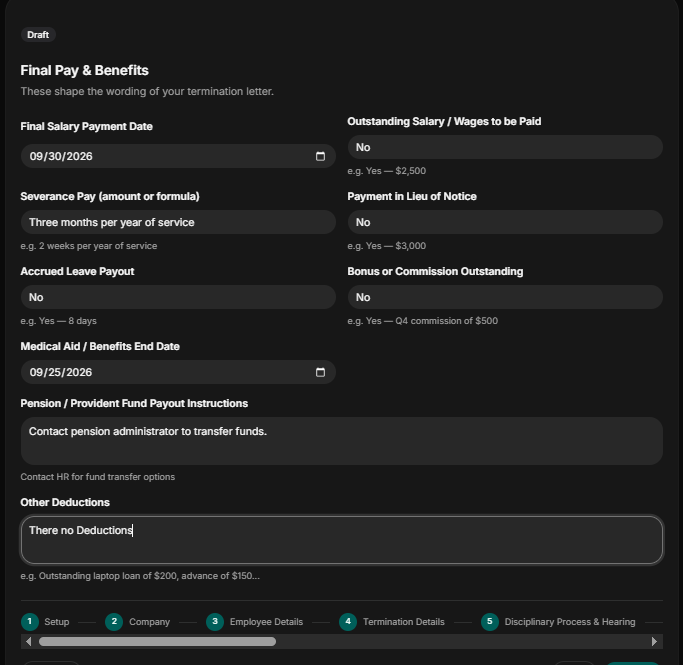
Step 7: Detail Final Pay and BenefitsStep 7: Detail Final Pay and Benefits
Provide the final settlement due to the employee. If the company owns the employee, any outstanding payment indicates.
Final Salary Payment Date: Indicate the date the employee’s final salary will be paid in month-day-year format.
Outstanding Salary/Wages: Indicate “yes” or “no” if the employee owns any wages or salary. If “yes,” state the exact figure. E.g., $3000.
Severance Pay (Amount or formular): State the exact severance pay. E/g three months per year.
Payment in Lieu of Notice: Indicate “yes” or “no” if you have to make payment in lieu of notice. If “yes,” state the exact figure. E.g., $3000.
Accrued Leave Payout: indicate “yes” or “no” if there is any accrued leave payout. If “yes,” state the number of days, e.g., 8 days.
Bonus or Commission Outstanding: Indicate “yes” or “no” if there are any bonuses or commission due the employee. If “yes,” state the quarter and exact figure. E.g., Q4 commission of $500.
Medical Aid/Benefit End Date: State the date the organization will stop medical and benefits to the employee in month-day-year format.
Pension/Provident Fund Payout Instruction: Leave instruction on how the employee will get his provident or pension fund payout.
Other Deduction: State if there will be any deduction on the final settlement due to the employee E.g., an outstanding laptop loan of $600 or a loan advance of $800.
Step 8: Company Property and Asset Return
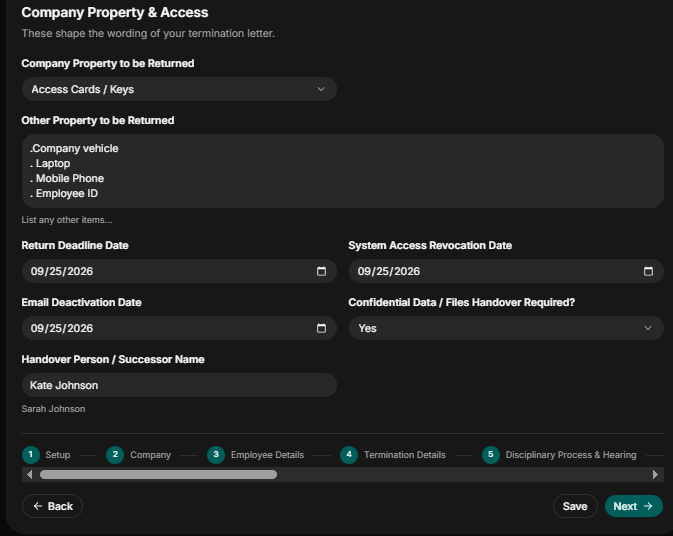
At this section, provide and indicate precisely the company property or asset in the employee’s possession that needs to be returned and the revocation of access to company systems.
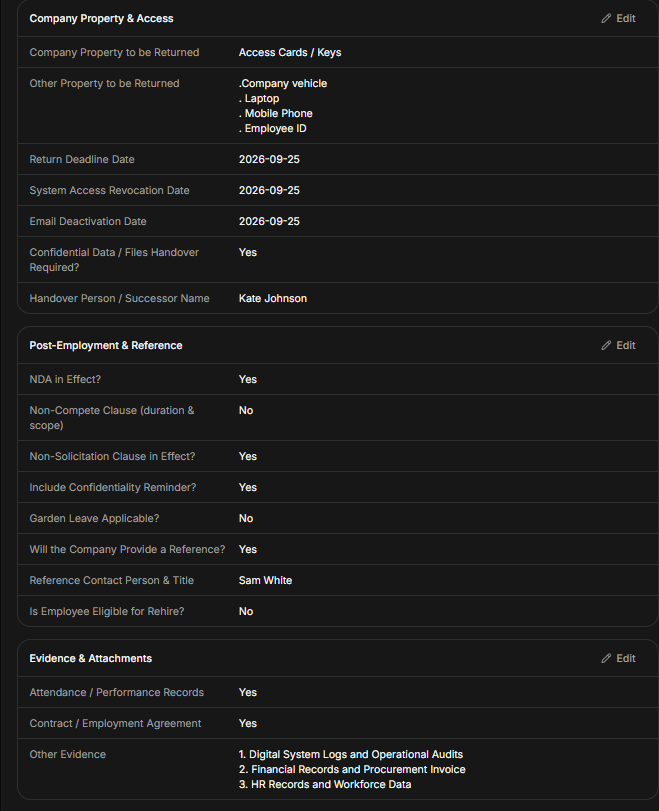
Company Property to Be Returned: Indicate the company property in the employee’s possession that he is supposed to return. E.g., access card/key, laptops, car/vehicle, employee ID, and mobile phone.
Other Property to be Returned: List other properties in the employee’s possession; he is supposed to return them, including the company vehicle, laptop, and mobile phone.
Return Deadline Date: State the return deadline date the employee is supposed to return the property or asset in his possession.
System Access Revocation: State the date the employee accesses to company system will be revoked in month-day-year format.
Email Deactivation Date: State the date the employee’s company email will be deactivated in month-day-year format.
Confidential Data/File Handover Required?: Indicate “yes” or “no” if confidential files are to be handed over.
Handover Person/Successor Names: Name the employee the sacked employee is supposed to hand over to.
Step 9: Indicate Post-Employment Obligations
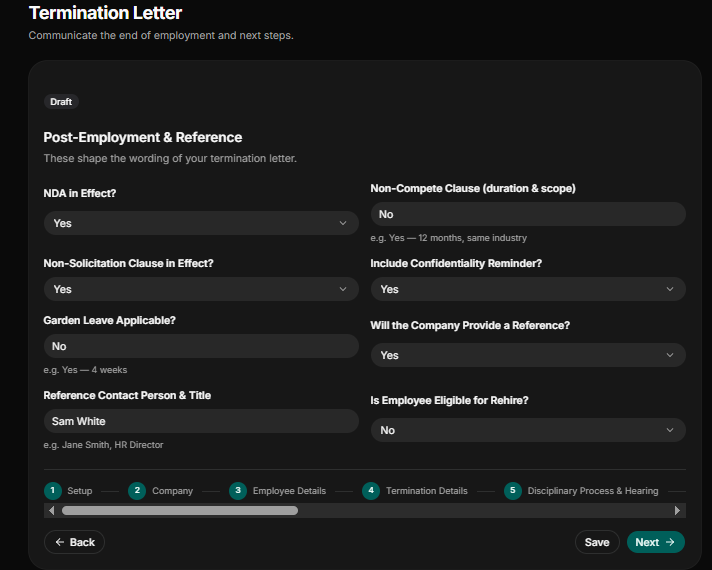
Indicate clearly surviving contractual terms to protect your company’s operations and intellectual property.
Non-Disclosure Agreement (NDA) Effect: Indicate “yes” or “no” if the departing employee is bound by an NDA.
Non-Solicitation in Effect: Indicate “yes” or “no” if the departing employee can contact your customer, staff, or client.
Non-Compete Clause: Indicate “yes” or “no” if the departing employee cannot join a rival company or start a competing business. If yes, state the duration and scope. E.g., 10 months and the same industry.
Include Confidentiality Remainder: Indicate “yes” or “no” if the former employee will be included in the Confidentiality Remainder.
Garden Leave Applicable? : Indicate “yes” or “no” if the departing employee is required to stay away from work during the notice period while receiving full salary and benefits. If “yes,” state the number of weeks. E.g., five weeks.
Will the Company Provide a Reference?: Indicate “yes” or “no” if the departing employee will be provided a reference.
Is the Employee Eligible to Be Rehired?: Indicate “yes” or “no” if the employee being sacked can be rehired by the company.
Reference Contact Person & Title: Provide the name of the reference contact and the position he holds in the company, e.g., Sam White, HR Director.
Step 10: Include Evidence & Attachments
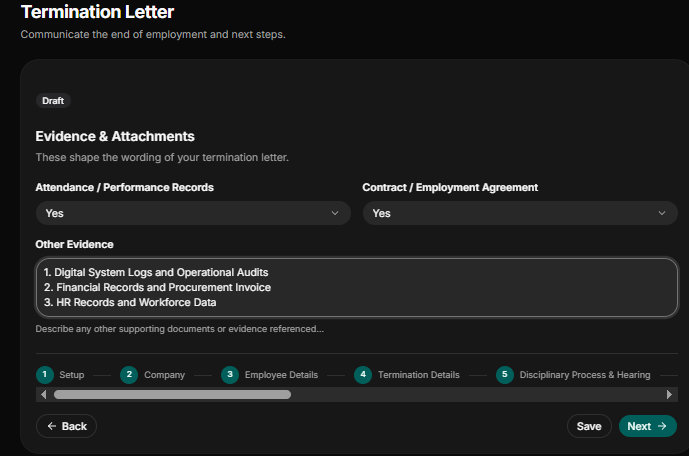
To make your termination letter legally solid, include all evidence and attachments that led to the final decision.
Attendance/Performance: Indicate “yes” or “no” if you attached every evidence and performance record to the letter
Contract/Employee Agreement: Indicate “yes” or “no” if you have included the employee employment contract
Other Evidence: List the other supporting document or evidence used in arriving at the final decision.
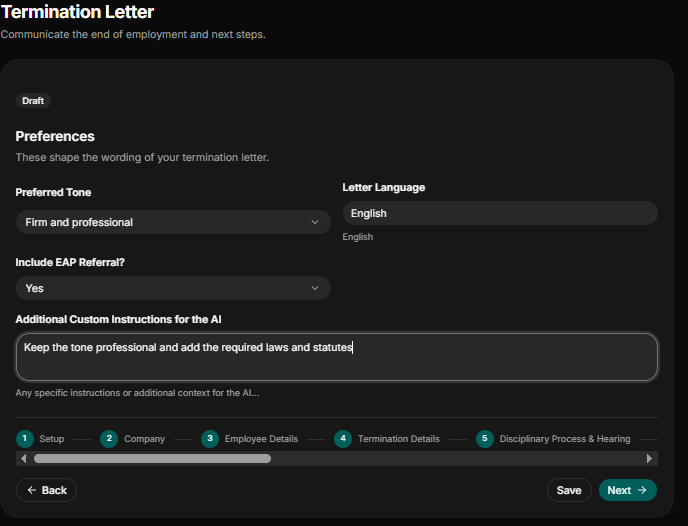
Step 11: Indicate Preferences
This is the final icing on the cake. Shape how you want your termination letter to be in terms of tone, wording, and more.
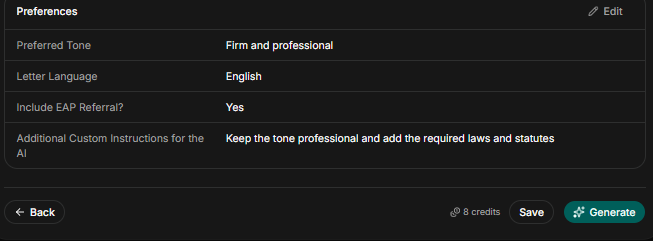
Preferred Tone: Indicate whether you want the letter to be formal and direct, firm and professional, compassionate but formal, or a strict-legal compliance tone.
Letter Language: State the language to be used in drafting the letter. E.g., English.
Include EAP referral?: Indicate “yes” or “no” whether to include Employee Assistance Program (EAP) referral.
Additional Instruction for the AI: State if you want to give any specific instructions when drafting the letter.
Step 12: Review and Confirm
Review and confirm that all the information provided are precise and accurate. This stage help you prevent misrepresentation of names, titles and also identify missing or wrong date. Once you confirm that every detail provided is accurate and precise, then you generate the document.
Step 13: Review and Edit
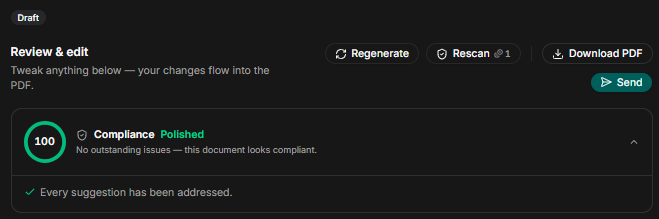
After the document has been generate do review the final to check missing dates, names, and other clauses. Once the manuel edit is done you run the rescan function to check for any compliance and legal gaps. Ater the rescan is done, the final draft is ready to send out for digital signature, or filed to the employee record.
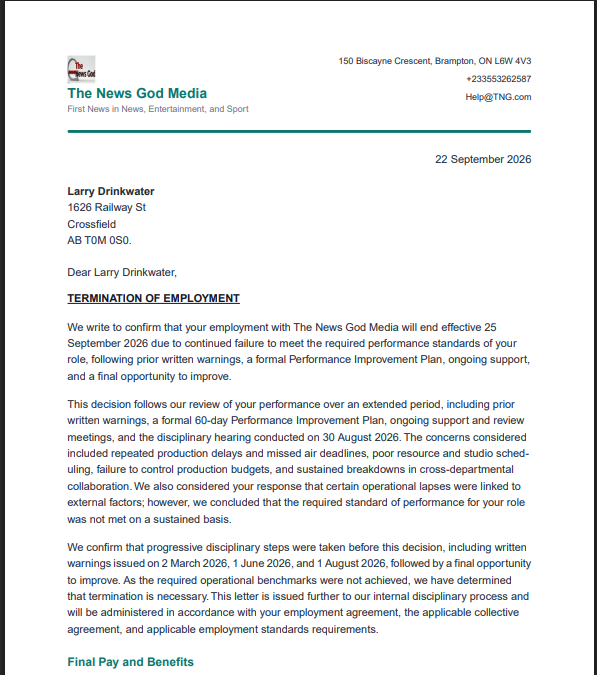
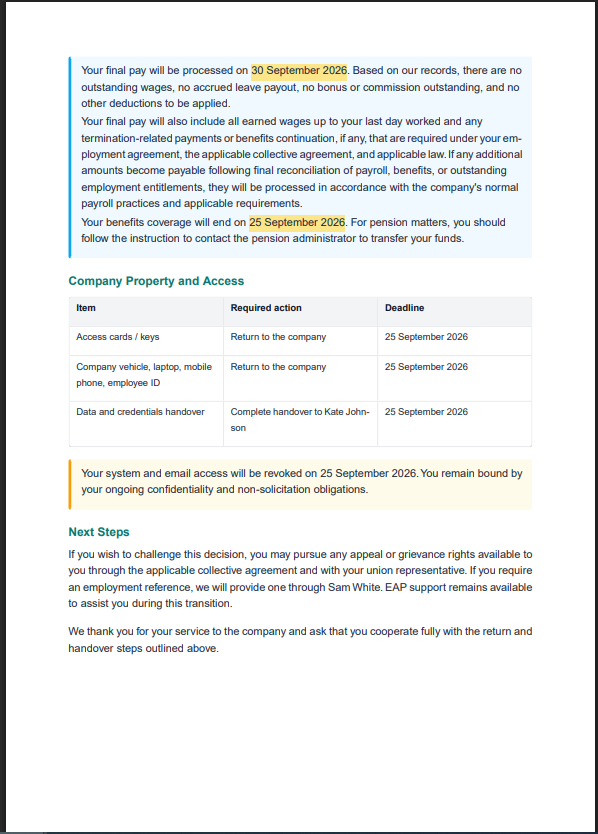
How a Final Termination Letter Generated Look Like?
Below is how a final termination letter generated with HRDocket looks like after going through all the steps listed above. The sample shown is for Larry Drinkwater.

Conclusion
Legal and labor disputes have crippled a lot of small- and medium-sized enterprises. Don’t be the next victim. Sign up for HRDocket and use the termination letter generator to draft all your termination letters to avoid future legal and labor disputes. It takes less than 15 minutes to input all the detail required to generate a legally defensible termination letter. Join HRDocket Now.