Welcoming a new employee into an organization is also an exciting moment in every organization’s history, but sometimes the administrative work and paperwork that comes with it become a headache for most businesses and HR professionals. A complete onboarding package can easily feel overwhelming.
The hurdle mostly arises from the drafting and defining of roles, making it difficult to structure to comply with regional labor law and the traditional way of preparing a document can be time-consuming. When the process is not well planned and structured, it can result in the omission of important details on both the employee and employer part creating administrative error and leaving your business exposed to compliance risk.
However, in 2026, drafting a well-structured and legally solid and risk-free onboarding document should not be a headache for businesses and HR professionals. AI-powered HR platforms and automated document builders like HRDocket have completely transformed the process. Instead of starting from scratch and putting together a template from different platforms, businesses and HR professionals can now generate in less than 15 minutes a fully compliant, legally solid, and structured onboarding document in a single afternoon. By using a step-by-step digital workflow with guided input, you can turn hours of manual data entry into a less than minute routine.
In this article, I will walk you through each step on how to draft a legally solid, jurisdiction-based onboarding document.
How to Draft an Onboarding Document in Less Than 15 Minutes
Step 1: Setup and Selection of Jurisdiction
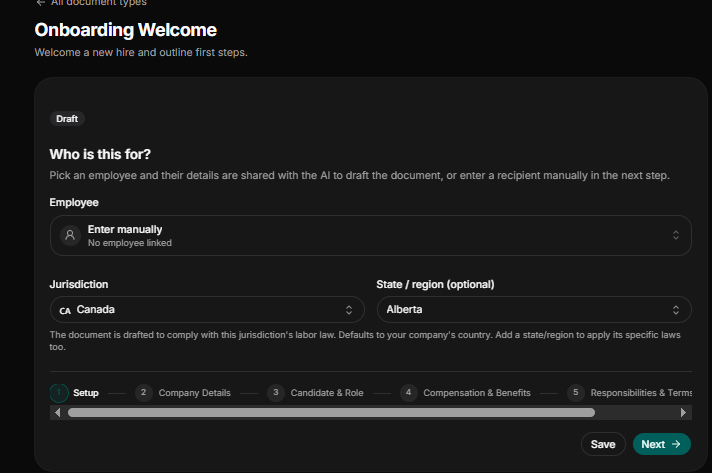
Selecting the right jurisdiction and state ensures the onboarding document complies with local labor law and standards since each country and some states have their own labor law.
Select Recipient: Select the employee profile from the employee records or database if the said employee has been added to the databases; if not, choose Enter manually.
Jurisdiction and Region: Select the jurisdiction the employee is based in, not where the company is headquartered (e.g., Canada) and state/region (e.g., Alberta). The selection of the jurisdiction based on the employee’s country of residence is important because the employee might be a remote worker in Canada but the company is based in the USA. In this case the employee is bounded by the labor laws of Canada and his specific state or region.
The AI tool uses this selection to draft the document to comply with applicable labor laws.
Step 2: Set Company Details and Date of Letter
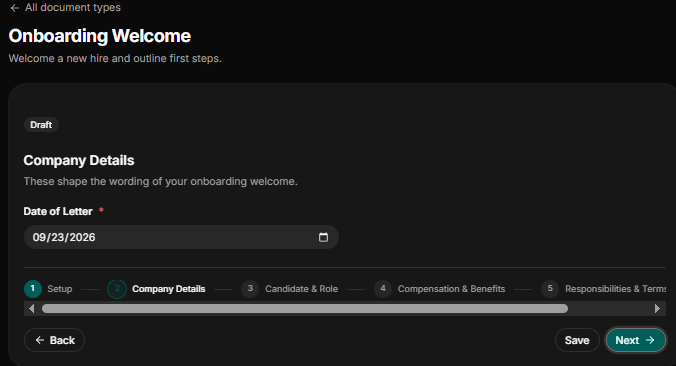
Because you have already filled out or added your company profile after signing up into HRDocket. At this stage you will be required to enter the date the letter was drafted for the official documentation date for record-keeping and formal notice timelines.
Date of Letter: Input the correct date the letter was drafted in month-day-year format (e.g., 09/23/2026).
Step 3: Input Candidate Details
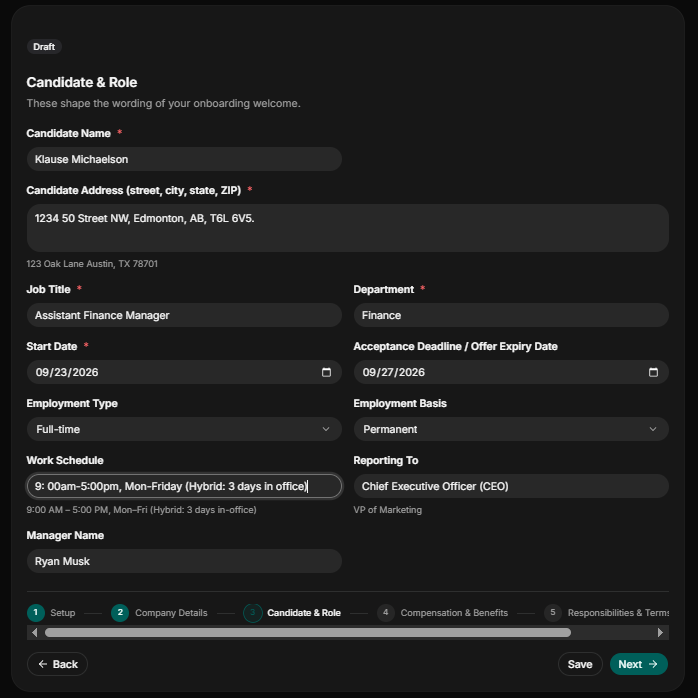
State accurately the candidate personal information, employment terms, and reporting structures to ensure contract clarity.
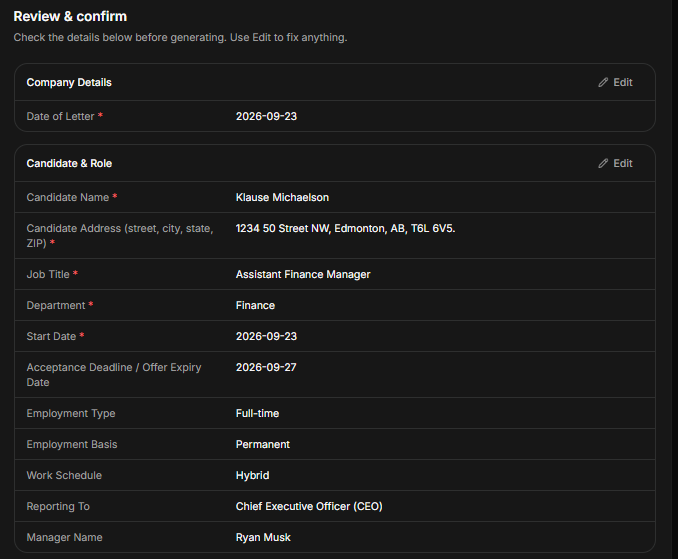
Candidate Name: State the candidate’s full name as it appears on his government-issued ID (e.g., Klause Michaelson).
Candidate Address: Capture the candidate’s precise residential address. In our case the candidate is from Alberta, Canada (e.g., 1234 50 Street NW, Edmonton, AB, T6L 6V5).
Job Title and Department: State the position or the job title of the new employee and the department he is assigned to (e.g., Job Title: Assistant Finance Manager and Department: Finance).
Start Date: State the date the new employee is supposed to start work in the month-day-year format (e.g., 09/27/2026).
Acceptance Deadline/Offer Expiry: State the exact deadline date the new employee must accept the employment letter given or lose the job (e.g., 10/1/2026).
Employment Type: Indicate the type of contract the new employee is being offered. e.g., full-time, part-time, contract, intern, temporary, and consultant.
Work Schedule: Indicate the work schedule of the new employee (e.g., 9:00am-5:00pm, Mon-Friday (Hybrid: 3 days in office) or 9:00am-5:00pm, Mon-Friday, all on office premises).
Employment Basis: Specify the basis of the candidate’s employment, whether the candidate will be employed as permanent staff, fixed-term contact, employed at-will, or on probation.
Manager Name: State the name of the manager the new employee will be working directly under.
Reporting To: State the position of the head of a department or top-level management; the new employee will be reporting to (e.g., Chief Executive Officer (CEO)).
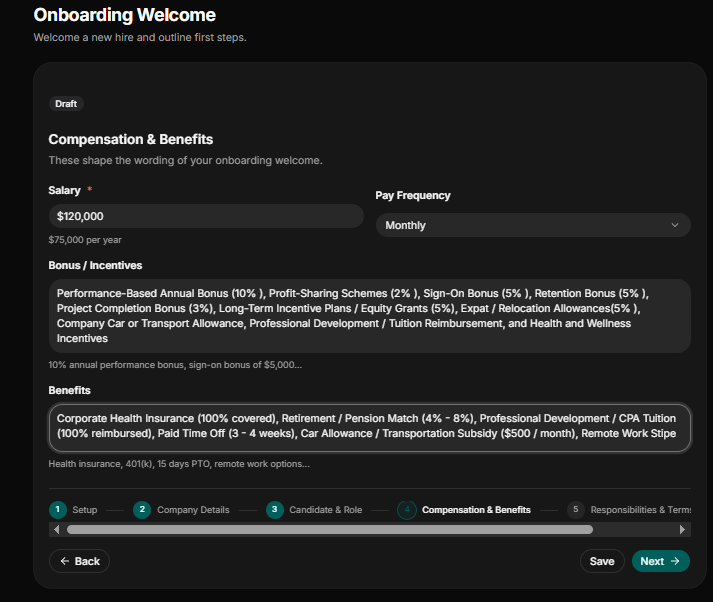
Step 4: Define Compensation and Benefits
State the financial packages the new employee will be entitled to per year and the frequency of payment. Also state the bonuses and benefits he will be receiving.
Salary: State the yearly base salary the new employee will receive (e.g., $120,000 per year).
Pay Frequency: Indicate the frequency of payment (e.g., monthly, biweekly, or semi-monthly).
Bonus/Incentive: State without ambiguity the bonus of new employment and must comply with his jurisdiction labor law and statute (e.g., Profit-Sharing Schemes (2%), Sign-On Bonus (5%), Retention Bonus (5%), and Project Completion Bonus (3%)).
Benefits: Again, state the precise benefit that the new employee will be entitled to (e.g., Corporate Health Insurance (100% covered), Retirement / Pension Match (4% – 8%), Professional Development / CPA Tuition (100% reimbursed), Paid Time Off (3 – 4 weeks)).
Step 5: Outline Employees’ Responsibilities and Contact Information
The last but most important in terms of HR operations and administrative duties.
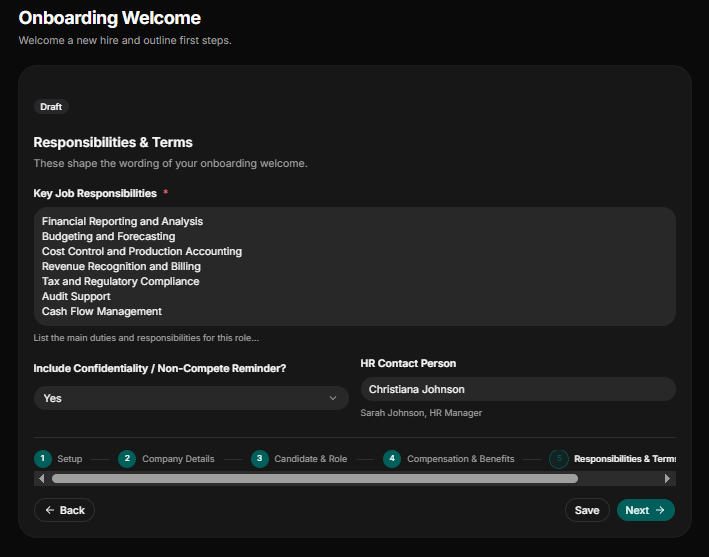
- Key Job Responsibilities: List the new employee’s duties and responsibilities for the role or position he is being offered employment in. In our example, Kluse Michaelson will be assistant finance manager; here are some of his listed responsibilities and key duties:
- Financial Reporting and Analysis
- Budgeting and Forecasting
- Cost Control and Production Accounting
- Revenue Recognition and Billing
- Tax and Regulatory Compliance
- Audit Support
- Cash Flow Management
Include Confidentiality/Non-Compete Remainder: Indicate “yes” or “no” whether to include standard Confidentiality and Non-Compete reminders.
HR Contact Person: State the name and position of one worker to be assigned to the new employee for candidate inquiries.
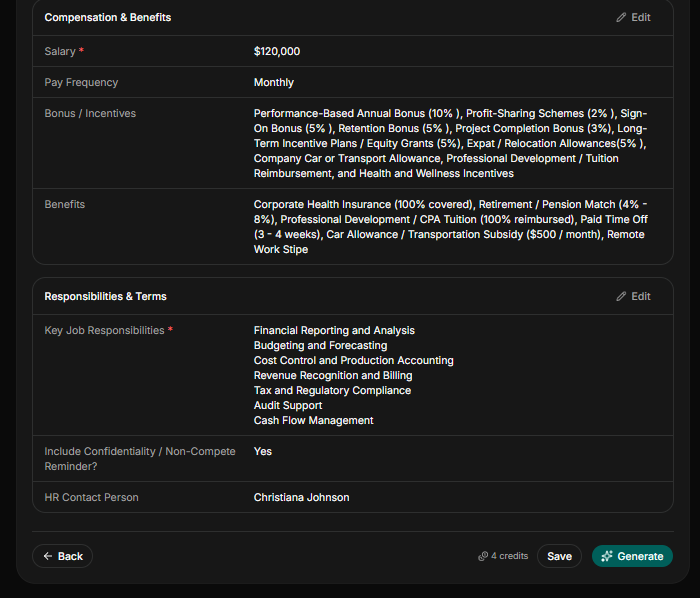
Step 5: Review and Confirm
Review and check to confirm that all the details provided, including employee name, address, salary, benefits, and core duties, are accurate. Failure to review these details to check if it matches the right one could lead to misrepresentation and the risk of losing the new hire. After the review, you can save and generate the draft.
Step 6: Review and Edit
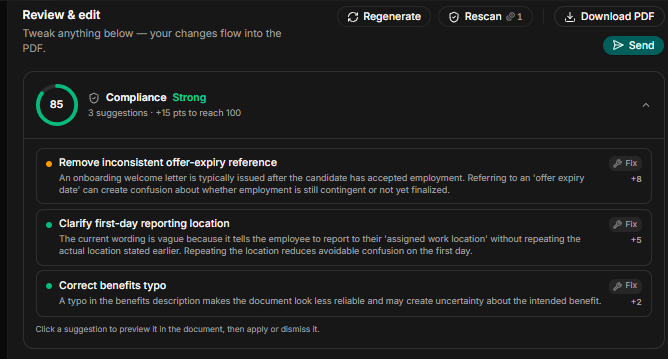
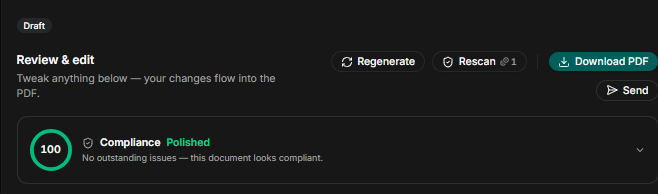
After generating the draft onboarding document, review again and edit the draft letter by using the rescan function to check for any compliance and legal gaps. After applying the rescan function and the document is now 100% compliance polished with no outstanding issues, the draft is ready to send out for digital signature or filed to the employee record.
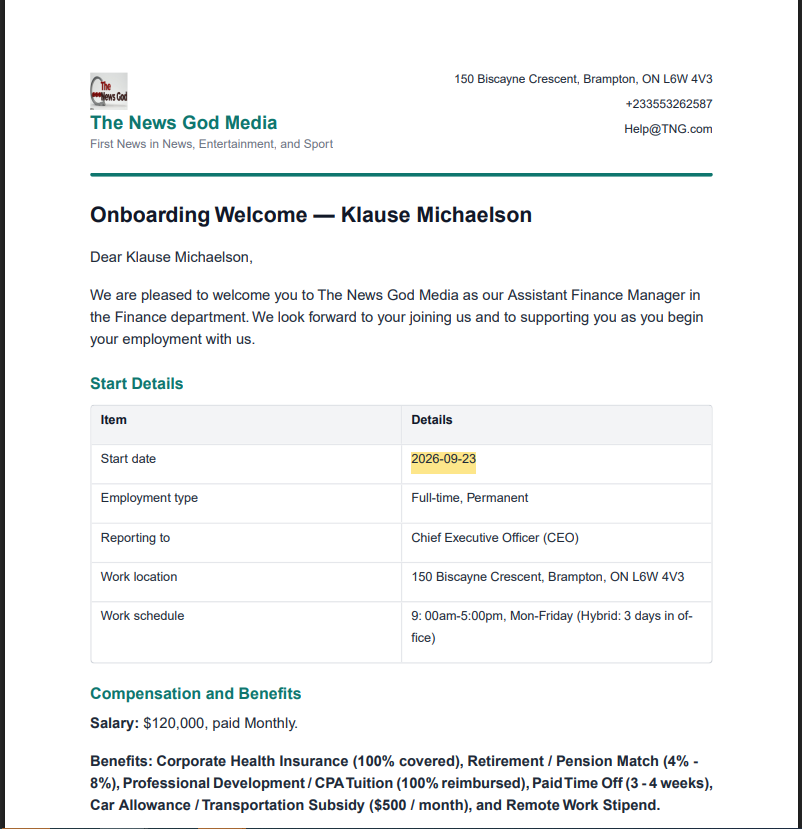
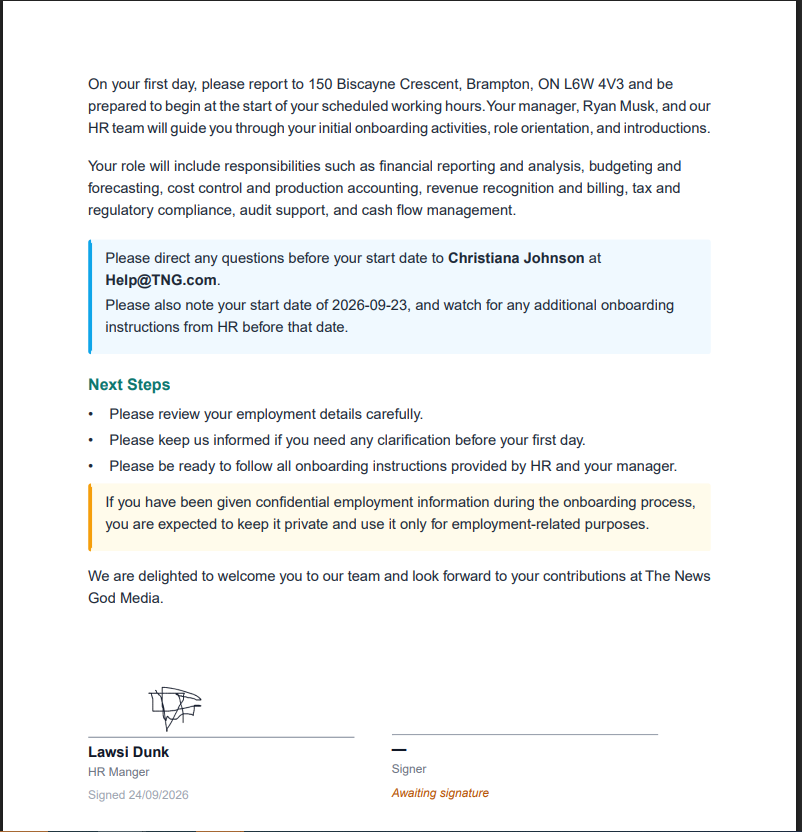
How a Generated Onboarding Document with HRDocket Looks Like
After going through the six steps explained above, you will get a well-structured, legally strong, jurisdiction-based onboarding letter in less than 15 minutes.
Conclusion
Join a host business that has automated and streamlined their HR workflow with HRDocket. HRDocket brings HR documentation and employee records together throughout the employee lifecycle. From job descriptions, offer letters, contracts, onboarding, and employee handbooks to performance management, disciplinary documentation, policy acknowledgements, leave, workplace incidents, resignation, and offboarding, HRDocket helps businesses create, manage, sign, track, and store employment documentation in one place.