Every Product You Need to Generate, Organize, Sign and Manage HR Documentation
HRDocket is one HR workspace for small and growing businesses. Contracts and letters, employee records, licences and certificates, policies, leave, incidents, company equipment and an employee portal, all in one place and all connected to the same employee record.


Most small businesses run HR on a patchwork of tools
A Word template for contracts, a separate app for signatures, a spreadsheet for holiday, calendar reminders for certificates, and an email chain for every policy change. Each one works on its own. Together they leave gaps, and the gaps are where things go wrong.
HRDocket puts all of it in one workspace. Generate a letter and it’s already on the employee’s record. Approve leave and the balance updates. A certificate is about to run out and the reminder goes to HR and the employee.
See the products the way you’d use them
These are real screens from the app. Pick a tab, or let it play through on its own.
Generate it, check it, send it for signature
Pick a document type and an employee, and HRDocket drafts it with their details filled in. The compliance check scores it out of 100 and tells you what’s missing. Edit, regenerate or download the PDF, then send it for e-signature from the same screen.
Explore the AI HR document generator →

One record per employee, with everything on it
Documents, files, credentials, incidents, assets, leave and onboarding each have their own tab on the employee’s profile. The timeline shows every letter and contract in the order it happened.
Explore employee records →

Licences and certificates, tracked before they lapse
Set what each role or department needs, record what each person holds, and get reminders before and after anything expires. Staff upload their renewals and HR approves them.
Explore credential tracking →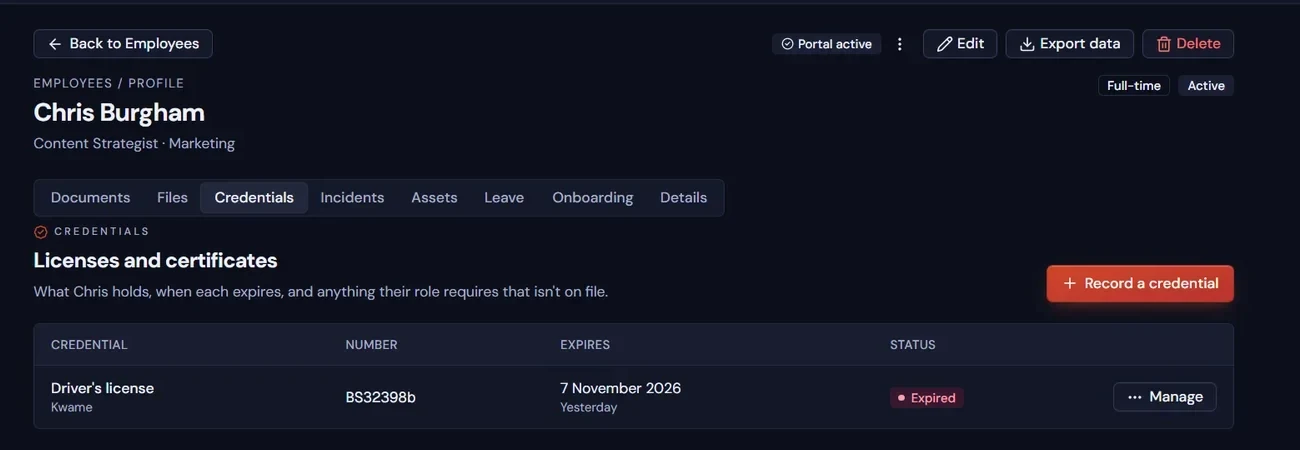

Company documents, kept apart from employee files
Templates, handbooks, policies and uploaded files live in the HR Document Library. Link existing documents without copying them, and sort everything into folders for your team or just for you.
Explore the HR Document Library →
Know who has read the policy
Publish a policy, then see each employee’s acknowledgement with the date. Publish a new version and everyone is asked again, with the history kept.
Explore policy management →
Employees help themselves
Staff log in to their own portal to request leave or a document, download their files, review their details, upload renewed certificates, and read announcements and policies.
Explore the employee portal →

Everything HRDocket does, grouped the way the app is
Each product has its own page with screenshots and details. Use as many or as few as you need. They all share the same employees, so nothing gets typed in twice.
HR Documents
Create, check, sign and store every HR letter, contract and form.
AI HR Document GeneratorOffer letters, contracts, warning letters, PIPs, promotion and salary letters, termination, reference and verification letters, plus policies and handbooks. Pick an employee and their details fill in.Explore →
AI Compliance ChecksEvery generated document gets a score out of 100 and a list of what to add or fix before it goes out, like tying conduct rules back to your policies.Explore →
 E-SignaturesSend any document for signature. Draft, Final and Signed statuses show where each one is, and the signed copy is saved to the employee’s record.Explore →
 Bulk Document GeneratorChoose a group of employees and create the same letter for all of them at once, each one personalised and filed to the right person.Explore →
 HR TemplatesPersonal templates, templates shared with your workspace, and ready-made ones from us. Use them with or without AI.Explore →
 HR Document LibraryNewCompany templates, handbooks, policies and files in one place, in folders for your team or only for you.Explore →
People & Records
Everything about each employee, from their first day to their last.
 Employee RecordsOne profile per person with documents, files, credentials, incidents, assets, leave and onboarding. Import your team or add people one at a time, and export the data when you need it.Explore →
Credential & Licence TrackingSeven built-in credential types plus your own. Set requirements by role, department or employment type, and export a CSV or PDF report for audits.Explore →
Expiration AlertsReminders before and after documents expire, by email, in the app and on the employee’s dashboard. 30, 7 and 3 days before by default, and you can change them. Recurring reminders too.Explore →
 Decision LogNewWrite down why each warning, promotion, pay change or dismissal happened, at the time it happened, and keep it on the employee’s record.Explore →
 Workplace Incident LogRecord incidents, grievances and accidents with severity and status, add evidence, and generate the warning letter straight from the case.Explore →
 Asset TrackingLaptops, phones, keys and uniforms, with serial numbers and who has them. Mark them returned when someone leaves.Explore →
 Leave ManagementAnnual, sick, unpaid, compassionate and study leave, or add your own. Entitlements, carry-over limits, approvals and balances per person.Explore →
 OnboardingSee every new hire’s progress, from tasks before their start date to their first week and beyond.Explore →
Compliance & Communication
Get policies read, announcements seen and requests answered.
Policy Management & AcknowledgementPublish policies, track who has acknowledged each version, and keep the history when a policy changes.Explore →
 Company BroadcastsSend an announcement to your whole team and it shows up in their portal instead of getting lost in email.Explore →
Employee RequestsEmployees ask for things like an employment confirmation letter from their portal, and get notified when it’s ready.Explore →
Employee Portal & Workspace
Where your team logs in, and where you see what needs doing.
Employee Self-Service PortalRequests, documents, details, credentials, assets, leave, announcements, policies and onboarding, all in one login for each employee.Explore →
HR DashboardCounts for employees, documents, alerts and requests, recent documents, and a “Needs your attention” list so nothing slips.Try it free →- Audit log of activity
- Team access for other admins
- More than one company per account
- Your letterhead on documents
- Rename things to match your words (Settings > Naming)
- CSV employee import
From the job advert to the reference letter
Follow one employee through HRDocket. Every step adds to the same record, so when someone asks “what happened and when?”, the answer is already there.
One employee’s journey: scroll to explore
HRDocket vs. the tools you might be using now
Most businesses piece HR together from documents, a signature tool and a spreadsheet. Here’s how that compares.
| What you need | HRDocket | Word / Google Docs | Signature apps | AI chatbots | Large HR suites |
|---|---|---|---|---|---|
| HR documents drafted for you | ✓ | × | × | ✓ | Limited |
| Documents filed to the employee automatically | ✓ | × | × | × | Limited |
| E-signatures | ✓ | × | ✓ | × | Limited |
| Compliance check on each document | ✓ | × | × | × | × |
| Licence and certificate expiry reminders | ✓ | × | × | × | Limited |
| Policies, leave, incidents and assets | ✓ | × | × | × | ✓ |
| Employee self-service portal | ✓ | × | × | × | ✓ |
| Priced for small teams | ✓ | ✓ | Varies | ✓ | × |
Comparing HRDocket with a specific tool? See our comparison pages.
HR software for teams without a big HR department
HRDocket is built for small and growing businesses in the US, Canada, the UK, Europe and Australia. Documents are drafted for the jurisdiction you choose.
Small business owners
You do HR on top of everything else. HRDocket drafts the paperwork so you don’t start from a blank page.
Office and operations managers
The person who “also does HR”. One place for contracts, leave, policies and reminders.
Growing teams
Hiring every month? Offer letters, contracts and onboarding stop piling up.
Healthcare, care and licensed work
Track licences and certificates by role, with reminders before anything lapses.
Need one document? Start with a free generator
Each of these has its own page where you can create the document. Sign up and every one of them saves straight to the employee’s record.
Hiring & Onboarding
Growth & Performance
Conduct & Discipline
One subscription, every product included
You don’t buy these one by one. Plans are based on how many employees you have, so a team of eight isn’t paying like a team of fifty.
Free plan
Try the document generator and set up your company, no card needed.
7-day Business trial
New accounts get every Business feature free for a week.
Paid plans from $19/month
Pay yearly and get two months free.
Frequently Asked Questions About HRDocket Products
The questions people ask before they sign up.
What products does HRDocket offer?
HRDocket includes an AI HR document generator with compliance checks, e-signatures, bulk document generation, HR templates and an HR document library. For your people there are employee records, credential and licence tracking, expiration alerts, a decision log, an incident log, asset tracking, leave management and onboarding. You also get policy acknowledgement tracking, company broadcasts, employee requests and an employee self-service portal.
Do I have to pay for each product separately?
No. It’s one subscription for your workspace. Plans are based on your number of employees, with higher plans adding more employees, AI credits and usage. See the pricing page for the details.
Is there a free plan or free trial?
Yes, both. There’s a free plan, and every new account gets a 7-day trial of the Business plan. You don’t need a credit card for either.
How do the products work together?
They all share the same employee records. A letter you generate, a policy someone acknowledges, a certificate they upload or a laptop you assign all land on that person’s profile, so you never enter the same details twice.
Does HRDocket include payroll?
No. HRDocket handles HR documents, records and compliance. Keep running payroll with your accountant or payroll software as you do today.
Can employees log in themselves?
Yes. Each employee can have their own portal login to request leave or documents, download their files, review their details and ask for changes, upload renewed certificates, and read announcements and policies.
Can I bring in my existing employees and documents?
Yes. Import employees from a CSV file or add them one at a time, upload existing files to each employee, and keep company templates, handbooks and policies in the HR Document Library.
Which countries does HRDocket work for?
HRDocket is built for employers in the US, Canada, the UK, Europe and Australia. When you generate a document you choose the jurisdiction, and the draft reflects it.
Do AI-generated documents replace legal advice?
No. HRDocket drafts documents from the information you give it and checks them for gaps, but you should review every document before using it, and take legal advice for complex or high-risk situations.
Who can see our HR data?
Only the people you give access to. You choose which team members can use the workspace, employees only see their own information in the portal, data is encrypted in transit, and an audit log records activity.
Bring your HR paperwork into one place this week
Add a few employees, generate a contract, send it for signature and see it land on their record. It takes about five minutes to set up.
HRDocket uses AI to help draft HR documents from the information you provide. Review AI-generated content before use. HRDocket does not provide legal, tax or payroll advice.