
Never find out about an expired license from an inspector again.
HRDocket keeps every employee license, CPR card, certificate and insurance date in one place. It reminds the right people before anything runs out, and lets your staff upload their own renewals.
- No credit card
- Free setup help
- Plans from $19 a month
Expired credentials rarely come from carelessness.
They come from busy weeks, a spreadsheet nobody opens, and too many dates for one person to hold in their head.
HRDocket’s job is to watch the dates for you, so the right person hears about a renewal weeks before it becomes a problem.
Built for small teams where every credential counts.
If your people need a valid license, card or certificate to do their job, HRDocket keeps track of it.
Clinics and practices
Nursing and therapy licenses, CPR/BLS, liability insurance.
Home care
CPR, first aid, driver’s licenses and insurance for caregivers on the road.
Staffing agencies
Licenses, certificates and work permits for every person you place.
Childcare
CPR and first aid for every staff member, kept current.
Security, transport and trades
Licenses, driver’s licenses and safety certificates.
Set it up once. Then it runs on its own.
Add your team
Add employees one by one, or import everyone from a spreadsheet.
Choose what each role needs
CPR/BLS, licenses and insurance are already set up. Say who must hold each one.
Pick your reminder schedule
For example 60, 30 and 7 days before expiry, and who gets each reminder.
Let staff renew
Employees upload the new document from their alert. You check it, and it’s filed to their record.
Most teams are set up in an afternoon. If you’d rather not do it yourself, we’ll set it up with you for free.
The credentials you track are already set up.
Seven common types come built in, each with a renewal period you can change. Add your own in a minute, like a DEA registration or a TB test.
- Set how often each one renews, or mark it as never expiring
- Require it for everyone, or only for certain roles, departments or employment types
- Anyone missing a required credential shows up straight away
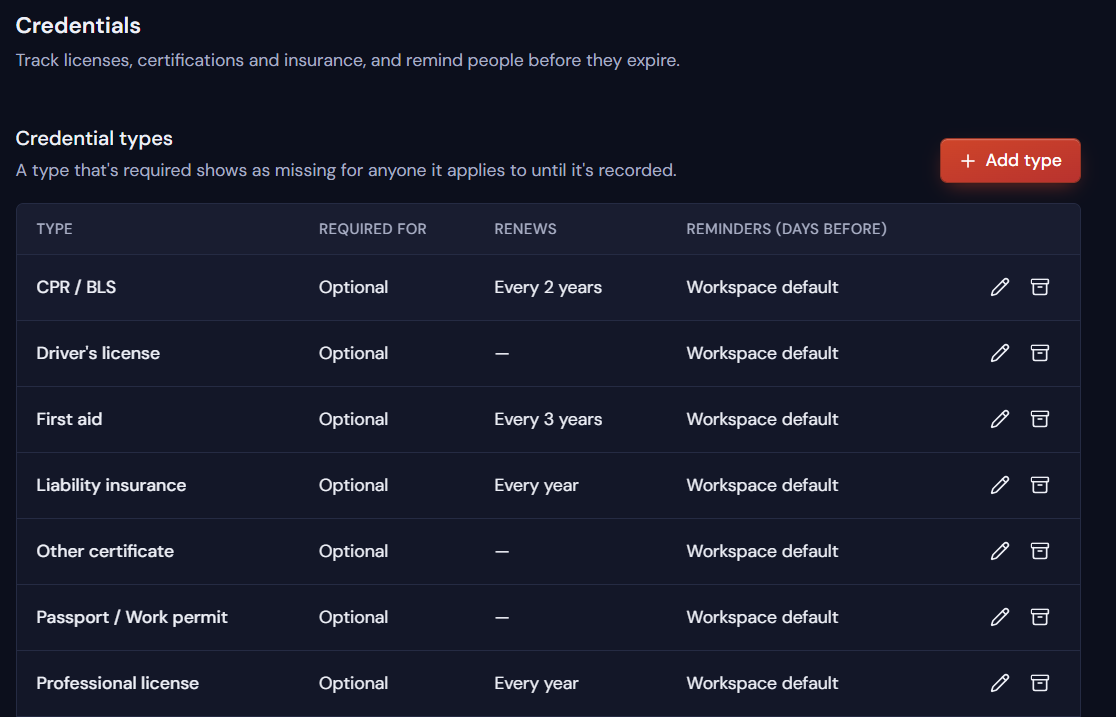
The built-in credential types in HRDocket’s settings
You decide when reminders go out, and to whom.
Our default is 30, 7 and 3 days before expiry. Change it for any credential: slow renewals can start 60 or 90 days early.
- Send each reminder to the employee, HR, their manager, or all three
- Alerts arrive by email, in the app and on the employee’s dashboard
- If a date passes, HRDocket keeps reminding until the renewal is in
Staff upload their renewals. You check them before they count.
When something is due, employees see it the moment they log in and upload the new document themselves. It lands in your To review list, so HR can look it over before it’s marked current.
- No emailing photos of cards back and forth
- Nothing is marked current until someone has checked it
- The old version is kept in the history, never overwritten
One report shows who’s current, expiring or missing something.
See every employee against every credential, as a matrix or a list. Filter by department or credential, and download it as a CSV or PDF when an auditor, client or insurer asks.
- Expired, missing, in review, expiring and current, counted at the top
- Each employee’s profile shows what they hold, when it expires, and what their role still needs
- Part of HRDocket’s wider HR records, documents and e-signatures
| Employee | CPR / BLS | Driver’s license | First aid | Prof. license | Liability ins. |
|---|---|---|---|---|---|
| Dana LeeNursing | |||||
| Marcus HillTherapy | |||||
| Priya ShahNursing | |||||
| Tom WalshHome care | |||||
| Ana RuizFront desk |
A spreadsheet stores dates. It doesn’t watch them.
| Spreadsheet or calendar | HRDocket | |
|---|---|---|
| Reminders | Only if someone remembers to check | Automatic, on your schedule, to the right people |
| Renewals | You chase each person by email | Staff upload their own, and HR checks them before they count |
| After the date passes | Silence | Reminders continue until it’s renewed |
| Different roles | One long list for everyone | Requirements set per role, department or type, with missing items flagged |
| When an auditor asks | An afternoon of digging through files | Download a CSV or PDF report in seconds |
| Proof | Scattered files and email attachments | Every version kept, with dates, on the employee’s record |
| When someone leaves | The tracker quietly goes out of date | Everything stays with the person’s record |

“I trained in Human Resource Counselling, and the same thing kept coming up with small teams: the paperwork existed, but nobody was watching the dates. Not because people didn’t care, but because there were too many dates and too few hands.”
“We built HRDocket so a practice manager or an HR coordinator doesn’t need a perfect memory to stay compliant. If you’d like help getting your team and credentials set up, reply to your welcome email and we’ll do it with you, free.”
Priced by team size, not per feature.
Every account starts with 7 days of our Business plan, free. No credit card needed.
Starter
- Up to 15 employees
- Credential tracking and expiry alerts
- Up to 25 active recurring reminders
- Employee self-service uploads
Growth
- Up to 50 employees
- Unlimited recurring reminders
- Everything in Starter
- 250 AI credits a month
Business
- Up to 140 employees
- Unlimited recurring reminders
- Everything in Growth
- 600 AI credits a month
Annual plans get 2 months free. A free plan is also available for up to 3 employees. See full pricing
Questions people ask before they start
Which credentials can I track?
Seven types come built in: CPR/BLS, professional licenses, liability insurance, first aid, driver’s licenses, passports and work permits, and other certificates. You can add your own in a minute, for example a DEA registration, a board certification or a food handler certificate.
Can I change when reminders are sent?
Yes. The default is 30, 7 and 3 days before expiry, and you can set your own schedule for each credential type, such as 60, 30 and 7 days. You also choose who receives each reminder: the employee, HR, the manager, or all three.
What happens if a credential expires anyway?
HRDocket keeps sending reminders after the expiry date, for example every 7 days, until the renewed document is uploaded. The credential also shows as expired in your reminders list, so it can’t be missed.
Can employees upload their own renewed documents?
Yes. Each employee has their own login. When a credential is due, they see an alert on their dashboard and upload the renewal directly. It goes to HR’s To review list, and once checked it is saved to their record. The previous version is kept in the history.
Can different roles have different requirements?
Yes. For each credential type you decide who must hold it: everyone, or only certain roles, departments or employment types. A nurse practitioner, a therapist and an office administrator each see only what applies to them.
Can I check uploaded renewals before they count?
Yes. When an employee uploads a renewed license or certificate, it goes to your To review list and shows as “in review” on the report. HR looks it over before it is marked current, so nothing is filed without a check.
Can I get a credentials report for an audit?
Yes. The credentials report shows every employee against every credential, marked expired, missing, in review, expiring or current. Filter it by department or credential type, view it as a matrix or a list, and download it as a CSV or PDF.
How long does setup take?
Most small teams are set up in an afternoon: add your employees or import them from a spreadsheet, choose which credentials each role needs, and set your reminder schedule. If you would rather not do it yourself, our team will set it up with you for free.
Is there a free trial?
Yes. Every new account gets 7 days of the Business plan with every feature, and no credit card is needed. After 7 days you can choose a paid plan, or your account moves to the free plan for up to 3 employees.
Is HRDocket only for credential tracking?
No. Credential tracking is one part of HRDocket. The same account also handles employee records, HR documents and letters, e-signatures, policy acknowledgments and incident logs, all linked to each employee.
Know exactly what expires next, by the end of today.
Add your team, pick your credentials, and let HRDocket watch the dates from here on.
- No credit card
- Free setup help
- Cancel any time
Questions first? Start the trial and reply to your welcome email. A real person reads every reply.