
Hiring is not a joke. It requires rapt attention because it has become more competitive and the rules of compliance are more complex than they used to be. That’s not all; employee expectations are fluctuating each day, mainly moving higher than expected. While at it, labor laws and authorities do not care about the business owner; they expect you to be on top of affairs in the area of proper document management for your employees.
HR document automation software helps businesses create, manage, route, sign and securely store employment documents and HR actions directly within the right employee profile. Using DocuSign, PandaDoc, and alternatives at the start seems like the perfect solution for companies. However, these platforms are mostly built for sales documents, general e-signatures, and contracts.
For small business owners and HR professionals, the bigger opportunity lies in connecting employee-level information, HR document generation, reviews, approvals, signatures, policy acknowledgements and employee records into a single, unified workflow.
Quick comparison
| Criteria | HRDocket | PandaDoc | DocuSign |
| HR document generation | HR-focused | General-purpose | General-purpose |
| Employee records | Built around employee profiles | Document-focused | Agreement-focused |
| HR document templates | Native HR templates + custom templates | General document templates | General agreement templates |
| Electronic signatures | Yes | Yes | Yes |
| Policy acknowledgements | Yes | Workflow/document capabilities | Agreement capabilities |
| Workplace incident records | Yes | Not an HR-specific feature | Not an HR-specific feature |
| Employee lifecycle documentation | Core use case | Broader document workflows | Broader agreement workflows |

What HR Document Automation Software Actually Means
Document automation falls into different categories, including general document automation and HR document automation. General document automation speeds up creating, sending, and signing any document, including a sales proposal, a vendor contract, and rental agreement.
General purpose automation platforms are built around sender-recipient transactions. This means that in most cases, documents go out, come back signed and the workflow ends there.
On the other hand, HR document automation is built around the entire employment cycle, keeping the employee at the center of the process. Document automation for HR uses dynamic templates, structured employee information, and workflow automation to reduce the manual administrative work of HR professionals.
Modern platforms offer specialized features like AI-assisted drafting, jurisdiction-aware compliance, AI-compliance checks, employee self-service portals, digital signatures, automatic filing, audit trails, company asset management, and workplace compliance.
Who needs HR Document Automation Software
HR document automation is built for businesses that need to manage standardized documentation, employee records, and compliance in one secure, centralized platform. This software is valuable for:
- Small businesses (5-50 employees): Companies that regularly generate employment documents such as offer letters, employment contracts, NDAs, PIPs, warning letters, salary letters and termination letters without a dedicated HR system.
- Growing SMBs: Businesses scaling their workforce need structured, professional HR workflows without the complexity of enterprise-grade software.
- HR and operations teams: Professionals who spend hours every week manually drafting HR documents, chasing signatures, or answering routine employee requests.
- Disorganized Organizations: Companies dealing with messy documentation and chaotic employee records.
- Businesses needing stronger compliance and risk management.
Read Also: Best Document Automation Software Solutions for Scaling People Teams

What to look for in HR document automation software
The difference between what general-purpose and specialized software offers your business matters more than most businesses realize. For instance, an HR documentation problem creates legal challenges, employee nagging and agitation, compliance issues, delays in onboarding, and operational disorder.
For all the correspondents we spoke to, they have the same story to share. The conclusion is that businesses that use generic documentation software sooner or later fall into a pit of problems:
Employee files scattered across desktop folders and random email threads.
Missing onboarding documents when labor regulators come knocking.
No centralized HR record system to verify employment timelines.
Difficult policy acknowledgment tracking when disputes happen.
Manual compliance follow-ups that take hours of manual labor.
Before choosing a dedicated HR platform, you need to focus on solutions that offer more than just generic AI writing capabilities. Here are some key features to consider:
HR-specific document generation
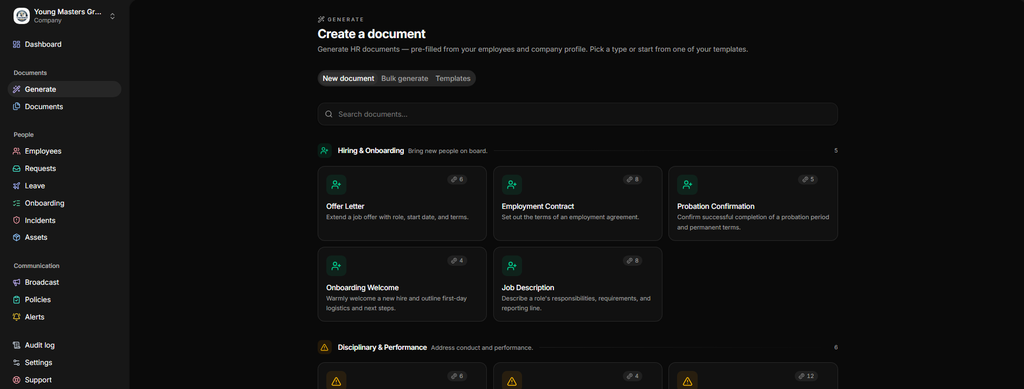
The platform should support the types of documents your team actually creates. Modern platforms feature an AI-powered document generator library capable of generating HR files for everything from hiring to offboarding and automatically saving final versions directly to the right employee profile.
Employee information reuse
Look for a platform that auto-pulls repetitive information like employee information, such as employee names, roles, contacts and company details, during document creation. This eliminates manual data and drastically speeds up the document creation process.
Document templates
Your team shouldn’t have to start from scratch every time. Look for platforms with reusable company-approved templates and the ability to customize them.
Review and approval workflows
HR professionals should be able to review and approve documents before they are issued.
Legal binding electronic signatures
Choose a platform that allows you to sign and route documents for e-signatures internally. Top employee document automation tools automatically file these signed documents into the correct employee profile.
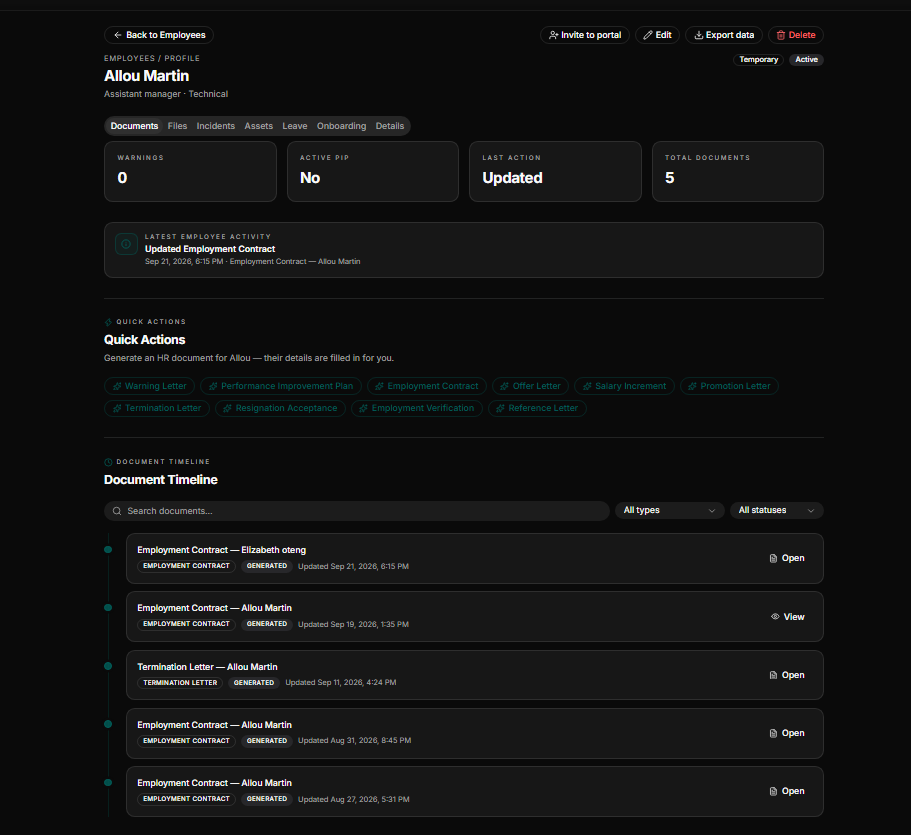
Centralized employee profiles
A Strong document automation platform for the HR team must include a centralized employee profile that stores employee employment records and HR actions.
Document version history
HR documents go through periodic changes and updates. The platform should record and maintain every document history and activity logs, making it easier to see exactly what changed, when and by whom.
Expiration reminders
Some important documents, such as contracts, licenses, permits, certifications and training records, require periodic renewal. It is therefore crucial to look for platforms with proactive reminders to alert you ahead of the expiration deadlines.
Policy management and tracking
Prioritize platforms that will allow you to publish company policies and help you track whether employees received, read, and acknowledged them.
Access controls
Employment records contain sensitive information that should not be accessible by everyone. Look for platforms with strict, role-based access controls to ensure that only authorized persons can access such information.
Scalability
Always consider platforms built to grow with your business.
Top document automation software for small businesses
Comparison methodology
This comparison focuses on the HR documentation workflow rather than just the total volume of features a platform offers. Each platform was evaluated based on its current publicly listed features and pricing.
We evaluated platforms using the following criteria:
- Core capabilities: HR document generation, HR-specific documentation, electronic signatures, employee records management, and workflow automation.
- Plan transparency: Feature claims are verified strictly based on publicly documented plan inclusions.
- HR-specific focus: Key strengths and limitations focus specifically on it fitting for HR document workflows and not general product quality.
The right choice depends on whether your primary problem is HR documentation, general business documents or electronic agreements.
PandaDoc: Best for general business document workflows
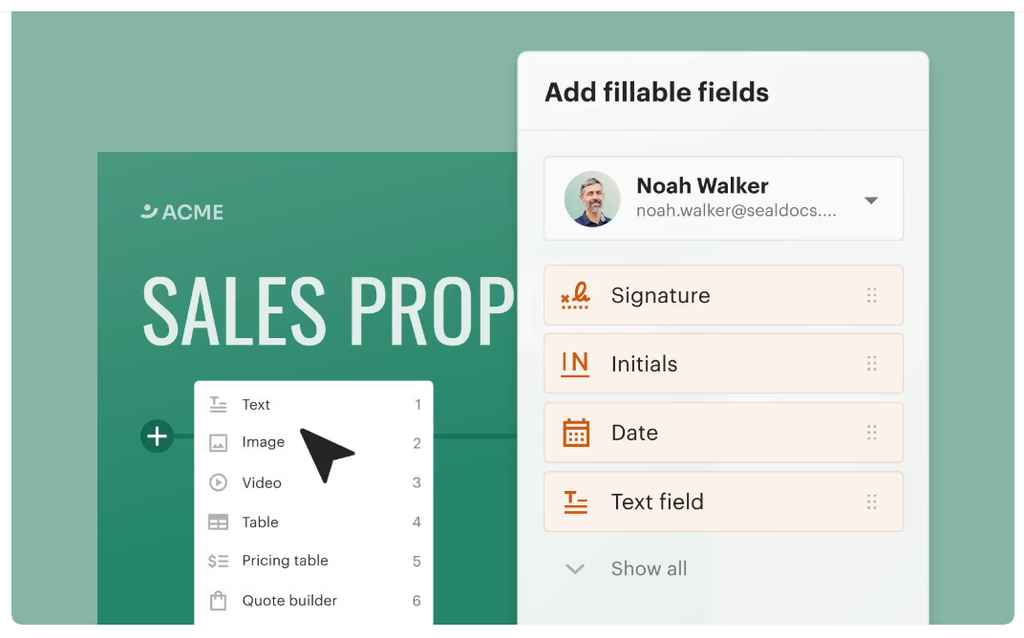
PandaDoc is a document automation and electronic signature platform built primarily for sales proposals, quotes and contracts. Its automation capabilities include document creation, electronic signatures, tracking, approvals, content management and integrations.
Strengths
- Interactive editor: Drag-and-drop document editor with rich media and reusable templates.
- Engagement analytics: Real-time tracking showing when a recipient opens and reads a document
- Workflow connectivity: Native CRM integrations on the business plan
- A limited free plan for occasional e-signature
Limitation
- No employee records system: Every signed document is a standalone file and not linked to an employee profile.
- Compliance gaps: It lacks jurisdiction-aware drafting for employment documents.
- It has no expiration reminders for time-bound HR documents.
Pricing
PandaDoc’s pricing starts at $35/user/month monthly and is billed annually at $19/user/month. There is also an enterprise package that requires a custom quote and a limited free plan for e-signatures.
Docusign: Electronic signatures and agreement workflows
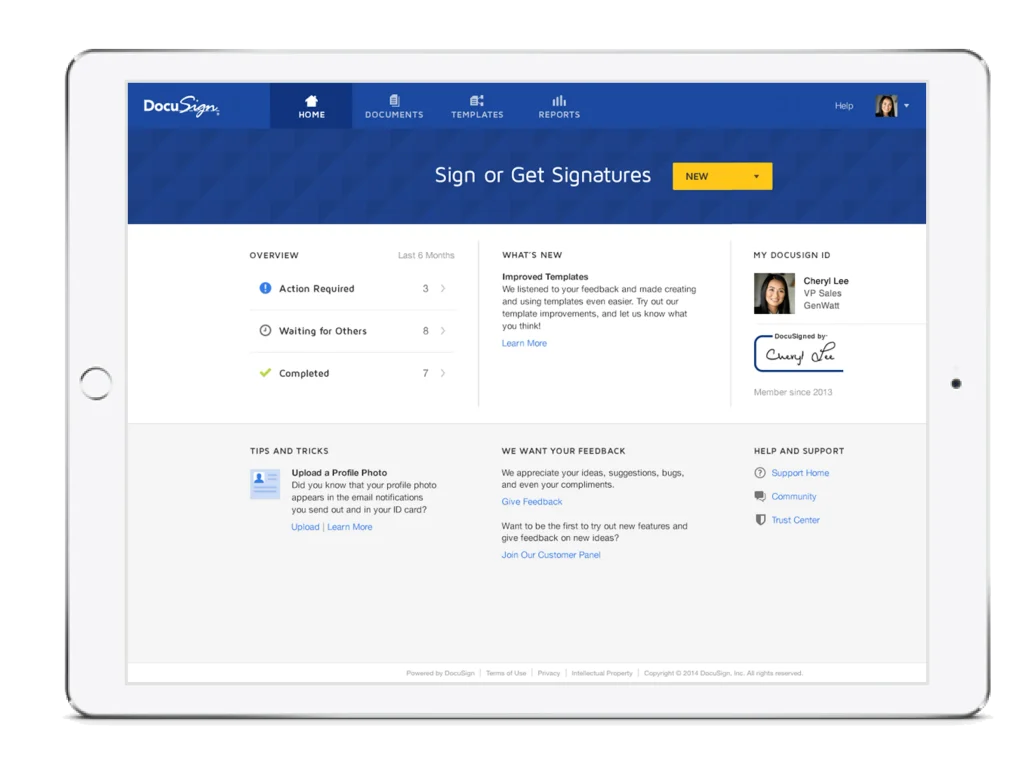
DocuSign is a globally renowned e-signature brand for sending individual documents or complex document sets. Key features include reusable templates, audit trails, signing workflows, notifications, and integrations. The platform offers more advanced capabilities at higher tiers.
Strengths
- Reusable templates for repeated document types
- Reliable audit trails an certificate of completion on every signed envelope.
- Structured electronic signatures, automated agreement routing, and systematic notifications.
Limitation
- It lacks built-in document generation logic; it only handles signatures for files you uploaded.
- The platform does not feature jurisdiction-aware drafting or employee records.
- It lacks transparent pricing.
Pricing
Docusign pricing starts at $11/month (5 envelopes/month); Standard at $30/user/month (billed annually); and Business Pro at $45/user/month (billed annually). Enhanced plans require a custom quote.
HRDocket: Best for HR teams that want documentation connected with employee records
HRDocket is a purpose-built, AI-powered system for HR documentation, employee records and workplace compliance management. It helps create, sign, organize, manage and store HR documents and employee records throughout the entire employee lifecycle. Instead of treating files as standalone documents, the platform automatically connects the employment document to the correct employee
Because the struggles for HR teams are real. Coming up daily with organizing, tracking, and managing employee documentation from recruitment to termination isn’t a joke. Platforms like PandaDoc and DocuSign are excellent at collecting signatures. But HR departments need much more than signatures. What they need is structured systems, and HRDocket is a master of that.
What HRDocket Offers Small Teams
Instead of forcing HR teams to adapt a sales oriented platform into an HR workflow, HRDocket gives businesses a centralized HR documentation environment designed specifically for employee management. This changes how businesses operate internally.
1. Designed Specifically for HR Teams
Most document automation software treats employees the same way they treat customers. That is a major problem. Employees require long-term documentation, performance records, and policy acknowledgments that stay linked to their profiles forever.
HRDocket approaches documentation from an HR-first perspective rather than a sales-first perspective. For small businesses without large HR departments, this is extremely important. Most SMEs do not have dedicated software administrators or expensive compliance consultants. They need a tool that works immediately and matches real HR operations.
2. Better Value for Growing Startups
One major frustration with platforms like PandaDoc and DocuSign is pricing expansion. At first, the monthly subscription may appear manageable. But costs rise quickly when businesses need more users, team access, or templates.
HRDocket focuses on practical HR functionality rather than overwhelming businesses with enterprise level upselling. Small businesses benefit because they often need employee document management, offer letters, and staff documentation not hundreds of advanced sales analytics features they may never touch. This focused approach allows businesses to spend money on actual HR operations rather than bloated software subscriptions.
3. Centralized Employee Documentation
One of the most dangerous issues in small businesses is decentralized employee records. Many companies still store HR files in WhatsApp chats, email attachments, on personal laptops, and across Google Drive accounts. This creates major risks, including lost records, compliance exposure, and slow response times during audits.
HRDocket solves this by centralizing employee documentation into a single structured environment. This is one of the biggest advantages HRDocket has over general-purpose document software.
4. Built for Real HR Operations
Many HR professionals discover that generic e-signature platforms still require multiple external tools to fully operate. For example, you end up using one software for signatures, another for employee records, and another for onboarding templates. This creates massive software fatigue.
HRDocket reduces this complexity by acting more like a dedicated HR documentation hub. For small businesses, this simplicity is a true competitive advantage.
Key strengths of HRDocket
HR document creation and automated filing: HRDocket helps HR teams create over 21 standardized employment documents and automatically files them to the right employee profile.
AI-assisted and jurisdiction-aware drafting: The platform uses AI to generate standardized HR documents while taking the labor and employment laws of the selected jurisdiction into account.
Employee records management: HRDocket helps businesses keep their employee records organized, secure, and easily accessible.
Custom templates: It provides reusable, customizable templates for recurring HR needs.
Digital signature: It allows HR teams to digitally sign and route their documents efficiently for electronic signatures.
Policy management and acknowledgement: The platform allows HR professionals to publish policies and track employee acknowledgements.
Limitation of HRDocket
- Not a full HRIS: The platform has limited Human Resource Information System (HRIS) features.
- No Built-in payroll: HRDocket is yet to integrate a native payroll system
- HR-specific focus: The platform is purpose-built for HR documentation and employee records management and might not be suitable for general business automation.
Pricing
HRDocket offers a free plan with limited features for individuals and businesses testing the platform. Its paid plans start at a flat rate of $19/month (or billed 15.83/month annually). All paid plans include full HR document generator access, auto-fill employee and company details, digital signatures, expiration reminders, AI-assisted document drafting, email delivery for generated documents, and more. Compare HRDocket pricing plans side by side.
Feature-by-feature comparison
| Feature | HRDocket | PandaDoc | DocuSign |
| E-signature | Yes | Yes | Yes |
| HR document generation/drafting | Yes | No | No |
| Employee record linkage | Yes | No | No |
| Jurisdiction-aware compliance drafting | Yes | No | No |
| Expiration/renewal alerts | Yes | No | No |
| Policy distribution & acknowledgment tracking | Yes | No | No |
| Incident logging | Yes | No | No |
| Leave/PTO management | Yes | No | No |
| Employee self-service portal | Yes | No | No |
| CRM integrations | Not applicable | Yes | Yes |
| Free plan | Yes | Yes | No |
Which document automation platform is best for your best
There is no document automation platform that fits all organizations. The best platform mostly depends on the size of your business and the documents you handle. The platforms discussed above solves entirely different problems:
- Choose HRDocket if you need standardized HR document automation linked directly to your employee records.
- Choose PandaDoc if your primary focus is creating and tracking sales proposals with integrated e-signatures.
- Choose DocuSign if your main requirement is advanced agreement workflows
Frequently Asked Questions
What is HR document automation software?
HR document automation software helps organizations create, manage, organize and store employment documents. It keeps these files directly linked to the correct employee profile throughout their entire employment cycle.
What HR documents can be automated?
Modern platforms like HRDocket can automate over 21 HR documents, including job descriptions, employee handbooks, NDAs, salary increase letters, PIPs, leave letters, termination letters, and reference letters.
What is the difference between HR document automation software and a generative AI bot?
Generative AI tools like ChatGPT, Claude and Gemini can only generate text. However, dedicated HR platforms like HRDocket are structured around HR documentation workflows involving employee records, company information, templates, approvals, signatures, storage, and document history.
Can you integrate electronic signatures into HR workflow?
Yes. A modern HR platform allows HR teams to sign and route documents for e-signatures seamlessly. Once finalized, the completed versions are automatically saved directly to the correct employee profile without manual uploading.
Does HR document automation platforms support multi-state or multi-jurisdiction compliance?
Yes. Strong HR documentation platforms support multi-state compliance by using jurisdiction-aware drafting to generate standardized documents tailored to local labor laws. Modern platforms like HRDocket also feature an AI compliance checker that flags errors, outdated clauses and inconsistencies before a document is sent.
Conclusion
Small businesses often underestimate the importance of organization until problems appear, such as missing contracts during employee disputes, lost warning letters, or difficulty proving policy acknowledgment. Disorganization quickly becomes expensive.
HR documentation is not optional. Employment relationships generate ongoing records that businesses must manage carefully. While enterprise systems exist, they often come with complicated dashboards, long training periods, and administrative overload. Small businesses rarely need massive enterprise complexity—they need speed, organization, and practical workflows that save time.
PandaDoc and DocuSign are strong alternative platforms for document signing and sales-related workflows. But many small businesses eventually discover they still need a dedicated HR documentation system. That is where HRDocket becomes a smarter option.
Instead of trying to force generic document software into HR operations, HRDocket focuses directly on the real world needs of workforce managers. Its HR-first approach helps businesses stay organized, improve employee documentation, and reduce operational confusion from day one. Managing employees is simply not the same as managing sales contracts, and your software should reflect that reality.
If you haven’t tried it yet, give it a thought to use HR Docket. The result is a more practical, more affordable, and more business-focused solution for companies that want HR systems that work without complexity.
Start generating HR documents today
Every generator is included on every plan. Add the essentials, review the draft, and keep the final document linked to your HR records.
Free plan available · No setup fees · Cancel anytime