
Background & Reference Check Form Generator
Create a background and reference check form before you make the offer. Add the candidate, the referee and what they tell you about the person’s job, performance and conduct, and HRDocket writes it up as one tidy document: a consent request for the candidate, their details, and the referee’s answers, ready to review and sign.


- Candidate consent
- Candidate details
- Referee details
- Employment verified
- Performance & conduct
- Would rehire
A quick phone call isn’t a reference check
Most small businesses check references with a five-minute call and a few notes on a pad. Different questions every time, no written consent from the candidate, and nothing on file if the hire goes wrong and someone asks what you checked. A written form fixes all three.
Consent, candidate and referee, in a single document
The finished form opens with a consent request to the candidate, sets out their details in a table, then records what the referee confirmed and said. Everything you’d want to show if a hiring decision were ever questioned.
Fill it in while you’re on the phone with the referee
Each step only asks what shapes the wording of the form. Save at any point and come back after the call.
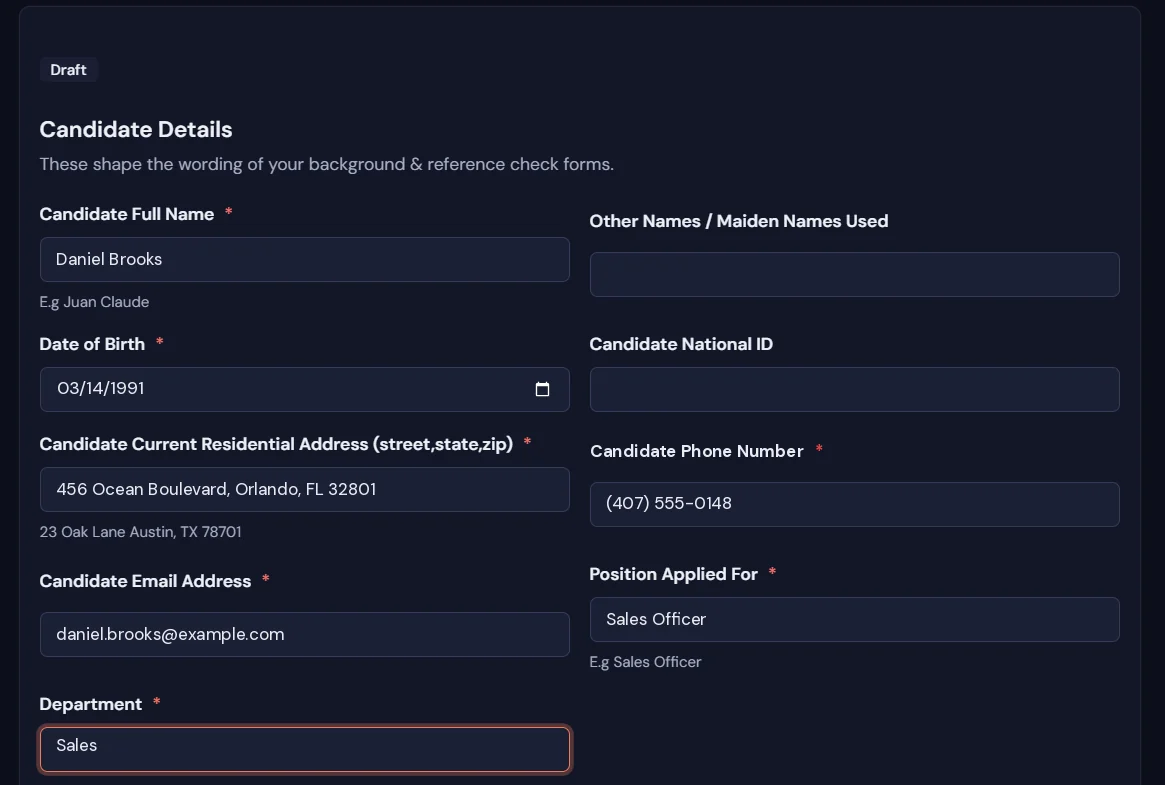
Add the candidate
Full name and any other names used, date of birth, address, phone and email, and the job and department they’ve applied for. Other names matter: a referee may know the person by a maiden name.
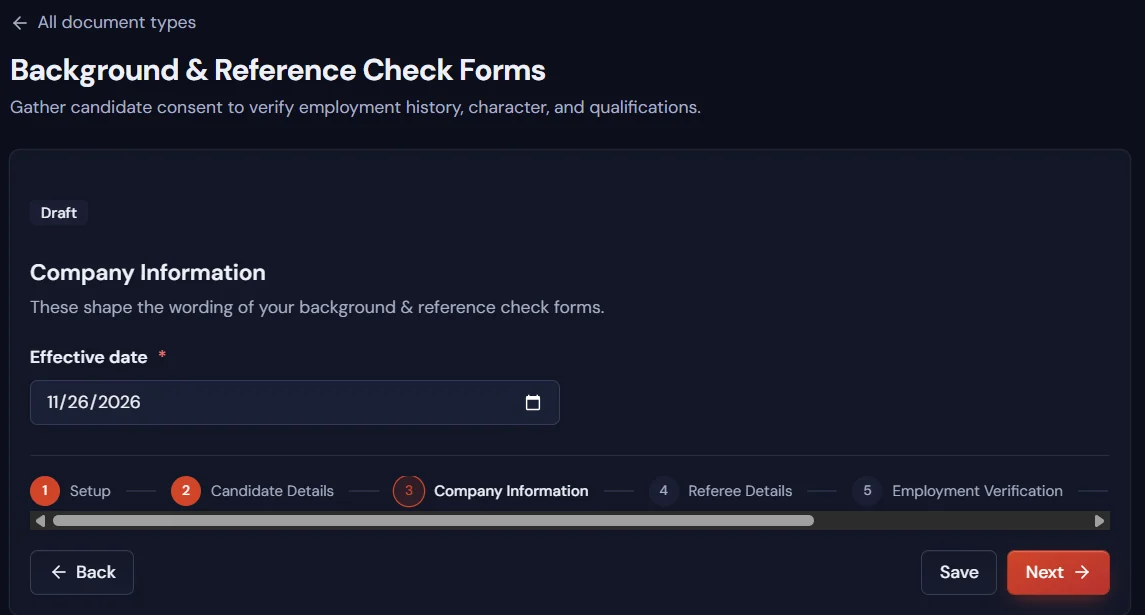
Set the effective date
The date the form takes effect. Your company name, address and letterhead are added for you.
Record who gave the reference
The referee’s name, job title, organisation, phone and email, the date of the check, how they know the candidate and for how long.
Verify the job they say they did
Ask the referee to confirm the job title and employment dates, the capacity they worked together in, and the candidate’s main day-to-day responsibilities.

Capture what the referee says
How they handled pressure and deadlines, how they worked with colleagues, the quality of their work, any disciplinary or integrity concerns, why they left, and the question that says the most: would you rehire them?

Review, edit and sign
HRDocket writes the form on your letterhead in a few seconds. Edit anything in the built-in editor, download the PDF, or send it to the candidate to sign their consent.
What a good reference check should cover
Whatever the role, the same four things are worth checking before you make an offer. Use this as a guide when you review your generated form.
Consent and identity
- Written consent: the candidate agrees, in writing, to you contacting referees and running checks.
- The right person: full name, other names used, date of birth and contact details.
- The right job: the position and department they applied for.
Employment history
- Job title and dates: do they match the CV?
- Responsibilities: what the person actually did day to day.
- The referee’s position: a direct manager’s view counts for more than a colleague’s.
Performance and conduct
- Quality of work: in the referee’s own words.
- Pressure and teamwork: how they handled deadlines, conflict and colleagues.
- Conduct: any disciplinary action, warnings or integrity concerns.
Leaving and rehiring
- Why they left: does it match what the candidate told you?
- Would you rehire them? A hesitant answer here is worth a follow-up question.
- Who ran the check: the name of the person in your team who spoke to the referee.
12 reference check questions to ask every referee
These are the questions the generator walks you through. Ask them in the same order every time, so you can compare one candidate’s references with another’s.
- How do you know the candidate, and for how long?Sets how much weight to give the answers.
- In what capacity did you work with them?
- Can you confirm their job title at your company?
- Can you confirm the dates they worked for you?
- What were their main day-to-day responsibilities?Compare with the CV.
- How would you describe the quality of their work?
- How did they handle pressure, deadlines and conflict?
- How did they work with colleagues and managers?
- What areas could they improve in?
- Were there any disciplinary actions, warnings or integrity concerns?
- Why did they leave?
- Would you rehire them?Often the most honest answer you’ll get.
Tip: get the candidate’s written consent before you contact referees. In some countries and US states, background checks also come with their own consent and notice rules, so check what applies where you’re hiring.
More than a template: a reference check you can show
A free reference check template gives you a list of questions. HRDocket gives you a finished, consistent document with the candidate’s consent and the referee’s answers, kept with the rest of your hiring paperwork.
Consent built in
The form opens with a written consent request to the candidate.
The same questions
Every referee is asked the same things, in the same order.
On your letterhead
Your company name, address and logo are added for you.
Save and finish later
Save mid-call and pick it up afterwards.
Edit before you send
Change any wording in the editor, then download the PDF.
Signed electronically
Send it to the candidate to sign their consent.
Every new hire, every kind of team
Small businesses
Proper reference checks without an HR department.
Hiring managers
A script to follow on the call, and a record afterwards.
Growing companies
The same check for every hire as you take on more people.
Multi-location businesses
Every site checks references the same way.
Healthcare and care
A written reference check for roles working with patients and vulnerable people.
Security, finance and trades
Roles where honesty and track record really matter.
Recruitment agencies
Consistent references to pass on to clients.
HR teams
One standard form, whoever runs the check.
Reference check form questions
Answers about background checks, reference check forms and how the generator works.
What is a reference check form?
A reference check form is a written record of what a candidate’s former manager or colleague tells you about them: their job title and dates, responsibilities, quality of work, conduct, why they left and whether they’d hire them again. Using the same form for every referee keeps checks fair and gives you a record if a hiring decision is ever questioned.
What’s the difference between a background check and a reference check?
A reference check is a conversation with people who worked with the candidate. A background check is wider and can include verifying identity, employment history, qualifications and, where the law allows, criminal records. This form covers the candidate’s consent and the reference and employment verification part.
Do I need the candidate’s consent?
It’s good practice to get written consent before contacting referees, and in many countries and US states it’s required for background checks. The generated form opens with a consent request you can send the candidate to sign. Check the rules where you’re hiring, especially for criminal record checks.
What questions should I ask a referee?
Confirm how they know the candidate, the job title, dates and responsibilities, then ask about quality of work, how they handled pressure and colleagues, any disciplinary concerns, why they left, and whether they would rehire them. The list above has all 12 questions the generator covers.
How does the generator work?
You go through five short steps: setup, candidate details, company information, referee details and employment verification. HRDocket then writes the form on your letterhead, and you can edit it, download it as a PDF or send it for signature.
Can I check more than one referee?
Yes. Create one form for each referee, so every reference is recorded separately with the same questions.
Can I save it and finish after the call?
Yes. Use Save at any step and the form stays as a draft until you’re ready to continue.
Is the reference check form generator free?
You can start free. HRDocket has a free plan, and every new account gets a 7-day Business trial with no credit card needed. See the pricing page for plan details.
The rest of your hiring paperwork
Job description
Write the role before you advertise it.
Offer letter
Once the references check out.
Employment contract
The terms, ready to sign.
Non-disclosure agreement
Protect confidential information from day one.
Onboarding welcome letter
First-day details for your new starter.
Employment verification
When another employer asks you for a reference.
Employee records
Hiring documents on the new employee’s record.
Recruitment & hiring
Every hiring document, from advert to contract.
Check every new hire the same, fair way
Create a background and reference check form in minutes, with the candidate’s consent and the referee’s answers in one document on your letterhead.